Page 267 of 435
Select a phonebook you want to
choose a phone number f rom.
If the phonebook you select is PIN-
protected, you will need to enter the
PIN to access it. See page f or
more inf ormation.
Press and release the HFL Talk
button and say ‘‘ .’’
Select ‘‘.’’
Press the INFO button, then select
‘‘
.’’
1.
2. 3.
275
On models with navigation system
CONT INUED
To redial the last numbercalled by HFL: To make a call f rom
an imported phonebook:
Redial
Search Imported
Phonebook Cellular Phone
BluetoothHandsFreeL ink
263
Features
2012 Crosstour
Page 268 of 435
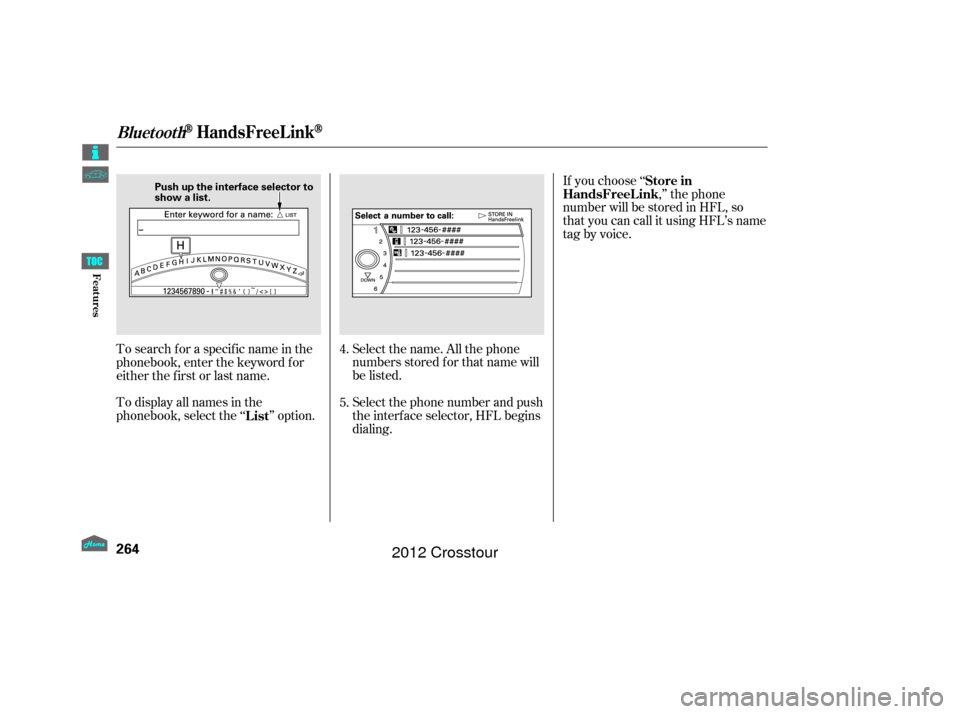
Select the name. All the phone
numbers stored f or that name will
be listed.
To search f or a specif ic name in the
phonebook, enter the keyword f or
either the f irst or last name.
To display all names in the
phonebook, select the ‘‘ ’’ option.
Select the phone number and push
the interf ace selector, HFL begins
dialing.If you choose ‘‘
,’’ the phone
number will be stored in HFL, so
that you can call it using HFL’s name
tag by voice.
4.
5.
List Store in
HandsFreeL ink
BluetoothHandsFreeL ink
264
Push up the interface selector to
show a list.
Features
2012 Crosstour
Page 269 of 435
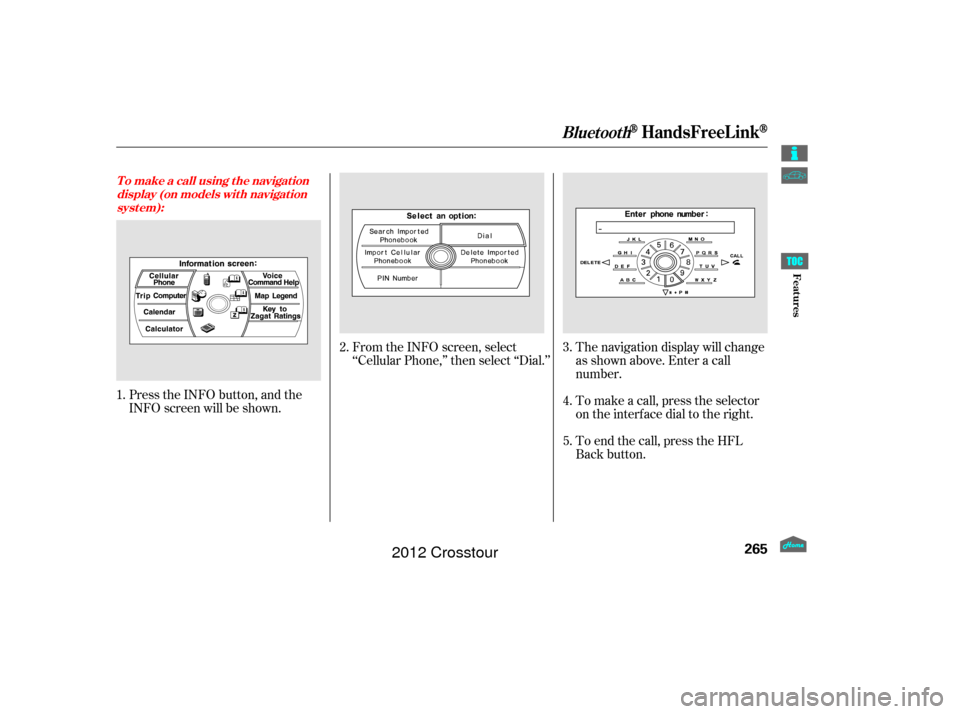
Press the INFO button, and the
INFO screen will be shown.From the INFO screen, select
‘‘Cellular Phone,’’ then select ‘‘Dial.’’
The navigation display will change
as shown above. Enter a call
number.
To make a call, press the selector
on the interface dial to the right.
To end the call, press the HFL
Back button.
1.
2.
3.
4.
5.
T o make a call using t he navigat ion display (on models wit h navigat ionsyst em):
BluetoothHandsFreeL ink
265
Features
2012 Crosstour
Page 270 of 435
When you receive a call, an incoming
call notif ication (if activated) will
play and interrupt the audio system
if it is on.
Press the HFL Talk button to answer
the call, or the HFL Back button to
hang up.If your phone has Call Waiting, press
and release the HFL Talk button to
put the original call on hold and
answer the incoming call.
To return to the original call, press
the HFL Talk button again. If you
don’t want to answer the incoming
call, disregard it and continue with
your original call. If you want to hang
up the original call and answer the
new call, press the HFL Back button.Press and release the HFL Talk
button and say ‘‘ .’’ You can transfer a call from HFL
to your phone, or from your phone
to HFL.
Receiving a Call
T ransf erring a Call
Transfer
Call Wait ing
BluetoothHandsFreeL ink
266
Features
2012 Crosstour
Page 271 of 435

�Ì
You can mute your voice to the
person you are talking to
during a call.
To mute your voice during a call,
press and release the HFL Talk
button and say ‘‘ .’’
To unmute your voice, press and
release the HFL Talk button and say
‘‘ ’’ again.
HFL allows you to send numbers
or names during a call. This is
useful when you call a menu-driven
phone system.
Press and release the HFL Talk
button bef ore a command.
Say ‘‘ .’’
Follow the HFL prompts and say
the name or number you want to
send.
Follow the HFL prompts to send
the tones and continue the call. To send a pound ( ), say
‘‘pound.’’ To send a star (*), say ‘‘star.’’ Youcanstoreupto50nameswith
their associated numbers in HFL.
The numbers you store can be not
only phone numbers but other types,
such as account numbers or
passwords, which can be sent during
a menu-driven call.
1.
2.
3.
CONT INUED
Muting a Call
Mute
Mute Send Numbers or
Names During a Call
Send Phonebook
To send a name or
number during a call:
BluetoothHandsFreeL ink
267
NOTE:
Features
2012 Crosstour
Page 272 of 435
Avoid using duplicate name
entries.
Avoid using ‘‘home’’ as a name
entry.
It is easier f or HFL to recognize a
multisyllabic or longer name. For
example, use ‘‘Peter’’ instead of
‘‘Pete,’’ or ‘‘John Smith’’ instead of
‘‘John.’’Press and release the HFL Talk
button bef ore a command.
Say ‘‘ .’’
Say‘‘ ’’aftertheprompts.
Follow the HFL prompts and say
thenameentryyouwanttoedit.
When asked, say the new number
for that name.
Follow the HFL prompts to
complete the edit.
Press and release the HFL Talk
button bef ore a command.
Say ‘‘ .’’
Say‘‘ ’’aftertheprompts.
Say a name you want to list as your
phonebook entry.
Say the number you want to store
f or the name entry.
Follow the HFL prompts and say
‘‘ ’’ to store the entry.
1.
2.
3.
4.
5.
1.
2.
3.
4.
5.Phonebook
Edit
Phonebook
Store
Enter
To edit the number stored in a name:
T o st ore a phonebook ent ry:
BluetoothHandsFreeL ink
268
NOTE:
Features
2012 Crosstour
Page 273 of 435
Press and release the HFL Talk
button bef ore a command.Press and release the HFL Talk
button bef ore a command.
Say ‘‘ .’’
Say‘‘ ’’aftertheprompts.
Say the name you want to delete
and follow the HFL prompts to
complete the deletion. Say ‘‘
.’’
Say‘‘ ’’aftertheprompts.
HFL begins reading the names in
the order they were stored.
If you hear a name you want to call,
immediatelypresstheHFLTalk
button and say ‘‘ .’’ Press and release the HFL Talk
button bef ore a command.
Follow the HFL prompts, select a
number f rom your cell phone, and
send it to HFL. Say ‘‘ ’’ af ter the
prompts. Say ‘‘ .’’
Follow the HFL prompts and
name the number, or say
‘‘ ’’ if it is not the number
you want to store.
Follow the HFL prompts if you
want to store another number.
1.
2.
3.
4. 1.
2.
3.
4. 1.
2.
3.
5.
Phonebook
Delete
Phonebook
List
Call Receive contact Phonebook
Discard
T o delet e a name: T o list all names in t he phonebook: T o st ore a specif ic phone number
f rom your cell phone direct ly t o t heHFL phonebook (available on somephones):
BluetoothHandsFreeL ink
269
Features
2012 Crosstour
Page 274 of 435
(available on some phones)handsf reelink.honda.
com
On models with navigation system
www.handsfreelink.ca,The entire phonebook data of the
cell phone that is linked to HFL can
be imported to the navigation system.
Select ‘‘
,’’ and HFL will begin
importing the phonebook. Select
‘‘ ’’ af ter the import is completed. Once a phonebook has been
imported, you can search the phone
numbers by the person’s name.
Select ‘‘
,’’ and a list of imported
phonebooks will be displayed.
Select a phonebook f rom the list.
In the U.S., visit
or call (888) 528-7876.
For a list of cell phones that are
compatible with this f eature: If you select
f rom
the Inf ormation screen menu, you
will see f ive HFL options.
In Canada, visit
or call (888) 528-7876. Cellular Phonebook
Import Cellular
Phonebook
OK Search Imported
Phonebook
Cellular Phone
Import Cellular Phonebook:
Search Import ed Phonebook:
BluetoothHandsFreeL ink
270
IMPORTED DATE
IMPORTED
PHONEBOOK PIN ICON
Features
2012 Crosstour