2012 HONDA CROSSTOUR service
[x] Cancel search: servicePage 70 of 435

This shows the temperature of the
engine’s coolant. During normal
operation, the pointer should rise
from the bottom mark to about the
middle of the gauge. In severe
driving conditions, such as very hot
weather or a long period of uphill
driving, the pointer may rise to the
upper zone. If it reaches the red
(hot) mark, pull saf ely to the side of
the road. Turn to page for
instructions and precautions on
checking the engine cooling system.This shows how much f uel you have.
It may show slightly more or less
than the actual amount. The needle
returns to the bottom after you turn
of f the ignition.
If your f uel f ill cap is loose or
missing, a ‘‘CHECK FUEL CAP’’
message appears on the information
display af ter you start the engine.
For more inf ormation, see page .
The inf ormation display in the
instrument panel shows you the
engine oil lif e and maintenance
service items when the ignition
switch is in the ON (II) position. This
inf ormation helps to keep you aware
of the periodic maintenance your
vehicle needs f or continued trouble-
f ree driving. Ref er to page f or
more inf ormation. 285
325 384
Gauges
Temperature Gauge
Fuel Gauge
Check Fuel Cap Message
Maintenance Minder
66
TM
Avoid driving with an extremely low
f uel level. Running out of f uel could
cause the engine to misf ire, damaging
the catalytic converter.
Inst rument s and Cont rols
2012 Crosstour
Page 143 of 435

On the FM band, you can select a
favorite station and display the
program service name provided by
the radio data system (RDS).
The RDS inf ormation display
f unction shows the name of the RDS
station you are listening to. With the
audio system on and the FM band
selected, you can turn this f unction
on or of f .If the station you are listening to is
not an RDS station, the display
continues to show the f requency
with the RDS inf ormation display
f unction on.
When you turn of f this f unction by
pressing the TITLE button, the
display shows ‘‘RDS INFO OFF.’’
To switch the function between on
and off, press and release the TITLE
button. With the system on, you will
see the ‘‘RDS INFO ON’’ message on
the display. If the station you are
listening to is an RDS station, the
display shows the station name.
CONT INUED
Radio Data System (RDS)
RDS INFO Display
Playing the FM/A M Radio (Models without navigation system)
139
RDS INFO DISPLAY ON
Features
2012 Crosstour
Page 152 of 435

There may be other geographic
situations that could af f ect XM Radio
reception.After you’ve registered with XM
Radio, keep your audio system in the
XM Radio mode while you wait f or
activation. This should take about
If your XM Radio service has expired
or you purchased your vehicle f rom
a previous owner, you can listen to a
sampling of the broadcasts available
on XM Radio. With the ignition
switch in the ACCESSORY (I) or the
ON (II) position, press the
button. A variety of music
types and styles will play. While waiting f or activation, make
sure your vehicle remains in an open
area with good reception. Once your
audio system is activated,
‘‘CATEGORY’’ or ‘‘CHANNEL’’ will
appear in the display, and you’ll be
able to listen to XM Radio broadcasts.
XM Radio will continue to send an
activation signal to your vehicle f or
at least 12 hours from the activation
request. If the service has not been
activated after 36 hours, contact
XM
Radio. In Canada, contact
.
If you decide to purchase XM radio
service, contact XM Radio at
,orat
1-800-852-9696. In Canada, contact
XM CANADA
at , or
at 1-877-209-0079. You will need to
give them your radio I.D. number
and your credit card number. To get
your radio I.D. number, press the button, then turn the
selector knob until ‘‘CH 000’’ appears
in the display. Your I.D. will appear
in the display.
As required by the FCC:
Changes or modif ications not expresslyapproved by the party responsible f orcompliance could void the user’sauthority to operate the equipment.
www.siriusxm.comwww.xmradio.ca
This Category II radiocommunication
device complies with Industry CanadaStandard RSS-310.Operation is subject to the f ollowing twoconditions: (1) this device may not causeinterf erence, and (2) this device mustaccept any interf erence, includinginterf erence that may cause undesiredoperation of the device.
Receiving XM Radio Service
Playing the XMRadio (Models without navigation system)
148
Features
XM CANADA
30 minutes.
2012 Crosstour
Page 186 of 435

On the FM band, you can select a
favorite station and display the
program service name provided by
the radio data system (RDS).
The RDS INFO display f unction
shows the name of the station you
are listening to. With the audio
system on and the FM band selected,
you can turn this f unction on or of f .
,pressthe
A. SEL side of the bar. This restores
the presets you originally set.
For inf ormation on FM/AM radio
frequencies and reception, see
.
You will see ‘‘0’’ displayed if auto
select cannot f ind a strong station f or
every preset button. You can also press the A.SEL side of
the SCAN/A.SEL bar. You will see
A.SEL on the screen, and the system
goes into scan mode f or several
seconds. The system stores the
f requencies of six AM and twelve
FM stations in the preset buttons. press ENTER
on the interf ace selector.
If you do not like the stations auto
select has stored, you can store
other f requencies on the preset
buttons (icons) as previously
described.
To turn of f auto select
To turn of f auto select,
Playing the FM/A M Radio (Models with navigation system)
Radio Data System (RDS)
RDS INFO Display
182
page 231Features
2012 Crosstour
Page 200 of 435

Driving on a road beside a vertical
wall, steep clif f , or hill to the south
of you.After you’ve registered with XM
Radio, keep your audio system in the
XM Radio mode while you wait f or
activation. This should take about 30
minutes.
If your XM Radio service has expired
or you purchased your vehicle f rom
a previous owner, you can listen to a
sampling of the broadcasts available
on XM Radio. With the ignition
switch in the ACCESSORY (I) or the
ON (II) position, press the
button. A variety of music
types and styles will play.
If you decide to purchase XM radio
service, contact XM Radio at ,orat
1-800-852-9696. In Canada, contact
XM CANADA
at , or
at 1-877-209-0079. You will need to
give them your radio I.D. number
and your credit card number. To get
your radio I.D. number, press the side of the TUNE bar until ‘‘0’’
appears in the display. Your I.D. will
appear in the display. While waiting f or activation, make
sure your vehicle remains in an open
area with good reception. Once your
audio system is activated, CAT
(category) or CH (channel) will
appear in the center display, and
you’ll be able to listen to XM Radio
broadcasts. XM Radio will continue
to send an activation signal to your
vehicle for at least 12 hours from the
activation request. If the service has
not been activated after 36 hours,
contact XM
Radio. In Canada,
contact XM CANADA
.
Driving on the lower level of a
multi-tiered road.
Driving on a single lane road
alongside dense trees taller than
50 ft. (15 m) to the south of you.
There may be other geographic
situations that could af f ect XM Radio
reception.
www.siriusxm.com
www.xmradio.ca
As required by the FCC:
Changes or modif ications not expresslyapproved by the party responsible f orcompliance could void the user’sauthority to operate the equipment.This Category II radiocommunicationdevice complies with Industry CanadaStandard RSS-310.Operation is subject to the f ollowing twoconditions: (1) this device may not causeinterf erence, and (2) this device mustaccept any interf erence, includinginterf erence that may cause undesiredoperation of the device.
Receiving XM Radio Service
Playing the XMRadio (Models with navigation system)
196
Features
2012 Crosstour
Page 285 of 435

Bef ore you begin driving your
vehicle, you should know what
gasoline to use and how to check the
levels of important f luids. You also
need to know how to properly store
luggage or packages. The
inf ormation in this section will help
you. If you plan to add any
accessories to your vehicle, please
read the information in this section
first..............................
Break-in Period .282
.................
Fuel Recommendation . 282
.........
Service Station Procedures . 283
....................................
Ref ueling .283
........
Check Fuel Cap Message . 285
Opening and Closing ................................
the Hood .287
...................................
Oil Check .288
.............
Engine Coolant Check . 288
...............................
Fuel Economy .289
...
Accessories and Modif ications . 292
.............................
Carrying Cargo .294
Bef ore Driving
Bef ore Driving
281
2012 Crosstour
Page 287 of 435

CONT INUED
For f urther important f uel-related
inf ormation f or your vehicle, or
inf ormation on gasoline that does not
contain MMT, visit Owner Link at. In Canada, visit
f or additional
inf ormation on gasoline.
Because the level of detergency and
additives in gasoline vary in the
market, Honda endorses the use of
‘‘TOP TIER Detergent Gasoline’’
where available to help maintain the
perf ormance and reliability of your
vehicle. TOP TIER Detergent
Gasoline meets a new gasoline
standard jointly established by
leading automotive manuf acturers to
meet the needs of today’s advanced
engines. Qualif ying gasoline retailers
will, in most cases, identif y their
gasoline as having met ‘‘TOP TIER
Detergent Gasoline’’ standards at the
retail location. This f uel is
guaranteed to contain the proper
level of detergent additives and be
f ree of metallic additives. The proper
level of detergent additives, and
absence of harmf ul metallic additives
in gasoline, help avoid build-up of
deposits in your engine and emission
control system.
Use of gasoline with these additives
may adversely af f ect perf ormance,
and cause the malfunction indicator
lamp on your instrument panel to
come on. If this happens, contact
your dealer f or service. Some
gasoline today is blended with
oxygenates such as ethanol. Your
vehicle is designed to operate on
oxygenated gasoline containing up to
10% ethanol by volume. Do not use
gasoline containing methanol. If you
notice any undesirable operating
symptoms, try another service
station or switch to another brand of
gasoline.
owners.honda.com
www.honda.ca
Fuel Recommendation, Service Station Procedures
283
Bef ore Driving
2012 Crosstour
Page 288 of 435
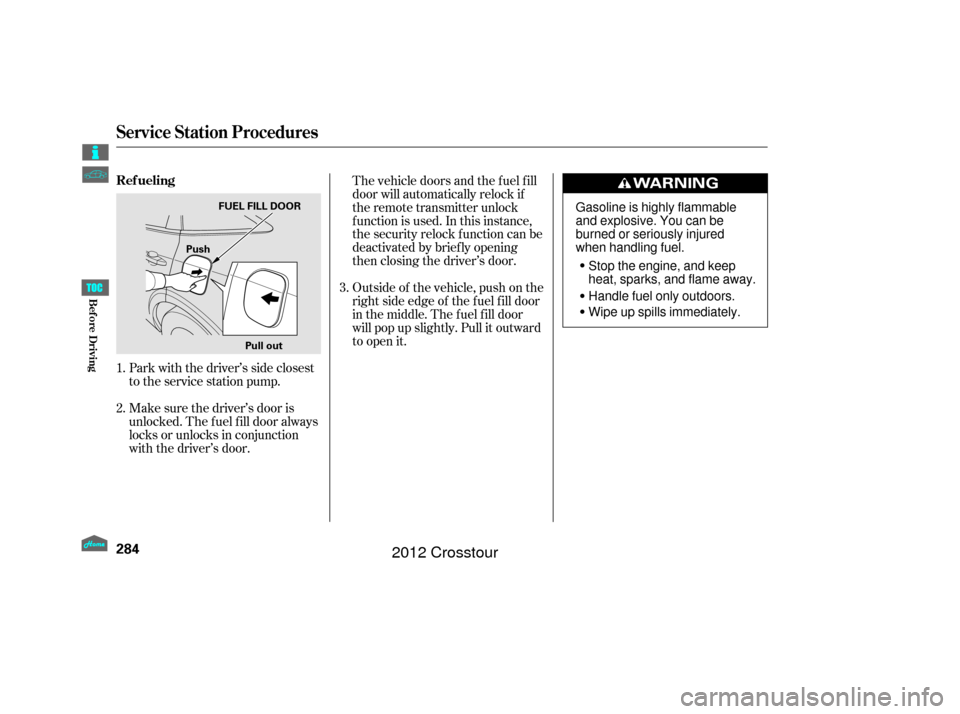
Park with the driver’s side closest
to the service station pump.
Make sure the driver’s door is
unlocked. The f uel f ill door always
locks or unlocks in conjunction
with the driver’s door.The vehicle doors and the f uel f ill
door will automatically relock if
the remote transmitter unlock
f unction is used. In this instance,
the security relock f unction can be
deactivated by brief ly opening
then closing the driver’s door.
Outside of the vehicle, push on the
right side edge of the f uel f ill door
in the middle. The f uel f ill door
will pop up slightly. Pull it outward
to open it.
1.
2. 3.
Service Station Procedures
Ref ueling
284
Pull out
Push
FUEL FILL DOOR
Gasoline is highly flammable
and explosive. You can be
burned or seriously injured
when handling fuel.
Stop the engine, and keep
heat, sparks, and flame away.
Handle fuel only outdoors.
Wipe up spills immediately.
Bef ore Driving
2012 Crosstour