Page 78 of 435

Push the button between the center
vents to turn on the hazard warning
lights (f our-way f lashers). This
causes all f our outside turn signals
and both turn indicators in the
instrument panel to f lash. Use the
hazard warning lights if you need to
park in a dangerous area near heavy
traf f ic, or if your vehicle is disabled.
The instrument panel will illuminate
with reduced brightness when you
unlock and open the driver’s door.
The brightness will increase slightly
when you insert the key in the
ignitionswitch,thengotonormal
brightness when you turn the
ignition switch to the ON (II)
position.
If you insert the key but do not turn
the ignition switch to the ON (II)
position, the illumination turns of f in
about 10 seconds. If you do not insert the key in the
ignition switch af ter opening the
driver’s door, the illumination turns
of f about 30 seconds af ter you close
the door.
To reduce glare at night, the
instrument panel illumination dims
when you turn the light switch to or . Turning the select/
reset knob to the right until you hear
a beep will cancel the reduced
brightness. The level of brightness is shown on
the inf ormation display while you
adjust it. It goes out about 5 seconds
af ter you f inish adjusting. Hazard Warning Button
Instrument Panel Brightness, Hazard Warning Button
74
BRIGHTNESS LEVEL
U.S. model is shown.
Inst rument s and Cont rols
2012 Crosstour
Page 129 of 435

The security system helps to dis-
courage vandalism and thef t of your
vehicle. Your vehicle has an anti-theft audio
system that requires a code number
to enable it. The standard audio system has
many f eatures. This section
describes those f eatures and how to
use them. The climate control system in your
vehicle provides a comfortable
driving environment in all weather
conditions................
Climate Control System . 126
................................
Audio System .134
................................
Audio System .135
..........
Playing the FM/AM Radio . 136
................
Playing the XM
Radio . 143
.................................
Playing Discs .149
...
Disc Changer Error Messages . 158
............................
PlayinganiPod
. 159
.................
iPod
Error Messages . 167
Playing a USB Flash Memory ........................................
Device .168
USB Flash Memory Device ........................
Error Messages .176
................................
Audio System .177
..........
Playing the FM/AM Radio . 178
................
Playing the XM
Radio . 190
.................................
Playing Discs .197
...
Disc Changer Error Messages . 208
............................
PlayinganiPod
. 209
.................
i
Pod
Error Messages . 218
Playing a USB Flash Memory ........................................
Device .219 USB Flash Memory Device
........................
Error Messages .228
............
FM/AM Radio Reception . 229
..................
Protecting Your Discs . 231
................
Remote Audio Controls . 234
......................
Auxiliary Input Jack .236
.................
Radio Thef t Protection . 237
..........................
Setting the Clock .238
............................
Security System .241
.........................................
Compass .242
...............................
Cruise Control .246
HomeLink
Universal ................................
Transceiver .249
........
HandsFreeLink. 253
...
Rearview Camera and Monitor . 277
Rearview Mirror with Rearview .........................
Camera Display .278
Models without navigation system
Models with navigation system Bluetooth
Features
Features
125
2012 Crosstour
Page 130 of 435
Climate Control System
With navigation system
Without navigation system
126
AUTO
INDICATOR
DRIVER’S SIDE
TEMPERATURE
WINDSHIELD DEFROSTER
BUTTON
DRIVER’S SIDE TEMPERATURE
CONTROL SWITCH
MODE CONTROL BUTTON
PASSENGER’S SIDE
TEMPERATURE
ON/OFF BUTTON
SYNC BUTTON PASSENGER’S SIDE
TEMPERATURE CONTROL
SWITCH
MODE CONTROL
BUTTON
SYNC
BUTTON
U.S. models are shown. PASSENGER’S SIDE TEMPERATURE
AUTO BUTTON
PASSENGER’S SIDE
TEMPERATURE
CONTROL SWITCH
DRIVER’S SIDE
TEMPERATURE
CONTROL SWITCH AIR CONDITIONING
(A/C) BUTTON
ON/OFF
BUTTON DRIVER’S SIDE TEMPERATURE AUTO INDICATOR
REAR WINDOW
DEFOGGER/
HEATED MIRROR
BUTTON RECIRCULATION
BUTTON REAR WINDOW
DEFOGGER/
HEATED MIRROR
BUTTON CENTER DISPLAY
WINDSHIELD
DEFROSTER
BUTTON
FAN CONTROL
BUTTONS
AIR CONDITIONING (A/C)
BUTTON
RECIRCULATION BUTTON FAN CONTROL SWITCH
AUTO BUTTON
Features
2012 Crosstour
Page 131 of 435

The system automatically selects
the proper mix of conditioned
and/or heated air that will, as
quickly as possible, raise or lower
the interior temperature to your
pref erence.
Press the Auto button. The
indicator in the button also comes
on as a reminder. You will see
AUTO on the display (in the
center display on models with
navigation system).
Set the desired temperature with
the temperature control switch.
You can set the driver’s side
temperature and the passenger’s
side temperature separately. The driver’s side temperature and
the passenger’s side temperature can
be set separately. Push up the switch
of the appropriate temperature
control to increase the temperature
of airflow. Push down the switch to
decrease it. Each set temperature is
showninthedisplay(inthecenter
display on models with navigation
system).
The automatic climate control
system in your vehicle maintains the
interior temperature you select,
removes moisture f rom the air and
makes the interior dry. The system
also adjusts the fan speed and
airf low levels.
The climate control system can also
be operated by voice control. See the
navigation system manual f or
complete details.
1.
2.
On models with navigation system
CONT INUED
Using A utomatic Climate Control
Voice Control System
T emperat ure Cont rol
Climate Control System
127
Features
2012 Crosstour
Page 133 of 435

�Û�Ý When the indicator in the button is
on, air f rom the vehicle’s interior is
sent through the system again.
When the indicator is off, air is
brought in f rom the outside of the
vehicle (fresh air mode).
Switch to recirculation mode when
driving through dusty or smoky
conditions, then return to fresh air
mode. Thesystemshouldbeleftinfresh
air mode under almost all conditions.
Keeping the system in recirculation
mode, particularly with the A/C of f ,
can cause the windows to fog up. The outside air intakes f or the
climate control system are at the
base of the windshield. Keep this
area clear of leaves and other debris.
You can manually select various
f unctions of the climate control
system when it is in f ully automatic
mode. All other f eatures remain
automatically controlled. Making any
manual selection causes the word
AUTO in the display to go out.
Push the switch up to increase the
fanspeedandairflow.Pushthe
switch down to decrease them. This button turns the air
conditioningonandoff.Youwillsee
A/C ON or A/C OFF in the display.
When you turn the A/C of f , the
system cannot regulate the inside
temperature if you set the
temperature control below the
outside temperature.
Press the button to increase the
fanspeedandairflow.Pressthe
button to decrease them.
On models without navigation system On models with navigation system
CONT INUED
Recirculat ion But t on
A ir Condit ioning (A /C) But t onSemi-automatic Operation
Fan Control
Climate Control System
129
Features
2012 Crosstour
Page 136 of 435
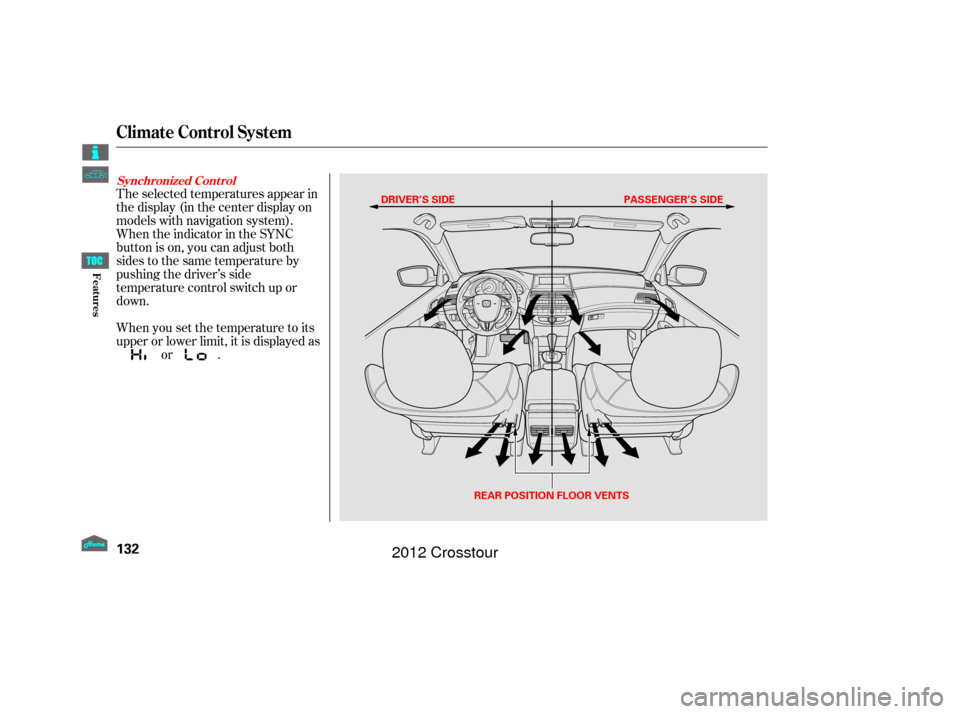
The selected temperatures appear in
the display (in the center display on
models with navigation system).
When the indicator in the SYNC
button is on, you can adjust both
sides to the same temperature by
pushing the driver’s side
temperature control switch up or
down.
When you set the temperature to its
upper or lower limit, it is displayed asor .
Synchronized Cont rol
Climate Control System
132
DRIVER’S SIDE PASSENGER’S SIDE
REAR POSITION FLOOR VENTS
Features
2012 Crosstour
Page 139 of 435

Most audio system f unctions can be
controlled by standard buttons, bars,
and knobs. In addition, you can
access some f unctions by using the
selector knob on the audio system.The knob turns lef t and right. Use it
to scroll through lists, or to make
selections or adjustments to a list or
menu item on the display. When you
make a selection, push the center of
the selector (ENTER) to go to that
selection.
When the audio system is in XM
Radio mode or playing discs, pushing
the selector (ENTER) knob switches
the display between the normal
display and the extended display.
The extended display has three
segments to display the detailed
inf ormation.
Pressing the MENU button
again will also cancel the
menu display mode. To select any setting such as the
clock, sound adjustment, or the
compass, press the MENU button.
To use any audio system f unction,
the ignition switch must be in the
ACCESSORY (I) or ON (II) position.
You can select the item by turning
the selector knob. To go back to the
previous display, press the RETURN
button.
Selector K nob
Menu Display
Audio System(Models without navigation system)
135
SELECTOR
KNOBMENU
BUTTON
RETURN
BUTTON
Features
2012 Crosstour
Page 141 of 435

�µ�µ �µ
The band and f requency that the
radio was last tuned to are displayed.
To change bands, press the AM or
FM button. On the FM band, ST will
be displayed if the station is
broadcasting in stereo. Stereo
reproduction in AM is not available.
On the AM band, AM noise
reduction turns on automatically. The ignition switch must be in the
ACCESSORY (I) or ON (II) position.
Turn the system on by pushing the
power/volume knob or the AM or
FM button. Adjust the volume by
turning the power/volume knob. You can use any of f ive methods to
f ind radio stations on the selected
band: tune, skip, scan, the preset
buttons, and auto select.
The skip f unction searches
up and down f rom the current
f requency to f ind a station with a
strong signal. To activate it, press
and hold the or side of the
SKIP bar until you hear a beep, then
release it. On the FM band, you can also
use the features provided by the
radio data system (RDS). For
more information on the RDS,
see page .
Use the selector knob to
tune the radio to a desired f requency.
Turn the knob right to tune to a
higher f requency, or lef t to tune to a
lower f requency. The scan f unction samples
all stations with strong signals on the
selected band. To activate it, press
the SCAN button, then release it.
You will see SCAN in the display.
When the system finds a strong
signal, it will stop and play that
station f or about 10 seconds.
If you do nothing, the system will
scan f or the next strong station and
play it f or 10 seconds. When it plays
a station that you want to listen to,
press the SCAN button again.
141
CONT INUED
To Select a Station
To Play the Radio
SK IP TUNESCAN
Playing the FM/A M Radio
(Models without navigation system)
137
Features
2012 Crosstour