Page 269 of 435
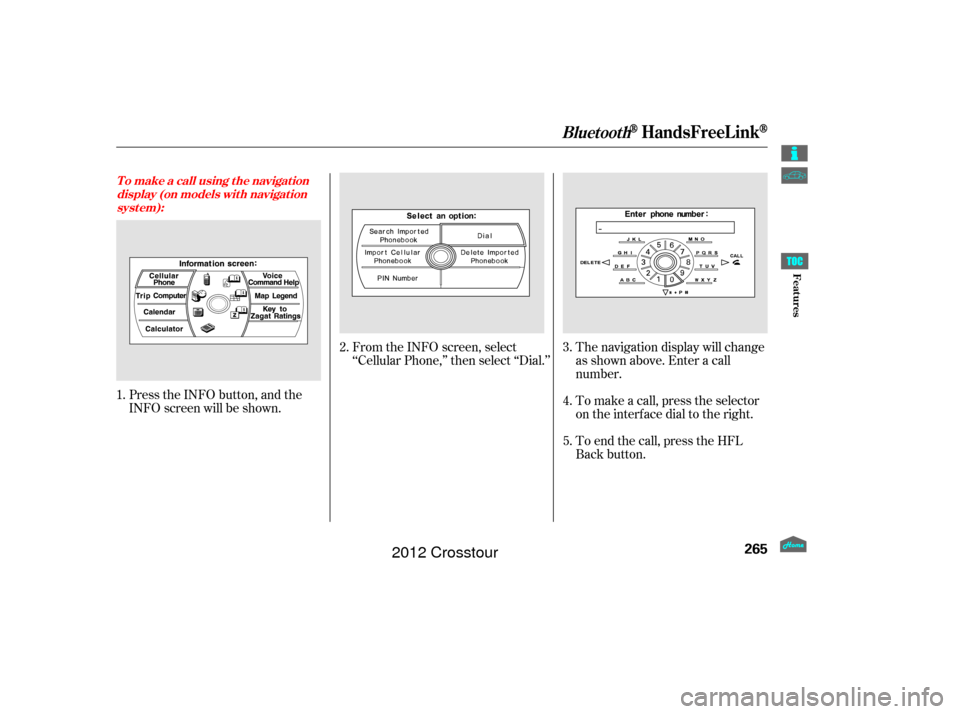
Press the INFO button, and the
INFO screen will be shown.From the INFO screen, select
‘‘Cellular Phone,’’ then select ‘‘Dial.’’
The navigation display will change
as shown above. Enter a call
number.
To make a call, press the selector
on the interface dial to the right.
To end the call, press the HFL
Back button.
1.
2.
3.
4.
5.
T o make a call using t he navigat ion display (on models wit h navigat ionsyst em):
BluetoothHandsFreeL ink
265
Features
2012 Crosstour
Page 274 of 435
(available on some phones)handsf reelink.honda.
com
On models with navigation system
www.handsfreelink.ca,The entire phonebook data of the
cell phone that is linked to HFL can
be imported to the navigation system.
Select ‘‘
,’’ and HFL will begin
importing the phonebook. Select
‘‘ ’’ af ter the import is completed. Once a phonebook has been
imported, you can search the phone
numbers by the person’s name.
Select ‘‘
,’’ and a list of imported
phonebooks will be displayed.
Select a phonebook f rom the list.
In the U.S., visit
or call (888) 528-7876.
For a list of cell phones that are
compatible with this f eature: If you select
f rom
the Inf ormation screen menu, you
will see f ive HFL options.
In Canada, visit
or call (888) 528-7876. Cellular Phonebook
Import Cellular
Phonebook
OK Search Imported
Phonebook
Cellular Phone
Import Cellular Phonebook:
Search Import ed Phonebook:
BluetoothHandsFreeL ink
270
IMPORTED DATE
IMPORTED
PHONEBOOK PIN ICON
Features
2012 Crosstour
Page 281 of 435

Thename and logos are
registered trademarks owned by
Bluetooth SIG, Inc. and any use of
such marks by Honda Motor Co.,
Ltd. is under license. Other
trademarks and trade names are
those of their respective owners. Refer to the navigation system
manual f or operation of the rearview
camera.Bluetooth
As required by the FCC:
This device complies with Part 15 of theFCC rules. Operation is subject to thef ollowing two conditions: (1) This devicemay not cause harmf ul interf erence, and(2) this device must accept anyinterf erence received, includinginterf erence that may cause undesiredoperation.
Changes or modif ications not expresslyapproved by the party responsible f orcompliance could void the user’sauthority to operate the equipment. On models with navigation system
This device complies with Industry Canada Standard RSS-210.Operation is subject to the f ollowing twoconditions: (1) this device may not causeinterf erence, and (2) this device mustaccept any interf erence that may causeundesired operation of the device.
Bluet oot h
Wireless Technology
Rearview Camera and Monitor
BluetoothHandsFreeL ink, Rearview Camera and Monitor
277
Features
2012 Crosstour
Page 372 of 435

Fill the f uel tank.
Wash and dry the exterior
completely.
Clean the interior. Make sure the
carpeting, floor mats, etc., are
completely dry.
If you need to park your vehicle f or
an extended period (more than 1
month), there are several things you
should do to prepare it f or storage.
Proper preparation helps prevent
deterioration and makes it easier to
get your vehicle back on the road. If
possible, store your vehicle indoors.
If your vehicle’s battery is
disconnected, or goes dead, the time
setting may be lost. To reset the time,
see page .
If your vehicle’s battery is
disconnected or goes dead, the audio
system may disable itself. The next
time you turn on the radio, you will
see ‘‘ENTER CODE’’ in the
frequency display. Use the preset
buttons to enter the code (see
).
The navigation system will also
disableitself.Thenexttimeyouturn
on the ignition switch, the system
will require you to enter a PIN
bef ore it can be used. Ref er to the
navigation system manual. 240
On models with navigation system
Checking the Battery, Vehicle Storage
Vehicle Storage
368
The battery gives off explosive
hydrogen gas during normal
operation.
A spark or flame can cause the
battery to explode with enough
force to kill or seriously hurt you.
Wear protective clothing and a
face shield, or have a skilled
technician do the battery
maintenance.
Maint enancepage 239
2012 Crosstour
Page 423 of 435

T he publications shown below can be purchased f rom Helm
Incorporated. You can order by phone or online:Call Helm Inc. at 1-800-782-4356 (credit card orders only)
Go online at
If you are interested in other years or models, contact Helm Inc.
at 1-800-782-4356.Covers maintenance and recommended procedures f or
repair to engine and chassis components. It is written
f or the journeyman mechanic, but it is simple enough
f or most mechanically inclined owners to understand.
Describes the procedures involved in the replacement
of damaged body parts.
Authorized Manuals
Purchasing Factory Authorized Manuals Service Manual:
Body Repair Manual:
(U.S. only)
Authorized Manuals
419
Publication
Form Number 61TP602
61TP631
31TP6620
31TP6820
31TP6M20 31TP6Q20 HON-R Form Description
2010-2012 Crosstour V6 Service Manual
2010-2012 Crosstour L4/V6 Body Repair Manual 2012 Crosstour Owner’s Manual
2012 Crosstour Navigation System Owner’s Manual 2012 Crosstour Honda Service History
2012 Crosstour Technology Reference Guide Order Form for Previous Years-
Indicate Year and Model Desired
www.helminc.com
2012 Crosstour