Page 259 of 333

258
Maintenance
Replacing Light Bulbs
Headlight Bulbs
When replacing, use the following bulbs.1.Remove the cover.
2. Remove the coupler.
uIt can be removed by pushing the tab.
3. Rotate the old bulb to the left to remove.
4. Insert a new bulb into the headlight
assembly and turn it to the right.
5. Insert the coupler into the connector of the
bulb.
High beam headlight:60 W (HB3)
Low beam headlight:55 W (H11 for halogen bulb type)
35W (D4S for high voltage discharge)
■High Beam Headlight
1Headlight Bulbs
NOTICE
Halogen bulbs get very hot when lit.
Oil, perspiration, or a scratch on the glass can cause
the bulb to overheat and shatter.
The headlight aim is set by the factory, and does not
need to be adjusted. However, if you regularly carry
heavy items in the cargo area, have the aiming
readjusted at a dealer or by a qualified technician.
The HB3 and H11 types are halogen bulbs.
When replacing a bulb, handle it by its base, and
protect the glass from contact with your skin or hard
objects. If you touch the glass, clean it with
denatured alcohol and a clean cloth.
The exterior lights' inside lenses (headlights, brake
lights, etc.) may fog temporarily after a vehicle wash
or while driving in the rain. This does not impact the
exterior light function.
However, if you see a large amount of water or ice
accumulated inside the lenses, have your vehicle
inspected by a dealer.
Cover
TabCoupler
Bulb
Page 260 of 333
259
uuReplacing Light BulbsuHeadlight Bulbs
Maintenance
High voltage can remain in the circuit for a long period of time after the light is
switched off. Do not attempt to inspect or replace the high voltage discharge type
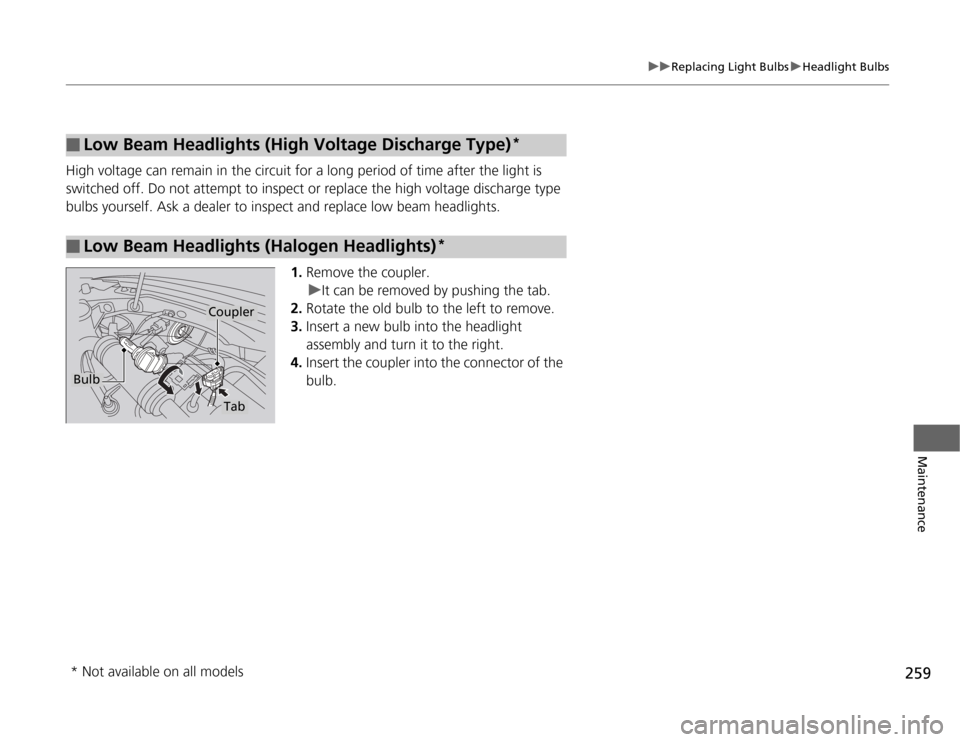
bulbs yourself. Ask a dealer to inspect and replace low beam headlights.1.Remove the coupler.
uIt can be removed by pushing the tab.
2. Rotate the old bulb to the left to remove.
3. Insert a new bulb into the headlight
assembly and turn it to the right.
4. Insert the coupler into the connector of the
bulb.
■Low Beam Headlights (High Vol tage Discharge Type)*
■Low Beam Headlights (Halogen Headlights) *
Bulb
Coupler
Tab
* Not available on all models
Page 261 of 333
260
uuReplacing Light BulbsuFog Light Bulbs*
Maintenance
Fog Light Bulbs *
When replacing, use the following bulbs.
1.Turn the steering wheel all the way to the
opposite side from the fog light being
replaced.
Passenger side: Turn the steering wheel to
the left.
Driver side: Turn the steering wheel to the
right.
2. Remove the clip and screws, and pull the
inner fender back.
Fog Lights: 55 W (H11)
1Fog Light Bulbs *
NOTICE
Halogen bulbs get very hot when li
t. Oil, perspiration,
or a scratch on the glass can cause the bulb to
overheat and shatter.
The fog lights are halogen bulbs.
When replacing a bulb, handle it by its plastic case,
and protect the glass from contact with your skin or
hard objects. If you touch the glass, clean it with
denatured alcohol and a clean cloth.
Insert a flat-tip screwdri ver, lift and remove the
central pin to remove the clip.
Central Pin
Inner Fender
Screw
Clip
* Not available on all models
Page 262 of 333
261
uuReplacing Light BulbsuFog Light Bulbs*
Maintenance
3.
Remove the coupler.
uIt can be removed by pushing the tab.
4. Rotate the old bulb to the left to remove.
5. Insert a new bulb into the light assembly
and turn it to the right.
6. Insert the coupler into the connector of the
bulb.
1Fog Light Bulbs *
Insert the clip wi th the central pin raised, and push
until it is flat.
Push until the
pin is flat.
Bulb
Tab
Coupler
* Not available on all models
Page 263 of 333
262
uuReplacing Light BulbsuFront Turn Signal/Parking/Side Marker Light Bulbs
Maintenance
Front Turn Signal/Parking/Side Marker Light Bulbs
When replacing, use the following bulbs.1.Turn the socket to the left and remove it,
then remove the old bulb.
2. Insert a new bulb.
Side Turn Signal/Emergency Indicator Light Bulbs
Door mirrors have the side turn signal lights. Have an authorized Honda dealer
inspect and replace the light bulbs.
Front Turn Signal/Parking/Side Marker Light: 28W/8 W
Page 264 of 333
263
uuReplacing Light BulbsuBack-Up Light, Rear Turn Signal Light and Rear Side Marker Light Bulbs
Continued
Maintenance
Back-Up Light, Rear Turn Signal Light and Rear Side
Marker Light Bulbs
When replacing, use the following bulbs.1.Pry on the edge of the cover using a flat-tip
screwdriver to remove the cover.
uWrap the flat-tip screwdriver with a cloth to prevent scratches.
2. Remove the bolts.
3. Pull the light assembly out of the rear pillar.
Back-Up Light: 16 W
Rear Turn Signal Light: 21 W (Amber)
Rear Side Marker Light: 3 CP
Cover
Page 265 of 333
264
uuReplacing Light BulbsuBrake/Taillight Bulbs
Maintenance
4.Turn the socket to the left and remove it,
then remove the old bulb.
5. Insert a new bulb.
6. Reinstall the light assem bly by sliding it on
to the guide on the body.
Brake/Taillight Bulbs
Brake/rear taillight bulbs are LED type. Have an authorized Honda dealer inspect and
replace the light bulbs.
Guide
Page 266 of 333
265
uuReplacing Light BulbsuRear License Plate Light Bulbs
Maintenance
Rear License Plate Light Bulbs
When replacing, use the following bulb.1.Remove the lens by prying on the edge of
the lens using a flat-tip screwdriver.
uWrap the flat-tip screwdriver with a cloth to prevent scratches.
2. Remove the old bulb and insert a new bulb.
High-Mount Brake Light Bulbs
High-mount brake light bulbs are LED type. Have an authorized Honda dealer
inspect and replace the light bulbs.
Rear License Plate Light: 5 W