Page 186 of 361

185
Features
Audio Error Messages
CD Player
If a disc error occurs, you may see the following error messages.
Error MessageCauseSolution
HEAT ERRORHigh temperature●Turn the audio system off and allow the player to cool down until
the error message is cleared.
UNPLAYABLE/ UnsupportedTrack/file format not supported●Current track/file will be skipped. The next supported track/file plays automatically.
BAD DISC PLEASE CHECK
OWNERS MANUAL PUSH
EJECT
Mechanical error
●Press the (eject) button and remove the disc, and check that the
error message is cleared.
● Check that the disc is not damaged or deformed, and insert the disc again.
2Protecting CDs P. 192
● If the error message reappears, press the button, and pull out the disc.
● Insert a different disc.
If the new disc plays, there is a problem with the first disc.
● If the error message repeats, or the disc cannot be removed,
contact a dealer.
Do not try to force the disc out of the player.
MECH ERROR
BAD DISC PLEASE CHECK
OWNERS MANUALServo error
CHECK DISCDisc error●
Check that the disc is not damaged or deformed.
2Protecting CDs P. 192
Page 187 of 361
186
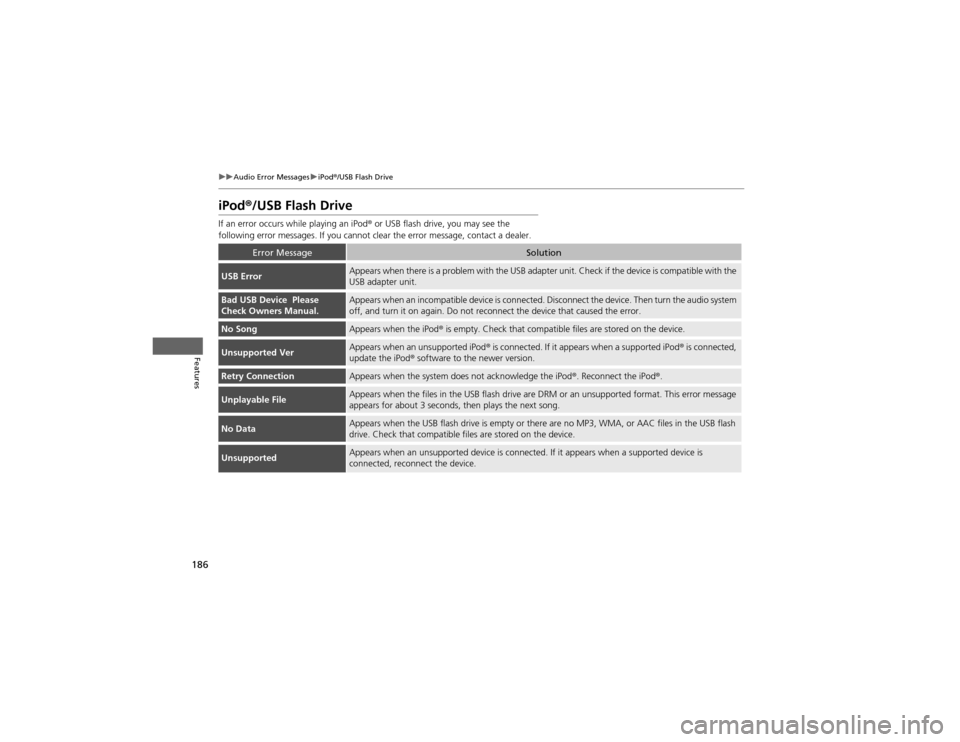
uuAudio Error MessagesuiPod®/USB Flash Drive
Features
iPod ®/USB Flash Drive
If an error occurs while playing an iPod ® or USB flash drive, you may see the
following error messages. If you cannot clear the error message, contact a dealer.
Error MessageSolution
USB ErrorAppears when there is a problem with the USB adapter unit. Check if the device is compatible with the USB adapter unit.
Bad USB Device Please
Check Owners Manual.Appears when an incompatible device is connected. Disconnect the device. Then turn the audio system
off, and turn it on again. Do not reconnect the device that caused the error.
No SongAppears when the iPod ® is empty. Check that compatible files are stored on the device.
Unsupported VerAppears when an unsupported iPod ® is connected. If it appears when a supported iPod ® is connected,
update the iPod ® software to the newer version.
Retry ConnectionAppears when the system does not acknowledge the iPod ®. Reconnect the iPod ®.
Unplayable FileAppears when the files in the USB flash drive are DRM or an unsupported format. This error message
appears for about 3 seconds, then plays the next song.
No DataAppears when the USB flash drive is empty or there are no MP3, WMA, or AAC files in the USB flash
drive. Check that compatible files are stored on the device.
UnsupportedAppears when an unsupported device is connected. If it appears when a supported device is
connected, reconnect the device.
Page 188 of 361
187
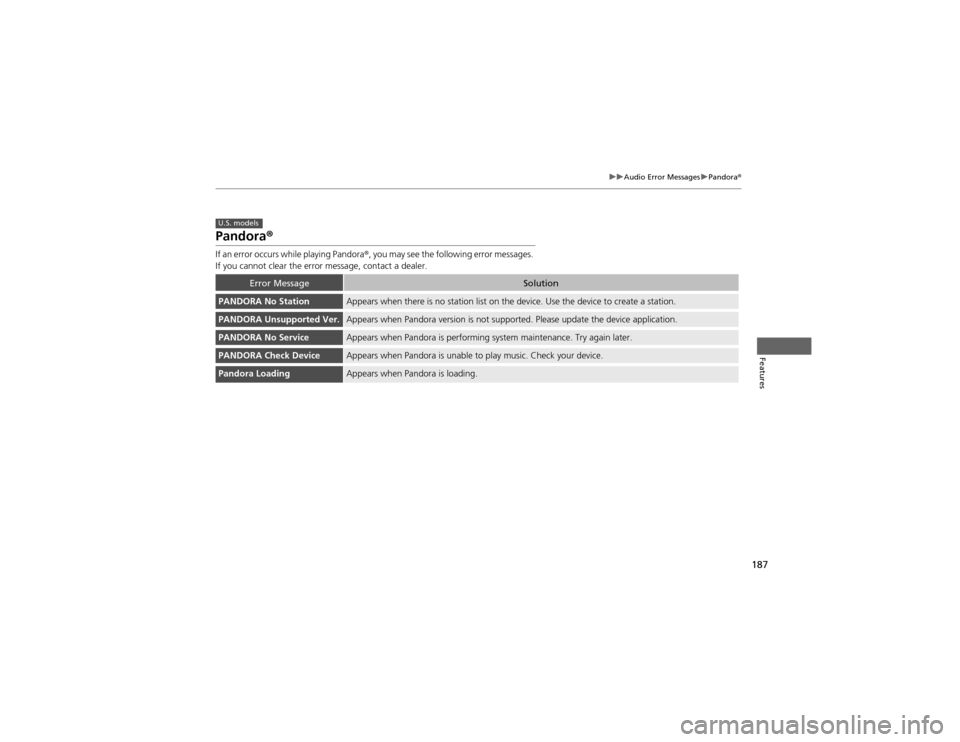
uuAudio Error MessagesuPandora®
Features
Pandora ®
If an error occurs while playing Pandora ®, you may see the following error messages.
If you cannot clear the error message, contact a dealer.
Error MessageSolution
PANDORA No StationAppears when there is no station list on the device. Use the device to create a station.
PANDORA Unsupported Ver.Appears when Pandora version is not supported. Please update the device application.
PANDORA No ServiceAppears when Pandora is performing system maintenance. Try again later.
PANDORA Check DeviceAppears when Pandora is unable to play music. Check your device.
Pandora LoadingAppears when Pandora is loading.
U.S. models
Page 189 of 361
188
uuAudio Error MessagesuDVD Player Error Messages
Features
DVD Player Error Messages
Error MessageCauseSolution
Disc ErrorFOCUS ErrorPress the disc eject button, and remove the disc. Check for an error indication.
Insert the disc again. If the code does not disappear or the disc cannot be
removed, consult a dealer.
MECH ErrorMechanical Error
Region ErrorInvalid region codeThe disc is not playable in this unit. Eject the disc, and insert a disc compatible
with this system.
Heat ErrorHigh temperatureTurn the system off and allow the player to cool down until the error message
is cleared.
Format ErrorTrack/file format not
supportedCurrent track/file will be skipped. The next supported track/file plays automatically.
Models with rear entertainment system
Page 190 of 361

189
Features
Audio Remote Controls
Allows you to operate the audio system while driving.SOURCE Button
Cycles through the audio modes as follows:
FM1 FM2 AM XM1*
XM2 *
CD AUX
(+ (- (Volume) Buttons
Press (+ : Increases the volume.
Press (- : Decreases the volume.
Buttons
• When listening to the radio
Press : Selects the next preset radio station.
Press : Selects the previous preset radio station.
• When listening to a CD, iPod ®, USB flash drive, or Bluetooth® Audio
Press : Skips to the next song.
Press : Goes back to the beginning of the current or previous song.
• When listening to Pandora ®*
Press : Skips to the next song.
Press and hold : Selects the previous station.
Press and hold : Selects the next station.
1Audio Remote Controls
The CD mode appears only when a CD is loaded.
When in the AUX mode, the following are operable
from the remote controls:
• iPod ®/USB flash drive connected to the USB
adapter cable
• Bluetooth ® Audio (with some phones only)
Button
SOURCE Button
Button
(+ Button
(- Button
* Not available on all models
Page 191 of 361

190
Features
General Information on the Audio System
XM® Radio Service *
1. You need your radio ID ready before registering for subscription. To see the ID in
the display: Turn the selector knob until 0 appears.
2. Have your radio ID and credit card number ready, and either call or visit the XM ®
website to subscribe.
Press the (XM ®) button and stay in this mode for about 30 minutes until the
service is activated. Make sure your vehicle is in an open area with good reception. LOADING: XM ® is loading the audio or program information.
OFF AIR:
The channel is not currently broadcasting.
UPDATING:
The encryption code is being updated. Channels 0 and 1 still work normally. NO SIGNAL:
The signal is too weak in the current location.
--------:
No such channel exists, the channel is not part of your subscription, or the artist or
title information is unavailable.
ANTENNA:
There is a problem with the XM ® antenna. Contact a dealer.
■Subscribing to XM ® Radio
■Receiving XM ® Radio
■XM ® Radio Display Messages
1Subscribing to XM ® Radio
Contact Information for XM ® Radio:
US: XM ® Radio at www.siriusxm.com or (800) 852-
9696
Canada: XM ® Canada at www.xmradio.ca , or (877)
209-0079
1Receiving XM ® Radio
The XM ® satellites are in orbit over the equator;
therefore, objects south of the vehicle may cause
satellite reception interruptions. Satellite signals are
more likely to be blocked by tall buildings and
mountains the farther north you travel from the
equator.
You may experience reception problems under the
following circumstances:
• In a location with an obstruction to the south of
your vehicle.
• In tunnels
• On the lower level of a multi-tiered road
• Large items carried on the roof rack
* Not available on all models
Page 192 of 361
191
uuGeneral Information on the Audio SystemuRecommended CDs
Continued
Features
Recommended CDs •Use only high-quality CD-R or CD-RW discs labeled for audio use.
• Use only CD-R or CD-RW discs on which the recordings are closed.
• Play only standard round-shaped CDs.
• Some software files may not allow for audio play or text data display.
• Some versions of MP3 or WMA formats may be unsupported.
1Recommended CDs
A Dual-disc cannot play on this audio unit. If recorded
under certain conditions, a CD-R or CD-RW may not play either.
■CDs with MP3 or WMA files
The CD packages or jackets should have one of these marks.
Page 193 of 361
uuGeneral Information on the Audio SystemuRecommended CDs
192
Features
■ Protecting CDs
Follow these precautions when handling or storing CDs: • Store a CD in its case when it is not being played.
• When wiping a CD, use a soft clean cloth from the center to the outside edge.
• Handle a CD by its edge. Never touch either surface.
• Never insert foreign objects into the CD player.
• Keep CDs out of direct sunlight and extreme heat.
• Do not place stabilizer rings or labels on the CD.
• Avoid fingerprints, liquids, and felt-tip pens on the CD.1Protecting CDs
NOTICEDo not insert a damaged CD. It may be stuck inside
and damage the audio unit.
Examples:
● Damaged CDsBubbled/
Wrinkled
With Label/Sticker Using
Printer Label Kit
Sealed With Plastic Ring ●Poor quality
CDs
Chipped/
Cracked Warped Burrs
● Small CDs
3-inch
(8-cm) CD
●
Bubbled, wrinkled, labeled, and
excessively thick CDs