Page 165 of 361
uuAudio System Basic OperationuPlaying an iPod®
164
Features
1. Press to display the iPod ® menu.
2. Rotate to select a menu.
3. Press to display the items on that menu.
4. Rotate to select an item, then press .
■How to Select a File from the iPod ® Menu1Playing an iPod ®
Available operating functions vary on models or
versions. Some functions may not be available on the
vehicle's audio system.
If there is a problem, you may see an error message
on the multi-information display. 2 iPod ®/USB Flash Drive P. 186
iPod® Menu
Page 167 of 361
166
uuAudio System Basic OperationuPlaying Pandora®
Features
Playing Pandora ®
Activate Pandora ®, and connect the iPhone ® using your dock connector to the USB
adapter cable, then press the AUX button.
2 USB Adapter Cable P. 151
U.S. modelsiPhone® use only
/ Buttons
Press to the next
station.
Press to the previous
station.
(Power) Button
Press to turn the audio
system on and off.
SKIP Button
Press to skip a song.
SETUP Button
Press to display menu items.
Selector Knob
Press to enter PANDORA MENU.
Turn to adjust the volume.
Press and turn to select an item, then
press to set your selection.
AUX Button
Press to select iPhone
® (if connected
when the Pandora ® application is
activated).
Album Art
Rating Icon
Page 169 of 361

168
uuAudio System Basic OperationuPlaying a USB Flash Drive
Features
Playing a USB Flash Drive
Your audio system reads and plays sound files on a USB flash drive in either MP3, WMA or AAC*1
format.
Connect your USB flash drive to the USB adapter cable, then press the AUX button.
2 USB Adapter Cable P. 151
*1:Only AAC format files recorded with iTunes ® are playable on this unit.
/ Buttons
Press to skip to the next
folder, and to skip to the
beginning of the previous
folder.
SCAN Button
You will get a 10-second
sampling of each file.● Press to sample all files in the current folder.
● Press two times to sample
the first file in each of the
main folders.
● To turn off scan, press and
hold the button. (Power) Button
Press to turn the audio system on and off.
SEEK/SKIP Buttons
Press or to change files.SETUP Button
Press to display menu items.
Selector Knob
Turn to adjust the volume.
Press and turn to select an item, then
press to set your selection.
AUX Button
Press to select USB flash drive (if connected).
USB Indicator
Comes on when a USB flash drive
is connected.
Page 170 of 361
Continued169
uuAudio System Basic OperationuPlaying a USB Flash Drive
Features
1.Press to switch the display to a folder list.
2. Rotate to select a folder.
3. Press to change the display to a list of
files in that folder.
4. Rotate to select a file, then press .
■How to Select a File from a Folder with the Selector Knob1Playing a USB Flash Drive
Use the recommended USB flash drives.
2 General Information on the Audio System
P. 190
Files in WMA format protected by digital rights
management (DRM) are not played.
The audio system displays Unplayable File, and then
skips to the next file.
If there is a problem, you may see an error message
on the multi-information display.
2 iPod ®/USB Flash Drive P. 186
Folder Selection
Track Selection
Page 171 of 361
uuAudio System Basic OperationuPlaying a USB Flash Drive
170
Features
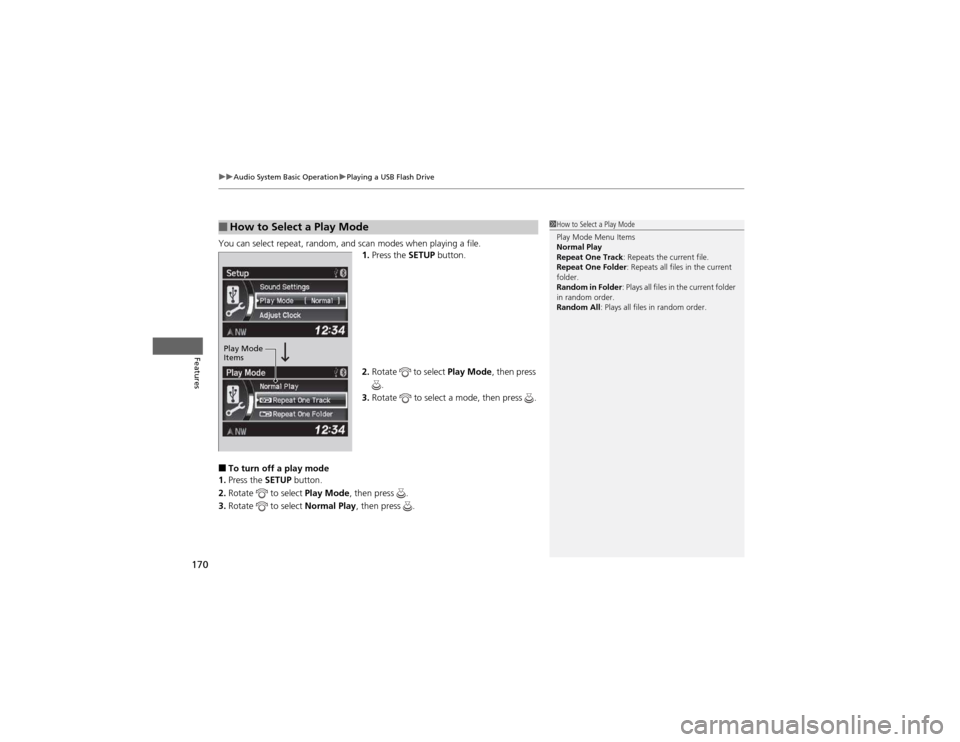
You can select repeat, random, and scan modes when playing a file. 1.Press the SETUP button.
2. Rotate to select Play Mode, then press
.
3. Rotate to select a mode, then press .
■ To turn off a play mode
1. Press the SETUP button.
2. Rotate to select Play Mode, then press .
3. Rotate to select Normal Play, then press .
■How to Select a Play Mode1How to Select a Play Mode Play Mode Menu Items
Normal Play
Repeat One Track : Repeats the current file.
Repeat One Folder : Repeats all files in the current
folder.
Random in Folder : Plays all files in the current folder
in random order.
Random All : Plays all files in random order.
Play Mode
Items
Page 187 of 361
186
uuAudio Error MessagesuiPod®/USB Flash Drive
Features
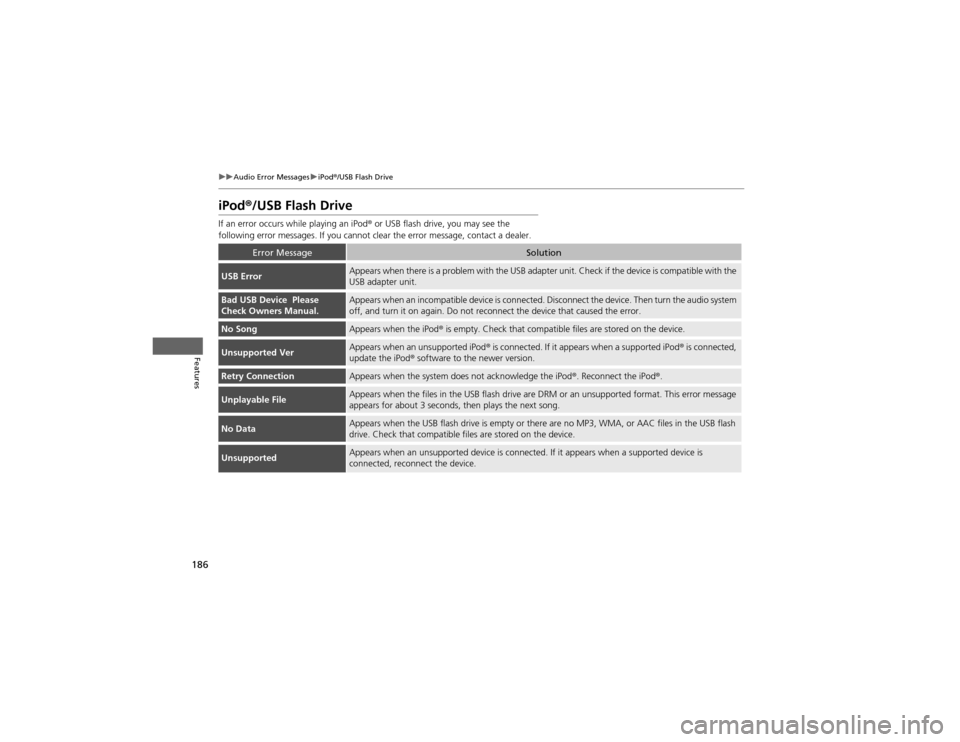
iPod ®/USB Flash Drive
If an error occurs while playing an iPod ® or USB flash drive, you may see the
following error messages. If you cannot clear the error message, contact a dealer.
Error MessageSolution
USB ErrorAppears when there is a problem with the USB adapter unit. Check if the device is compatible with the USB adapter unit.
Bad USB Device Please
Check Owners Manual.Appears when an incompatible device is connected. Disconnect the device. Then turn the audio system
off, and turn it on again. Do not reconnect the device that caused the error.
No SongAppears when the iPod ® is empty. Check that compatible files are stored on the device.
Unsupported VerAppears when an unsupported iPod ® is connected. If it appears when a supported iPod ® is connected,
update the iPod ® software to the newer version.
Retry ConnectionAppears when the system does not acknowledge the iPod ®. Reconnect the iPod ®.
Unplayable FileAppears when the files in the USB flash drive are DRM or an unsupported format. This error message
appears for about 3 seconds, then plays the next song.
No DataAppears when the USB flash drive is empty or there are no MP3, WMA, or AAC files in the USB flash
drive. Check that compatible files are stored on the device.
UnsupportedAppears when an unsupported device is connected. If it appears when a supported device is
connected, reconnect the device.
Page 190 of 361

189
Features
Audio Remote Controls
Allows you to operate the audio system while driving.SOURCE Button
Cycles through the audio modes as follows:
FM1 FM2 AM XM1*
XM2 *
CD AUX
(+ (- (Volume) Buttons
Press (+ : Increases the volume.
Press (- : Decreases the volume.
Buttons
• When listening to the radio
Press : Selects the next preset radio station.
Press : Selects the previous preset radio station.
• When listening to a CD, iPod ®, USB flash drive, or Bluetooth® Audio
Press : Skips to the next song.
Press : Goes back to the beginning of the current or previous song.
• When listening to Pandora ®*
Press : Skips to the next song.
Press and hold : Selects the previous station.
Press and hold : Selects the next station.
1Audio Remote Controls
The CD mode appears only when a CD is loaded.
When in the AUX mode, the following are operable
from the remote controls:
• iPod ®/USB flash drive connected to the USB
adapter cable
• Bluetooth ® Audio (with some phones only)
Button
SOURCE Button
Button
(+ Button
(- Button
* Not available on all models
Page 194 of 361
193
uuGeneral Information on the Audio SystemuCompatible iPod® and USB Flash Drives
Features
Compatible iPod ® and USB Flash Drives
• Use a recommended USB flash drive of 256 MB or higher.
• Some digital audio players may not be compatible.
• Some USB flash drives (e.g., a device with security lockout) may not work.
• Some software files may not allow for audio play or text data display.
• Some versions of MP3, WMA, or AAC formats may be unsupported.
■iPod ® Model Compatibility
ModeliPod classic ® 80GB/160GBiPod classic ® 120GBiPod classic ® 160GB (launch in 2009)iPod ® (5th generation)iPod nano ®iPod touch ®iPhone ® 3GSiPhone ® 4
■USB Flash Drives
1iPod ® Model Compatibility
This system may not work with all software versions
of these devices.
1USB Flash Drives
Files on the USB flash drive are played in their stored
order. This order may be different from the order
displayed on your PC or device.