2012 HONDA CIVIC SEDAN dead battery
[x] Cancel search: dead batteryPage 19 of 345

18
Quick Reference Guide - 2012 Civic SedanHandling the Unexpected (P 297)
Flat Tire (P 299)
● Park in a safe location and replace the
flat tire with the compact spare tire in the
trunk.
Indicators Come On
(P 313)
●Identify the indicator and consult the
owner's manual.
Engine Won't Start
(P 306)
● If the battery is dead, jump start using a
booster battery.
Blown Fuse (P 318)
● Check for a blown fuse if an electrical
device does not operate.
Overheating (P 311)
● Park in a safe location. If you do not see
steam under the hood, open the hood,
and let the engine cool down.
Emergency Towing
(P 321)
●Call a professional towing service if you
need to tow your vehicle.
CIVIC 4D-31TR3600.book 18 ページ 2011年2月14日 月曜日 午後2時51分
Home
QRG
Index
Page 102 of 345
101
uuLocking and Unlocking the Doors uLocking/Unlocking the Doors from the Outside
Continued
Controls
Locking/Unlocking the Doors from the Outside
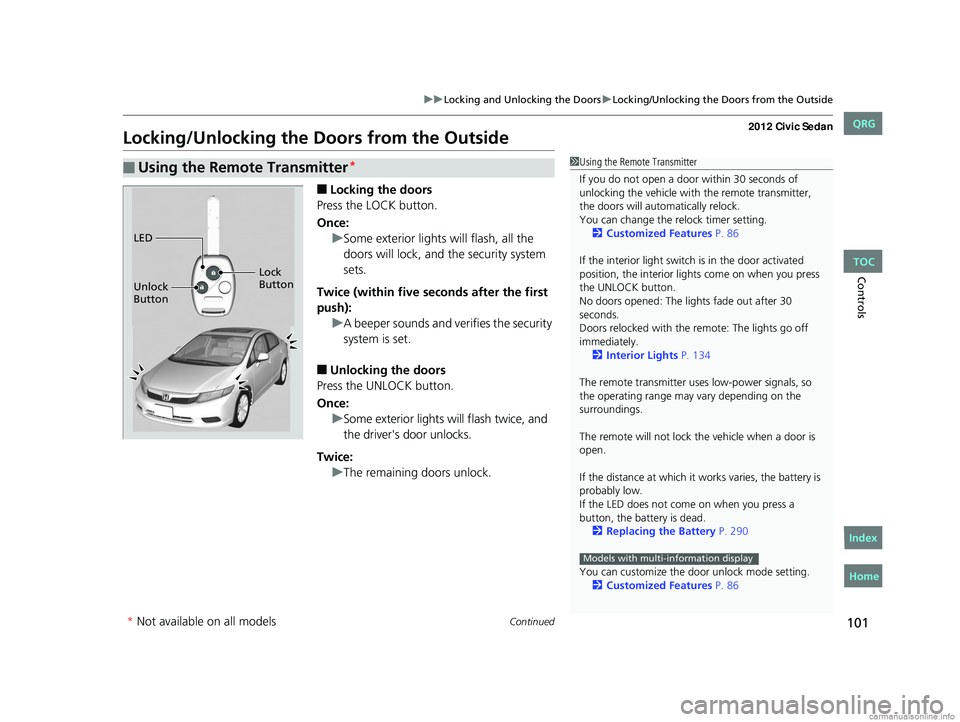
■Locking the doors
Press the LOCK button.
Once: uSome exterior lights will flash, all the
doors will lock, and the security system
sets.
Twice (within five se conds after the first
push): uA beeper sounds and verifies the security
system is set.
■Unlocking the doors
Press the UNLOCK button.
Once: uSome exterior lights will flash twice, and
the driver's door unlocks.
Twice: uThe remaining doors unlock.
■Using the Remote Transmitter*1Using the Remote Transmitter
If you do not open a door within 30 seconds of
unlocking the vehicle with the remote transmitter,
the doors will automatically relock.
You can change the relock timer setting.
2 Customized Features P. 86
If the interior light switch is in the door activated
position, the interior light s come on when you press
the UNLOCK button.
No doors opened: The li ghts fade out after 30
seconds.
Doors relocked with the remote: The lights go off
immediately. 2 Interior Lights P. 134
The remote transmitter us es low-power signals, so
the operating range may vary depending on the
surroundings.
The remote will not lock th e vehicle when a door is
open.
If the distance at which it works varies, the battery is
probably low.
If the LED does not come on when you press a
button, the battery is dead. 2 Replacing the Battery P. 290
You can customize the door unlock mode setting. 2 Customized Features P. 86
Models with multi-information display
LED
Unlock
Button Lock
Button
* Not available on all models
CIVIC 4D-31TR3600.book 101 ページ 2011年2月14日 月曜日 午後2時51分
TOC
Home
QRG
Index
Page 114 of 345

113
uuSecurity System uSecurity System Alarm*
Controls
■Setting the security system alarm
The security system alarm automatically sets when the following conditions have
been met:
• The ignition switch is in LOCK
(0, and the key has been removed from the
ignition switch.
• The hood and trunk are closed.
• All doors are locked with the key or the remote transmitter.
■When the security system alarm sets
The security system indicator in the in strument panel blinks. When the blinking
interval changes after about 15 seconds, the security system is set.
■To cancel the security system alarm
The security system is canceled when the ve hicle is unlocked using the key or remote
transmitter, or the ignition switch is turned to ON
(w. The security system indicator
goes off at the same time.
■The panic button on the remote
transmitter
If you press the panic button for
approximately one second, the following will
occur for about 30 seconds:
• The horn sounds.
• Some exterior lights flash.
■Canceling panic mode
Press any button on the remote transmitter, or turn the ignition switch to ON
(w.
■Panic Mode
1 Security System Alarm
Do not set the security system alarm when someone
is in the vehicle or a window is open. The system can
accidentally activate when:
•Unlocking the door with th e lock tab or the master
door lock switch.
•Opening the trunk with the trunk release or the
emergency trunk opener.
If the battery goes dead after you have set the
security system alarm, the security alarm may go off
once the battery is re charged or replaced.
If this occurs, deactivate the security system alarm by
unlocking a door using the ke y or remote transmitter.
Do not attempt to alter th is system or add another
device to it.
Panic
Button
CIVIC 4D-31TR3600.book 113 ページ 2011年2月14日 月曜日 午後2時51分
TOC
Home
QRG
Index
* Not av ailable on all mo dels
Page 147 of 345
146
uuAudio System*uAudio System Theft Protection*
Features
Audio System Theft Protection*
The audio system is disabled when it is di sconnected from the power source, such as
when the battery is disconnected or goes dead.
■Reactivating th e audio system
1. Turn the ignition switch to ON
(w, and turn on the audio system.
u If you turn the ignition switch to ACCESSORY
(q, you will be requested to
enter the audio security code. See step 3.
2. Press and hold the power button ag ain for more than two seconds.
u The audio system is reactivated when the system’s control unit recognizes that
the system is in your vehicle.
If the control unit fails to recogniz e, “ENTER CODE” appears on the multi-
information display.
3. Enter the audio security code using the pr eset buttons. If you enter an incorrect
digit, continue to the last digit, then try again. If you do not enter code correctly
after 10 tries, leave the system for one ho ur before trying again, or visit a dealer
to have the system reset.
1 Audio System Theft Protection
Find the audio system's se curity code and serial
number label in your owner’s manual kit.
We recommend that you write down the serial
number in this owner’s manual.
Do not store the label in your vehicle. If you lose the
label, you must first retrie ve the serial number, and
then obtain the code.
You can find out about your serial number and
security code from a dealer.
You can register the securi ty code at Owner Link
(owners.honda.com. ), and find information on how
to retrieve the serial num ber and obtain the code at
radio-navicode.honda.com .
U.S. models
* Not available on all models
CIVIC 4D-31TR3600.book 146 ページ 2011年2月14日 月曜日 午後2時51分
TOC
Home
QRG
Index
Page 290 of 345

289
Maintenance
Battery
Checking the Battery
Check the battery condition monthly. Look at
the test indicator window and check the
terminals for corrosion.
If your vehicle's battery is disconnected or goes dead:
• The audio system
* is disabled.
2 Reactivating the audio system P. 146
•The clock resets.
2 Setting the Clock P. 98
•The navigation system* is disabled.
2 Refer to the navigation system manual
Charging the Battery
Disconnect both battery cables to prevent damaging your vehicle's electrical system.
Always disconnect the negative (–) cable first, and reconnect it last.
1Battery
WARNING: Battery post, terminals,
and related accessories contain lead
and lead compounds.
Wash your hands after handling.
The test indicator's color information is on the
battery.
When you find corrosion, cl ean the battery terminals
by applying a baking powder and water solution.
Rinse the terminals with water. Cloth/towel dry the
battery. Coat the terminals with grease to help
prevent future corrosion.
3WARNING
The battery gives off explosive hydrogen
gas during normal operation.
A spark or flame can cause the battery to
explode with enough force to kill or
seriously hurt you.
When conducting any battery
maintenance, wear protective clothing
and a face shield, or have a skilled
technician do it.
Test Indicator window
* Not available on all models
CIVIC 4D-31TR3600.book 289 ページ 2011年2月14日 月曜日 午後2時51分
TOC
Home
QRG
Index
Page 307 of 345

306
Handling the Unexpected
Engine Does Not Start
Checking the Engine
If the engine does not start, turn the ignition switch to START (e and check the
starter.
Starter conditionChecklist
Starter doesn’t turn or turns
over slowly.
The battery may be dead. Check
each of the items on the right and
respond accordingly.Check brightness of the interior light.
Turn on interior lights and check brightness.
●If the interior lights are dim or do not come on at all
2 Battery P. 289●If the interior lights come on normally 2 Fuses P. 318
The starter turns over normally
but the engine doesn’t start.
There may be a problem with the
fuse. Check each of the items on
the right and respond accordingly.Review the engine start procedure.
Follow its instructions, and try to start the engine again.
2 Starting the Engine P. 211
Check the immobilizer system indicator.
When the immobilizer system indicator is blinking, the engine cannot be started.
2Immobilizer System P. 112
Check the fuel level.
There should be enough fuel in the tank.
2 Fuel Gauge P. 78
Check the fuse.
Check all fuses, or have the vehicle checked by a dealer.
2Inspecting and Changing Fuses P. 320
If the problem continues:
2Emergency Towing P. 321
1Checking the Engine
If you must start the vehi cle immediately, use an
assisting vehicle to jump start it.
2 Jump Starting P. 307
CIVIC 4D-31TR3600.book 306 ページ 2011年2月14日 月曜日 午後2時51分
TOC
Home
QRG
Index
Page 332 of 345

331Continued
Information
Emissions Testing
Testing of Readiness Codes
Your vehicle uses "readiness codes," as part of its onboard self diagnostic system.
Some states refer to these codes during testing to see if your vehicle's emissions
components are working properly.
The codes may not be read if you go thro ugh the testing just after the battery has
gone dead or been disconnected.
To check if they are set, tu rn the ignition switch to ON
(w, without starting the
engine. The malfunction indicator lamp will co me on for several seconds. If it then
goes off, the readiness codes are set. If it blinks five times, the readiness codes are
not set.
If you are required to have your vehicle te sted before the readiness codes are ready,
prepare the vehicle for retest ing by doing the following:
1. Fill the gas tank to approximately 3/4 full.
2. Park the vehicle and leave the engine off for 6 hours or more.
3. Make sure the ambient temperature is between 40°F and 95°F (4°C and 35°C).
4. Start the engine without touching the ac celerator pedal, and let it idle for 20
seconds.
5. Keep the vehicle in
(P (automatic transmission) or (N (manual transmission).
Increase the engine speed to 2,000 rpm, and hold it there for about 3 minutes.
6. Let the engine idle with your foot off the accelerator for 20 seconds.
1Testing of Readiness Codes
The readiness codes are erased when the battery is
disconnected, and set again only after several days of
driving under a variety of conditions.
If a testing facility determines that the readiness
codes are not set, you may be requested to return at
a later date to complete the test.
If the testing facility determines the readiness codes
are still not set, see a dealer.
CIVIC 4D-31TR3600.book 331 ページ 2011年2月14日 月曜日 午後2時51分
TOC
Home
QRG
Index
Page 339 of 345

338
INDEX
Bulb Replacement..................................... 268
Brake Light, Taillight, Back-Up Light,
Rear Turn Signal Light and Rear Side Marker
Lights..................................................... 275
Fog Lights ................................................ 272
Front Turn Signal/Parking/Side Marker
Lights..................................................... 273
Headlights ............................................... 268
High-Mount Brake Light .......................... 277
Rear License Plate Light............................ 276
Bulb Specifications............................ 324, 326
C
Carbon Monoxide Gas................................ 62
Carrying Cargo.................................. 203, 205
CD Player........................................... 151, 161
Certification Label.................................... 328
Changing Bulbs......................................... 268
Charging System Indicator................. 67, 313
Child Safety................................................. 50
Childproof Door Locks ............................. 104
Emergency Trunk Opener ........................ 111
Child Seat.................................................... 50
Booster Seats ............................................. 61
Child Seat for Infants ................................. 52
Child Seat for Small Children ..................... 53
Installing a Child Seat with a Lap/
Shoulder Seat Belt.................................... 57
Larger Children .......................................... 60
Rear-facing Child Seat ............................... 52
Selecting a Child Seat ................................ 54
Using a Tether ........................................... 59
Childproof Door Locks............................. 104
Cleaning the Exterior............................... 294
Cleaning the Interior................................ 292
Clock............................................................ 98
Clutch Fluid............................................... 266
Coat Hook................................................. 138
Compact Spare Tire.................. 299, 325, 327
Console Compartment............................. 135
Controls....................................................... 97
Coolant (Engine)...................................... 261
Adding to the Radiator ............................ 262
Adding to the Reserve Tank..................... 261
High Temperature Indicator ....................... 69
Low Temperature Indicator........................ 74
Overheating ............................................ 311
Creeping (Automatic Transmission)........ 214
Cruise Control........................................... 220
Indicator.................................................... 75
Cup Holders.............................................. 136
Customer Service Information................. 336
Customized Features.................................. 86
D
Daytime Running Lights.......................... 120
Dead Battery............................................. 307
Defrosting the Windshield and
Windows................................................. 142
Devices that Emit Radio Waves............... 329
Dimming
Headlights .............................................. 118
Rearview Mirror ...................................... 125
Dipstick (Engine Oil)................................ 255
Directional Signals (Turn Signal)............. 118
Display/Information Button...................... 82
Door Mirrors............................................. 125
Doors.......................................................... 99
Auto Door Locking.................................. 105
Auto Door Unlocking .............................. 105
Door Open Indicator ........................... 27, 70
Keys.......................................................... 99
Locking/Unlocking the Doors
from the Inside...................................... 103
Locking/Unlocking the Doors
from the Outside................................... 101
Lockout Prevention System ..................... 102
DOT Tire Quality Grading........................ 283
Driving...................................................... 201
Automatic Transmission .......................... 214
Braking ................................................... 229
Cruise Control ........................................ 220
Shifting Gear .................................. 215, 217
Starting the Engine ................................. 211
Dust and Pollen Filter.............................. 291
E
Eco Assist System.......................................... 7
ECON Button............................................ 123
Elapsed Time.............................................. 84
CIVIC 4D-31TR3600.book 338 ページ 2011年2月14日 月曜日 午後2時51分
INDEXA B C D E F G H I J K L M N O P Q R S T U V W X Y Z
Home
QRG