Page 86 of 345

Continued85
uuGauges and Displays uMulti-Information Display*
Instrument Panel
Shows the outside temperature in Fahr enheit (U.S.) or Celsius (Canada).
■Adjusting the outside temperature display
Adjust the temperature reading up to ±5°F or ±3°C if the temperature reading
seems incorrect.
Use the multi-information display's customiz ed features to correct the temperature.
2Customized Features P. 86
Shows the instant fuel economy as a bar graph in mpg or l/100 km.
Engine horsepower usage while driving is
displayed in the power monitor.
“100%” indicates that horsepower is at its
maximum.
Shows you turn-by-turn driv ing directions to your destination linked with the
navigation system.
2 Refer to the navigation system manual
■Outside Temperature*
■Instant Fuel Economy*
■Power Monitor*
1Outside Temperature
The temperature sensor is in the front bumper.
Road heat and exhaust from another vehicle can
affect the temperature reading when your vehicle
speed is less than 19 mph (30 km/h).
It may take several minutes for the display to be
updated after the temperature reading has stabilized.
1Power Monitor
Engine horsepower is affected by external conditions
such as driving conditions, or vehicle condition. The
power monitor can compensate for some of these
variables, but different re adings may be displayed.
■Turn-by-Turn Directions*1Turn-by-Turn Directions
You can select whether th e turn-by-turn display
comes on or not during the route guidance. 2 Customized Features P. 86
* Not available on all models
CIVIC 4D-31TR3600.book 85 ページ 2011年2月14日 月曜日 午後2時51分
TOC
Home
QRG
Index
Page 87 of 345
uuGauges and Displays uMulti-Information Display*
86
Instrument Panel
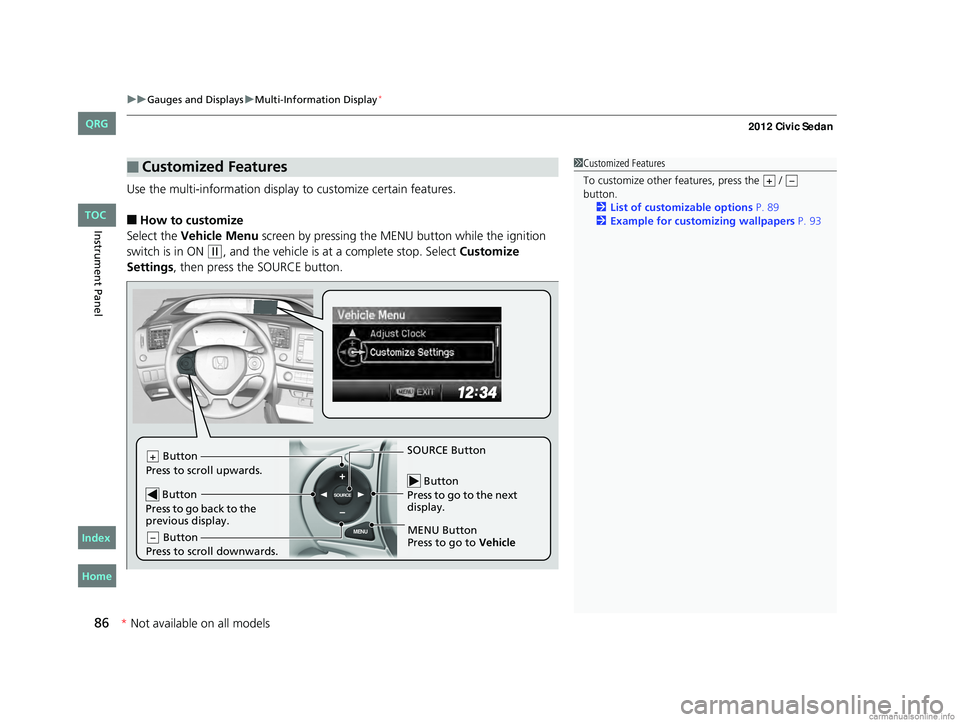
Use the multi-information display to customize certain features.
■How to customize
Select the Vehicle Menu screen by pressing the ME NU button while the ignition
switch is in ON
(w, and the vehicle is at a complete stop. Select Customize
Settings , then press the SOURCE button.
■Customized Features1Customized Features
To customize other features, press the /
button.
2 List of customizable options P. 89
2 Example for customizing wallpapers P. 93
+–
MENU
SOURCE Button
Press to go to the next
display.
SOURCE Button
MENU Button
Press to go to Vehicle
Button
Press to scroll upwards.+
Button
Press to go back to the
previous display.
Button
Press to scroll downwards.–
CIVIC 4D-31TR3600.book 86 ページ 2011年2月14日 月曜日 午後2時51分
TOC
* Not availabl eon allmo dels
Home
QRG
Index
Page 88 of 345
87
uuGauges and Displays uMulti-Information Display*
Continued
Instrument Panel
■Customization flow
Press the MENU button.1 Customized Features
You can exit the customizing screen at any time by
pressing the MENU button.
Vehicle Menu
Vehicle Information
Odometer/Trip Meter
Adjust Clock
Maintenance info
Trip Meter Reset
Select Trip/Odometer
CIVIC 4D-31TR3600.book 87 ページ 2011年2月14日 月曜日 午後2時51分
TOC
Home
QRG
Index
*Not availabl eon allmo dels
Page 89 of 345
88
uuGauges and Displays uMulti-Information Display*
Instrument Panel
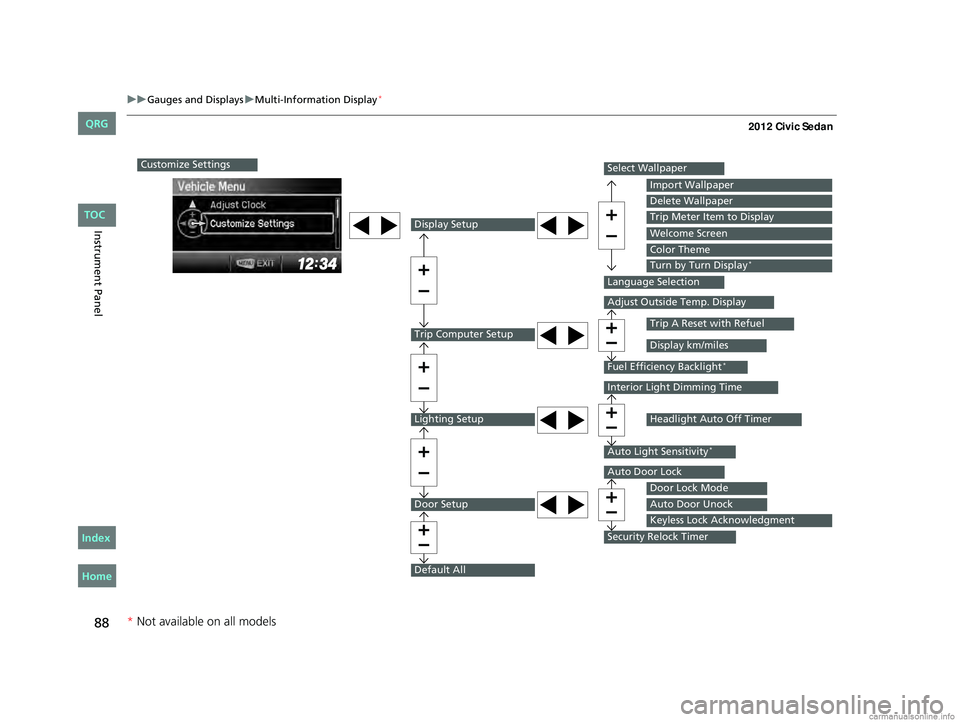
Customize Settings
Display Setup
Trip Computer Setup
Lighting Setup
Door Setup
Default All
Select Wallpaper
Language Selection
Adjust Outside Temp. Display
Fuel Efficiency Backlight*
Interior Light Dimming Time
Auto Light Sensitivity*
Auto Door Lock
Security Relock Timer
Import Wallpaper
Delete Wallpaper
Trip Meter Item to Display
Welcome Screen
Color Theme
Turn by Turn Display*
Trip A Reset with Refuel
Display km/miles
Headlight Auto Off Timer
Door Lock Mode
Auto Door Unock
Keyless Lock Acknowledgment
* Not available on all models
CIVIC 4D-31TR3600.book 88 ページ 2011年2月14日 月曜日 午後2時51分
TOC
Home
QRG
Index
Page 90 of 345
89
uuGauges and Displays uMulti-Information Display*
Continued
Instrument Panel
■List of customizable options
*1: Default Setting Setup Group Customizable Features
DescriptionSelectable settings
Vehicle
InformationMaintenance infoReset the Maintenance MinderTM.No/Yes
Odometer/
Trip Meter Trip Meter Reset
Reset the trip meter. Trip A/Trip B
Select Trip/Odometer Switch between odometer, trip meter A, and trip
meter B. ODO
*1/Trip A/Trip B
Adjust ClockSets time display 12 hour or 24 hour and adjust the time.12 h*1/24 h
CIVIC 4D-31TR3600.book 89 ページ 2011年2月14日 月曜日 午後2時51分
TOC
Home
QRG
Index
*
Not av ailable on all mo dels
Page 91 of 345

90
uuGauges and Displays uMulti-Information Display*
Instrument Panel
*1: Not available on all models
*2: Default Setting
*3: Default Setting for 1.8 ℓ engine models
*4: Default Setting for 2.4 ℓ engine models
*5: Refer to the navigation system manual for complete details.Setup Group Customizable Features
DescriptionSelectable settings
Customize
Settings Display
SetupSelect
Wallpaper
Select the full-size analogue clock or the wallpaper. Clock
*2/Image 1/Image 2/
Image 3
Import
Wallpaper Import an image file for a new wallpaper. Three images can be stored.
2
Importing Wallpapers
from USB P. 93
Delete
Wallpaper Delete an image file for a wallpaper.
Image 1/Image 2/Image 3
Trip Meter
Item to
Display Select an item to be displayed along with average
fuel economy.
Range
*2/Elapsed time/
Average speed
Select an item to be displayed along with the instant
fuel economy. Average Fuel
*2/Range/
Elapsed time/Average speed
Welcome
Screen Select whether the welcome screen comes on or not
when you turn the ignition switch to ON
(w.
On*2/Off
Color Theme Changes the co lor of the screen. Blue
*3/Red*4/Amber/Gray
Turn by Turn
Display
*1, *5Select whether the turn-by-tu rn display comes on or
not during the route guidance. On*2/Off
Language
Selection Changes the displayed language.
English
*2/French/Spanish
1.8 ℓ engine models
2.4 ℓ engine models
CIVIC 4D-31TR3600.book 90 ページ 2011年2月14日 月曜日 午後2時51分
TOC
Home
QRG
Index
* Not av ailable on all mo dels
Page 92 of 345
91
uuGauges and Displays uMulti-Information Display*
Continued
Instrument Panel
*1: Not available on all models
*2: Default SettingSetup Group Customizable Features
DescriptionSelectable settings
Customize
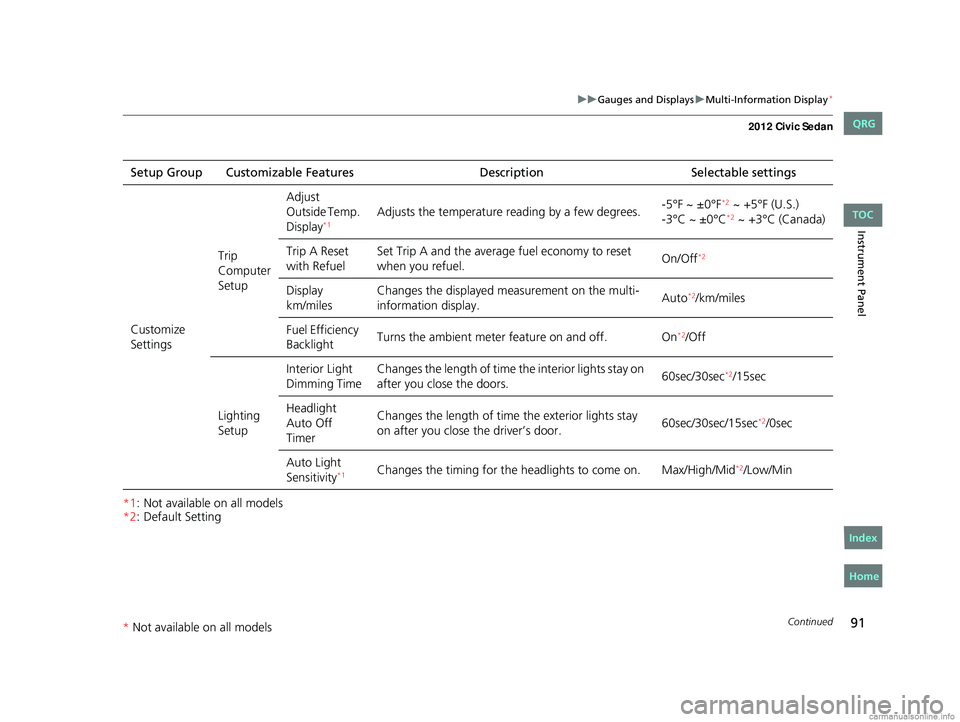
Settings Trip
Computer
SetupAdjust
Outside Temp.
Display
*1Adjusts the temperature r
eading by a few degrees. -5°F ~ ±0°F*2 ~ +5°F (U.S.)
-3°C ~ ±0°C*2 ~ +3°C (Canada)
Trip A Reset
with Refuel Set Trip A and the average fuel economy to reset
when you refuel.
On/Off
*2
Display
km/milesChanges the displayed m
easurement on the multi-
information display. Auto*2/km/miles
Fuel Efficiency
Backlight Turns the ambient meter feature on and off. On
*2/Off
Lighting
Setup Interior Light
Dimming Time
Changes the length of time the interior lights stay on
after you close the doors.
60sec/30sec
*2/15sec
Headlight
Auto Off
Timer Changes the length of time
the exterior lights stay
on after you close the driver’s door. 60sec/30sec/15sec
*2/0sec
Auto Light
Sensitivity
*1Changes the timing for the head lights to come on. Max/High/Mid*2/Low/Min
CIVIC 4D-31TR3600.book 91 ページ 2011年2月14日 月曜日 午後2時51分
TOC
Home
QRG
Index
* Not av ailable on all mo dels
Page 93 of 345
92
uuGauges and Displays uMulti-Information Display*
Instrument Panel
*1:Default Setting
*2:Default Setting for automatic transmission
*3:Default Setting for manual transmissionSetup Group Customizable Features
DescriptionSelectable settings
Customize
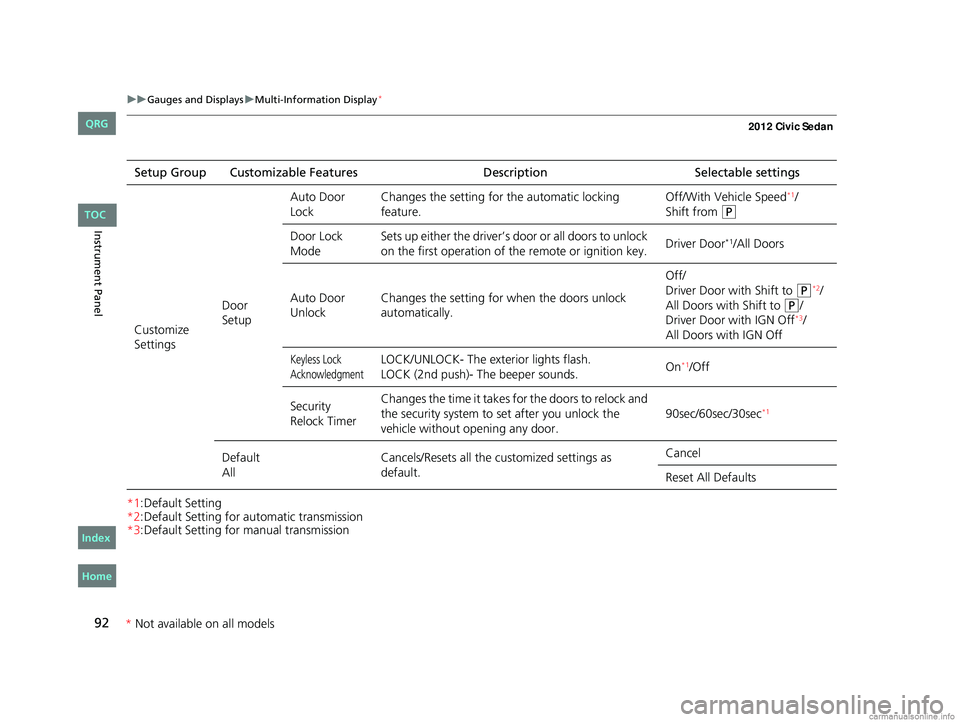
Settings Door
SetupAuto Door
Lock
Changes the setting for
the automatic locking
feature. Off/With Vehicle Speed
*1/
Shift from
(P
Door Lock
Mode Sets up either the driver’s door or all doors to unlock
on the first operation of the remote or ignition key.
Driver Door*1/All Doors
Auto Door
Unlock Changes the setting for
when the doors unlock
automatically. Off/
Driver Door with Shift to
(P*2/
All Doors with Shift to
(P/
Driver Door with IGN Off*3/
All Doors with IGN Off
Keyless Lock
AcknowledgmentLOCK/UNLOCK- The exterior lights flash.
LOCK (2nd push)- The beeper sounds. On*1/Off
Security
Relock Timer Changes the time it takes for the doors to relock and
the security system to set after you unlock the
vehicle without opening any door.
90sec/60sec/30sec
*1
Default
AllCancels/Resets all the customized settings as
default. Cancel
Reset All Defaults
CIVIC 4D-31TR3600.book 92 ページ 2011年2月14日 月曜日 午後2時51分
TOC
Home
QRG
Index
*
Not availabl eon allmo dels