Page 2 of 345

Contents
Child Safety P. 50 Exhaust Gas Hazard P. 62 Safety Labels P. 63
Opening and Closing the Trunk P. 109 Security System P. 112 Opening and Closing the Windows P. 114
Operating the Switches Around the Steering Wheel P. 117 Adjusting the Mirrors P. 125
Interior Lights/Interior Convenience Items P. 134 Heating and Cooling*
P. 140
Audio Error Messages *
P. 172 General Information on the Audio System *
P. 174
When Driving P. 211 Braking P. 229 Parking Your Vehicle P. 233
Accessories and Modifications P. 238
Maintenance Under the Hood P. 251 Replacing Light Bulbs P. 268
Checking and Maintaining Tires P. 280 Battery P. 289 Remote Transmitter Care *
P. 290
Cleaning P. 292
Engine Does Not Start P. 306 Jump Starting P. 307 Shift Lever Does Not Move P. 310
Fuses P. 318 Emergency Towing P. 321
Devices that Emit Radio Waves P. 329 Reporting Safety Defects P. 330
Authorized Manuals P. 335 Customer Service Information P. 336
Quick Reference GuideP. 2
Safe DrivingP. 23
Instrument PanelP. 65
ControlsP. 97
FeaturesP. 143
DrivingP. 201
MaintenanceP. 239
Handling the UnexpectedP. 297
InformationP. 323
IndexP. 337
2012 Civic 4D Online Reference Owner's Manual
Note: All page numbers referenced in this document are hyperlinked.
Page 5 of 345
Visual Index
4Quick Reference Guide
❙Door Mirror Controls *
(P 125)
❙Passenger's Front Airbag
(P 38)
❙Parking Brake (P 229)
❙Glove Box (P 135)
❙Rearview Mirror (P 125)
❙Accessory Power Socket
(P 137)
❙Shift Lever
Automatic Transmission
(P 214)
Manual Transmission
(P 217)
❙Hood Release Handle (P 253)
❙Fuel Fill Door Release Handle (P 235)
❙Driver’s Pocket
❙Trunk Release (P 109)
❙Power Door Lock Master Switch *
(P 104)
❙Power Window Switches (P 114)
❙Auxiliary Input Jack*
(P 145)
❙Interior Fuse Box (P 319)
❙Driver's Front Airbag (P 38)
Page 63 of 345

62
Safe Driving
Exhaust Gas Hazard
Carbon Monoxide Gas
The engine exhaust from this vehicle contains carbon monoxide, a colorless,
odorless, and highly toxic gas. As long as you properly maintain your vehicle, carbon
monoxide gas will not get into the interior. ■Have the exhaust system inspected for leaks whenever
• The exhaust system is making an unusual noise.
• The exhaust system may have been damaged.
• The vehicle is raised for an oil change.
When you operate a vehicle with the trunk open, airflow can pull exhaust gas into
the interior and create a hazardous condition. If you must drive with the trunk open,
open all the windows and set the heating and cooling *
system as shown below.
1. Select the fresh air mode.
2. Select the mode.
3. Set the fan speed to high.
4. Set the temperature control to a comfortable setting.
Adjust the heating and cooling *
system in the same manner if you sit in your parked
vehicle with the engine running.
1Carbon Monoxide Gas
An enclosed area such as a garage can quickly fill up with carbon monoxide gas.
Do not run the engine with the garage door closed.
Even when the garage door is open, drive out of the
garage immediately after starting the engine.
3WARNING
Carbon monoxide gas is toxic.
Breathing it can cause unconsciousness and
even kill you.
Avoid any enclosed areas or activities that
expose you to carbon monoxide.
* Not available on all models
Page 89 of 345
88
uuGauges and DisplaysuMulti-Information Display*
Instrument Panel
Customize Settings
Display Setup
Trip Computer Setup
Lighting Setup
Door Setup
Default All
Select Wallpaper
Language Selection
Adjust Outside Temp. Display
Fuel Efficiency Backlight*
Interior Light Dimming Time
Auto Light Sensitivity
*
Auto Door Lock
Security Relock Timer
Import Wallpaper
Delete Wallpaper
Trip Meter Item to Display
Welcome Screen
Color Theme
Turn by Turn Display*
Trip A Reset with Refuel
Display km/miles
Headlight Auto Off Timer
Door Lock Mode
Auto Door Unock
Keyless Lock Acknowledgment
* Not available on all models
Page 92 of 345

91
uuGauges and DisplaysuMulti-Information Display*
Continued
Instrument Panel
*1: Not available on all models
*2: Default SettingSetup Group Customizable Features Description Selectable settings
Customize
Settings Trip Computer SetupAdjust
Outside Temp.
Display
*1 Adjusts the temperature reading by a few degrees.
-5°F ~ ±0°F
*2
~ +5°F (U.S.)
-3°C ~ ±0°C *2
~ +3°C (Canada)
Trip A Reset
with Refuel Set Trip A and the average fuel economy to reset
when you refuel.
On/Off
*2
Display km/miles Changes the displayed measurement on the multi-information display.
Auto
*2
/km/miles
Fuel Efficiency
Backlight Turns the ambient meter feature on and off. On
*2
/Off
Lighting Setup Interior Light
Dimming Time
Changes the length of time the interior lights stay on
after you close the doors.
60sec/30sec
*2
/15sec
Headlight Auto Off
Timer Changes the length of time the exterior lights stay
on after you close the driver’s door.
60sec/30sec/15sec
*2
/0sec
Auto Light Sensitivity *1Changes the timing for the headlights to come on. Max/High/Mid
*2
/Low/Min
Page 98 of 345

97
Controls
This chapter explains how to operate the various controls necessary for driving.
Setting the Clock ................................ 98
Locking and Unlocking the Doors
Key Types and Functions ... ................. 99
Locking/Unlocking the Doors from the Outside .......................................... 101
Locking/Unlocking the Doors from the
Inside ............................................. 103
Childproof Door Locks ..................... 104
Auto Door Locking/Unlocking *
........ 105
Opening and Closing the Trunk ....... 109
Security System ................................ 112
Immobilizer System .......................... 112
Security System Alarm *
.................... 112
Opening and Closing the Windows ..... 114Opening and Closing the Moonroof*...... 116Operating the Switches Around the
Steering WheelIgnition Switch ................................. 117
Turn Signals ..................................... 118
Light Switches.................................. 118Fog Lights *
...................................... 120
Daytime Running Lights ................... 120
Wipers and Washers ........................ 121
Brightness Control ........................... 122 Rear Defogger/Heated Door Mirror *
Button ........................................... 123
ECON Button *
................................. 123
Adjusting the Steering Wheel........... 124 Adjusting the Mirrors
....................... 125
Interior Rearview Mirror ................... 125
Power Door Mirrors *
....................... 125
Adjusting the Seats .......................... 126
Adjusting the Seat Positions ............. 126
Interior Lights/Interior Convenience Items ................................................ 134
Interior Lights .................................. 134
Interior Convenience Items .............. 135
Heating and Cooling *
....................... 140
Using Vents, Heating and A/C *
........ 140
* Not available on all models
Page 102 of 345

101
uuLocking and Unlocking the DoorsuLocking/Unlocking the Doors from the Outside
Continued
Controls
Locking/Unlocking the Doors from the Outside■Locking the doors
Press the LOCK button.
Once:
uSome exterior lights will flash, all the
doors will lock, and the security system sets.
Twice (within five seconds after the first
push):
uA beeper sounds and verifies the security
system is set.
■ Unlocking the doors
Press the UNLOCK button.
Once:
uSome exterior lights will flash twice, and
the driver's door unlocks.
Twice:
uThe remaining doors unlock.
■Using the Remote Transmitter *1Using the Remote Transmitter
If you do not open a door within 30 seconds of
unlocking the vehicle with the remote transmitter,
the doors will automatically relock.
You can change the relock timer setting.
2 Customized Features P. 86
If the interior light switch is in the door activated
position, the interior lights come on when you press
the UNLOCK button.
No doors opened: The lights fade out after 30
seconds.
Doors relocked with the remote: The lights go off immediately. 2 Interior Lights P. 134
The remote transmitter uses low-power signals, so
the operating range may vary depending on the
surroundings.
The remote will not lock the vehicle when a door is open.
If the distance at which it works varies, the battery is probably low.
If the LED does not come on when you press a
button, the battery is dead. 2 Replacing the Battery P. 290
You can customize the door unlock mode setting. 2 Customized Features P. 86
Models with multi-information display
LED
Unlock
Button Lock
Button
* Not available on all models
Page 126 of 345
125
Controls
Adjusting the Mirrors
Interior Rearview Mirror
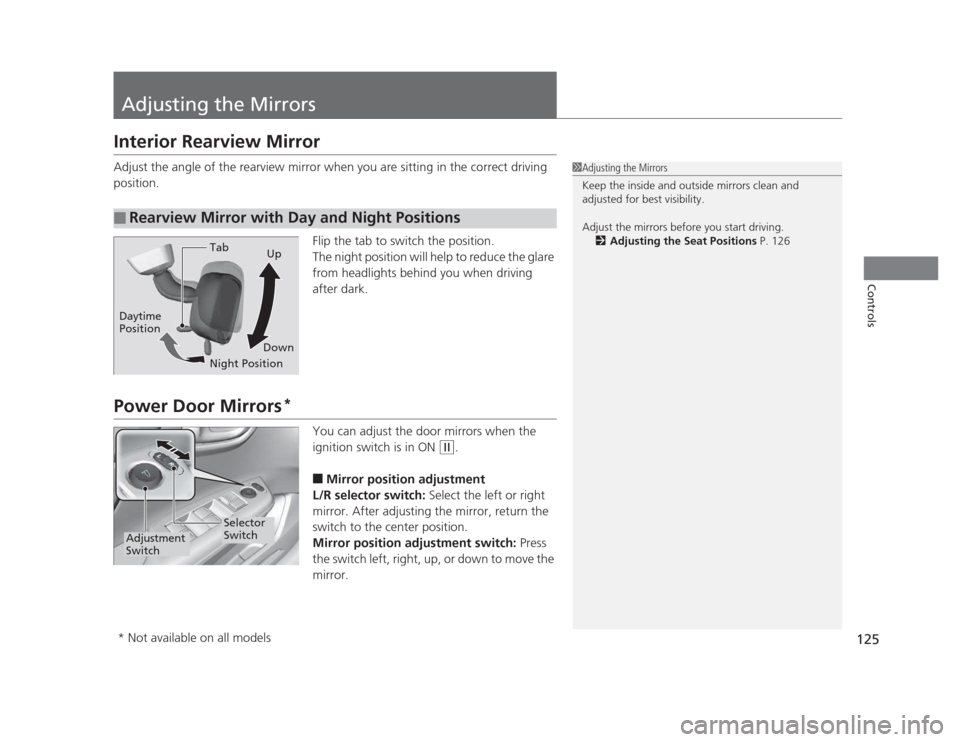
Adjust the angle of the rearview mirror when you are sitting in the correct driving
position.Flip the tab to switch the position.
The night position will help to reduce the glare
from headlights behind you when driving after dark.
Power Door Mirrors*
You can adjust the door mirrors when the
ignition switch is in ON
(w.
■ Mirror position adjustment
L/R selector switch: Select the left or right
mirror. After adjusting the mirror, return the
switch to the center position.
Mirror position adjustment switch: Press
the switch left, right, up, or down to move the
mirror.
■Rearview Mirror with Day and Night Positions
1Adjusting the Mirrors
Keep the inside and outside mirrors clean and
adjusted for best visibility.
Adjust the mirrors before you start driving. 2 Adjusting the Seat Positions P. 126
Tab
Daytime Position
Night PositionUp
Down
Selector
Switch
Adjustment
Switch
* Not available on all models