Page 153 of 345
uuAudio System Basic Operation*uPlaying a CD
152
Features
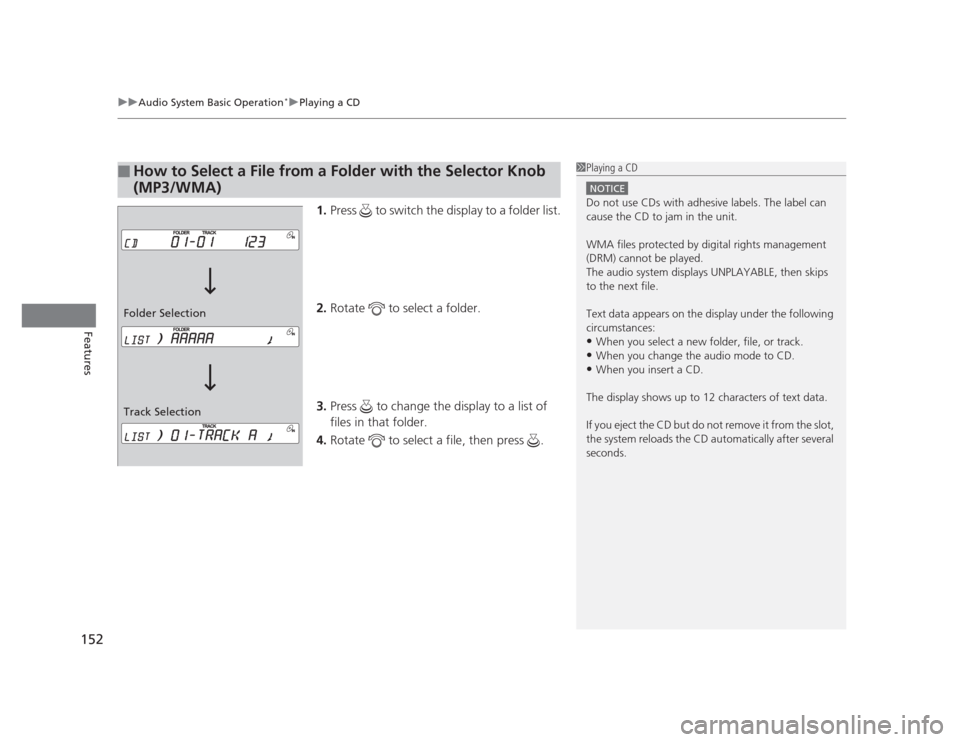
1. Press to switch the display to a folder list.
2. Rotate to select a folder.
3. Press to change the display to a list of files in that folder.
4. Rotate to select a file, then press .
■How to Select a File from a Folder with the Selector Knob
(MP3/WMA)1Playing a CD
NOTICE
Do not use CDs with adhesive labels. The label can
cause the CD to jam in the unit.
WMA files protected by digital rights management
(DRM) cannot be played.
The audio system displays UNPLAYABLE, then skips to the next file.
Text data appears on the display under the following
circumstances: •When you select a new folder, file, or track.
• When you change the audio mode to CD.
• When you insert a CD.
The display shows up to 12 characters of text data.
If you eject the CD but do not remove it from the slot,
the system reloads the CD automatically after several
seconds.
Track Selection
Folder Selection
Page 159 of 345
158
uuAudio System Basic Operation*uPlaying the AM/FM Radio
Features
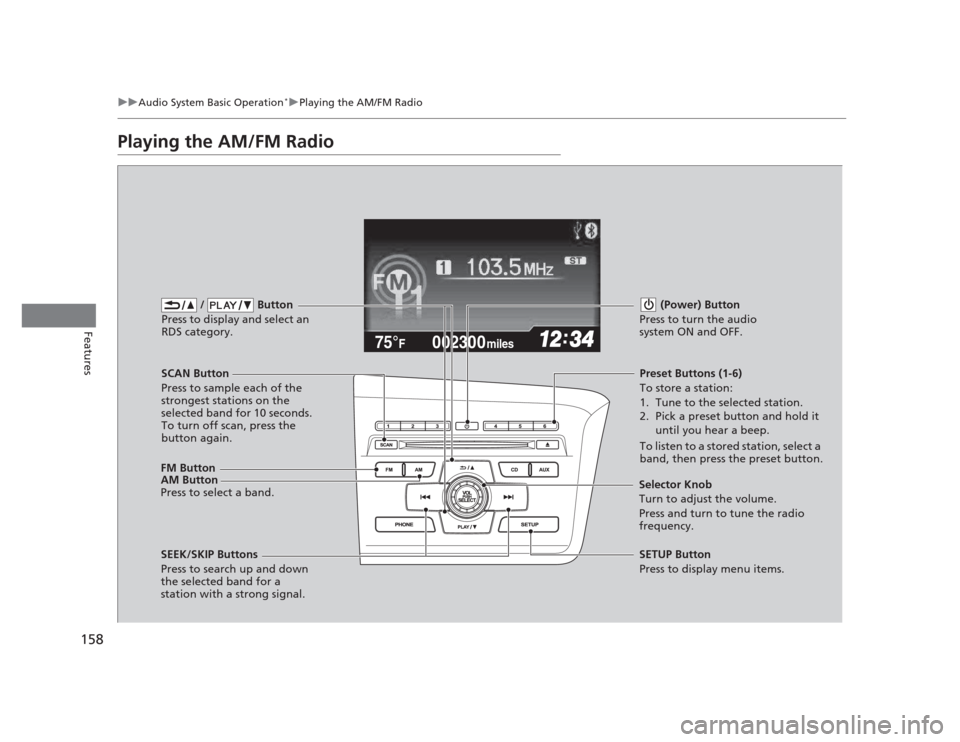
Playing the AM/FM Radio
002300
75°F miles
FM Button / Button
Press to display and select an
RDS category.
SCAN Button
Press to sample each of the
strongest stations on the
selected band for 10 seconds.
To turn off scan, press the
button again. (Power) Button
Press to turn the audio
system ON and OFF.Preset Buttons (1-6)
To store a station:
1. Tune to the selected station.
2. Pick a preset button and hold it until you hear a beep.
To listen to a stored station, select a
band, then press the preset button.
SEEK/SKIP Buttons
Press to search up and down
the selected band for a
station with a strong signal. SETUP Button
Press to display menu items.
Selector Knob
Turn to adjust the volume.
Press and turn to tune the radio
frequency.
AM Button
Press to select a band.
Page 163 of 345
uuAudio System Basic Operation*uPlaying a CD
162
Features
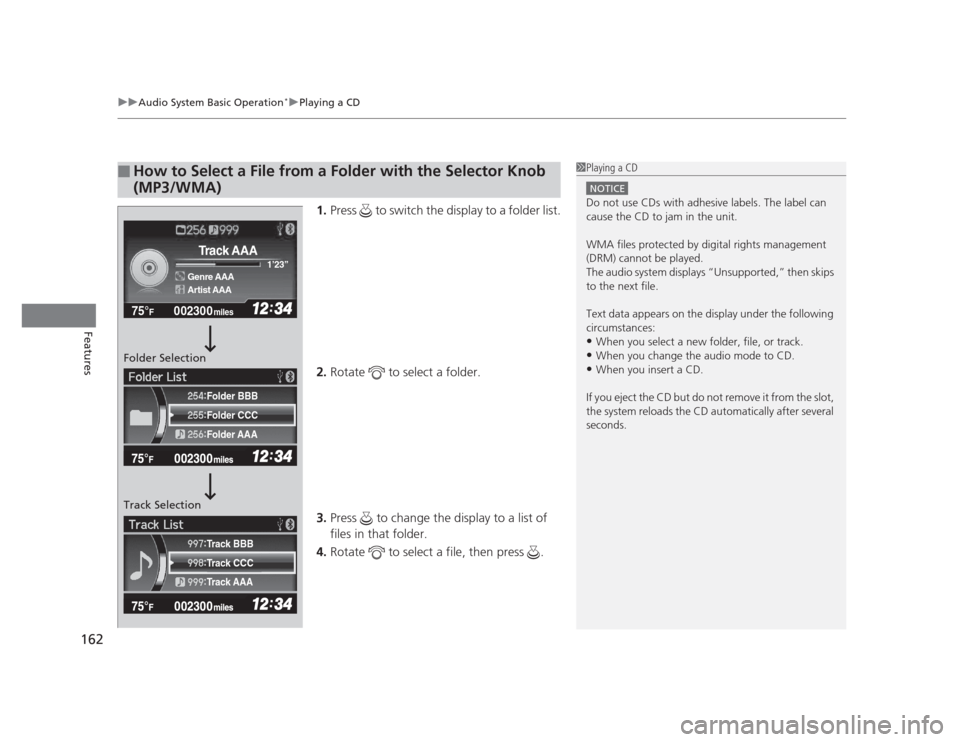
1. Press to switch the display to a folder list.
2. Rotate to select a folder.
3. Press to change the display to a list of files in that folder.
4. Rotate to select a file, then press .
■How to Select a File from a Folder with the Selector Knob
(MP3/WMA)1Playing a CD
NOTICE
Do not use CDs with adhesive labels. The label can
cause the CD to jam in the unit.
WMA files protected by digital rights management
(DRM) cannot be played.
The audio system displays “Unsupported,” then skips to the next file.
Text data appears on the display under the following
circumstances: •When you select a new folder, file, or track.
• When you change the audio mode to CD.
• When you insert a CD.
If you eject the CD but do not remove it from the slot,
the system reloads the CD automatically after several
seconds.
002300
75°F miles
Genre AAA 1
Page 174 of 345
173
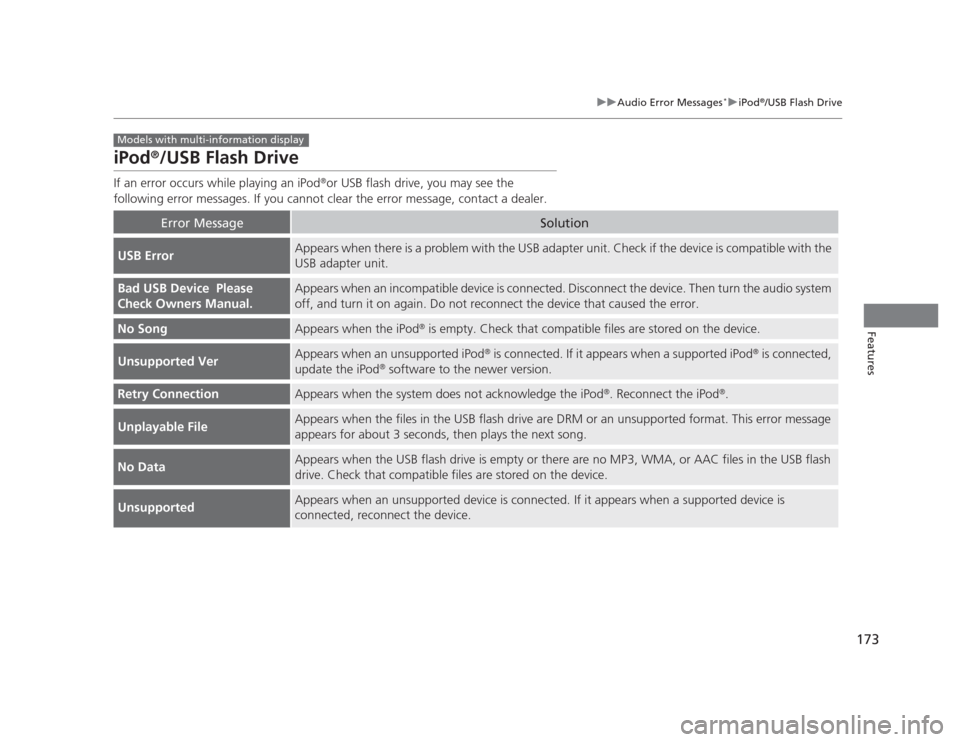
uuAudio Error Messages*uiPod®
/USB Flash Drive
Features
iPod ®
/USB Flash Drive
If an error occurs while playing an iPod ®
or USB flash drive, you may see the
following error messages. If you cannot clear the error message, contact a dealer.
Error MessageSolution
USB ErrorAppears when there is a problem with the USB adapter unit. Check if the device is compatible with the USB adapter unit.
Bad USB Device Please
Check Owners Manual.Appears when an incompatible device is connected. Disconnect the device. Then turn the audio system
off, and turn it on again. Do not reconnect the device that caused the error.
No SongAppears when the iPod ®
is empty. Check that compatible files are stored on the device.
Unsupported VerAppears when an unsupported iPod ®
is connected. If it appears when a supported iPod ®
is connected,
update the iPod ®
software to the newer version.
Retry ConnectionAppears when the system does not acknowledge the iPod ®
. Reconnect the iPod ®
.
Unplayable FileAppears when the files in the USB flash drive are DRM or an unsupported format. This error message
appears for about 3 seconds, then plays the next song.
No DataAppears when the USB flash drive is empty or there are no MP3, WMA, or AAC files in the USB flash
drive. Check that compatible files are stored on the device.
UnsupportedAppears when an unsupported device is connected. If it appears when a supported device is
connected, reconnect the device.
Models with multi-information display
Page 202 of 345

201
Driving
This chapter discusses driving, refueling, and information on items such as accessories.
Before Driving Driving Preparation .......................... 202
Maximum Load Limit........................ 205
Towing a Trailer
Towing Preparation .......................... 207
Driving Safely with a Trailer .............. 209
Towing Your Vehicle ........................ 210
When Driving Starting the Engine .......................... 211
Precautions While Driving................. 213
Automatic Transmission ................... 214 Shifting .......................................... 215
Shifting .......................................... 217
Cruise Control *
............................... 220
VSA® (Vehicle Stability Assist), aka ESC
(Electronic Stability Control), System ...... 223
TPMS (Tire Pressure Monitoring System) ... 225
Tire Pressure Monitoring System (TPMS) - Required Federal Explanation ......... 226
Braking
Brake System ................................... 229
ABS (Anti-lock Brake System) ........... 231
Automatic transmission models
Manual transmission models
Brake Assist System ......................... 232
Parking Your Vehicle
When Stopped ................................ 233
Parking ............................................ 233
Refueling Fuel Information .............................. 234
How to Refuel ................................. 235
Fuel Economy .................................... 237
Improving Fuel Economy .................. 237
Accessories and Modifications
Accessories ...................................... 238
Modifications................................... 238
* Not available on all models
Page 213 of 345
uuWhen DrivinguStarting the Engine
212
Driving
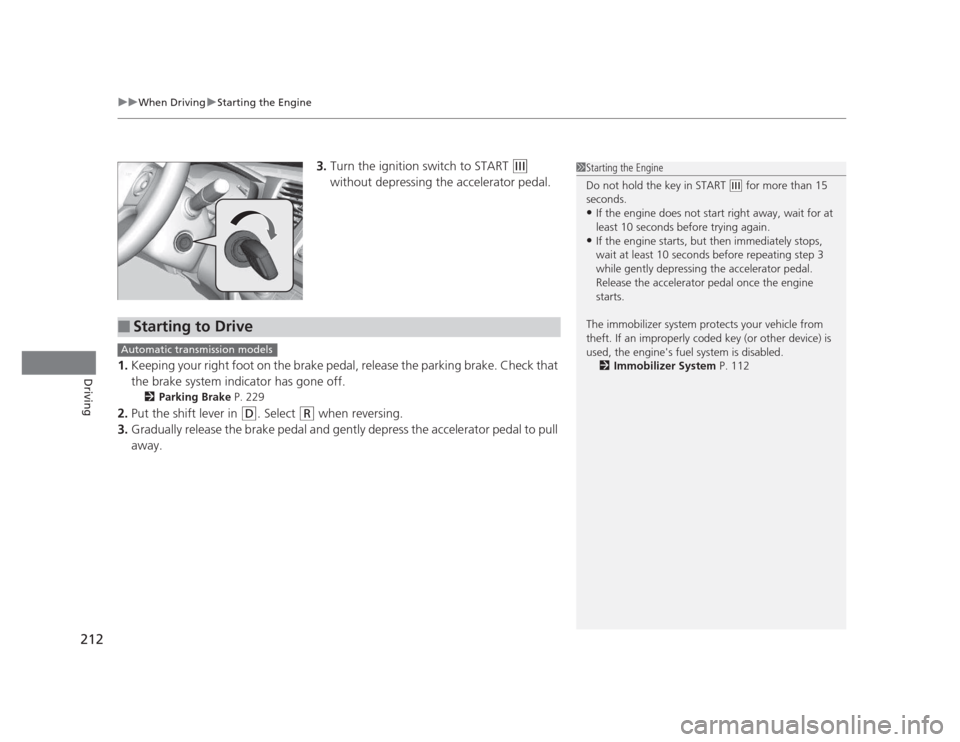
3. Turn the ignition switch to START (e
without depressing the accelerator pedal.
1. Keeping your right foot on the brake pedal, release the parking brake. Check that
the brake system indicator has gone off.
2 Parking Brake P. 229
2. Put the shift lever in
(D . Select (R when reversing.
3. Gradually release the brake pedal and gently depress the accelerator pedal to pull
away.
1Starting the Engine
Do not hold the key in START
(e for more than 15
seconds. • If the engine does not start right away, wait for at
least 10 seconds before trying again.
• If the engine starts, but then immediately stops,
wait at least 10 seconds before repeating step 3
while gently depressing the accelerator pedal.
Release the accelerator pedal once the engine starts.
The immobilizer system protects your vehicle from
theft. If an improperly coded key (or other device) is
used, the engine's fuel system is disabled. 2 Immobilizer System P. 112
■Starting to Drive
Automatic transmission models
Page 216 of 345
215
uuWhen DrivinguShifting
Continued
Driving
Shifting
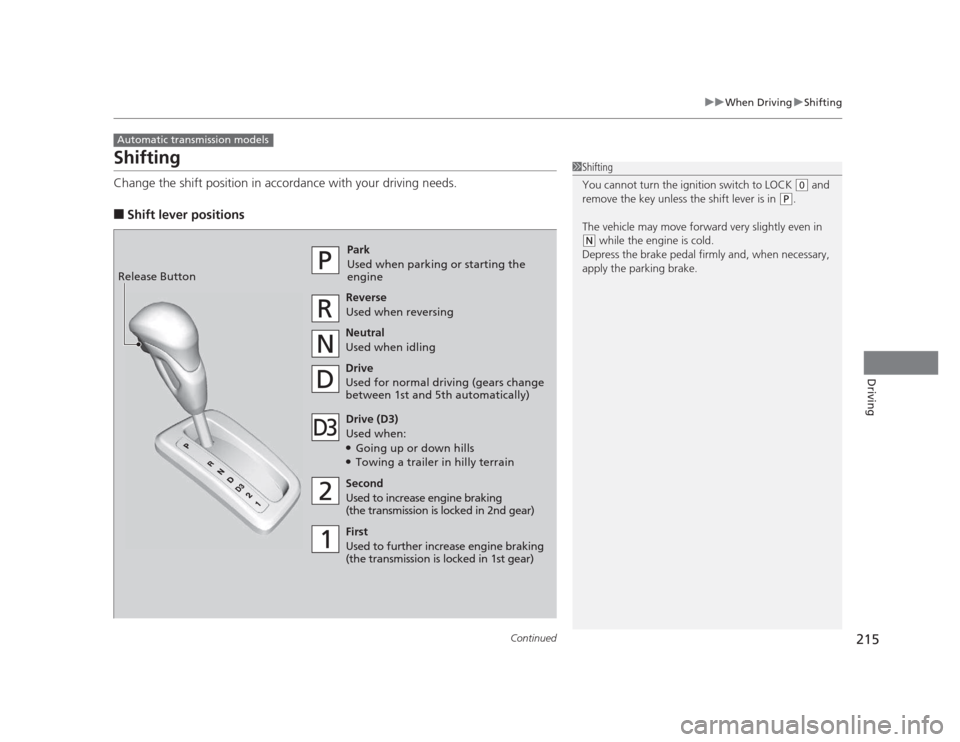
Change the shift position in accordance with your driving needs. ■Shift lever positions
Automatic transmission models
1Shifting
You cannot turn the ignition switch to LOCK
(0 and
remove the key unless the shift lever is in
(P .
The vehicle may move forward very slightly even in
(N while the engine is cold.
Depress the brake pedal firmly and, when necessary,
apply the parking brake.Park
Used when parking or st arting the
engine
ReverseUsed when reversing
Neutral
Used when idling
Drive
Used for normal driving (gears change
between 1st and 5th automatically)
Drive (D3)
Used when:● Going up or down hills
● Towing a trailer in hilly terrain
Second
Used to increase engine braking
(the transmission is locked in 2nd gear)
First
Used to further increase engine braking
(the transmission is locked in 1st gear)
Release Button
Page 218 of 345
217
uuWhen DrivinguShifting
Continued
Driving
Shifting
Fully depress the clutch pedal to operate the shift lever and change gears, then
slowly release the pedal.
Depress the clutch pedal, and pause for a few seconds before shifting into
(R, or
shift into one of the forward gears for a moment. This stops the gears so they do not
“grind.”
■Shift Lever Operation
Manual transmission models
1Shifting
NOTICE
Do not shift to (R before the vehicle comes to a
complete stop.
Shifting to
(R before stopping can damage the
transmission.
NOTICE
Before downshifting, make sure the engine will not
go into the tachometer's red zone. Should this occur,
it can severely damage your engine.
There is a metallic part on the shift lever. If you leave
the vehicle parked outside for a long time on a hot
day, be careful before moving the shift lever. Because
of heat, the shift lever may be extremely hot. If the
outside temperature is low, the shift lever may feel cold.