Page 73 of 345

72
uuIndicatorsu
Instrument Panel
IndicatorNameOn/BlinkingExplanationMessage*
Low Tire Pressure
Indicator
Low Tire Pressure/ TPMS
Indicator
●
Comes on for a few seconds when you
turn the ignition switch to ON
(w .
● Comes on if the tire pressure of any of the
tires becomes significantly low.
● Comes on for a while and then goes off
when a compact spare tire is temporarily
installed.
● Blinks for about one minute, and then
stays on if there is a problem with the
TPMS, or when a compact spare tire is
temporarily installed.
●
Comes on while driving - Stop in a
safe place, check tire pressures, and
inflate the tire(s) if necessary.
● Blinks and remains on - Have the
vehicle checked by a dealer. If the
vehicle is fitted with a compact spare,
get your regular tire repaired or
replaced and put back on your vehicle
as soon as you can.
System
Message
Indicator *
●
Comes on for a few seconds when you
turn the ignition switch to ON
(w , then
goes off.
● Comes on along with a beep when a
problem is detected. A system message on
the multi-information display appears at
the same time.
● While the indicator is on, press the
(display/information) button to
see the message again.
● Refer to the Indicators information in
this chapter when a system message
appears on the multi-information
display. Take the appropriate action for the message.
● The multi-information display does not return
to the normal screen unless the warning is
canceled, or the button is pressed.
—
U.S.
models only
Models with
information
display
Models with
multi-
information
display
Models with information display
Models with multi-information displayModels with multi-information display
* Not available on all models
Page 74 of 345

73
uuIndicatorsu
Continued
Instrument Panel
IndicatorNameOn/BlinkingExplanationMessage*
Turn Signal
Indicators
●
The turn signal indicators blink when
you operate the turn signal lever.
● If you press the hazard warning
button, both indicators and all turn
signals blink at the same time.● Does not blink or blinks rapidly - A
turn signal light bulb has blown.
Change the bulb immediately. 2Replacing Light Bulbs
P. 273, 275
—
High-Beam
Indicator●
Comes on when the high beam
headlights are on.
——
Lights On
Indicator
●Comes on whenever the light switch
is on, or in AUTO *
when the exterior
lights are on.● If you remove the key from the ignition
switch while the exterior lights are on, a
chime sounds when the driver's door is
opened.
—
Fog Light
Indicator *●
Comes on when the fog lights are
on.
——
Side Airbag Off
Indicator
●
Comes on for a few seconds when
you turn the ignition switch to ON
(w , then goes off.
● Comes on when the passenger side
airbag system is automatically shut
off.
● It does not mean there is a problem
with your side airbags.
● Comes on when nobody is sitting in
the passenger seat - Have the vehicle
checked by a dealer.
● Comes on when someone is sitting
in the seat - Have the passenger sit
properly.U.S.
Canada
* Not available on all models
Page 77 of 345
76
uuIndicatorsuMulti-Information Display Warning and Information Messages *
Instrument Panel
Multi-Information Display Warning and Information Messages *
The following messages appear only on the multi-information display. Press the (display/information) button to see the message
again with the system message indicator on.
MessageConditionExplanation
● Appears when the fuel fill cap is loose or is not
installed.
2 Check/Tighten Fuel Cap Message P. 314
●
Appears if there is a problem with the DRL system.●Have your vehicle checked by a dealer.
2Daytime Running Lights P. 120
●
Appears when washer fluid gets low.●Refill washer fluid.
2Refilling Window Washer Fluid P. 267Canadian models
* Not available on all models
Page 78 of 345
77
uuIndicatorsuMulti-Information Display Warning and Information Messages*
Instrument Panel
MessageConditionExplanation
●
Appears when the scheduled maintenance is due soon.
● Consequently, "SERVICE DUE NOW" and "SERVICE PAST DUE" follow.2 Maintenance Minder Messages on the Multi-
Information Display P. 248
●
Appears when you open the driver's door while the ignition key is in ACCESSORY
(q .
●
Turn the ignition switch to LOCK (0 , then remove the
key.
● Appears when you open the driver's door while the
ignition key is in LOCK
(0 .
●
Remove the key from the ignition switch.
Page 83 of 345
82
uuGauges and DisplaysuMulti-Information Display*
Instrument Panel
Multi-Information Display *
The multi-information display shows the odometer, trip meter, outside temperature
indicator *
, and other gauges.
It also displays important messages such as warnings and other helpful information.
Press the (display/information) button or the (SEL/RESET) knob to change the display.
■Switching the Display
123456
Genre AAA
Song AAA
Artist AAA
200
24.0
123456
123456
123456
Display/
Information
Button Fuel consumption
Audio/HFL
*
display Fuel consumption
Black screen
Full size analogue clock/
Wallpaper
2.4 � engine models
Power monitor
1.8 � engine models
2.4 � engine models
* Not available on all models
Page 115 of 345

114
Controls
Opening and Closing the Windows
Opening/Closing the Power Windows
The power windows can be opened and closed when the ignition switch is in ON
(w, using the switches on the doors. The driver's side switches can be used to open
and close all of the windows.
The power window lock button on the driver's side must be switched off (not
pushed in, indicator off) to open and close the windows from anywhere other than
the driver's seat.
When the power window lock button is pushed in, the indicator comes on and you
can only operate the driver's window. Turn the power window lock button on when
children are in the vehicle.
■Automatic operation
To open: Push the switch down firmly.
To close: Pull the switch up firmly.
The window opens or closes completely. To
stop the window at any time, push or pull the
switch briefly. ■ Manual operation
To open: Push the switch down lightly.
To close: Pull the switch up lightly.
Release the switch when the window reaches
the desired position.
■Opening/Closing Windows with Auto-Open/Close Function *
1Opening/Closing the Power Windows
The power windows can be operated for up to 10
minutes after you turn the ignition switch off.
Opening either front door cancels this function.
Auto Reverse
If a power window senses resistance when closing
automatically, it will stop closing and reverse direction.
The driver’s window auto reverse function is disabled
when you continuously pull up the switch.
The auto reverse function stops sensing when the
window is almost closed to ensure that it fully closes.
3WARNING
Closing a power window on someone's
hands or fingers can cause serious injury.
Make sure your passengers are away from
the windows before closing them.
ON
OFF
Power Window
Lock Button
Indicator
Driver’s
Window
Switch
Front Passenger’s
Window Switch
* Not available on all models
Page 117 of 345
116
Controls
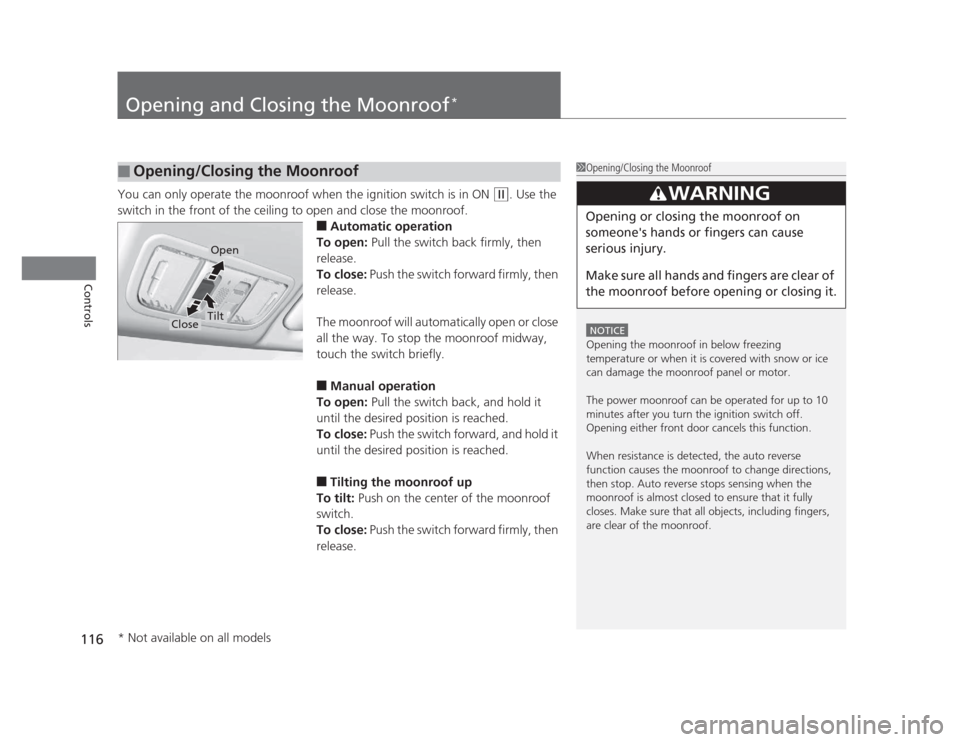
Opening and Closing the Moonroof*
You can only operate the moonroof when the ignition switch is in ON (w
. Use the
switch in the front of the ceiling to open and close the moonroof. ■Automatic operation
To open: Pull the switch back firmly, then
release.
To close: Push the switch forward firmly, then
release.
The moonroof will automatically open or close
all the way. To stop the moonroof midway,
touch the switch briefly. ■ Manual operation
To open: Pull the switch back, and hold it
until the desired position is reached.
To close: Push the switch forward, and hold it
until the desired position is reached. ■ Tilting the moonroof up
To tilt: Push on the center of the moonroof
switch.
To close: Push the switch forward firmly, then
release.
■Opening/Closing the Moonroof1Opening/Closing the Moonroof
NOTICE
Opening the moonroof in below freezing
temperature or when it is covered with snow or ice
can damage the moonroof panel or motor.
The power moonroof can be operated for up to 10
minutes after you turn the ignition switch off.
Opening either front door cancels this function.
When resistance is detected, the auto reverse
function causes the moonroof to change directions,
then stop. Auto reverse stops sensing when the
moonroof is almost closed to ensure that it fully
closes. Make sure that all objects, including fingers,
are clear of the moonroof.
3WARNING
Opening or closing the moonroof on
someone's hands or fingers can cause
serious injury.
Make sure all hands and fingers are clear of
the moonroof before opening or closing it.
Open
CloseTilt
* Not available on all models
Page 118 of 345

117
Controls
Operating the Switches Around the Steering Wheel
Ignition Switch
1Ignition Switch
You cannot take the key out unless the shift lever is in
(P.
If you open the driver's door when the key is in LOCK
(0 or ACCESSORY (q, a warning buzzer will sound
to remind you to take the key out.
When this happens, the following messages appear
on the multi-information display *
:
• In LOCK
(0 : "REMOVE KEY."
• In ACCESSORY
(q : "RETURN IGNITION SWITCH
TO LOCK (0) POSITION" The buzzer will stop when
you take the key out.
If the key won't turn from LOCK
(0 to ACCESSORY
(q , turn the key while moving the steering wheel left
and right. The steering wheel will unlock, allowing
the key to turn.
3WARNING
Removing the key from the ignition switch
while driving locks the steering. This can
cause you to lose control of the vehicle.
Remove the key from the ignition switch
only when parked.
Manual transmission models
Automatic transmission models
All models
(0 LOCK: Insert and remove the key in this
position.
(q ACCESSORY: Operate the audio system and
other accessories in this position.
(w ON: This is the position when driving.
(e START: This position is for starting the engine.
The switch returns to ON
(w when you let go of
the key.
* Not available on all models


