Page 136 of 345
135
uuInterior Lights/Interior Convenience ItemsuInterior Convenience Items
Continued
Controls
Interior Convenience ItemsPull the handle to open the glove box.
Pull the handle to open the console compartment.
■Glove Box1Glove Box
3WARNING
An open glove box can cause serious injury
to your passenger in a crash, even if the
passenger is wearing the seat belt.
Always keep the glove box closed while
driving.
■Console Compartment
Page 179 of 345
uuBluetooth®
HandsFreeLink ®*uUsing HFL
178
Features
The multi-information display notifies you
when there is an incoming call.
■HFL Status Display1Bluetooth ®
HandsFreeLink ®
Bluetooth ®
Wireless Technology
Bluetooth ®
name and logos are registered
trademarks owned by Bluetooth SIG, Inc., and any
use of such marks by Honda Motors Co., Ltd., is
under license. Other trademarks and trade names are
those of their respective owners.
HFL Limitations
An incoming call on HFL will interrupt the audio
system when it is playing. It will resume when the call is ended.
John
Signal Strength
HFL Mode Battery Level Status Roam Status
Call Name
Bluetooth IndicatorComes on when your
phone is connected to HFL.
1HFL Status Display
The information that appears on the multi-
information display varies between phone models.
You can change the system language to English,
French, or Spanish. 2 Customized Features P. 86
Page 189 of 345
uuBluetooth®
HandsFreeLink ®*uHFL Menus
188
Features
You can protect each of the six cell phones with a security PIN. 1.Press the PHONE button or the button.
2. Rotate to select Phone Setup, then
press .
uRepeat the procedure to select
Passcode .
3. Select a phone you want to add a security
PIN to.
uRotate to select a phone you want to
add a security PIN to, then press .
4. You will receive a confirmation message on the screen.
uRotate to select Yes, then press .
5. Enter a new four-digit number.
uRotate to select, then press . Press
to delete. Press to enter the
security PIN.
6. Re-enter the four-digit number.
uThe screen returns to the screen in step 2.
■To Create a Security PIN1To Create a Security PIN
In the phone is already security PIN protected, you
need to enter the current security PIN before clearing
the PIN or creating a new one.
002300
75°F miles
PHONE#4
PHONE#3 PHONE#5
Page 209 of 345
uuTowing a TraileruTowing Preparation
208
Driving
Towing equipment varies by the size of your trailer, how much load you are towing,
and where you are towing. ■ Hitches
The hitch must be of an approved type and properly bolted to the underbody. ■ Safety chains
Always use safety chains when you tow a trailer. Leave enough slack to allow the
trailer to turn corners easily, but do not allow the chains to drag on the ground. ■ Trailer brakes
There are two common types of trailer brakes: surge and electric. Surge brakes are
common for boat trailers, since the brakes will get wet. If you choose electric brakes,
be sure they are electronically actuated. Do not attempt to attach trailer brakes to
your vehicle's hydraulic system, as it will lower braking effectiveness and create a
potential hazard. ■ Additional towing equipment
Many states and provinces/territories require special outside mirrors when towing a trailer. Even if mirrors are not required in your locale, you should install special
mirrors if visibility is restricted in any way.
■ Trailer light
Trailer lights and equipment must comply with federal, state, province/territory, and
local regulations. Check with your local trailer sales or rental agency for the
requirements in the area where you plan to tow.
■Towing Equipment and Accessories1Towing Equipment and Accessories
Make sure that all equipment is properly installed and
maintained, and that it meets federal, state, province/
territory, and local regulations.
Consult your trailer sales or rental agency if any other
items are recommended or required for your towing
situation.
The lighting and wiring of trailers can vary by type
and brand. If a connector is required, it should only
be installed by a qualified technician.
Page 225 of 345

uuWhen DrivinguVSA®
(Vehicle Stability Assist), aka ESC (Electronic Stability Control), System
224
Driving
This button is on the driver side control panel.
To turn the VSA ®
system on and off, press and
hold it until you hear a beep.
VSA ®
will stop and the indicator will come on.
To turn it on again, press the (VSA ®
OFF)
button until you hear a beep.
VSA ®
is turned on every time you start the
engine, even if you turned it off the last time
you drove the vehicle.
■VSA ®
On and Off1VSA ®
(Vehicle Stability Assist), aka ESC (Electronic Stability
Control), System
Without VSA ®
, your vehicle will have normal braking
and cornering ability, but it will not have VSA ®
traction and stability enhancement.
In certain unusual conditions when your vehicle gets
stuck in shallow mud or fresh snow, it may be easier
to free it with the VSA ®
temporarily switched off.
When the VSA ®
system is off, the traction control
system is also off. You should only attempt to free
your vehicle with the VSA ®
off if you are not able to
free it when the VSA ®
is on.
Immediately after freeing your vehicle, be sure to
switch VSA ®
on again. We do not recommend driving
your vehicle with the VSA ®
and traction control
systems switched off.
If the low tire pressure/TPMS *
, low tire pressure *
, or
TPMS indicator *
comes on or blinks, the VSA ®
system
comes on automatically. In this case, you cannot turn
the system off by pressing the button.
You may hear a motor sound coming from the
engine compartment while system checks are being
performed immediately after starting the engine or
while driving. This is normal.
VSA ®
OFF
Indicator
1.8 � engine models
VSA ®
OFF
Indicator
2.4 � engine models
* Not available on all models
Page 228 of 345
227
uuWhen DrivinguTire Pressure Monitoring System (TPMS) - Required Federal Explanation
Continued
Driving
Please note that the TPMS is not a substitute for proper tire
maintenance, and it is the driver's responsibility to maintain
correct tire pressure, even if u nder-inflation has not reached the
level to trigger il lumination of the TPMS low tire pressure telltale.
Your vehicle has also been equipped with a TPMS malfunction
indicator to indicate when the sy stem is not operating properly.
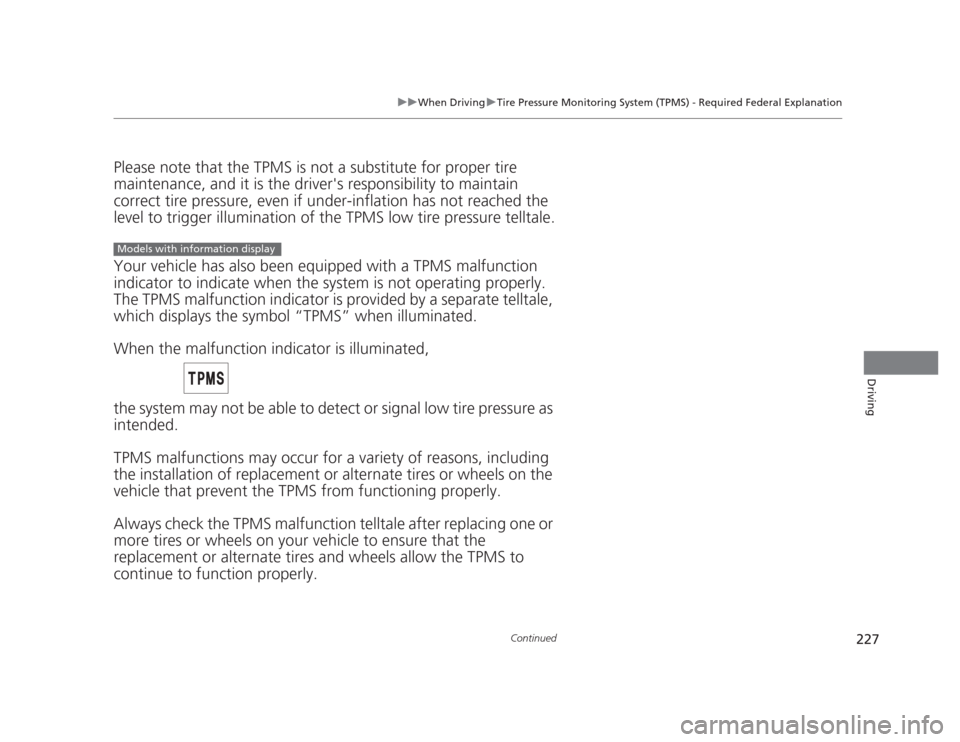
The TPMS malfunction indic ator is provided by a separate telltale,
which displays the symbol “TPMS” when illuminated.
When the malfunction indicator is illuminated,
the system may not be able to detect or signal low tire pressure as
intended.
TPMS malfunctions may occur for a variety of reasons, including
the installation of replacement or alternate tires or wheels on the
vehicle that prevent the TPMS from functioning properly.
Always check the TPMS malfunction telltale after replacing one or
more tires or wheels on your vehicle to ensure that the
replacement or alternate tires and wheels allow the TPMS to continue to function properly.
Models with information display
Page 229 of 345
228
uuWhen DrivinguTire Pressure Monitoring System (TPMS) - Required Federal Explanation
Driving
Your vehicle has also been equipped with a TPMS malfunction
indicator to indicate when the system is not operating properly.
The TPMS malfunction indicator is combined with the low tire
pressure telltale. When the system detects a malfunction, the
telltale will flash for approximately one minute and then remain continuously illuminated. This se quence will continue upon
subsequent vehicle start-ups as long as the malfunction exists.
When the malfunction indicator is illuminated, the system may
not be able to detect or signal low tire pressure as intended.
TPMS malfunctions may occur for a vari ety of reasons, including
the installation of replacement or alternate tires or wheels on the
vehicle that prevent the TPMS from functioning properly. Always check the TPMS malfunction telltale after replacing one or
more tires or wheels on your vehicle to ensure that the
replacement or alternate tires and wheels allow the TPMS to
continue to function properly.
Models with multi-information display
Page 242 of 345
241
uuBefore Performing MaintenanceuSafety When Performing Maintenance
Maintenance
Safety When Performing Maintenance
Some of the most important safety precautions are given here.
However, we cannot warn you of every conceivable hazard that can arise in
performing maintenance. Only you can decide whether or not you should perform
a given task. • To reduce the possibility of fire or explosion, keep cigarettes, sparks, and flames
away from the battery and all fuel related parts.
• To clean parts, use a commercially available degreaser or parts cleaner, not
gasoline.
• Wear eye protection and protective clothing when working with the battery or
compressed air.
• Engine exhaust contains carbon monoxide, which is poisonous and can kill you.
uOnly operate the engine if there is sufficient ventilation.
• The vehicle must be in a stationary condition.
uMake sure your vehicle is parked on level ground, the parking brake is set, and
the engine is off.
• Be aware that hot parts can burn you.
uMake sure to let the engine and exhaust system cool thoroughly before
touching vehicle parts.
• Be aware that moving parts can injure you.
uDo not start the engine unless instructed, and keep your hands and limbs away
from moving parts.
■Maintenance Safety
■Vehicle Safety
1Safety When Performing Maintenance
3WARNING
Improperly maintaining this vehicle or
failing to correct a problem before driving
can cause a crash in which you can be
seriously hurt or killed.
Always follow the inspection and
maintenance recommendations according
to the schedules in this owner's manual.
3WARNING
Failure to properly follow maintenance
instructions and precautions can cause you
to be seriously hurt or killed.
Always follow the procedures and
precautions in this owner's manual.