Page 248 of 345

247
uuMaintenance Minder™uTo Use Maintenance MinderTM
Continued
Maintenance
To Use Maintenance Minder TM
Maintenance items, which should be serviced at the same time that you replace the
engine oil, appear on the multi-information display.
You can view them on the Maintenance info screen at any time.
1. Turn the ignition switch to ON
(w .
2. Press the MENU button to go to the Vehicle Menu screen.
3. Select Vehicle Information with the button, then press the SOURCE button.
4. Press the SOURCE button again to go to the Maintenance info screen. The
engine oil life appears on the multi-information display.
■Displaying the Engine Oil Life and Maintenance Items
Models with multi-information display
1Displaying the Engine Oil Life and Maintenance Items
Based on the engine operating conditions, the
remaining engine oil life is calculated and displayed
as a percentage.
There is a list of maintenance main and sub items you
can view on the multi-information display.
2 Maintenance Service Items P. 249
Displayed Engine Oil
Life (%)Calculated Engine Oil Life (%)
100 100 to 91
9090 to 81
80 80 to 71
7070 to 61
60 60 to 51
5050 to 41
40 40 to 31
3030 to 21
20 20 to 16
1515 to 11
10 10 to 6
55 to 1
00
+
MENU
SOURCE
50
Engine oil
Air filters
2345
SOURCE
Button MENU
Button Button
+
Sub Item Engine Oil Life
Main
Item
Page 249 of 345

248
uuMaintenance Minder™uTo Use Maintenance MinderTM
Maintenance
The system message indicator ( ) comes on along with the Maintenance Minder message.
■Maintenance Minder Messages on the Multi-Information
Display
Maintenance MessageOil Life DisplayExplanationInformation
SERVICE DUE SOON15 %The remaining engine oil life is 15 to
6 percent. Once you switch the
display by pressing the
(display/information) button, this
message will go off.The engine oil is approaching the end
of its service life, and the maintenance
items should be inspected and serviced
soon.
SERVICE DUE NOW5 %The remaining engine oil life is 5 to 1
percent. Press the button to
switch to another display.The engine oil has almost reached the
end of its service life, and the
maintenance items should be inspected
and serviced as soon as possible.
SERVICE PAST DUENegative DistanceThe remaining engine oil life has
passed its service life, and a negative
distance appears after driving over
10 miles (U.S. models) or 10 km
(Canadian models). Press the
button to switch to another display.The engine oil life has passed.
The maintenance items must be
inspected and serviced immediately.
2345
15
Engine oil
Air filters
2345
2345
5
Engine oil
Air filters
2345
23452345
-30
Page 250 of 345
249
uuMaintenance Minder™uTo Use Maintenance MinderTM
Continued
Maintenance
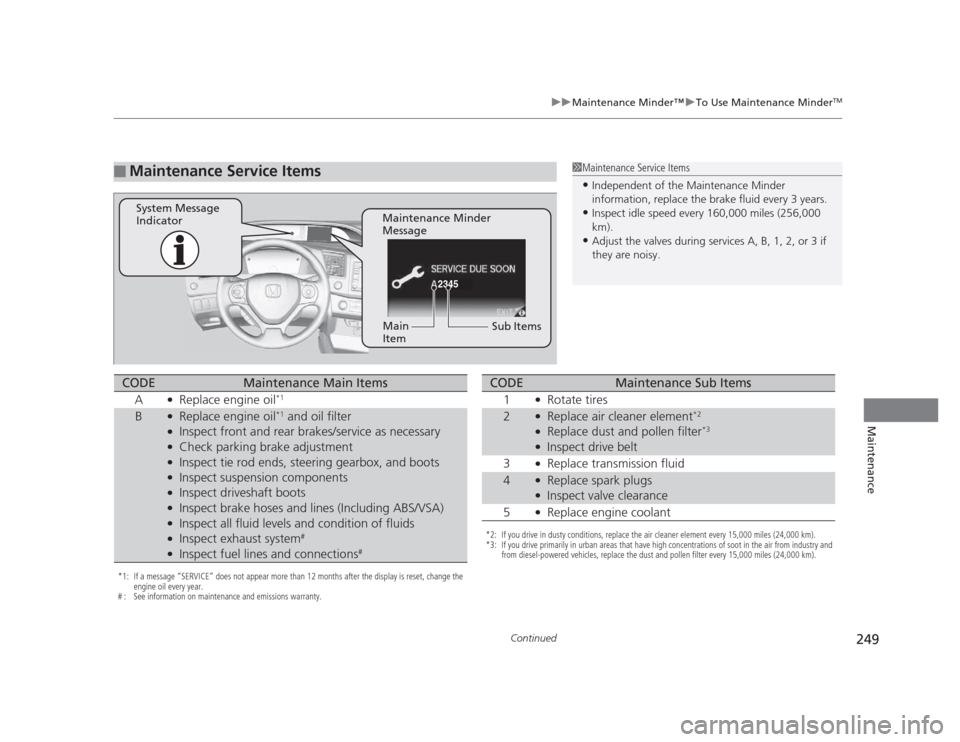
■Maintenance Service Items1Maintenance Service Items •
Independent of the Maintenance Minder
information, replace the brake fluid every 3 years.
• Inspect idle speed every 160,000 miles (256,000
km).
• Adjust the valves during services A, B, 1, 2, or 3 if
they are noisy.
2345
Maintenance Minder
Message
System Message
Indicator
Sub Items
Main
Item
*1: If a message
Page 251 of 345

uuMaintenance Minder™uTo Use Maintenance MinderTM
250
Maintenance
Reset the engine oil life display if you have performed the maintenance service. 1. Turn the ignition switch to ON
(w .
2. Go to the Maintenance info screen.
2 Displaying the Engine Oil Life and Maintenance Items P. 247
3. Press the SOURCE button.
uThe oil life reset mode is displayed on the multi-information display.
4. Select Yes with the button, then press the SOURCE button.
uThe displayed maintenance items disappear, and the engine oil life display returns to 100%.
uAny maintenance items that are necessary for your vehicle at the next
maintenance service will appear.
To cancel the oil life reset mode, select No, then press the SOURCE button.
■Resetting the Display1Resetting the Display
NOTICE
Failure to reset the engine oil life after a maintenance
service results in the system showing incorrect
maintenance intervals, which can lead to serious
mechanical problems.
The dealer will reset the engine oil life display after
completing the required maintenance service. If
someone other than a dealer performs maintenance
service, reset the engine oil life display yourself.
SOURCE
5
Engine oil
Air filters
2345Engine
Oil Life
SOURCE
Button Button
–
Maintenance Item Codes
–
Page 259 of 345

258
uuMaintenance Under the HooduChanging the Engine Oil and Oil Filter
Maintenance
Changing the Engine Oil and Oil Filter
You must change the engine oil and oil filter regularly in order to maintain the
engine's lubrication. The engine may be damaged if they are not changed regularly.
Change the oil and filter in accordance with the maintenance message on the information display*
/multi-information display *
.
1. Run the engine until it reaches normal
operating temperature, and then turn the
engine off.
2. Open the hood and remove the engine oil fill cap.
3. Remove the bolts on the undercarriage
and remove the under cover.
1Changing the Engine Oil and Oil Filter
NOTICE
You may damage the environment if you do not
dispose of the oil in a suitable way. If you are
changing the oil by yourself, appropriately dispose of
the used oil. Put the oil in a sealed container and take
it to a recycling center. Do not throw the oil away
into a garbage can or onto the ground.
Under CoverBolt
1.8 � engine
models
1.8 � engine models
* Not available on all models
Page 282 of 345

281
uuChecking and Maintaining TiresuTire and Loading Information Label
Continued
Maintenance
Tire and Loading Information Label
The label attached to the driver’s doorjamb provides necessary tire and loading information.
Tire LabelingThe tires that came on your vehicle have a
number of markings. Those you should be
aware of are described below.
Whenever tires are replaced, they should be replaced with tires of the same size.
1Tire and Loading Information Label
The tire and loading information label attached to the
driver’s doorjamb contains:
aThe number of people your vehicle can carry.
bThe total weight your vehicle can carry. Do not
exceed this weight.
cThe original tire sizes for front, rear, and spare.
dThe proper cold tire pressure for front, rear, and
spare.
Label
Example
Example Tire Size
Tire
Identification
Number (TIN)
Maximum Tire Load
Maximum
Tire Pressure
Tire Size
■Tire Sizes
1Tire Size
Following is an example of tire size with an
explanation of what each component means.
P205/55 R16 89H
P: Vehicle type (P indicates passenger vehicle).
205: Tire width in millimeters.
55: Aspect ratio (the tire’s section height as a
percentage of its width).
R: Tire construction code (R indicates radial).
16: Rim diameter in inches.
89: Load index (a numerical code associated with the
maximum load the tire can carry).
H: Speed symbol (an alphabetical code indicating the
maximum speed rating).
Page 288 of 345
287
uuChecking and Maintaining TiresuTire Rotation
Maintenance
Tire Rotation
Rotating tires according to the maintenance messages on the information display*
/
multi-information display *
helps to distribute wear more evenly and increase tire life.
■ Tires without rotation marks
Rotate the tires as shown here.
■ Tires with rotation marks
Rotate the tires as shown here.
1Tire Rotation
Tires with directional tread patterns should only be
rotated front to back (not from one side to the other).
Directional tires should be mounted with the rotation
indication mark facing forward, as shown below.
FRONT
Direction MarkFront
Front
* Not available on all models
Page 289 of 345

288
uuChecking and Maintaining TiresuWinter Tires
Maintenance
Winter Tires
If driving on snowy or frozen roads, mount all season marked ”M+S” tires, snow
tires, or tire chains; reduce speed; and maintain sufficient distance between vehicles when driving.
Be particularly careful when operating the steering wheel or brakes to prevent
skidding.
Use tire chains, snow tires, or all season tires when necessary or according to the law.
When mounting, refer to the following points.
For winter tires: • Select the size and load ranges that are the same as the original tires.
• Mount the tires to all four wheels.
For tire chains:• Install them on the front tires only.
• Because your vehicle has limited tire clearance, we strongly recommend using the
chains listed below:
• Follow the chain manufacturer's instruc tion when installing. Mount them as
tightly as you can.
• Check that the chains do not touch the brake lines or suspension.
• Drive slowly.
Cable-type: SCC Radial Chain SC1030
Cable-type: SCC Radial Chain SC1032
1Winter Tires
NOTICE
Traction devices that are the wrong size or improperly
installed can damage your vehicle's brake lines,
suspension, body, and wheels. Stop driving if they are
hitting any part of the vehicle.
When tire chains are mounted, follow the chain
manufacturer's instructions regarding vehicle
operational limits.
If your vehicle is equipped with summer tires, be
aware that these tires are not designed for winter
driving conditions. For more information, contact a dealer.
3WARNING
Using the wrong chains, or not properly
installing chains, can damage the brake
lines and cause a crash in which you can be
seriously injured or killed.
Follow all instruction s in this owner's
manual regarding the selection and use of
tire chains.
Models with P195/65R15 tires
Models with P205/55R16 tires
Models with P215/45R17 tires
Models with 215/45ZR17 tires