Page 116 of 449
Turnthekeyclockwiseagain,and
hold it. All f our windows and the
moonroof start to open. To stop
the windows and the moonroof ,
release the key.To close:
Insert the key in the driver’s door
lock.
Turn the key counterclockwise,
then release it.
Turn the key counterclockwise
again, and hold it. All four
windows and the moonroof start to
close. To stop the windows and
the moonroof , release the key.
To close the windows and the
moonroof f urther, turn and hold
the key again (within 10 seconds
of step 2).
To open the windows and the
moonroof f urther, turn and hold
the key again (within 10 seconds
of step 2).
If the windows and the
moonroof stop bef ore the desired
position, repeat steps 2 and 3.
1. 2.3. 4.
3.4.
Power Windows
Inst rument s and Cont rols
111
NOTE:
Main MenuTable of Contents
Page 123 of 449
Open the glove box by pulling the
handle to the lef t. Close it with a f irm
push. Lock or unlock the glove box
with the master key.To open the sunglasses holder, push
then release the indent. It will
unlatch and swing down. To close it,
push it until it latches. Make sure the
holder is closed while you are driving.
Sunglasses Holder
Glove Box
Interior Convenience Items
118
GLOVE BOX To lock Push
An open glove box can cause
serious injury to your passenger
inacrash,evenifthe
passenger is wearing the seatbelt.
Always keep the glove box
closed while driving.
Main MenuTable of Contents
Page 126 of 449
The ceiling light has a three-position
switch: ON, Door Activated, and
OFF. In the Door Activated (center)
position, the light comes on when
you:After all doors are closed tightly, the
light dims slightly, then f ades out in
about 30 seconds.
The ceiling light (with the switch in
the center position) comes on when
you remove the key f rom the ignition
switch. If you do not open a door, the
light stays on, then f ades out in
about 30 seconds.
Turn on a spotlight by pushing the
lens. Push the lens again to turn it
of f . You can use the spotlights at all
times.
If you leave any door open without
the key in the ignition switch, the
ceiling light will go of f af ter about 15
minutes.
Unlock the driver’s door with the
keyorremotetransmitter.
Open any door.
CONT INUED
Ceiling L ight
Spotlights
Interior Lights
Inst rument s and Cont rols
121
DOOR ACTIVATED POSITION
LX, LX-P, SE
Main MenuTable of Contents
Page 127 of 449
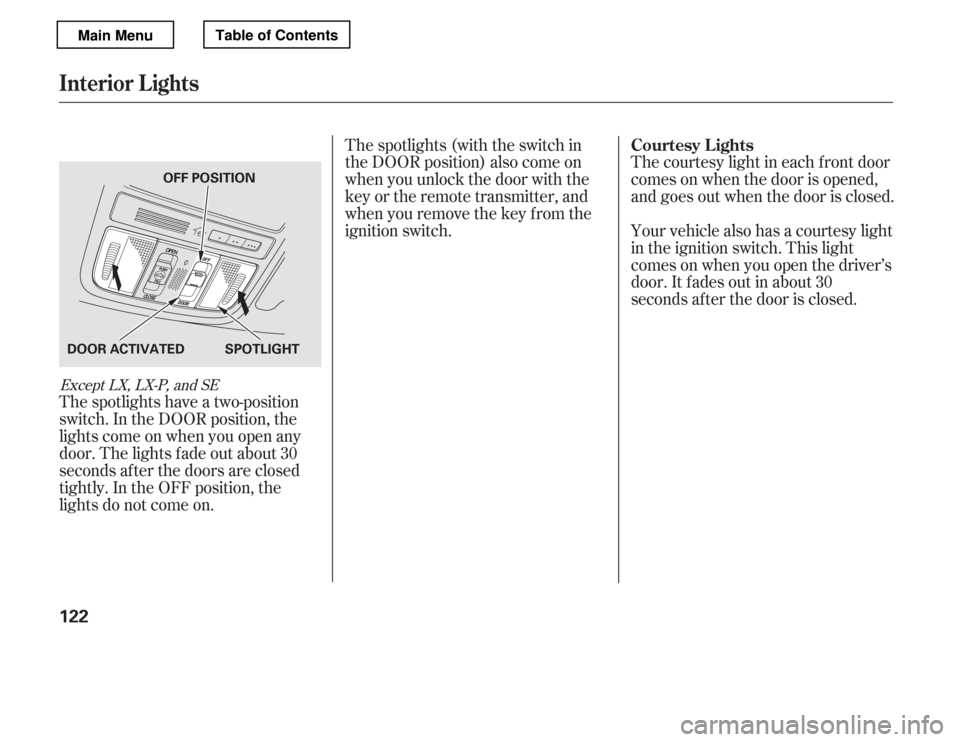
The spotlights have a two-position
switch. In the DOOR position, the
lights come on when you open any
door. The lights f ade out about 30
seconds af ter the doors are closed
tightly. In the OFF position, the
lights do not come on.The spotlights (with the switch in
the DOOR position) also come on
when you unlock the door with the
key or the remote transmitter, and
when you remove the key f rom the
ignition switch.
The courtesy light in each f ront door
comes on when the door is opened,
and goes out when the door is closed.
Your vehicle also has a courtesy light
in the ignition switch. This light
comesonwhenyouopenthedriver’s
door. It f ades out in about 30
seconds af ter the door is closed.
Except LX, LX-P, and SE
Courtesy Lights
Interior Lights
122
DOOR ACTIVATED SPOTLIGHTOFF POSITION
Main MenuTable of Contents
Page 128 of 449

The heating and air conditioning
system in your vehicle provides a
comf ortable driving environment in
all weather conditions.
The standard audio system has
many f eatures. This section
describes those f eatures and how to
use them.
Your vehicle has an anti-theft audio
system that requires a code number
to enable it.
The security system helps to dis-
courage vandalism and thef t of your
vehicle..............
Vents, Heating, and A/C . 124
...............
Climate Control System . 130
................................
Audio System . 138
................................
Audio System . 139
..........
Playing the FM/AM Radio . 140
................
Playing the XM
Radio . 148
.................................
Playing Discs . 154
Disc Player/Changer Error
...................................
Messages . 165
............................
PlayinganiPod
. 166
.................
iPod
Error Messages . 175
Playing a USB Flash Memory ........................................
Device . 176
USB Flash Memory Device ........................
Error Messages . 185
................................
Audio System . 186
..........
Playing the FM/AM Radio . 187
................
Playing the XM
Radio . 199
.................................
Playing Discs . 206
...
Disc Changer Error Messages . 217
............................
PlayinganiPod
. 218
.................
iPod
Error Messages . 226
Playing a USB Flash Memory ........................................
Device . 227 USB Flash Memory Device
........................
Error Messages . 236
..................
Protecting Your Discs . 237
............
FM/AM Radio Reception . 240
................
Remote Audio Controls . 242
......................
Auxiliary Input Jack . 244
.................
Radio Thef t Protection . 245
..........................
Setting the Clock . 246
............................
Security System . 249
.........................................
Compass . 251
...............................
Cruise Control . 255
HomeLink
Universal
................................
Transceiver . 258
........
HandsFreeLink
. 262
...
Rearview Camera and Monitor . 286
Models without navigation system
Models with navigation system Bluetooth
Except LX
Except LX, LX-P, and SE
Features
Features
123
Main Menu
Page 130 of 449

Turn this dial to increase or decrease
the fan speed and airflow.
Turning this dial clockwise increases
the temperature of the airflow.
This button turns the air
conditioning on and of f . The
indicatorinthebuttonisonwhen
the A/C is on.The system automatically
turns on the A/C and switches to
recirculation mode (see page to
use this setting). Air f lows f rom the
center and side vents in the
dashboard. Pressing the , A/C,
or any of the mode buttons cancels
MAX A/C, but the A/C stays on. When the recirculation indicator is
on, air f rom the vehicle’s interior is
sent throughout the system again.
When the indicator is off, air is
brought in f rom the outside of the
vehicle (fresh air mode).
The outside air intakes f or the
heating and cooling system are at
the base of the windshield. Keep this
area clear of leaves and other debris.
Thesystemshouldbeleftinfresh
air mode under almost all conditions.
Keeping the system in recirculation
mode, particularly with the A/C of f ,
can cause the windows to fog up.
Switch to recirculation mode when
driving through dusty or smoky
conditions, then return to fresh air
mode.
This button turns the rear window
def ogger on and of f (see page ).
Pushing this button also turns the
power mirror heaters on and of f .
/
128 76
Except U.S. LX, LX-P and SE
Vents, Heating, and A/C
Fan Control
T emperature Control
Air Conditioning (A/C) Button
MAX A/C Button
Recirculation Button Rear Window Def ogger
Button
Features
125
Main MenuTable of Contents
Page 144 of 449

Most audio system f unctions can be
controlled by standard buttons, bars,
and knobs. In addition, you can
access some f unctions by using the
selector knob on the audio system.The knob turns lef t and right. Use it
to scroll through lists, or to make
selections or adjustments to a list or
menu item on the display. When you
make a selection, push the center of
the selector (ENTER) to go to that
selection.
When the audio system is in XM
Radio mode or playing discs, pushing
the selector (ENTER) knob switches
the display between the normal
display and the extended display.
The extended display has three
segments to display the detailed
inf ormation.
To select any setting such as the
clock, sound adjusting, or the
compass (if equipped), press the
MENU button. To use any audio
system f unction, the ignition switch
must be in the ACCESSORY (I) or
ON (II) position. You can select the
item by turning the selector knob.
To go back to the previous display,
press the RETURN button.
Pressing the MENU button again
will also cancel the menu display
mode.
Selector K nob
Menu Display
Audio System (Models without navigation system)
Features
139
SELECTOR KNOBMENU
BUTTON
RETURN
BUTTON
Main MenuTable of Contents
Page 157 of 449

The XM satellites are in orbit over
the equator; therefore, objects south
of the vehicle may cause satellite
reception interruptions. To help
compensate f or this, ground-based
repeaters are placed in major
metropolitan areas.
Satellite signals are more likely to be
blocked by tall buildings and
mountains the f arther north you
travel f rom the equator. Carrying
large items on a roof rack can also
block the signal.
Depending on where you drive, you
may experience reception problems.
Interf erence can be caused by any of
these conditions:Driving on the north side of an
east/west mountain road.
Driving on the north side of a
large commercial truck on an
east/west road.
Driving in tunnels. Driving on a road beside a vertical
wall, steep clif f , or hill to the south
of you.
Driving on the lower level of a
multi-tiered road.
Driving on a single lane road
alongside dense trees taller than
50 ft. (15 m) to the south of you.
Large items carried on a roof rack.
Playing t he XMRadio (Models with premium audio system)
152
Signal may be blocked by
mountains or large obstacles to
the south.
Signal weaker in
these areas.
SATELLITE GROUND REPEATER
Main MenuTable of Contents