Page 250 of 449

If you make a mistake entering the
code, do not start over; complete the
f ive-digit sequence, then enter the
correct code. You have ten tries to
enter the correct code. If you areunsuccessful in ten attempts, you
must then leave the system on for
one hour bef ore trying again.
The Anti-thef t Identif ication Card
also lists your audio serial number. It
is best to store the card in a saf e
place at home. In addition, you
should write the audio system’s
serial number in this owner’s manual.
If your vehicle’s battery is
disconnected or goes dead, the audio
system disables itself . If this happens,
you will see ‘‘ENTER CODE’’ in the
f requency display next time you turn
on the system. Use the preset
buttons to enter the five-digit code.
ThecodeisontheAnti-theft
Identification Card included in your
owner’s manual kit. When it is
entered correctly, the radio will start
playing.
If you lose the Anti-thef t
Identif ication Card, you must obtain
thecodefromyourdealer.Todothis,
you will need the audio system’s
serial number. If you do not have the
serial number with you, ask your
dealer how to retrieve it.
You need to enter a separate code
f or the navigation system to
reactivate. The Anti-theft Card also
lists the navigation system’s security
code and serial number. Follow the
same procedure to retrieve the serial
number and obtain the code, and
read the navigation system manual
f or details.
We recommend that you register the
security code at Owner Link (owners.
honda.com.) If you lose the Anti-
thef t Identif ication Card bef ore
registering the code at Owner Link,
you must obtain the code f rom your
dealer or
. To do this, you will need the
audio system’s serial number. If you
do not have the serial number with
you,askyourdealerorgoto for
inf ormation on how to retrieve it.
The system will retain your AM and
FM presets even if power is
disconnected.
https://radio-navicode.honda.
com/
https://
radio-navicode.honda.com/ Canadian owners
Models with navigation system
U.S. owners
Except LX, LX-P and U.S. SE
Radio T hef t Protection
Features
245
Main MenuTable of Contents
Page 251 of 449

To set the time, press the CLOCK
button until you hear a beep. The
displayed time begins to blink.
Change the hours by pressing the H
(hour) button until the numbers
advance to the desired time. Change
the minutes by pressing the M
(minute) button until the numbers
advance to the desired time.
Press the CLOCK button again to
enter the set time.
You can quickly set the time to the
nearest hour. If the displayed time is
bef ore the half hour, press and hold
the CLOCK button, then press the R
(reset) button to set the time back to
the previous hour. If the displayed
time is af ter the half hour, the same
procedure sets the time f orward to
the beginning of the next hour.The navigation system receives
signals f rom the global positioning
system (GPS), and the displayed
time is updated automatically by the
GPS. Ref er to the navigation system
manual f or how to adjust the time.
1:06 would RESET to 1:00.
1:52 would RESET to 2:00.
For example:
On models with navigation system
On models without navigation system
Setting the Clock
246
On models without navigation system
MINUTE BUTTON
(PRESET 5)CLOCK BUTTON
RESET BUTTON
(PRESET 6)
HOUR BUTTON
(PRESET 4)
U.S. EX-L is shown.
Main MenuTable of Contents
Page 254 of 449

With the system set, you can still
open the trunk with the remote
transmitter without triggering the
alarm. The alarm will sound if the
trunk lock is f orced, or the trunk is
opened with the trunk release lever
or the emergency trunk opener.
The security system helps to protect
your vehicle and valuables f rom thef t.
The horn sounds and a combination
of headlights, parking lights, side
marker lights and taillights f lashes if
someone attempts to break into your
vehicle or remove the audio unit.
This alarm continues for two
minutes, then the system resets. To
deactivate the system before the two
minutes have elapsed, unlock the
driver’s door with the key or the
remote transmitter.
The security system automatically
sets 15 seconds after you lock the
doors, hood, and trunk. For the
system to activate, you must lock the
doors f rom the outside with the key,
or use driver’s lock tab, master door
lock switch, or remote transmitter.
The security system indicator on the
instrument panel starts blinking
immediately to show you the system
is setting itself . Once the security system sets,
opening any door, the trunk, or hood
without using the key or the remote
transmitter, will cause the alarm to
activate. It also activates if the
ignition switch is turned to the ON
(II) position, the audio unit is
removed f rom the dashboard, or the
wiring is cut.The security system does not set if
any door, the trunk, or hood is not
f ully closed. Bef ore you leave the
vehicle, make sure the doors, trunk
and hood are securely closed.
CONT INUED
Except LX
Security System
Features
249
SECURITY SYSTEM INDICATOR
Main MenuTable of Contents
Page 288 of 449
This command group allows you to
change or customize HFL basic
settings.Press and release the HFL Talk
button bef ore a command.
Say ‘‘ .’’ Once a passcode is set, you
will need to enter it to use HFL each
time you start the vehicle. If you
f orget the code, your dealer will have
toresetitforyou,oryouwillhaveto
clear the entire system (see page ).
Follow the HFL prompts and say
the 4-digit passcode you want to
set.
Say‘‘ ’’aftertheprompts.
Follow the HFL prompts to
conf irm the number.
1. 2.3. 4.
285
CONT INUED
System Setup
System setup
SecurityT o set a 4-digit passcode t o lock t heHFL syst em f or securit y purposes:
BluetoothHandsFreeL ink
Features
283
NOTE:
Main MenuTable of Contents
Page 297 of 449
Turn the engine of f , and conf irm the
f uel f ill cap is installed. If it is, loosen
it, then retighten it until it clicks at
least once. The message should go
off after several days of normal
driving once you tighten or replace
the f uel f ill cap. To scroll to another
display, press the select/reset knob.
The ‘‘CHECK FUEL CAP’’ message
will appear each time you restart the
engine until the system turns the
message of f .If the system still detects a leak in
your vehicle’s evaporative emissions
system, the malf unction indicator
lamp (MIL) comes on. If the f uel f ill
cap was not already tightened, turn
the engine of f , and check or
retighten the f uel f ill cap until it
clicks at least once. The MIL should
go of f af ter several days of normal
driving once the cap is tightened or
replaced. If the MIL does not go of f ,
have your vehicle inspected by a
dealer. For more inf ormation, see
page .
398
Service Station Procedures
292
Main MenuTable of Contents
Page 304 of 449
�µ�µ
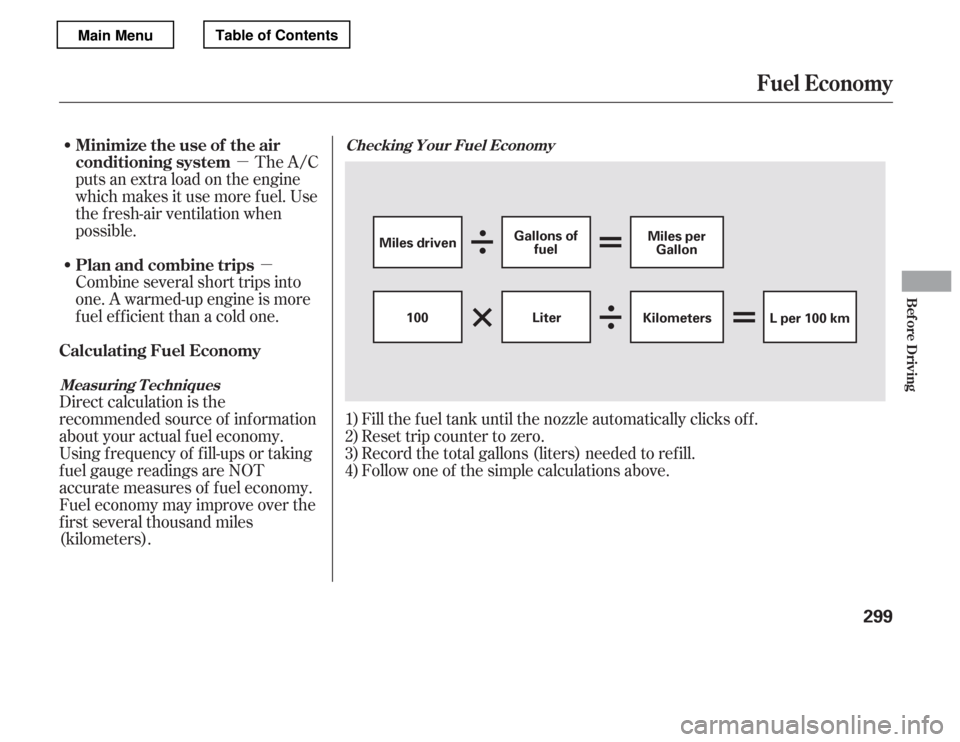
Fill the f uel tank until the nozzle automatically clicks of f .
Reset trip counter to zero.
Record the total gallons (liters) needed to ref ill.
Follow one of the simple calculations above.
The A/C
puts an extra load on the engine
which makes it use more f uel. Use
the f resh-air ventilation when
possible.
Combine several short trips into
one. A warmed-up engine is more
f uel ef f icient than a cold one.
Direct calculation is the
recommended source of inf ormation
about your actual f uel economy.
Using f requency of f ill-ups or taking
f uel gauge readings are NOT
accurate measures of f uel economy.
Fuel economy may improve over the
f irst several thousand miles
(kilometers). 1)2)3)4)
Checking Your Fuel Economy
Measuring T echniquesMinimize the use of the air
conditioning system
Plan and combine trips
Calculating Fuel Economy
Fuel Economy
Bef ore Driving
299
Miles driven Gallons of
fuel Miles per
Gallon
100 Kilometers
L per 100 km
Liter
Main MenuTable of Contents
Page 326 of 449

The VSA system cannot enhance the
vehicle’s driving stability in all
situations and does not control your
vehicle’s entire braking system. It is
still your responsibility to drive and
corner at reasonable speeds and to
leave a sufficient margin of safety.
The vehicle stability assist (VSA)
system helps to stabilize the vehicle
during cornering if the vehicle turns
more or less than desired. It also
assists you in maintaining traction
while accelerating on loose or
slippery road surf aces. It does this
by regulating the engine’s output and
by selectively applying the brakes.
When VSA is off, the VSA OFF
indicator comes on as a reminder.
When VSA activates, you will see the
VSA system indicator blink.
If this indicator comes on while
driving, pull to the side of the road
when it is saf e, and turn of f the
engine. Reset the system by
restarting the engine. If the VSA
system indicator stays on or comes
back on while driving, have the VSA
system inspected by your dealer.
The main f unction of the
VSA system is generally known as
Electronic Stability Control (ESC).
The system also includes a traction
control f unction. If the low tire pressure indicator or
TPMS indicator comes on, the VSA
system automatically turns on even if
the VSA system is turned of f by
pressing the VSA OFF switch (see
page ). If this happens, you
cannot turn the VSA system of f by
pressing the VSA OFF switch again.
Without VSA, your vehicle will have
normal braking and cornering ability,
but it will not have VSA traction and
stability enhancement.
When VSA activates, you may notice
that the engine does not respond to
the accelerator in the same way it
does at other times. There may also
be some noise f rom the VSA
hydraulic system. You will also see
the VSA system indicator blink. 322
Vehicle Stability Assist
(VSA ) System Indicator
VSA OFF Indicator
Vehicle St abilit y A ssist (VSA), aka Electronic Stability Control (ESC), System
Driving
321
NOTE:
Main MenuTable of Contents
Page 340 of 449

�µ
�µ �µ �µ�µ�µ�µ �µ �µ�µ �µ
�µ
CONT INUED
Calculated
Engine Oil Lif e (%)
100 % 91 %90 % 81 %
80 % 71 %
70 % 61 %
60 % 51 %
50 % 41 %
40 % 31 %
30 % 21 %
20 % 16 %
15 % 11 %10 % 6 %
5% 1% 0% Displayed
Engine Oil Lif e (%) 100 %90 %
80 %
70 %
60 %
50 %
40 %
30 %
20 %
15 %
10 %5% 0%
Your vehicle displays engine oil lif e
and maintenance service items on
the inf ormation display to show you
when you should have your dealer do
engine oil replacement and indicated
maintenance service. The remaining engine oil lif e is
shownonthedisplayaccordingto
this table:
To see the current engine oil lif e,
turn the ignition switch to the ON
(II) position, then press and release
the select/reset knob repeatedly
until the engine oil lif e indicator
appears (see page ).
Based on the engine operating
conditions, the onboard computer in
your vehicle calculates the remaining
engine oil lif e and displays it as a
percentage.
66
Maintenance Minder
Engine Oil L if e Display
Maint enance
335
ENGINE OIL LIFE INDICATORSELECT/RESET KNOB
U.S. model is shown.
TM
Main MenuTable of Contents