2012 GMC SIERRA 1500 clock
[x] Cancel search: clockPage 324 of 556
Black plate (48,1)GMC Sierra Owner Manual - 2012 - CRC - 11/15/11
9-48 Driving and Operating
Shifting into Neutral
To shift the transfer case to
N (Neutral) do the following:
1. Make sure the vehicle is parkedso that it will not roll.
2. Set the parking brake and press and hold the regular brake
pedal. See Parking Brake on
page 9‑54 for more information.
3. Start the vehicle or turn the ignition to ON/RUN.
4. Shift the transmission to N (Neutral).
5. Shift the transfer case to Two-Wheel Drive High.
6. Turn the transfer case dial clockwise to N (Neutral) until it
stops and hold it there until the
Neutral light starts blinking. This
will take at least 10 seconds.
Then slowly release the dial to
the four low position. The
N (Neutral) light will come on
when the transfer case shift to
N (Neutral) is complete. 7. If the engine is running, verify
that the transfer case is in
N (Neutral) by shifting the
transmission to R (Reverse) for
one second, then shift the
transmission to D (Drive) for
one second.
8. Turn the ignition to ACC/ ACCESSORY, which will turn the
engine off.
9. Place the transmission shift lever in P (Park).
10. Release the parking brake prior to moving the vehicle.
11. Turn the ignition to LOCK/OFF.
Shifting Out of Neutral
To shift the transfer case out of
N (Neutral) do the following:
1. Set the parking brake and apply the regular brake pedal.
2. Turn the ignition to ON/RUN with the engine off, and shift the
transmission to N (Neutral).
3. Turn the transfer case dial to Two-Wheel Drive High. After the transfer case has
shifted out of N (Neutral), the
N (Neutral) light will go out.
4. Release the parking brake prior to moving the vehicle.
Notice: Shifting the transmission
into gear before the requested
mode indicator light has stopped
flashing could damage the
transfer case. To help avoid
damaging the vehicle, always wait
for the mode indicator lights to
stop flashing before shifting the
transmission into gear.
5. Start the engine and shift the transmission to the desired
position.
Excessively shifting the transfer
case into or out of the different
modes may cause the transfer case
to enter the shift protection mode.
This will protect the transfer case
from possible damage and will only
allow the transfer case to respond
to one shift per 10 seconds. The
transfer case may stay in this mode
for up to three minutes.
Page 328 of 556
Black plate (52,1)GMC Sierra Owner Manual - 2012 - CRC - 11/15/11
9-52 Driving and Operating
Shifting into Neutral
To shift the transfer case to
N (Neutral) do the following:
1. Make sure the vehicle is parkedso that it will not roll.
2. Set the parking brake and apply the regular brake pedal. See
Parking Brake on page 9‑54 for
more information.
3. Start the vehicle or turn the ignition in ON/RUN.
4. Put the transmission in N (Neutral).
5. Shift the transfer case to Two-Wheel Drive High.
6. Turn the transfer case dial clockwise to N (Neutral) until it
stops and hold it there until
the N (Neutral) light starts
blinking. This will take at least
10 seconds. Then slowly release
the dial to the four low position.
The N (Neutral) light will come
on when the transfer case shift
to N (Neutral) is complete. 7. If the engine is running, make
sure that the transfer case is in
N (Neutral) by shifting the
transmission to R (Reverse) for
one second, then shift the
transmission to D (Drive) for
one second.
8. Turn the ignition to ACC/ ACCESSORY, which will turn
the engine off.
9. Place the transmission shift lever in P (Park).
10. Release the parking brake prior to moving the vehicle.
11. Turn the ignition to LOCK/OFF.
Shifting Out of Neutral
To shift out of N (Neutral) do the
following:
1. Set the parking brake and apply the regular brake pedal.
2. Turn the ignition to ON/RUN with the engine off, and shift the
transmission to N (Neutral). 3. Turn the transfer case dial
to Two-Wheel Drive High,
Four-Wheel Drive High,
or AUTO.
After the transfer case has
shifted out of N (Neutral), the
N (Neutral) light will go out.
4. Release the parking brake prior to moving the vehicle.
Notice: Shifting the transmission
into gear before the requested
mode indicator light has stopped
flashing could damage the
transfer case. To help avoid
damaging the vehicle, always wait
for the mode indicator lights to
stop flashing before shifting the
transmission into gear.
5. Start the engine and shift the transmission to the desired
position.
Page 348 of 556
Black plate (72,1)GMC Sierra Owner Manual - 2012 - CRC - 11/15/11
9-72 Driving and Operating
Filling the Tank
If the vehicle has a diesel engine,
see the Duramax diesel supplement
for more information.
{WARNING
Fuel vapor burns violently and a
fuel fire can cause bad injuries.
To help avoid injuries to you and
others, read and follow all the
instructions on the fuel pump
island. Turn off the engine when
refueling. Do not smoke near fuel
or when refueling the vehicle. Do
not use cellular phones. Keep
sparks, flames, and smoking
materials away from fuel. Do not
leave the fuel pump unattended
when refueling the vehicle. This is
against the law in some places.
Do not re-enter the vehicle while
pumping fuel. Keep children away
from the fuel pump; never let
children pump fuel.The tethered fuel cap is located
behind a hinged fuel door on the
driver side of the vehicle. Vehicles
that have a FlexFuel badge and
a yellow fuel cap can use either
unleaded gasoline or ethanol fuel
containing up to 85% ethanol (E85).
See
Fuel E85 (85% Ethanol) on
page 9‑71.
To remove the fuel cap, turn it
slowly counterclockwise.
{WARNING
Fuel can spray out on you
if you open the fuel cap too
quickly. If you spill fuel and then
something ignites it, you could be
badly burned. This spray can
happen if the tank is nearly full,
and is more likely in hot weather.
Open the fuel cap slowly and wait
for any hiss noise to stop. Then
unscrew the cap all the way. If the vehicle is a dual fuel tank
chassis cab model, and it runs out
of fuel, refuel the front fuel tank first
to ensure a quick restart.
Be careful not to spill fuel. Do not
top off or overfill the tank and wait a
few seconds after you have finished
pumping before removing the
nozzle. Clean fuel from painted
surfaces as soon as possible. See
Exterior Care on page 10‑98.
When replacing the fuel cap, turn it
clockwise until it clicks. It will require
more effort to turn the fuel cap on
the last turn as you tighten it. Make
sure the cap is fully installed. The
diagnostic system can determine if
the fuel cap has been left off or
improperly installed. This would
allow fuel to evaporate into the
atmosphere. See
Malfunction
Indicator Lamp on page 5‑22.
Page 407 of 556
Black plate (21,1)GMC Sierra Owner Manual - 2012 - CRC - 11/15/11
Vehicle Care 10-21
How to Add Coolant to the
Coolant Surge Tank for
Gasoline Engines
If the vehicle has a diesel engine,
see“Cooling System” in the
Duramax Diesel Supplement for
the proper coolant fill procedure.
{WARNING
You can be burned if you spill
coolant on hot engine parts.
Coolant contains ethylene glycol
and it will burn if the engine parts
are hot enough. Do not spill
coolant on a hot engine.
Notice: This vehicle has a
specific coolant fill procedure.
Failure to follow this procedure
could cause the engine to
overheat and be severely
damaged.
{WARNING
An electric engine cooling fan
under the hood can start up even
when the engine is not running
and can cause injury. Keep
hands, clothing, and tools away
from any underhood electric fan.
{WARNING
Steam and scalding liquids from a
hot cooling system can blow out
and burn you badly. They are
under pressure, and if you turn
the coolant surge tank pressure
cap —even a little —they can
come out at high speed. Never
turn the cap when the cooling
system, including the coolant
surge tank pressure cap, is hot.
Wait for the cooling system and
coolant surge tank pressure cap
to cool if you ever have to turn
the pressure cap. If no coolant is visible in the surge
tank, add coolant as follows:
1. Remove the coolant surge tank
pressure cap when the cooling
system, including the coolant
surge tank pressure cap and
upper radiator hose, is no
longer hot.
Turn the pressure cap slowly
counterclockwise about one full
turn. If a hiss is heard, wait for
that to stop. A hiss means there
is still some pressure left.
2. Keep turning the pressure cap slowly, and remove it.
Page 425 of 556
Black plate (39,1)GMC Sierra Owner Manual - 2012 - CRC - 11/15/11
Vehicle Care 10-39
8. Turn the vertical aiming screwuntil the headlamp beam is
aimed to the horizontal tape
line. Turn it clockwise or
counterclockwise to raise or
lower the angle of the beam.
9. Make sure that the light from theheadlamp is positioned at the
bottom edge of the horizontal
tape line. The lamp on the
left (A) shows the correct
headlamp aim. The lamp on the
right (B) shows the incorrect
headlamp aim.
10. Repeat Steps 7 through 9 for the opposite headlamp.
Bulb Replacement
For the proper type of replacement
bulbs, see Replacement Bulbs on
page 10‑43.
For any bulb‐changing procedure
not listed in this section, contact
your dealer.
Halogen Bulbs
{WARNING
Halogen bulbs have pressurized
gas inside and can burst if you
drop or scratch the bulb. You or
others could be injured. Be sure
to read and follow the instructions
on the bulb package.
Headlamps, Front Turn
Signal, Sidemarker, and
Parking Lamps
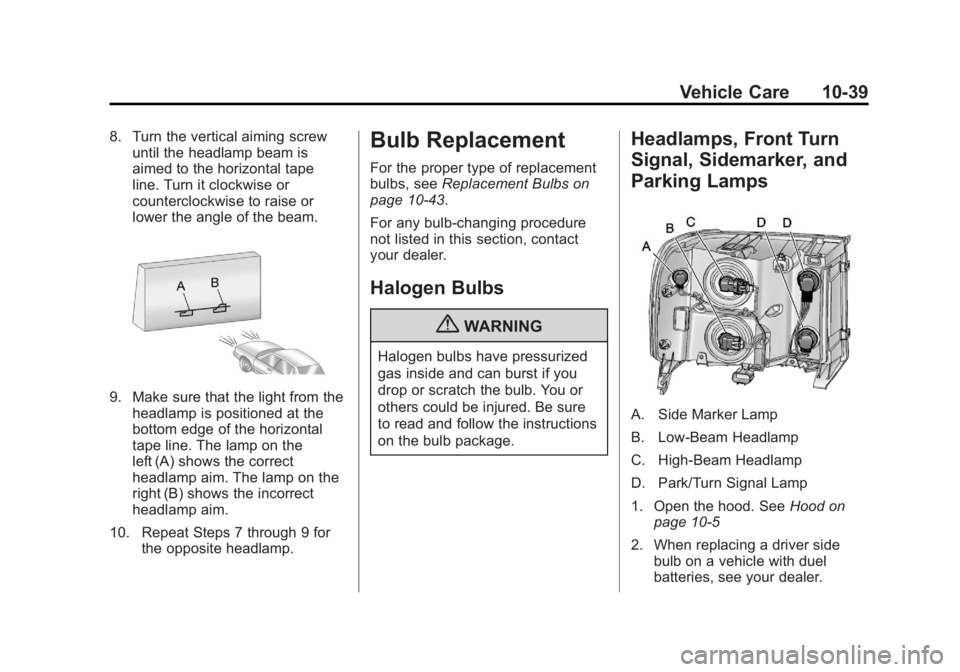
A. Side Marker Lamp
B. Low-Beam Headlamp
C. High-Beam Headlamp
D. Park/Turn Signal Lamp
1. Open the hood. See Hood on
page 10‑5
2. When replacing a driver side bulb on a vehicle with duel
batteries, see your dealer.
Page 426 of 556
Black plate (40,1)GMC Sierra Owner Manual - 2012 - CRC - 11/15/11
10-40 Vehicle Care
3. When replacing a bulb on thepassenger side, remove the
Engine Air Cleaner cover. See
Engine Air Cleaner/Filter on
page 10‑17 for more information.
4. Reach in and access the bulb sockets from inside the engine
compartment.
5. Turn the bulb socket counterclockwise to remove it
from the headlamp assembly
and pull it straight out.
6. Unplug the electrical connector from the old bulb by releasing
the clips on the bulb socket.
7. Replace it with a new bulb.
8. Plug in the electrical connector.
9. Reinstall the new bulb socket into the headlamp assembly and
turn it clockwise to secure.Pick-Up Box Identification
and Fender Marker
Lamps
The pick-up box identification lamps
are LEDs. For replacement of the
LED lighting assembly contact your
dealer.
To replace a pickup box fender
marker lamp bulb:
1. Press the tab from the back toremove the lamp.
2. Turn the bulb socket counterclockwise to remove
from the lamp assembly.
3. Gently pry the bulb from the socket.
4. Install the new bulb in socket.
5. Reinstall socket into lamp assembly.
6. Reinstall the lamp assembly.
Taillamps (Chassis Cab
Models)
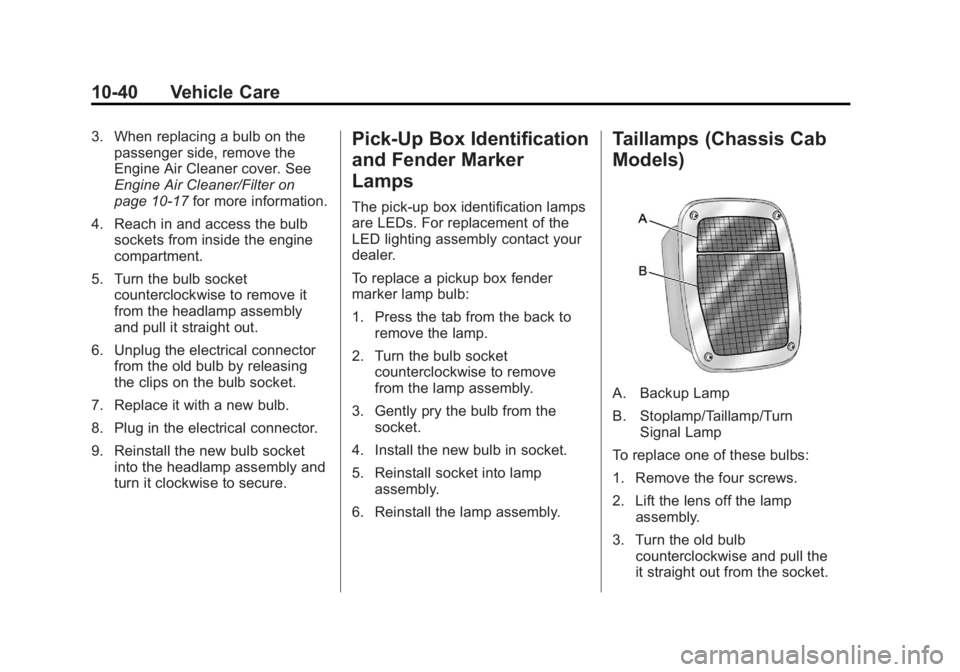
A. Backup Lamp
B. Stoplamp/Taillamp/Turn Signal Lamp
To replace one of these bulbs:
1. Remove the four screws.
2. Lift the lens off the lamp assembly.
3. Turn the old bulb counterclockwise and pull the
it straight out from the socket.
Page 427 of 556
Black plate (41,1)GMC Sierra Owner Manual - 2012 - CRC - 11/15/11
Vehicle Care 10-41
4. Install a new bulb into thesocket, turn it clockwise, and
press it in until it is tight.
5. Reinstall the lens and the four screws.
Taillamps, Turn Signal,
Stoplamps, and Back-Up
Lamps
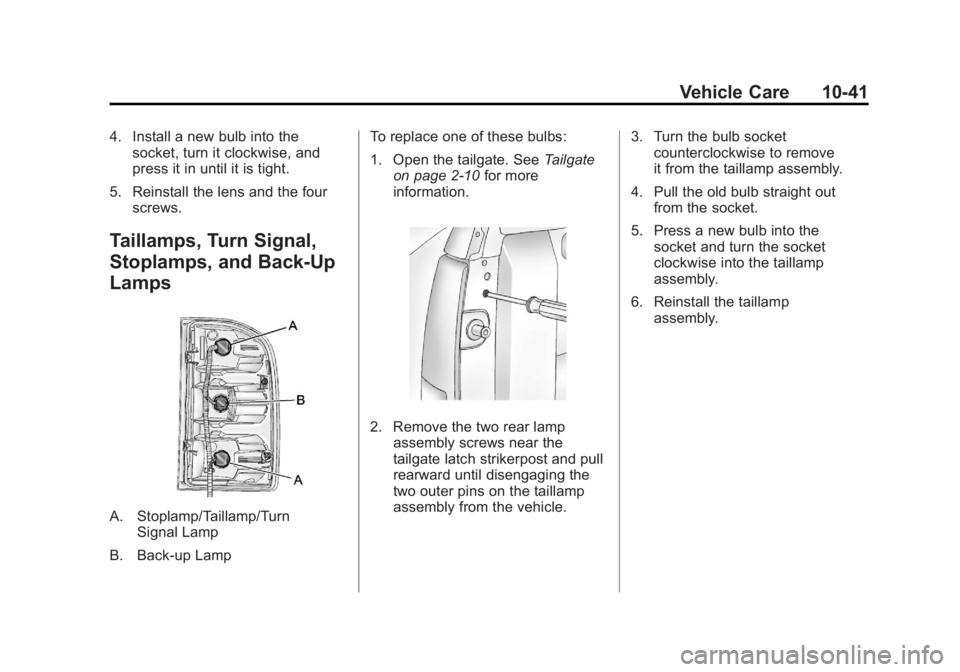
A. Stoplamp/Taillamp/Turn Signal Lamp
B. Back-up Lamp To replace one of these bulbs:
1. Open the tailgate. See
Tailgate
on page 2‑10 for more
information.
2. Remove the two rear lamp assembly screws near the
tailgate latch strikerpost and pull
rearward until disengaging the
two outer pins on the taillamp
assembly from the vehicle. 3. Turn the bulb socket
counterclockwise to remove
it from the taillamp assembly.
4. Pull the old bulb straight out from the socket.
5. Press a new bulb into the socket and turn the socket
clockwise into the taillamp
assembly.
6. Reinstall the taillamp assembly.
Page 428 of 556
Black plate (42,1)GMC Sierra Owner Manual - 2012 - CRC - 11/15/11
10-42 Vehicle Care
Center High-Mounted
Stoplamp (CHMSL) and
Cargo Lamp
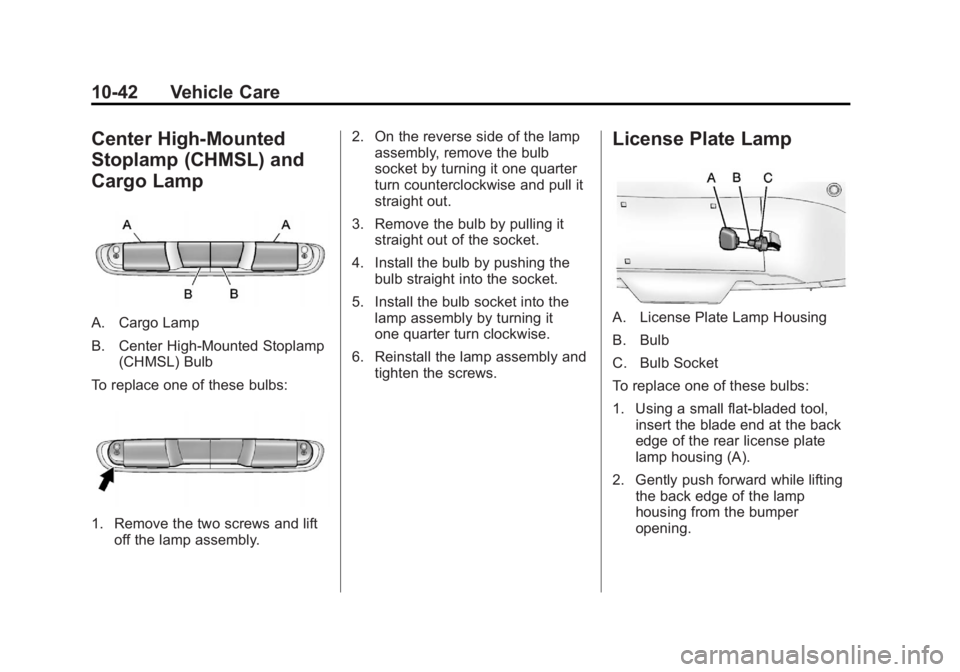
A. Cargo Lamp
B. Center High-Mounted Stoplamp(CHMSL) Bulb
To replace one of these bulbs:
1. Remove the two screws and lift off the lamp assembly. 2. On the reverse side of the lamp
assembly, remove the bulb
socket by turning it one quarter
turn counterclockwise and pull it
straight out.
3. Remove the bulb by pulling it straight out of the socket.
4. Install the bulb by pushing the bulb straight into the socket.
5. Install the bulb socket into the lamp assembly by turning it
one quarter turn clockwise.
6. Reinstall the lamp assembly and tighten the screws.
License Plate Lamp
A. License Plate Lamp Housing
B. Bulb
C. Bulb Socket
To replace one of these bulbs:
1. Using a small flat-bladed tool,insert the blade end at the back
edge of the rear license plate
lamp housing (A).
2. Gently push forward while lifting the back edge of the lamp
housing from the bumper
opening.