2012 GMC ACADIA wheel
[x] Cancel search: wheelPage 273 of 468

Black plate (15,1)GMC Acadia/Acadia Denali Owner Manual - 2012
Driving and Operating 9-15
{WARNING
Things you put inside the
vehicle can strike and injure
people in a sudden stop or
turn, or in a crash.
.Put things in the cargo
area of the vehicle. Try to
spread the weight evenly.
.Never stack heavier
things, like suitcases,
inside the vehicle so that
some of them are above
the tops of the seats.
.Do not leave an
unsecured child restraint
in the vehicle.
.When you carry something
inside the vehicle, secure
it whenever you can.
.Do not leave a seat folded
down unless you need to.
Starting and
Operating
New Vehicle Break-In
Notice: The vehicle does not
need an elaborate break-in.
But it will perform better in the
long run if you follow these
guidelines:
.If you have all-wheel drive,
keep your speed at 88 km/h
(55 mph) or less for the first
805 km (500 mi).
.Do not drive at any one
constant speed, fast or slow,
for the first 805 km (500 mi).
Do not make full-throttle
starts. Avoid downshifting to
brake or slow the vehicle.
.Avoid making hard stops for
the first 322 km (200 mi) or
so. During this time the new
brake linings are not yet
broken in. Hard stops with
new linings can mean
premature wear and earlier
replacement. Follow this
breaking-in guideline every
time you get new brake
linings.
.Do not tow a trailer during
break-in. See Driving
Characteristics and Towing
Tips on page 9‑45 for the
trailer towing capabilities of
your vehicle and more
information.
Following break‐in, engine speed
and load can be gradually
increased.
Page 275 of 468

Black plate (17,1)GMC Acadia/Acadia Denali Owner Manual - 2012
Driving and Operating 9-17
If the vehicle cannot be pulled
over, and must be shut off while
driving, turn the ignition to
ACC/ACCESSORY.
The steering can bind with the
wheels turned off center. If this
happens, move the steering wheel
from right to left while turning the
key to ACC/ACCESSORY. If this
does not work, then the vehicle
needs service.
ACC (ACC/ACCESSORY):This is
the position in which you can
operate the electrical accessories or
items plugged into the accessory
power outlets. This position unlocks
the ignition and steering wheel. Use
this position if the vehicle must be
pushed or towed.
R(ON/RUN): This position can be
used to operate the electrical
accessories and to display some
instrument panel warning and indicator lights. This position can
also be used for service and
diagnostics, and to verify the
proper operation of the malfunction
indicator lamp as may be required
for emission inspection purposes.
The switch stays in this position
when the engine is running.
The transmission is also unlocked
in this position. If you leave the
key in the ACC/ACCESSORY or
ON/RUN position with the engine
off, the battery could be drained.
You may not be able to start the
vehicle if the battery is allowed to
drain for an extended period of time.
/(START):
This is the position
that starts the engine. When the
engine starts, release the key.
The ignition switch will return to
ON/RUN for driving.
Key Lock Release
Vehicles with an automatic
transmission are equipped with an
electronic key lock release system.
This system is to prevent ignition
key removal unless the shift lever is
in P (Park).
The key lock release will not work
if the battery is charged less than
9‐volts, or uncharged. Try charging
or jump starting the battery. See
Jump Starting on page 10‑78.
Page 281 of 468

Black plate (23,1)GMC Acadia/Acadia Denali Owner Manual - 2012
Driving and Operating 9-23
Running the Vehicle
While Parked
It is better not to park with the
engine running. But if you ever have
to, here are some things to know.
{WARNING
Idling a vehicle in an enclosed
area with poor ventilation is
dangerous. Engine exhaust may
enter the vehicle. Engine exhaust
contains Carbon Monoxide (CO)
which cannot be seen or smelled.
It can cause unconsciousness
and even death. Never run the
engine in an enclosed area that
has no fresh air ventilation.
For more information, seeEngine
Exhaust on page 9‑22.
{WARNING
It can be dangerous to get out of
the vehicle if the automatic
transmission shift lever is not fully
in P (Park) with the parking brake
firmly set. The vehicle can roll.
Do not leave the vehicle when the
engine is running unless you
have to. If you have left the
engine running, the vehicle can
move suddenly. You or others
could be injured. To be sure the
vehicle will not move, even when
you are on fairly level ground,
always set the parking brake and
move the shift lever to P (Park).
Follow the proper steps to be
sure the vehicle will not move.
See Shifting Into Park on page 9‑20.
If parking on a hill and pulling a
trailer, see Driving Characteristics
and Towing Tips on page 9‑45.
Automatic
Transmission
The automatic transmission has a
shift lever located on the console
between the seats.
P (Park): This position locks the
front wheels. It is the best position
to use when starting the engine
because the vehicle cannot move
easily.
Page 282 of 468

Black plate (24,1)GMC Acadia/Acadia Denali Owner Manual - 2012
9-24 Driving and Operating
{WARNING
It is dangerous to get out of the
vehicle if the shift lever is not fully
in P (Park) with the parking brake
firmly set. The vehicle can roll.
Do not leave the vehicle when the
engine is running unless you
have to. If you have left the
engine running, the vehicle can
move suddenly. You or others
could be injured. To be sure the
vehicle will not move, even when
you are on fairly level ground,
always set the parking brake and
move the shift lever to P (Park).
SeeShifting Into Park on
page 9‑20. If you are pulling a
trailer, see Driving Characteristics
and Towing Tips on page 9‑45. Make sure the shift lever is fully in
P (Park) before starting the engine.
The vehicle has an automatic
transmission shift lock control
system. You must fully apply the
regular brake first and then press
the shift lever button before shifting
from P (Park) when the ignition key
is in ON/RUN. If you cannot shift out
of P (Park), ease pressure on the
shift lever, then push the shift lever
all the way into P (Park) as you
maintain brake application. Then
press the shift lever button and
move the shift lever into another
gear. See
Shifting out of Park on
page 9‑21.
R (Reverse): Use this gear to
back up.
Notice: Shifting to R (Reverse)
while the vehicle is moving
forward could damage the
transmission. The repairs would
not be covered by the vehicle
warranty. Shift to R (Reverse)
only after the vehicle is stopped. To rock the vehicle back and forth to
get out of snow, ice, or sand without
damaging the transmission, see
If the Vehicle Is Stuck on page 9‑10.
N (Neutral):
In this position, the
engine does not connect with the
wheels. To restart the engine when
the vehicle is already moving, use
N (Neutral) only. Also, use
N (Neutral) when the vehicle is
being towed.
{WARNING
Shifting into a drive gear while the
engine is running at high speed is
dangerous. Unless your foot is
firmly on the brake pedal, the
vehicle could move very rapidly.
You could lose control and hit
people or objects. Do not shift
into a drive gear while the engine
is running at high speed.
Page 285 of 468

Black plate (27,1)GMC Acadia/Acadia Denali Owner Manual - 2012
Driving and Operating 9-27
Automatic Engine Grade
Braking
Automatic Engine Grade Braking
assists when driving on a downhill
grade. It maintains vehicle speed by
automatically implementing a shift
schedule that uses the engine and
the transmission to slow the vehicle.
The system will automatically
command downshifts to reduce
vehicle speed, until the brake pedal
is no longer being pressed.
While in the Electronic Range
Select (ERS) mode, grade braking
is deactivated, allowing the driver
to select a range and limiting the
highest gear available. Grade
braking is available for normal
driving and in Tow/Haul mode.
SeeAutomatic Transmission on
page 9‑23.
Drive Systems
All-Wheel Drive
Vehicles with this feature always
send engine power to all four
wheels. It is fully automatic, and
adjusts itself as needed for road
conditions.
When using a compact spare tire
on an AWD vehicle, the system
automatically detects the compact
spare and disables AWD. To restore
AWD operation and prevent
excessive wear on the system,
replace the compact spare with a
full-size tire as soon as possible.
See Compact Spare Tire on
page 10‑77 for more information.
Brakes
Antilock Brake
System (ABS)
This vehicle has the Antilock Brake
System (ABS), an advanced
electronic braking system that helps
prevent a braking skid.
When the engine is started and the
vehicle begins to drive away, ABS
checks itself. A momentary motor or
clicking noise might be heard while
this test is going on, and it might
even be noticed that the brake
pedal moves a little. This is normal.
If there is a problem with ABS, this
warning light stays on. See Antilock
Brake System (ABS) Warning Light
on page 5‑22.
Page 286 of 468
Black plate (28,1)GMC Acadia/Acadia Denali Owner Manual - 2012
9-28 Driving and Operating
If driving safely on a wet road and it
becomes necessary to slam on the
brakes and continue braking to
avoid a sudden obstacle, a
computer senses that the wheels
are slowing down. If one of the
wheels is about to stop rolling, the
computer will separately work the
brakes at each wheel.
ABS can change the brake pressure
to each wheel, as required, faster
than any driver could. This can help
the driver steer around the obstacle
while braking hard.
As the brakes are applied, the
computer keeps receiving updates
on wheel speed and controls
braking pressure accordingly.
Remember: ABS does not change
the time needed to get a foot up to
the brake pedal or always decrease
stopping distance. If you get too
close to the vehicle in front of you,there will not be enough time to
apply the brakes if that vehicle
suddenly slows or stops. Always
leave enough room up ahead to
stop, even with ABS.
Using ABS
Do not pump the brakes. Just hold
the brake pedal down firmly and let
ABS work. You might hear the ABS
pump or motor operating and feel
the brake pedal pulsate, but this is
normal.
Braking in Emergencies
ABS allows the driver to steer and
brake at the same time. In many
emergencies, steering can help
more than even the very best
braking.
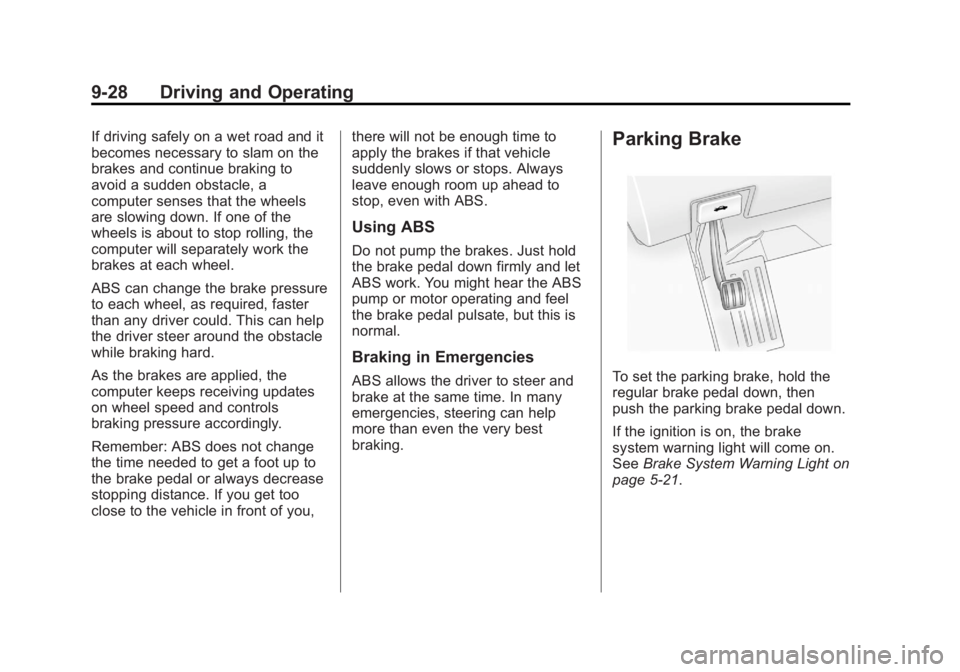
Parking Brake
To set the parking brake, hold the
regular brake pedal down, then
push the parking brake pedal down.
If the ignition is on, the brake
system warning light will come on.
See
Brake System Warning Light on
page 5‑21.
Page 289 of 468

Black plate (31,1)GMC Acadia/Acadia Denali Owner Manual - 2012
Driving and Operating 9-31
system. See“Traction Control
Operation” following for more
information.
When the traction control system
has been turned off, system noises
may be heard and felt as a result of
the brake-traction control working.
It is recommended to leave the
system on for normal driving
conditions, but it may be necessary
to turn the system off if the vehicle
is stuck in sand, mud, ice, or snow,
and you want to “rock”the vehicle to
attempt to free it. It may also be
necessary to turn off the system
when driving in extreme off-road
conditions where high wheel spin is
required. See If the Vehicle Is Stuck
on page 9‑10.
Traction Control Operation
The traction control system is part
of the StabiliTrak system. Traction
control limits wheel spin by reducing
engine power to the wheels (engine
speed management) and by
applying the brakes as necessary. The traction control system is
enabled automatically when the
vehicle is started. It will activate and
the StabiliTrak light will flash if it
senses that any of the wheels are
spinning or beginning to lose
traction while driving. If traction
control is turned off, only the
brake-traction control portion of
traction control will work. The
engine speed management will be
disabled. In this mode, engine
power is not reduced automatically
and the driven wheels can spin
more freely. This can cause the
brake-traction control to activate
constantly.
Notice:
If the wheel(s) of one axle
is allowed to spin excessively
while the StabiliTrak
®, ABS, brake
warning lights, and any relevant
DIC messages are displayed, the
transfer case could be damaged.
The repairs would not be covered
by the vehicle warranty. Reduce
engine power and do not spin the wheel(s) excessively while
these lights and messages are
displayed.
The traction control system may
activate on dry or rough roads or
under conditions such as heavy
acceleration while turning or
abrupt upshifts/downshifts of the
transmission. When this happens,
a reduction in acceleration may be
noticed, or a noise or vibration may
be heard. This is normal.
If cruise control is being used when
the system activates, the StabiliTrak
light will flash and cruise control will
automatically disengage. Cruise
control may be reengaged when
road conditions allow. See
Cruise
Control on page 9‑32.
StabiliTrak may also turn off
automatically if it determines that a
problem exists with the system.
If the problem does not clear itself
after restarting the vehicle, see your
dealer for service.
Page 290 of 468
Black plate (32,1)GMC Acadia/Acadia Denali Owner Manual - 2012
9-32 Driving and Operating
Cruise Control
With cruise control, a speed of
about 40 km/h (25 mph) or more can
be maintained without keeping your
foot on the accelerator. Cruise
control does not work at speeds
below about 40 km/h (25 mph).
When the brakes are applied, the
cruise control is disengaged.
{WARNING
Cruise control can be dangerous
where you cannot drive safely at
a steady speed. So, do not use
the cruise control on winding
roads or in heavy traffic.
Cruise control can be dangerous
on slippery roads. On such roads,
fast changes in tire traction can
cause excessive wheel slip, and
you could lose control. Do not use
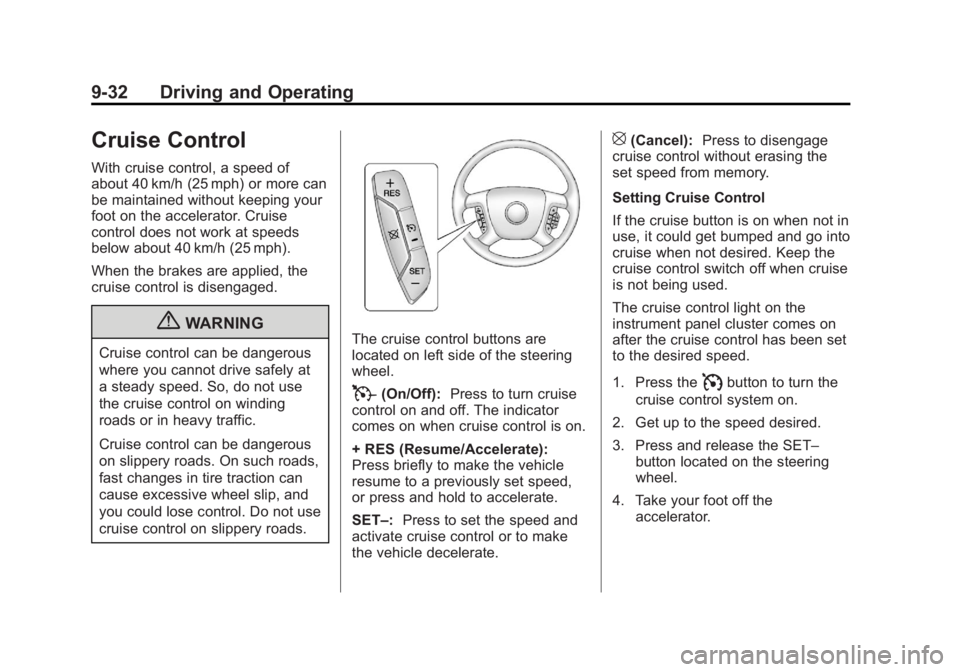
cruise control on slippery roads.The cruise control buttons are
located on left side of the steering
wheel.
T(On/Off):Press to turn cruise
control on and off. The indicator
comes on when cruise control is on.
+ RES (Resume/Accelerate):
Press briefly to make the vehicle
resume to a previously set speed,
or press and hold to accelerate.
SET–: Press to set the speed and
activate cruise control or to make
the vehicle decelerate.
[(Cancel): Press to disengage
cruise control without erasing the
set speed from memory.
Setting Cruise Control
If the cruise button is on when not in
use, it could get bumped and go into
cruise when not desired. Keep the
cruise control switch off when cruise
is not being used.
The cruise control light on the
instrument panel cluster comes on
after the cruise control has been set
to the desired speed.
1. Press the
Ibutton to turn the
cruise control system on.
2. Get up to the speed desired.
3. Press and release the SET– button located on the steering
wheel.
4. Take your foot off the accelerator.