Page 54 of 468
Black plate (22,1)GMC Acadia/Acadia Denali Owner Manual - 2012
2-22 Keys, Doors, and Windows
Express-Up/Express-Down
Windows
A window with the express‐up/down
feature allows it to be raised or
lowered without holding the switch.
Press or pull the window switch
fully and release it to activate the
express feature. The express mode
can be canceled by pressing or
pulling the switch.
Programming the Power
Windows
If the battery on the vehicle has
been recharged, disconnected,
or replaced, windows with the
express-up feature need to be
reprogrammed for this feature to
work. To program the window:
1. Close all doors with the ignitionin the ACC/ACCESSORY,
ON/RUN position, or when
Retained Accessory
Power (RAP) is active.
See Retained Accessory
Power (RAP) on page 9‑20. 2. Press and continue to hold the
window switch until the window
is fully open.
3. Pull up and hold the window switch to close the window.
Continue to hold it briefly after
the window is fully closed.
4. Repeat for each window that has the express-up feature.
Anti-Pinch Feature
The anti-pinch feature is on
windows with the express-up
feature. If an object is in the way of
the window as it is express-closing,
or in certain weather conditions like
severe icing, the window will stop
and open to a factory preset
position. The window functions
normally once the obstruction is
removed.
Rear Window Lockout
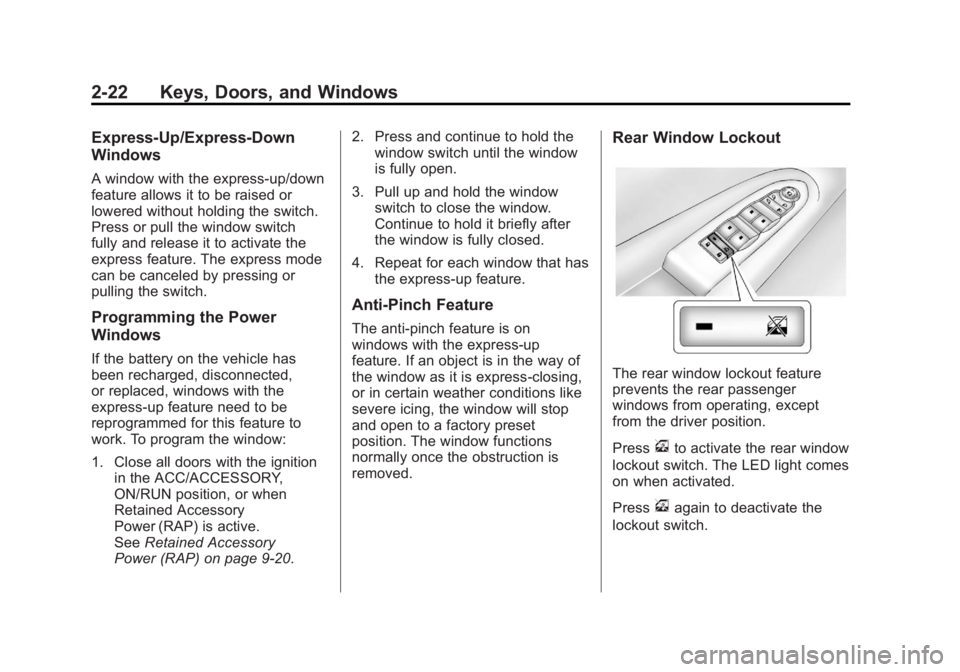
The rear window lockout feature
prevents the rear passenger
windows from operating, except
from the driver position.
Press
vto activate the rear window
lockout switch. The LED light comes
on when activated.
Press
vagain to deactivate the
lockout switch.
Page 58 of 468
Black plate (2,1)GMC Acadia/Acadia Denali Owner Manual - 2012
3-2 Seats and Restraints
Head Restraints
The vehicle's front seats have
adjustable head restraints in the
outboard seating positions.
{WARNING
With head restraints that are
not installed and adjusted
properly, there is a greater
chance that occupants will suffer
a neck/spinal injury in a crash.
Do not drive until the head
restraints for all occupants are
installed and adjusted properly.
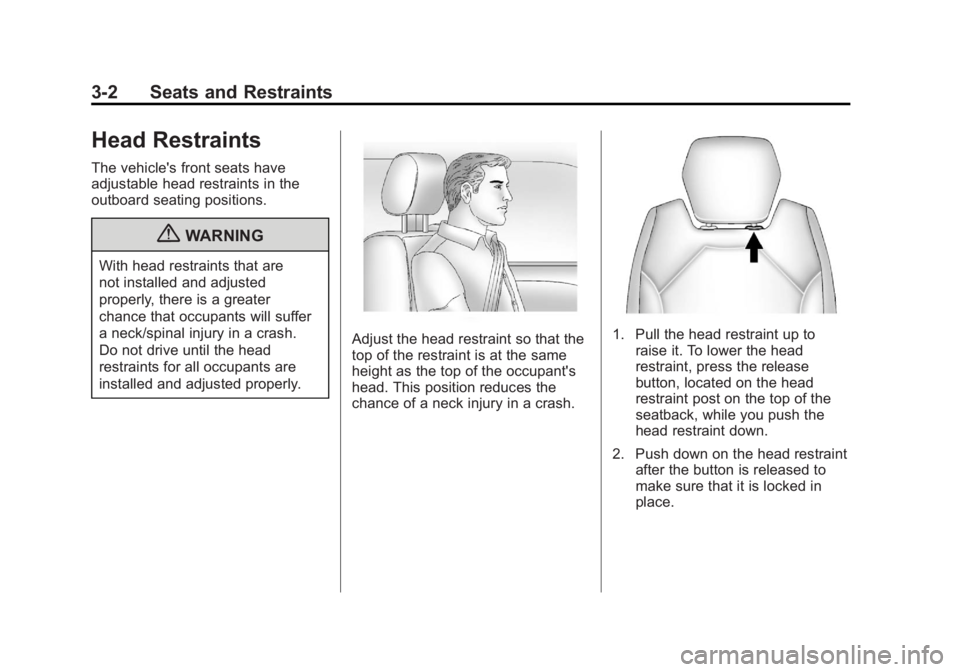
Adjust the head restraint so that the
top of the restraint is at the same
height as the top of the occupant's
head. This position reduces the
chance of a neck injury in a crash.1. Pull the head restraint up toraise it. To lower the head
restraint, press the release
button, located on the head
restraint post on the top of the
seatback, while you push the
head restraint down.
2. Push down on the head restraint after the button is released to
make sure that it is locked in
place.
Page 59 of 468
Black plate (3,1)GMC Acadia/Acadia Denali Owner Manual - 2012
Seats and Restraints 3-3
The vehicle's second‐row seats
have head restraints in the outboard
seating positions that cannot be
adjusted.
The vehicle's third‐row seats have
headrests in the outboard seating
positions that cannot be adjusted.
The vehicle's head restraints and
headrests are not designed to be
removed.Front Seats
Seat Adjustment
{WARNING
You can lose control of the
vehicle if you try to adjust a
manual driver seat while the
vehicle is moving. The sudden
movement could startle and
confuse you, or make you push a
pedal when you do not want to.
Adjust the driver seat only when
the vehicle is not moving.
A. Seat Adjustment Handle
B. Driver Seat Height AdjustmentLever
C. Seatback Lever
To adjust a manual seat:
1. Lift the handle (A) under the seat to unlock it.
2. Slide the seat to the desired position, and then release the
handle.
3. Try to move the seat back and forth to be sure it is locked in
place.
Page 62 of 468

Black plate (6,1)GMC Acadia/Acadia Denali Owner Manual - 2012
3-6 Seats and Restraints
Manual Reclining Seatbacks
{WARNING
You can lose control of the
vehicle if you try to adjust a
manual driver seat while the
vehicle is moving. The sudden
movement could startle and
confuse you, or make you push a
pedal when you do not want to.
Adjust the driver seat only when
the vehicle is not moving.
{WARNING
If either seatback is not locked, it
could move forward in a sudden
stop or crash. That could cause
injury to the person sitting there.
Always push and pull on the
seatbacks to be sure they are
locked.
To recline the seatback:
1. Lift the lever.
2. Move the seatback to thedesired position, and then
release the lever to lock the
seatback in place.
3. Push and pull on the seatback to make sure it is locked. To return the seatback to the upright
position:
1. Lift the lever fully without
applying pressure to the
seatback, and the seatback will
return to the upright position.
2. Push and pull on the seatback to make sure it is locked.
Page 64 of 468

Black plate (8,1)GMC Acadia/Acadia Denali Owner Manual - 2012
3-8 Seats and Restraints
Memory Remote Recall
The memory feature can recall the
driver seat and outside mirrors to
stored positions when entering the
vehicle.
To activate, unlock the driver door
with the Remote Keyless
Entry (RKE) transmitter. The driver
seat and outside mirrors will move
to the memory position associated
with the transmitter used to unlock
the vehicle.
This feature is turned on or off using
the vehicle personalization menu.
SeeVehicle Personalization (With
DIC Buttons) on page 5‑46 for more
information.
To stop recall movement, press one
of the power seat controls, memory
buttons, or the power mirror buttons.
If something has blocked the driver
seat while recalling a memory
position, the recall may stop. Remove the obstruction; then press
and hold the appropriate manual
control for the memory item that is
not recalling for two seconds.
Try recalling the memory position
again by pressing the appropriate
memory button. If the memory
position is still not recalling, see
your dealer for service.
Easy Exit Driver Seat
This feature can move the seat
rearward to allow extra room to exit
the vehicle.
S(Easy Exit Driver Seat):
Press
to recall the easy exit seat position.
The vehicle must be in P (Park).
If the easy exit seat feature is
programmed on in the vehicle
personalization menu, automatic
seat movement occurs when the
ignition key is removed. A single beep sounds. The driver
seat moves back approximately
8 cm (3 in). To move the seat back
farther, press
Sagain until the seat
is all the way back.
If something has blocked the driver
seat while recalling the exit position,
the recall may stop. Remove the
obstruction; then press and hold the
power seat control rearward for
two seconds. Try recalling the exit
position again. If the exit position is
still not recalling, see your dealer for
service.
See Vehicle Personalization
(With DIC Buttons) on page 5‑46 for
more information.
Page 66 of 468
Black plate (10,1)GMC Acadia/Acadia Denali Owner Manual - 2012
3-10 Seats and Restraints
Rear Seats
A. Seat Adjustment Handle
B. Reclining Seatback Strap
C. Sliding Seat Lever
Entering and Exiting the
Third Row
{WARNING
Using the third row seating
position while the second row is
folded, or folded and tumbled,
could cause injury in a sudden
stop or crash. Be sure to return
the seat to the passenger seating
position. Push and pull on the
seat to make sure it is locked into
place.
Notice: Folding a rear seat with
the safety belts still fastened may
cause damage to the seat or the
safety belts. Always unbuckle the
safety belts and return them to
their normal stowed position
before folding a rear seat.
To access the third row:
1. Remove objects on the floor in front of or on the second row
seat, or in the seat tracks on
the floor.
2. Move the front center console armrest completely forward.
See Center Console Storage on
page 4‑2.
Page 67 of 468

Black plate (11,1)GMC Acadia/Acadia Denali Owner Manual - 2012
Seats and Restraints 3-11
3. Place the folding armrests in theupright position.
4. Make sure that the safety belt is unfastened and in the stowed
position.
5. Pull the sliding seat lever (C) forward and move the seatback
forward. The seat cushion will
fold, and the entire seat will slide
forward. The head restraints will
fold out of the way automatically.
Returning the Seat to the
Seating Position
To return the second row seat to its
normal seating position:
1. Remove objects on the floorbehind the second row seat or in
the seat tracks on the floor.
2. Pull the seatback rearward until it is locked in place. 3. Slide the seat rearward by
pushing on the seatback until it
is locked into place.
4. Return the head restraint to the upright position by reaching
behind the seat and pulling the
head restraint forward until it
locks into place.
Push and pull on the head
restraint to make sure that it is
locked.
5. Push down on the rear of the seat cushion until it is locked in
place.
6. Push and pull on the seatback and seat cushion to make sure
they are locked in place.
7. Check that the safety belt is not under the seat cushion.
Reclining the Seatbacks
To recline the seatback:
1. Leaning forward in the seat, pullthe reclining seatback strap (B).
2. Move the seatback to the desired position, and then
release the strap to lock the
seatback in place.
3. Push and pull on the seatback to make sure it is locked.
Folding the Seatback
To fold the second row seatbacks:
1. Remove anything on or underthe seat.
2. Place the armrest in the upright position, and unfasten the
safety belt.
3. Pull forward on the reclining seatback strap (B) and push
down on the seatback.
The head restraint will fold down
automatically.
Page 68 of 468

Black plate (12,1)GMC Acadia/Acadia Denali Owner Manual - 2012
3-12 Seats and Restraints
To return the seatback to the
seating position, lift the upper corner
of the seatback and push it
rearward until it locks into place.
Push and pull on the seatback to
make sure it is locked. Pull up on
the head restraint to return it to the
upright, locked position.
Adjusting the Seats
To adjust the second row seats, pull
outward on the seat adjustment
handle (A). Slide the seat forward or
rearward to the desired position.
Release the handle, and push and
pull on the seat to make sure it is
locked.
Third Row Seats
{WARNING
Using the third row seating
position while the second row is
folded, or pushed forward in the
entry position, could cause injury
in a sudden stop or crash. Be
sure to return the seat to the
passenger seating position. Push
and pull on the seat to make sure
it is locked into place.
Folding the Seatback
Notice:Folding a rear seat with
the safety belts still fastened may
cause damage to the seat or the
safety belts. Always unbuckle the
safety belts and return them to
their normal stowed position
before folding a rear seat. To fold the third row seatback:
1. Remove anything on or under
the seat.2. Disconnect the rear safety beltmini-latch using a key in the slot
on the mini-buckle, and let the
belt retract into the headliner.
Stow the mini-latch in the holder
in the headliner.