2012 GMC ACADIA power windows
[x] Cancel search: power windowsPage 54 of 468
Black plate (22,1)GMC Acadia/Acadia Denali Owner Manual - 2012
2-22 Keys, Doors, and Windows
Express-Up/Express-Down
Windows
A window with the express‐up/down
feature allows it to be raised or
lowered without holding the switch.
Press or pull the window switch
fully and release it to activate the
express feature. The express mode
can be canceled by pressing or
pulling the switch.
Programming the Power
Windows
If the battery on the vehicle has
been recharged, disconnected,
or replaced, windows with the
express-up feature need to be
reprogrammed for this feature to
work. To program the window:
1. Close all doors with the ignitionin the ACC/ACCESSORY,
ON/RUN position, or when
Retained Accessory
Power (RAP) is active.
See Retained Accessory
Power (RAP) on page 9‑20. 2. Press and continue to hold the
window switch until the window
is fully open.
3. Pull up and hold the window switch to close the window.
Continue to hold it briefly after
the window is fully closed.
4. Repeat for each window that has the express-up feature.
Anti-Pinch Feature
The anti-pinch feature is on
windows with the express-up
feature. If an object is in the way of
the window as it is express-closing,
or in certain weather conditions like
severe icing, the window will stop
and open to a factory preset
position. The window functions
normally once the obstruction is
removed.
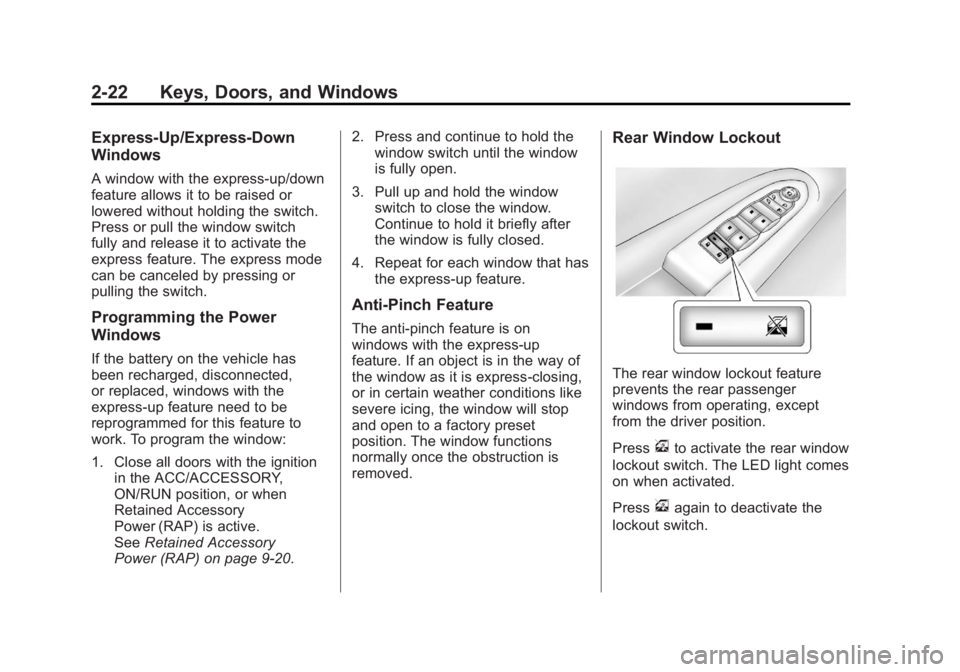
Rear Window Lockout
The rear window lockout feature
prevents the rear passenger
windows from operating, except
from the driver position.
Press
vto activate the rear window
lockout switch. The LED light comes
on when activated.
Press
vagain to deactivate the
lockout switch.
Page 55 of 468

Black plate (23,1)GMC Acadia/Acadia Denali Owner Manual - 2012
Keys, Doors, and Windows 2-23
Sun Visors
Pull the sun visor down or unhook it
and move it to the side to reduce
glare.
Visor Vanity Mirror
Lift the cover to use the mirror and
turn the lamps on.
Roof
Sunroof
The ignition must be in ON/RUN or
ACC/ACCESSORY to operate the
sunroof and power sunshade.
SeeRetained Accessory Power
(RAP) on page 9‑20.
The vehicle may have a sunroof
over the front seats and a rear
sunroof over the second row seats.
The rear sunroof does not open.
The switch to operate the front
sunroof is on the headliner above
the rearview mirror.
Vent: From the closed position,
press and hold the front of the
switch to vent the sunroof. Press
and hold the rear of the switch to
close the sunroof.
Express-open/Express-close:
From the closed position, press and
release the rear of the switch to
express-open the sunroof. Press
and release the front of the switch to
express-close the sunroof.
Page 248 of 468

Black plate (4,1)GMC Acadia/Acadia Denali Owner Manual - 2012
8-4 Climate Controls
Do not drive the vehicle until all
windows are clear.
For vehicles with heated outside
rearview mirrors, fog or frost is
cleared from the surface of the
mirror when
1is pressed.
Notice: Do not use anything
sharp on the inside of the rear
window. If you do, you could cut
or damage the warming grid, and
the repairs would not be covered
by the vehicle warranty. Do not
attach a temporary vehicle
license, tape, a decal, or anything
similar to the defogger grid.
Dual Automatic Climate Control System
The heating, cooling, and ventilation in the vehicle can be controlled with
this system.
A. Fan Control
B. AUTO (Automatic Operation)
C. Defrost
D. Recirculation
E. REAR (Rear Climate Control)
F. Air Delivery Mode Control
G. Driver Side Temperature Control H. Display
I. Power (On/Off)
J. Rear Window Defogger
K. Air Conditioning
L. PASS (Passenger)
M. Passenger Side Temperature
Control
Page 278 of 468

Black plate (20,1)GMC Acadia/Acadia Denali Owner Manual - 2012
9-20 Driving and Operating
Retained Accessory
Power (RAP)
These vehicle accessories can be
used for up to 10 minutes after the
ignition key is turned off:
.Audio System
.Power Windows
.Sunroof (if equipped)
Power to the windows and sunroof
will work up to 10 minutes or until a
door is opened.
The radio continues to work for
10 minutes or until the driver door
is opened.
For an additional 10 minutes of
operation, close all the doors and
turn the key to ON/RUN and then
back to LOCK/OFF.
All these features will work when
the key is in the ON/RUN or
ACC/ACCESSORY positions.
Shifting Into Park
{WARNING
It can be dangerous to get out of
the vehicle if the shift lever is not
fully in P (Park) with the parking
brake firmly set. The vehicle can
roll. If you have left the engine
running, the vehicle can move
suddenly. You or others could be
injured. To be sure the vehicle will
not move, even when you are on
fairly level ground, use the steps
that follow. If you are pulling a
trailer, see Driving Characteristics
and Towing Tips on page 9‑45.
1. Hold the brake pedal down and set the parking brake.
See Parking Brake on page 9‑28
for more information.
2. Move the shift lever into P (Park) by holding in the button on the
shift lever and pushing the shift
lever all the way toward the front
of the vehicle. 3. Turn the ignition key to
LOCK/OFF.
4. Remove the key and take it with you. If you can leave the vehicle
with the ignition key in your
hand, the vehicle is in P (Park).
Leaving the Vehicle with the
Engine Running
{WARNING
It can be dangerous to leave the
vehicle with the engine running.
The vehicle could move suddenly
if the shift lever is not fully in
P (Park) with the parking brake
firmly set. And, if you leave the
vehicle with the engine running,
it could overheat and even catch
fire. You or others could be
injured. Do not leave the vehicle
with the engine running.
Page 332 of 468

Black plate (20,1)GMC Acadia/Acadia Denali Owner Manual - 2012
10-20 Vehicle Care
If the overheat warning is displayed
with no sign of steam:
1. Turn the air conditioning off.
2. Turn the heater on to the highesttemperature and to the highest
fan speed. Open the windows as
necessary.
3. If in a traffic jam, shift to N (Neutral); otherwise,
shift to the highest gear while
driving —D (Drive) or L (Low).
If the temperature overheat gauge
is no longer in the overheat zone or
an overheat warning no longer
displays, the vehicle can be driven.
Continue to drive the vehicle slow
for about 10 minutes. Keep a safe
vehicle distance from the car in front
of you. If the warning does not come
back on, continue to drive normally.
If the warning continues, pull over,
stop, and park the vehicle
right away. If there is no sign of steam, idle the
engine for three minutes while
parked. If the warning is still
displayed, turn off the engine until it
cools down. Also, see
“Overheated
Engine Protection Operating Mode”
next in this section.
Overheated Engine
Protection
Operating Mode
This emergency operating mode lets
the vehicle be driven to a safe place
in an emergency situation. If an
overheated engine condition exists,
an overheat protection mode which
alternates firing groups of cylinders
helps prevent engine damage. In this mode, there is a significant
loss in power and engine
performance. The temperature
gauge indicates an overheat
condition exists. Driving extended
distances and/or towing a trailer in
the overheat protection mode
should be avoided.
Notice:
After driving in the
overheated engine protection
operating mode, to avoid engine
damage, allow the engine to cool
before attempting any repair.
The engine oil will be severely
degraded. Repair the cause of
coolant loss, change the oil
and reset the oil life system.
See Engine Oil on page 10‑8.
Page 348 of 468

Black plate (36,1)GMC Acadia/Acadia Denali Owner Manual - 2012
10-36 Vehicle Care
Relay SideRelays Usage
LT/PWR/ SEAT Driver Side Power
Seat Relay
RT/PWR/ SEAT Passenger Side
Power Seat Relay
PWR/WNDW Power Windows
Relay
PWR/
COLUMN Power Steering
Column Relay
L/GATE Liftgate Relay
LCK Power Lock Relay
REAR/WSW Rear Window
Washer Relay
UNLCK Power Unlock
Relay
DRL2 Daytime Running
Lamps 2 Relay
(If Equipped) Relays Usage
LT/UNLCK Driver Side Unlock
Relay
DRL Daytime Running
Lamps Relay
(If Equipped)
SPARE Spare
FRT/WSW Front Windshield
Washer Relay
Page 353 of 468

Black plate (41,1)GMC Acadia/Acadia Denali Owner Manual - 2012
Vehicle Care 10-41
Accessory Weight:The
combined weight of optional
accessories. Some examples
of optional accessories are
automatic transmission, power
steering, power brakes, power
windows, power seats, and air
conditioning.
Aspect Ratio
:The relationship
of a tire's height to its width.
Belt
:A rubber coated layer of
cords that is located between
the plies and the tread. Cords
may be made from steel or other
reinforcing materials.
Bead
:The tire bead contains
steel wires wrapped by steel
cords that hold the tire onto
the rim. Bias Ply Tire
:A pneumatic tire
in which the plies are laid at
alternate angles less than
90 degrees to the centerline of
the tread.
Cold Tire Pressure
:The
amount of air pressure in a tire,
measured in kPa (kilopascal)
or psi (pounds per square inch)
before a tire has built up heat
from driving. See Tire Pressure
on page 10‑44.
Curb Weight
:The weight of a
motor vehicle with standard and
optional equipment including
the maximum capacity of fuel,
oil, and coolant, but without
passengers and cargo.
DOT Markings
:A code
molded into the sidewall of a
tire signifying that the tire is in
compliance with the U.S.
Department of Transportation (DOT) Motor Vehicle Safety
Standards. The DOT code
includes the Tire Identification
Number (TIN), an alphanumeric
designator which can also
identify the tire manufacturer,
production plant, brand, and
date of production.
GVWR
:Gross Vehicle Weight
Rating. See Vehicle Load Limits
on page 9‑10.
GAWR FRT
:Gross Axle
Weight Rating for the front axle.
See Vehicle Load Limits on
page 9‑10.
GAWR RR
:Gross Axle
Weight Rating for the rear axle.
See Vehicle Load Limits on
page 9‑10.
Page 464 of 468

Black plate (8,1)GMC Acadia/Acadia Denali Owner Manual - 2012
i-8 INDEX
N
NavigationOnStar®. . . . . . . . . . . . . . . . . . . . . . 14-2
Vehicle Data Recording and Privacy . . . . . . . . . . . . . . . 13-22
Net, Convenience . . . . . . . . . . . . . . 4-5
New Vehicle Break-In . . . . . . . . . . 9-15
O
Object Detection System Messages . . . . . . . . . . . . . . . . . . . . 5-41
Odometer . . . . . . . . . . . . . . . . . . . . . . 5-13
Off-Road Recovery . . . . . . . . . . . . . . . . . . . . . . 9-5
Oil Engine . . . . . . . . . . . . . . . . . . . . . . . . 10-8
Engine Oil Life System . . . . . 10-10
Messages . . . . . . . . . . . . . . . . . . . . 5-40
Pressure Light . . . . . . . . . . . . . . . . 5-24
Older Children, Restraints . . . . . 3-38
Online Owner Center . . . . . . . . . . 13-7
OnStar
®
Additional Information . . . . . . . . 14-5
Connections . . . . . . . . . . . . . . . . . . 14-4
Diagnostics . . . . . . . . . . . . . . . . . . . 14-5
Emergency . . . . . . . . . . . . . . . . . . . 14-2 OnStar
®(cont'd)
Navigation . . . . . . . . . . . . . . . . . . . . 14-2
Overview . . . . . . . . . . . . . . . . . . . . . 14-1
Security . . . . . . . . . . . . . . . . . . . . . . 14-2
System, In Brief . . . . . . . . . . . . . . 1-25
Operation, Infotainment System . . . . . . . . . . . . . . . . . . . . . . . . 7-2
Ordering Service Publications . . . . . . . . 13-18
Outlets Power . . . . . . . . . . . . . . . . . . . . . . . . . 5-9
Overheated Engine Protection
Operating Mode . . . . . . . . . . . . . 10-20
Overheating, Engine . . . . . . . . . . 10-18
Overview, OnStar
®. . . . . . . . . . . . 14-1
P
Parade Dimming . . . . . . . . . . . . . . . . 6-7
Park Shifting Into . . . . . . . . . . . . . . . . . . . 9-20
Shifting Out of . . . . . . . . . . . . . . . . 9-21
Tilt Mirrors . . . . . . . . . . . . . . . . . . . . 2-19 Parking
Assist, Ultrasonic . . . . . . . . . . . . . 9-34
Brake . . . . . . . . . . . . . . . . . . . . . . . . . 9-28
Brake and P (Park)
Mechanism Check . . . . . . . . 10-27
Over Things That Burn . . . . . . . 9-22
Passenger Airbag Status
Indicator . . . . . . . . . . . . . . . . . . . . . 5-17
Passenger Compartment Air Filter . . . . . . . . . . . . . . . . . . . . . . 8-13
Passenger Sensing System . . . 3-31
Perchlorate Materials
Requirements, California . . . . . 10-3
Personalization Vehicle . . . . . . . . . . . . . . . . . . . . . . . 5-46
Phone
Bluetooth . . . . . . . . . . . . . . . . . . . . . 7-49
Power Door Locks . . . . . . . . . . . . . . . . . . . . 2-8
Mirrors . . . . . . . . . . . . . . . . . . . . . . . . 2-16
Outlets . . . . . . . . . . . . . . . . . . . . . . . . 5-9
Protection, Battery . . . . . . . . . . . . . 6-8
Retained Accessory (RAP) . . . 9-20
Seat Adjustment . . . . . . . . . . . . . . . 3-4
Steering Fluid . . . . . . . . . . . . . . . 10-21
Windows . . . . . . . . . . . . . . . . . . . . . 2-21