2012 GMC ACADIA controls
[x] Cancel search: controlsPage 257 of 468
Black plate (13,1)GMC Acadia/Acadia Denali Owner Manual - 2012
Climate Controls 8-13
Maintenance
Passenger Compartment
Air Filter
The filter removes dust, pollen,
and other airborne irritants from
outside air and inside air when in
recirculation mode.
To find out what type of replacement
filter to use, seeMaintenance
Replacement Parts on page 11‑13.
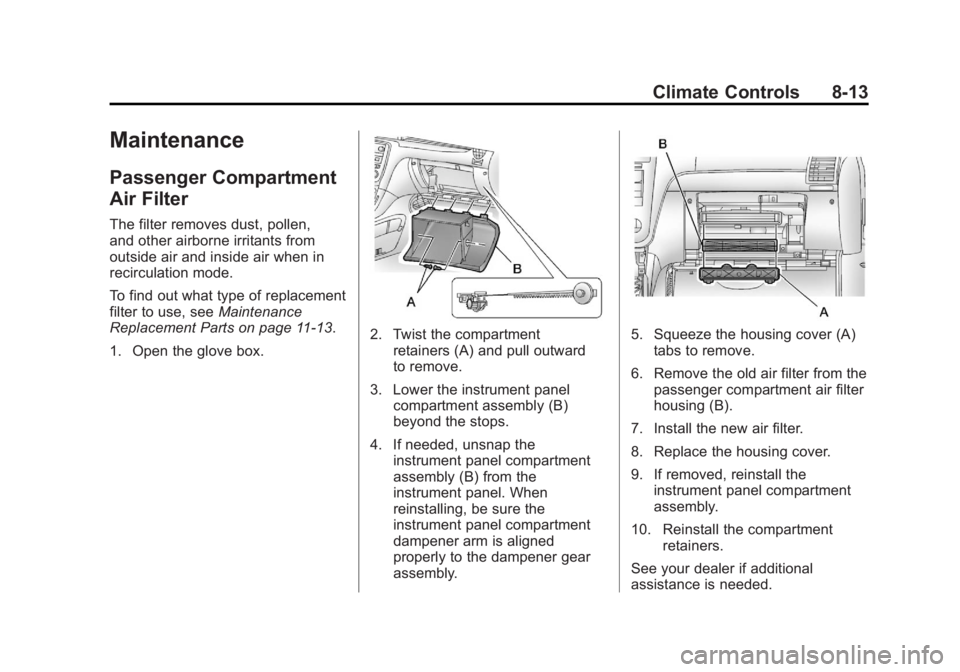
1. Open the glove box.
2. Twist the compartment retainers (A) and pull outward
to remove.
3. Lower the instrument panel compartment assembly (B)
beyond the stops.
4. If needed, unsnap the instrument panel compartment
assembly (B) from the
instrument panel. When
reinstalling, be sure the
instrument panel compartment
dampener arm is aligned
properly to the dampener gear
assembly.5. Squeeze the housing cover (A)tabs to remove.
6. Remove the old air filter from the passenger compartment air filter
housing (B).
7. Install the new air filter.
8. Replace the housing cover.
9. If removed, reinstall the instrument panel compartment
assembly.
10. Reinstall the compartment retainers.
See your dealer if additional
assistance is needed.
Page 258 of 468

Black plate (14,1)GMC Acadia/Acadia Denali Owner Manual - 2012
8-14 Climate Controls
2NOTES
Page 284 of 468

Black plate (26,1)GMC Acadia/Acadia Denali Owner Manual - 2012
9-26 Driving and Operating
When you shift from D (Drive) to
L (Low), the transmission will shift to
a pre-determined lower gear range.
The highest gear available for this
pre-determined range is displayed
next to the L in the DIC. SeeDriver
Information Center (DIC) (Without
DIC Buttons) on page 5‑30 orDriver
Information Center (DIC) (With DIC
Buttons) on page 5‑25 for more
information. The number displayed
in the DIC is the highest gear that
the transmission will be allowed to
operate in. This means that all
gears below that number are
available. For example, when
4 (Fourth) is shown next to the L,
1 (First) through 4 (Fourth) gears
are automatically shifted by the
vehicle. The transmission will not
shift into 5 (Fifth) until the + (Plus)
button is used or you shift back
into D (Drive). While in L (Low), the transmission
will prevent shifting to a lower gear
range if the engine speed is too
high. You have a brief period of time
to slow the vehicle. If vehicle speed
is not reduced within the time
allowed, the lower gear range shift
will not be completed. You must
further slow the vehicle, then press
the
−(Minus) button to the desired
lower gear range.
Automatic Engine Grade Braking
is not available when the ERS is
active. It is available in D (Drive) for
both normal and Tow/Haul mode.
While using the ERS, cruise control
and the Tow/Haul mode can be
used. See Tow/Haul Mode following.Tow/Haul Mode
_
(Tow/Haul): The vehicle may
have a Tow/Haul mode.
The button is located on the
instrument panel under the climate
controls.
Push the button to activate the
system. Push it again to deactivate
the system. You can use this feature
to assist when towing or hauling a
heavy load.
When Tow/Haul is activated the
Tow/Haul symbol will come on
the instrument panel cluster.
See “Tow/Haul Mode” underDriving
Characteristics and Towing Tips on
page 9‑45 for more information.
Page 286 of 468
Black plate (28,1)GMC Acadia/Acadia Denali Owner Manual - 2012
9-28 Driving and Operating
If driving safely on a wet road and it
becomes necessary to slam on the
brakes and continue braking to
avoid a sudden obstacle, a
computer senses that the wheels
are slowing down. If one of the
wheels is about to stop rolling, the
computer will separately work the
brakes at each wheel.
ABS can change the brake pressure
to each wheel, as required, faster
than any driver could. This can help
the driver steer around the obstacle
while braking hard.
As the brakes are applied, the
computer keeps receiving updates
on wheel speed and controls
braking pressure accordingly.
Remember: ABS does not change
the time needed to get a foot up to
the brake pedal or always decrease
stopping distance. If you get too
close to the vehicle in front of you,there will not be enough time to
apply the brakes if that vehicle
suddenly slows or stops. Always
leave enough room up ahead to
stop, even with ABS.
Using ABS
Do not pump the brakes. Just hold
the brake pedal down firmly and let
ABS work. You might hear the ABS
pump or motor operating and feel
the brake pedal pulsate, but this is
normal.
Braking in Emergencies
ABS allows the driver to steer and
brake at the same time. In many
emergencies, steering can help
more than even the very best
braking.
Parking Brake
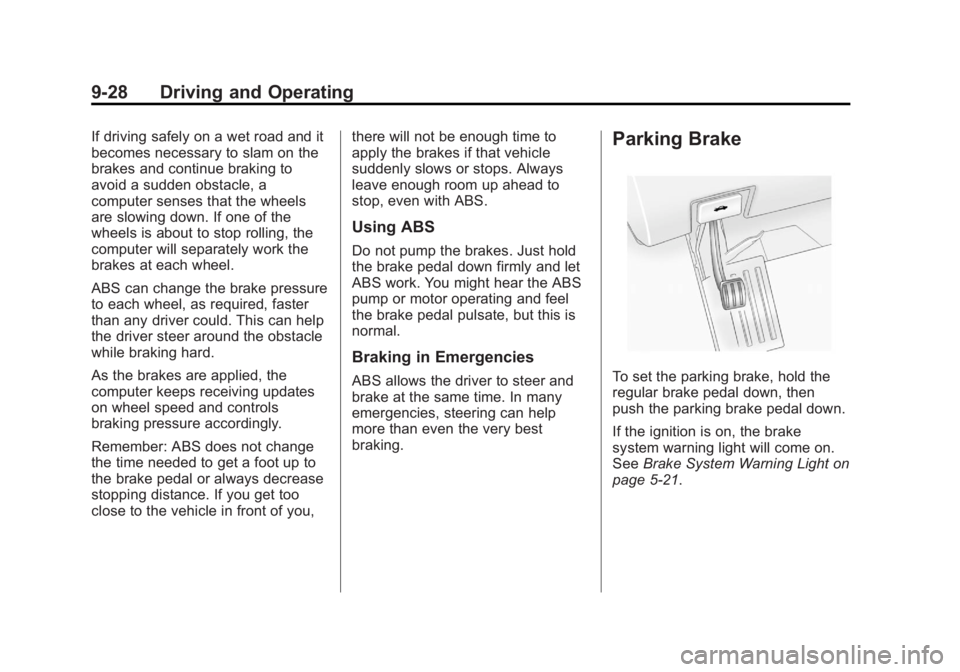
To set the parking brake, hold the
regular brake pedal down, then
push the parking brake pedal down.
If the ignition is on, the brake
system warning light will come on.
See
Brake System Warning Light on
page 5‑21.
Page 311 of 468

Black plate (53,1)GMC Acadia/Acadia Denali Owner Manual - 2012
Driving and Operating 9-53
*The fuse for this circuit is installed
in the underhood electrical center,
but the wires are not connected.
They should be connected by your
dealer or a qualified service center.
If the back-up lamp circuit is not
functional, contact your dealer.
If a remote (non-vehicle) battery is
being charged, press the Tow/Haul
mode switch located on the center
console near the climate controls.
This will boost the vehicle system
voltage and properly charge the
battery. If the trailer is too light for
Tow/Haul mode, turn on the
headlamps (non‐HID only) as a
second way to boost the vehicle
system and charge the battery.Electric Trailer Brake Control
Wiring Provisions
These wiring provisions for an
electric trailer brake controller are
included with the vehicle as part
of the trailer wiring package.
The instrument panel contains
blunt cut wires behind the steering
column for the electric trailer brake
controller. The harness contains the
following wires:
.Red/Black: Power Supply
.White: Brake Switch Signal
.Gray: Illumination
.Dark Blue: Trailer Brake Signal
.Black: Ground
The electric trailer brake controller
should be installed by your dealer or
a qualified service center.
Conversions and
Add-Ons
Add-On Electrical
Equipment
Notice: Do not add anything
electrical to the vehicle unless
you check with your dealer first.
Some electrical equipment can
damage the vehicle and the
damage would not be covered
by the vehicle's warranty. Some
add-on electrical equipment can
keep other components from
working as they should.
Add-on equipment can drain the
vehicle's 12‐volt battery, even if the
vehicle is not operating.
The vehicle has an airbag system.
Before attempting to add anything
electrical to the vehicle, see
Servicing the Airbag-Equipped
Vehicle on page 3‑35 andAdding
Equipment to the Airbag-Equipped
Vehicle on page 3‑36.
Page 434 of 468

Black plate (8,1)GMC Acadia/Acadia Denali Owner Manual - 2012
13-8 Customer Information
GM Mobility
Reimbursement Program
(U.S. and Canada)
This program is available to
qualified applicants for cost
reimbursement of eligible
aftermarket adaptive equipment
required for the vehicle, such as
hand controls or a wheelchair/
scooter lift for the vehicle.
For more information on the limited
offer, visit www.gmmobility.com or
call the GM Mobility Assistance
Center at 1-800-323-9935.
Text Telephone (TTY) users,
call 1-800-833-9935.
General Motors of Canada
also has a Mobility Program.
Call 1-800-GM-DRIVE (463-7483)
for details. TTY users call
1-800-263-3830.
Roadside Assistance
Program (U.S. and
Canada)
For U.S.‐purchased vehicles, call
1‐888‐881‐3302; (Text Telephone
(TTY): 1‐888‐889‐2438).
For Canadian‐purchased vehicles,
call1-800-268-6800.
Service is available 24 hours a day,
365 days a year.
Calling for Assistance
When calling Roadside Assistance,
have the following information
ready:
.Your name, home address, and
home telephone number
.Telephone number of your
location
.Location of the vehicle
.Model, year, color, and license
plate number of the vehicle
.Odometer reading, Vehicle
Identification Number (VIN), and
delivery date of the vehicle
.Description of the problem
Coverage
Services are provided up to
5 years/160 000 km (100,000 mi),
whichever comes first.
In the U.S., anyone driving the
vehicle is covered. In Canada, a
person driving the vehicle without
permission from the owner is not
covered.
Roadside Assistance is not a part of
the New Vehicle Limited Warranty.
GMC and General Motors of
Canada Limited reserve the right to
make any changes or discontinue
the Roadside Assistance program at
any time without notification.
Page 460 of 468
Black plate (4,1)GMC Acadia/Acadia Denali Owner Manual - 2012
i-4 INDEX
Drive SystemsAll-Wheel Drive . . . . . . . 9-27, 10-26
Driver Information Center (DIC) . . . . . . . . . . . 5-25, 5-30
Driving Characteristics andTowing Tips . . . . . . . . . . . . . . . . . 9-45
Defensive . . . . . . . . . . . . . . . . . . . . . . 9-3
Drunk . . . . . . . . . . . . . . . . . . . . . . . . . . 9-3
For Better Fuel Economy . . . . . 1-24
Highway Hypnosis . . . . . . . . . . . . . 9-7
Hill and Mountain Roads . . . . . . . 9-7
If the Vehicle is Stuck . . . . . . . . . 9-10
Loss of Control . . . . . . . . . . . . . . . . 9-5
Off-Road Recovery . . . . . . . . . . . . 9-5
Vehicle Load Limits . . . . . . . . . . . 9-10
Wet Roads . . . . . . . . . . . . . . . . . . . . 9-6
Winter . . . . . . . . . . . . . . . . . . . . . . . . . 9-8
Dual Automatic Climate Control System . . . . . . . . . . . . . . . . 8-4
DVD
Rear Seat EntertainmentSystem . . . . . . . . . . . . . . . . . . . . . . 7-38
DVD/CD Player . . . . . . . . . . . . . . . . 7-15E
Electrical Equipment, Add-On . . . . . . . . . . . . . . . . . . . . . . 9-53
Electrical System Engine CompartmentFuse Block . . . . . . . . . . . . . . . . 10-31
Fuses and Circuit
Breakers . . . . . . . . . . . . . . . . . . 10-31
Instrument Panel Fuse Block . . . . . . . . . . . . . . . . . . . . . . 10-34
Overload . . . . . . . . . . . . . . . . . . . 10-30
Emergency, OnStar
®. . . . . . . . . . 14-2
Engine Air Cleaner/Filter . . . . . . . . . . . 10-12
Check and Service EngineSoon Light . . . . . . . . . . . . . . . . . . 5-18
Compartment Overview . . . . . . . 10-6
Coolant . . . . . . . . . . . . . . . . . . . . . 10-14
Coolant Temperature Gauge . . . . . . . . . . . . . . . . . . . . . . 5-14
Coolant Temperature Warning Light . . . . . . . . . . . . . . . 5-23
Cooling System . . . . . . . . . . . . . 10-14
Cooling System Messages . . . 5-39
Cover . . . . . . . . . . . . . . . . . . . . . . . . . 10-8
Drive Belt Routing . . . . . . . . . . . . 12-3 Engine (cont'd)
Exhaust . . . . . . . . . . . . . . . . . . . . . . 9-22
Heater . . . . . . . . . . . . . . . . . . . . . . . . 9-19
Oil Life System . . . . . . . . . . . . . 10-10
Oil Messages . . . . . . . . . . . . . . . . . 5-40
Overheated Protection
Operating Mode . . . . . . . . . . . 10-20
Overheating . . . . . . . . . . . . . . . . 10-18
Power Messages . . . . . . . . . . . . . 5-40
Pressure Light . . . . . . . . . . . . . . . . 5-24
Running While Parked . . . . . . . . 9-23
Starting . . . . . . . . . . . . . . . . . . . . . . . 9-18
Entry Lighting . . . . . . . . . . . . . . . . . . . 6-6
Equipment, Towing . . . . . . . . . . . . 9-51
Event Data Recorders . . . . . . . . 13-21
Extender, Safety Belt . . . . . . . . . . 3-22
Exterior Lamp Controls . . . . . . . . . 6-1
F
Features Memory . . . . . . . . . . . . . . . . . . . . . . . . 1-8
Filter, Engine Air Cleaner . . . . . . . . . 10-12
Flash-to-Pass . . . . . . . . . . . . . . . . . . . 6-2
Flashers, Hazard Warning . . . . . . 6-4
Page 462 of 468

Black plate (6,1)GMC Acadia/Acadia Denali Owner Manual - 2012
i-6 INDEX
Headlamps (cont'd)Flash-to-Pass . . . . . . . . . . . . . . . . . . 6-2
High-Beam On Light . . . . . . . . . . 5-25
High/Low Beam Changer . . . . . . 6-2
Heated and Ventilated Front Seats . . . . . . . . . . . . . . . . . . . . . . . . . 3-9
Heated Mirrors . . . . . . . . . . . . . . . . . 2-17
Heater Engine . . . . . . . . . . . . . . . . . . . . . . . . 9-19
Heating and Air Conditioning . . . 8-1
High Voltage Devices and Wiring . . . . . . . . . . . . . . . . . . . . . . . 10-30
High-Beam On Light . . . . . . . . . . . 5-25
Highway Hypnosis . . . . . . . . . . . . . . 9-7
Hill and Mountain Roads . . . . . . . . 9-7
Hill Start Assist (HSA) . . . . . . . . . 9-29
Hood . . . . . . . . . . . . . . . . . . . . . . . . . . 10-4
Horn . . . . . . . . . . . . . . . . . . . . . . . . . . . . 5-5
How to Wear Safety Belts Properly . . . . . . . . . . . . . . . . . . . . . . 3-16
I
Ignition Positions . . . . . . . . . . . . . . 9-16
Ignition Transmission LockCheck . . . . . . . . . . . . . . . . . . . . . . . 10-27 Immobilizer . . . . . . . . . . . . . . . . . . . . 2-14
Infants and Young Children,
Restraints . . . . . . . . . . . . . . . . . . . . 3-40
Infotainment . . . . . . . . . . . . . . . . . . . . 7-1
Instrument Cluster . . . . . . . . . . . . . 5-12
Instrument Panel Storage Area . . . . . . . . . . . . . . . . . . 4-1
Introduction . . . . . . . . . . . . . . . . . . . . . . . iii
J
Jump Starting . . . . . . . . . . . . . . . . . 10-78
K
Key and Lock Messages . . . . . . . 5-41
Keyless Entry Remote (RKE) System . . . . . . . . 2-3
Keys . . . . . . . . . . . . . . . . . . . . . . . . . . . . 2-2
L
Labeling, Tire Sidewall . . . . . . . . 10-38
Lamps Courtesy . . . . . . . . . . . . . . . . . . . . . . . 6-5
Dome . . . . . . . . . . . . . . . . . . . . . . . . . . 6-5
Exterior Controls . . . . . . . . . . . . . . . 6-1
License Plate . . . . . . . . . . . . . . . 10-29 Lamps (cont'd)
Malfunction Indicator . . . . . . . . . 5-18
Messages . . . . . . . . . . . . . . . . . . . . 5-41
Reading . . . . . . . . . . . . . . . . . . . . . . . 6-6
Lap-Shoulder Belt . . . . . . . . . . . . . 3-17
LATCH System Replacing Parts after aCrash . . . . . . . . . . . . . . . . . . . . . . . 3-53
LATCH, Lower Anchors and
Tethers for Children . . . . . . . . . . 3-46
LED Lighting . . . . . . . . . . . . . . . . . . 10-29
Liftgate Carbon Monoxide . . . . . . . . . . . . . 2-10
Lighting
Delayed Entry . . . . . . . . . . . . . . . . . 6-6
Delayed Exit . . . . . . . . . . . . . . . . . . . 6-7
Entry . . . . . . . . . . . . . . . . . . . . . . . . . . 6-6
Illumination Control . . . . . . . . . . . . 6-5
LED . . . . . . . . . . . . . . . . . . . . . . . . 10-29
Parade Dimming . . . . . . . . . . . . . . . 6-7
Lights Airbag Readiness . . . . . . . . . . . . . 5-16
Antilock Brake System(ABS) Warning . . . . . . . . . . . . . . 5-22
Brake System Warning . . . . . . . 5-21
Charging System . . . . . . . . . . . . . 5-18
Cruise Control . . . . . . . . . . . . . . . . 5-25