Page 49 of 406

Radio Display Condition Action Required
ACQUIRING Radio requires more
than two seconds to
produce audio for the
selected channel.No action required.
This message should
disappear shortly.
SAT FAULT Internal module or
system failure
present.If this message does
not clear within a short
period of time, or with
an ignition key cycle,
your receiver may have
a fault. See your
authorized dealer for
service.
INVALID CHNL Channel no longer
available.This previously
available channel is no
longer available. Tune
to another channel. If
the channel was one of
your presets, you may
choose another channel
for that preset button.
UNSUBSCRIBED Subscription not
available for this
channel.Contact SIRIUS�at
1–888–539–7474 to
subscribe to the
channel or tune to
another channel.
NO TEXT Artist information not
available.Artist information not
available at this time on
this channel. The
system is working
properly.
NO TEXT Song title information
not available.Song title information
not available at this
time on this channel.
The system is working
properly.
Entertainment Systems
49
2012 Taurus
Owners Guide, 1st Printing
USA(fus)
Page 50 of 406
Radio Display Condition Action Required
NO TEXT Category information
not available.Category information
not available at this
time on this channel.
The system is working
properly.
NO SIGNAL Loss of signal from
the SIRIUS�satellite
or SIRIUS�tower to
the vehicle antenna.You are in a location
that is blocking the
SIRIUS�signal (i.e.,
tunnel, under an
overpass, dense foliage,
etc.). The system is
working properly. When
you move into an open
area, the signal should
return.
UPDATING Update of channel
programming in
progress.No action required. The
process may take up to
three minutes.
CALL SIRIUS
1–888–539–7474Satellite service has
been deactivated by
SIRIUS�Satellite
Radio.Call SIRIUS�at
1–888–539–7474 to
re-activate or resolve
subscription issues.
NAVIGATION SYSTEM (IF EQUIPPED)
Your vehicle may be equipped with a navigation system. Refer to the
Navigation Systemsupplement for further information.
SYNC�(IF EQUIPPED)
Your vehicle may be equipped with SYNC�, a hands-free communications
and entertainment system with special phone and media features. For
more information, please refer to theSYNC�supplement or to the
SYNC�section in theNavigation Systemsupplement (if equipped).
Entertainment Systems
50
2012 Taurus
Owners Guide, 1st Printing
USA(fus)
Page 79 of 406
ELECTRONIC COMPASS (IF EQUIPPED)
The compass heading is displayed in the center integrated display (CID).
The compass reading may be affected when you drive near large
buildings, bridges, power lines and powerful broadcast antenna. Magnetic
or metallic objects placed in, on or near the vehicle may also affect
compass accuracy.
Usually, when something affects the compass readings, the compass will
correct itself after a few days of operating your vehicle in normal
conditions. If the compass still appears to be inaccurate, a manual
calibration may be necessary. Refer toCompass calibration
adjustment.
Most geographic areas (zones) have a magnetic north compass point that
varies slightly from the northerly direction on maps. This variation is four
degrees between adjacent zones and will become noticeable as the
vehicle crosses multiple zones. A correct zone setting will eliminate this
error. Refer toCompass zone adjustment.
Compass zone adjustment
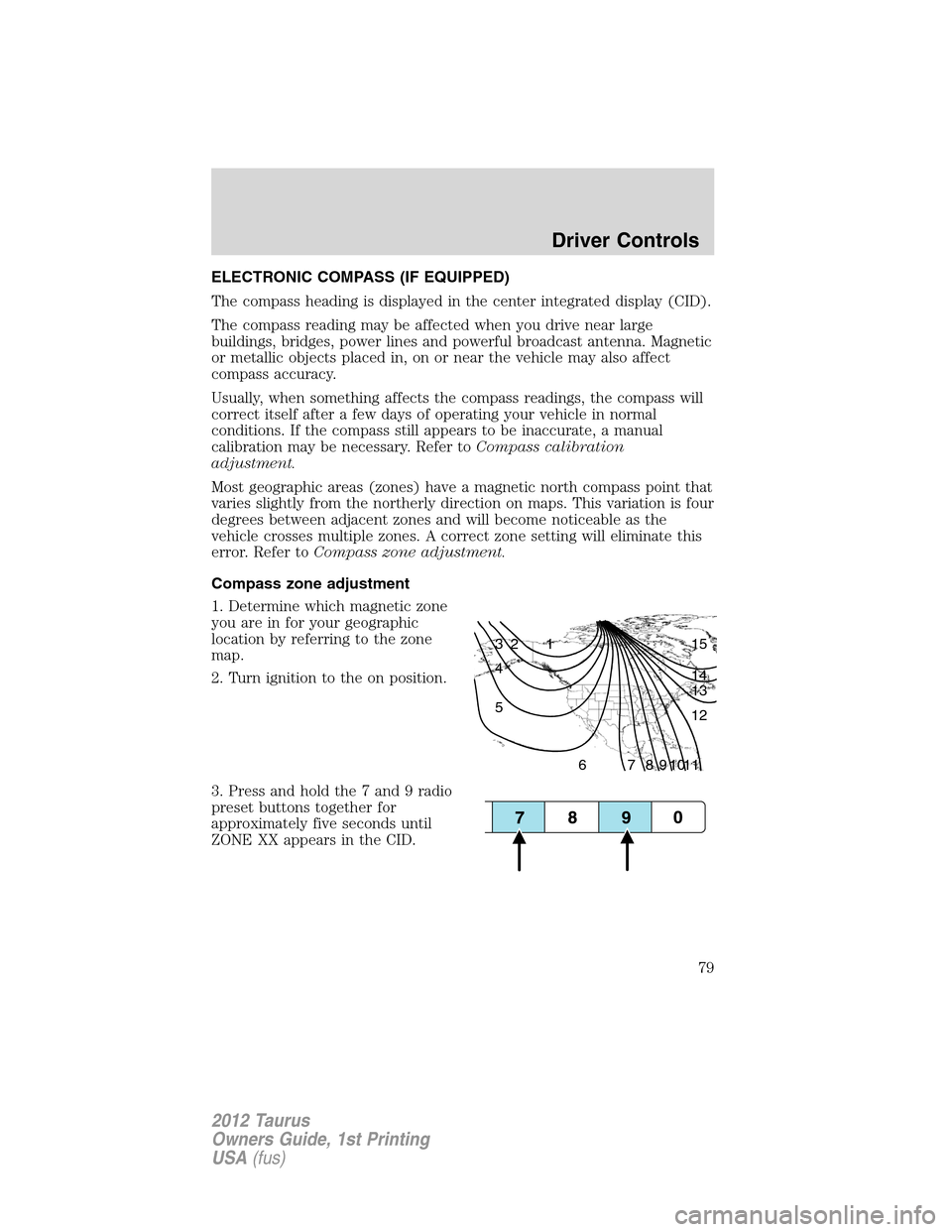
1. Determine which magnetic zone
you are in for your geographic
location by referring to the zone
map.
2. Turn ignition to the on position.
3. Press and hold the 7 and 9 radio
preset buttons together for
approximately five seconds until
ZONE XX appears in the CID.
1 2 3
4
5
6 7 8 9 101112 13 14 15
Driver Controls
79
2012 Taurus
Owners Guide, 1st Printing
USA(fus)
Page 80 of 406
4. Press and release the 7 and 9
radio preset buttons together,
repeatedly until ZONE XX changes
to the correct zone (1–15) in the
CID.
5. The direction will display after
the buttons are released. The zone
is now updated.
Compass calibration adjustment
Perform compass calibration in an open area free from steel structures
and high voltage lines. For optimum calibration, turn off all electrical
accessories (heater/air conditioning, wipers, etc.) and make sure all
vehicle doors are shut.
1. Start the vehicle.
2. To calibrate, press and hold the 7
and 9 radio preset buttons together
for approximately 10 seconds until
CAL appears. Release the buttons.
3. Slowly drive the vehicle in a
circle (less than 3 mph [5 km/h])
until the CAL display changes to the
direction value (N, S, E, W, etc.). It
may take up to five circles to
complete calibration.
4. The compass is now calibrated.
Driver Controls
80
2012 Taurus
Owners Guide, 1st Printing
USA(fus)
Page 98 of 406
WARNING:Do not use ACC when towing a trailer with brake
controls. Aftermarket trailer brakes will not function properly
when ACC is activated because the brakes are electronically controlled.
Failing to do so may result in loss of vehicle control, which could result
in serious injury.
WARNING:Do not use tires sizes other than those
recommended because this can affect the normal operation of
ACC. Failing to do so may result in a loss of vehicle control, which
could result in serious injury.
STEERING WHEEL CONTROLS (IF EQUIPPED)
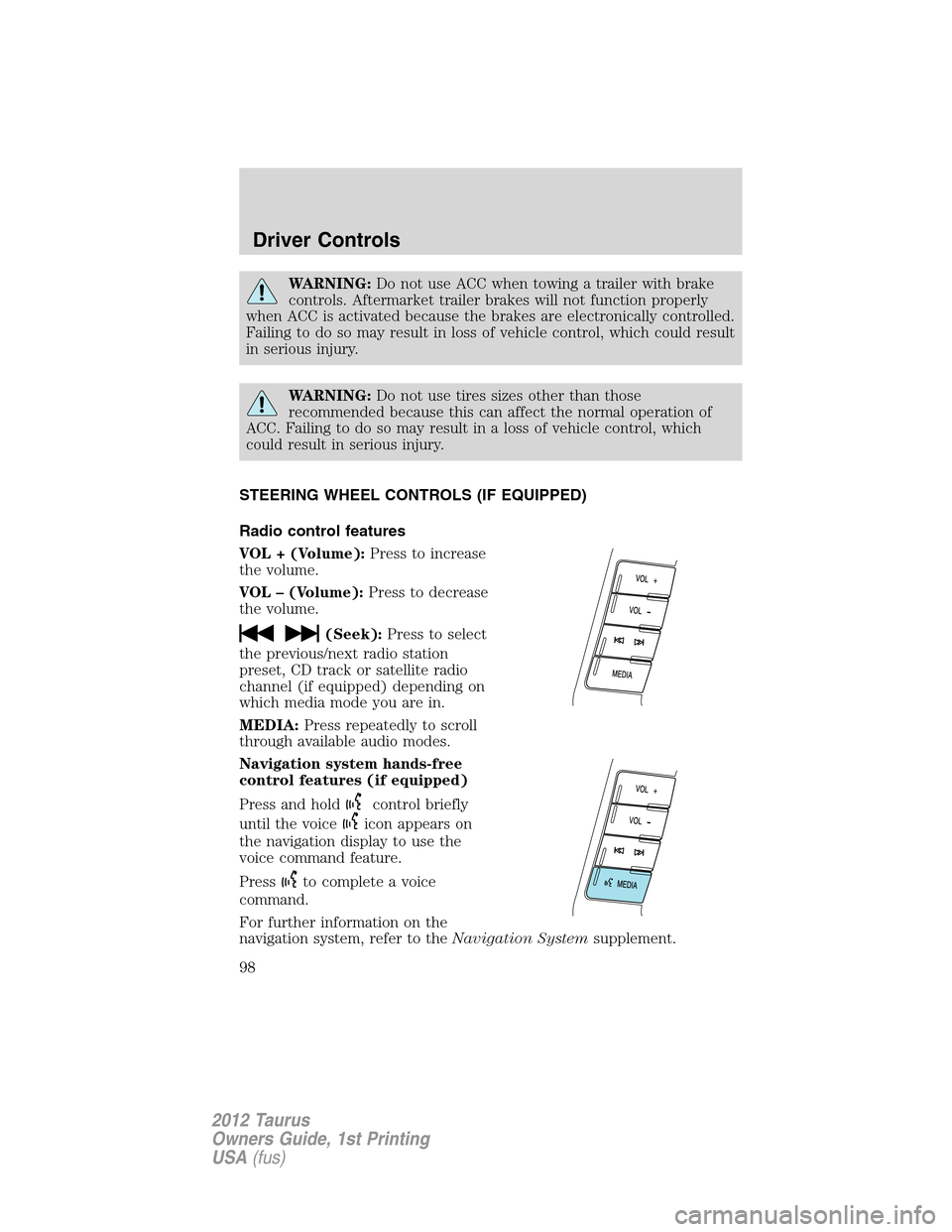
Radio control features
VOL + (Volume):Press to increase
the volume.
VOL – (Volume):Press to decrease
the volume.
(Seek):Press to select
the previous/next radio station
preset, CD track or satellite radio
channel (if equipped) depending on
which media mode you are in.
MEDIA:Press repeatedly to scroll
through available audio modes.
Navigation system hands-free
control features (if equipped)
Press and hold
control briefly
until the voice
icon appears on
the navigation display to use the
voice command feature.
Press
to complete a voice
command.
For further information on the
navigation system, refer to theNavigation Systemsupplement.
Driver Controls
98
2012 Taurus
Owners Guide, 1st Printing
USA(fus)
Page 99 of 406
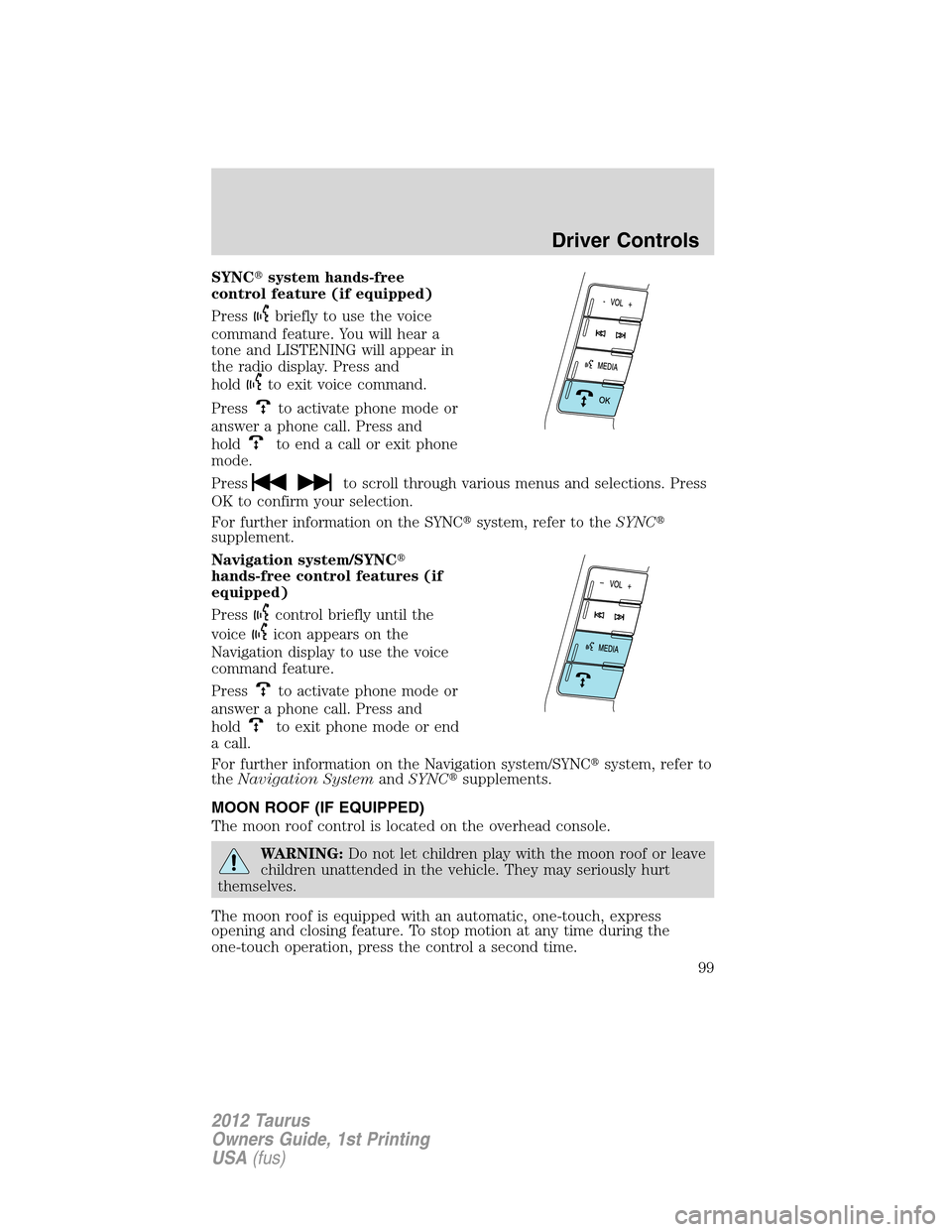
SYNC�system hands-free
control feature (if equipped)
Press
briefly to use the voice
command feature. You will hear a
tone and LISTENING will appear in
the radio display. Press and
hold
to exit voice command.
Press
to activate phone mode or
answer a phone call. Press and
hold
to end a call or exit phone
mode.
Press
to scroll through various menus and selections. Press
OK to confirm your selection.
For further information on the SYNC�system, refer to theSYNC�
supplement.
Navigation system/SYNC�
hands-free control features (if
equipped)
Press
control briefly until the
voice
icon appears on the
Navigation display to use the voice
command feature.
Press
to activate phone mode or
answer a phone call. Press and
hold
to exit phone mode or end
a call.
For further information on the Navigation system/SYNC�system, refer to
theNavigation SystemandSYNC�supplements.
MOON ROOF (IF EQUIPPED)
The moon roof control is located on the overhead console.
WARNING:Do not let children play with the moon roof or leave
children unattended in the vehicle. They may seriously hurt
themselves.
The moon roof is equipped with an automatic, one-touch, express
opening and closing feature. To stop motion at any time during the
one-touch operation, press the control a second time.
Driver Controls
99
2012 Taurus
Owners Guide, 1st Printing
USA(fus)
Page 101 of 406
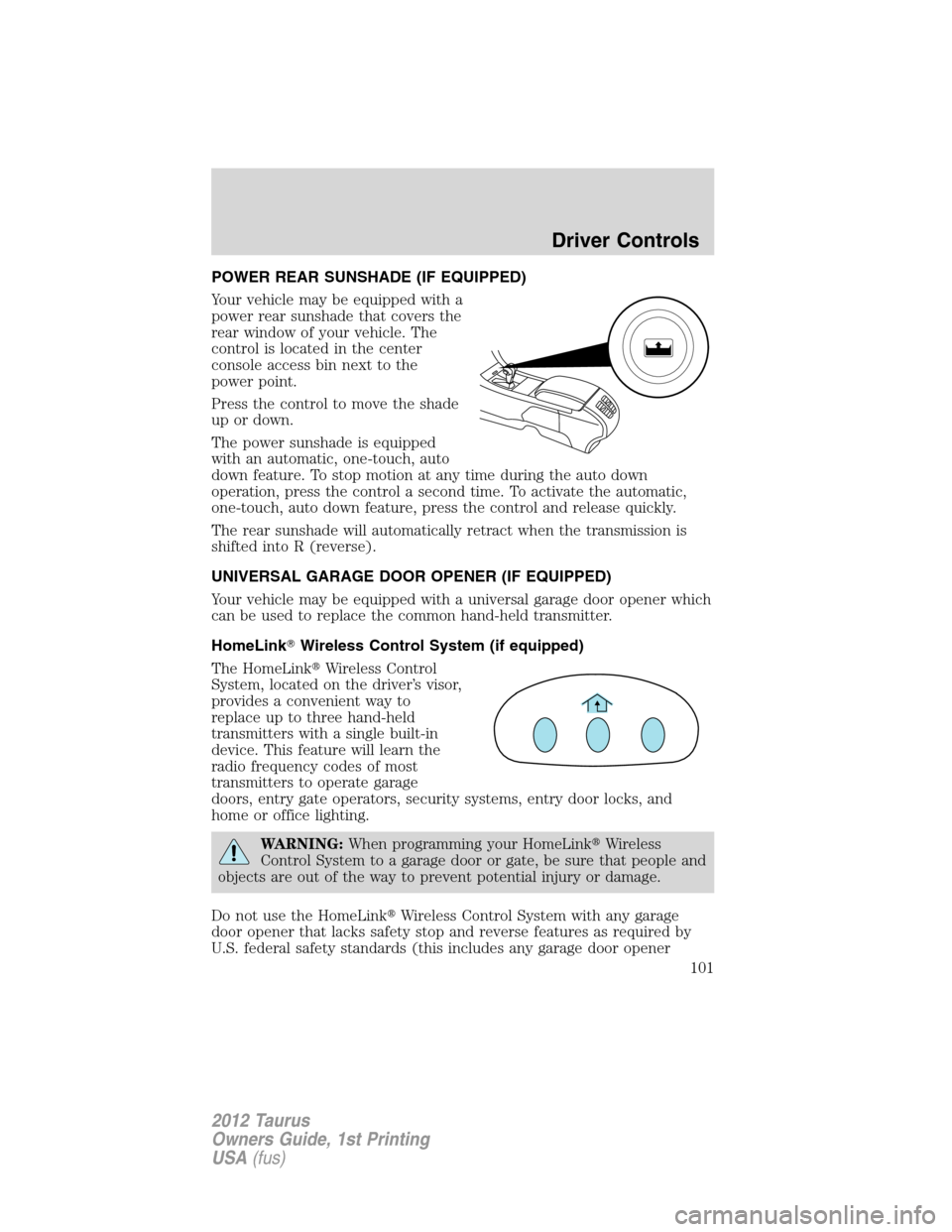
POWER REAR SUNSHADE (IF EQUIPPED)
Your vehicle may be equipped with a
power rear sunshade that covers the
rear window of your vehicle. The
control is located in the center
console access bin next to the
power point.
Press the control to move the shade
up or down.
The power sunshade is equipped
with an automatic, one-touch, auto
down feature. To stop motion at any time during the auto down
operation, press the control a second time. To activate the automatic,
one-touch, auto down feature, press the control and release quickly.
The rear sunshade will automatically retract when the transmission is
shifted into R (reverse).
UNIVERSAL GARAGE DOOR OPENER (IF EQUIPPED)
Your vehicle may be equipped with a universal garage door opener which
can be used to replace the common hand-held transmitter.
HomeLink�Wireless Control System (if equipped)
The HomeLink�Wireless Control
System, located on the driver’s visor,
provides a convenient way to
replace up to three hand-held
transmitters with a single built-in
device. This feature will learn the
radio frequency codes of most
transmitters to operate garage
doors, entry gate operators, security systems, entry door locks, and
home or office lighting.
WARNING:When programming your HomeLink�Wireless
Control System to a garage door or gate, be sure that people and
objects are out of the way to prevent potential injury or damage.
Do not use the HomeLink�Wireless Control System with any garage
door opener that lacks safety stop and reverse features as required by
U.S. federal safety standards (this includes any garage door opener
Driver Controls
101
2012 Taurus
Owners Guide, 1st Printing
USA(fus)
Page 102 of 406

model manufactured before April 1, 1982). A garage door which cannot
detect an object, signaling the door to stop and reverse, does not meet
current U.S. federal safety standards. For more information, contact
HomeLink�at:www.homelink.comor1–800–355–3515.
Retain the original transmitter for use in other vehicles as well as for
future programming procedures (i.e. new HomeLink�equipped vehicle
purchase). It is also suggested that upon the sale of the vehicle, the
programmed Homelink�buttons be erased for security purposes, refer to
Programmingin this section.
Programming
Do not program HomeLink�with the vehicle parked in the garage.
Note:Your vehicle may require the ignition switch to be turned to the
accessory position for programming and/or operation of the HomeLink�.
It is also recommended that a new battery be placed in the hand-held
transmitter of the device being programmed to HomeLink�for quicker
training and accurate transmission of the radio-frequency signal.
1. Position the end of your
hand-held transmitter 1–3 inches
(2–8 cm) away from the HomeLink�
button you wish to program (located
on your visor) while keeping the
indicator light in view.
2. Simultaneously press and hold
both the chosen HomeLink�and
hand-held transmitter buttons until the HomeLink�indicator light
changes from a slow to a rapidly blinking light. Now you may release
both the HomeLink�and hand-held transmitter buttons.
Note:Some entry gates and garage door openers may require you to
replace Step 2 with procedures noted in theGate Operator and
Canadian Programmingin this section for Canadian residents.
3. Firmlypress and hold for five seconds and releasethe
programmed HomeLink�button up to two separate times to activate the
door. If the door does not activate, press and hold the just-trained
HomeLink�button and observe the indicator light.
•If the indicator lightstays on constantly, programming is complete
and your device should activate when the HomeLink�button is pressed
and released.
•If the indicator light blinksrapidly for two seconds and then turns
to a constant light continue with “Programming” Steps 4 through
Driver Controls
102
2012 Taurus
Owners Guide, 1st Printing
USA(fus)