2012 FORD FOCUS park assist
[x] Cancel search: park assistPage 272 of 406

WARNING:The EPS has diagnostics checks that continuously
monitor the EPS to ensure proper operation of the electronic
system. When an electronic error is detected, the message STEERING
ASSIST FAULT SERVICE REQUIRED will be displayed in the message
center. If this happens, stop the vehicle in a safe place and turn off the
engine. After at least 10 seconds, reset the system by restarting the
engine, and watch the message center for STEERING ASSIST FAULT
SERVICE REQUIRED. If the message returns, or returns while driving,
take the vehicle to your dealer to have it checked. With the message
displayed, the steering assist is turned off, making the vehicle harder
to steer.
If the steering wanders or pulls, check for:
•an improperly inflated tire.
•uneven tire wear.
•loose or worn suspension components.
•loose or worn steering components.
•improper steering alignment.
A high crown in the road or high crosswinds may also make the steering
seem to wander/pull.
BRAKE-SHIFT INTERLOCK
This vehicle is equipped with a brake-shift interlock feature that prevents
the gearshift lever from being moved from P (Park) when the ignition is
in the on position unless the brake pedal is pressed.
If you cannot move the gearshift lever out of P (Park) with ignition in
the on position and the brake pedal pressed, it is possible that a fuse has
blown or the vehicle’s brake lamps are not operating properly. Refer to
Fuses and relaysin theRoadside Emergencieschapter.
If the fuse is not blown and the brake lamps are working properly, the
following procedure will allow you to move the gearshift lever from P
(Park):
Driving
272
2012 Focus(foc)
Owners Guide, 1st Printing
USA(fus)
Page 277 of 406

Hill start assist (HSA) system (if equipped)
The hill start assist (HSA) system makes it easier to pull away when the
vehicle is on a slope without the need to use the parking brake. When
HSA is active, the vehicle will remain stationary on the slope for two to
three seconds after you release the brake pedal. During this time, you
have time to move your foot from the brake to the accelerator pedal and
pull away. The brakes are released automatically once the engine has
developed sufficient drive to prevent the vehicle from rolling down the
slope. This is an advantage when pulling away on a slope, (for example,
from a car park ramp, traffic lights or while in reverse traveling uphill
into a parking space).
WARNING:HSA does not replace the parking brake. When you
leave the vehicle, always apply the parking brake and select P
(Park).
Using HSA
The HSA system is activated automatically when the vehicle is stopped
on a slope greater than four degrees. HSA operates with the vehicle
facing downhill if reverse gear is selected.
WARNING:You must remain in the vehicle once you have
activated HSA.
WARNING:During all times you are responsible for controlling
the vehicle, supervising the HSA system and intervening, if
required.
Activating HSA
1. Press the brake pedal to bring the vehicle to a complete standstill.
Keep the brake pedal pressed.
2. If the sensors detect that the vehicle is on a slope, the HSA system
will be activated automatically in D (Drive) uphill or R (Reverse)
downhill.
3. When you remove your foot from the brake pedal, the vehicle will
remain on the slope without rolling away for approximately two to three
seconds. This hold time will automatically be extended if you are in the
process of driving off.
4. Drive off in the normal manner. The brakes will be released
automatically.
Driving
277
2012 Focus(foc)
Owners Guide, 1st Printing
USA(fus)
Page 278 of 406
Note:If the engine is revved excessively, HSA will be deactivated.
Deactivating hill start assist
To deactivate HSA, perform one of the following:
•Apply the parking brake.
•Drive off uphill without re-applying the brake.
•Wait for two to three seconds until the HSA system deactivates
automatically.
•If hill start assist is active in D (Drive), select R (Reverse).
•If hill start assist is active in R (Reverse), select N (Neutral).
Note:The HSA warning lamp (if
equipped) in the instrument cluster
momentarily illuminates when the
ignition is turned on. If a
malfunction is detected in the HSA system, HSA will be deactivated and
this warning lamp will appear on the instrument cluster.
If your vehicle gets stuck in mud or snow
If your vehicle gets stuck in mud or snow, it may be rocked out by
shifting between forward and reverse gears, stopping between shifts in a
steady pattern. Press lightly on the accelerator in each gear.
Do not rock the vehicle if the engine is not at normal operating
temperature or damage to the transmission may occur.
Do not rock the vehicle for more than a minute or damage to the
transmission and tires may occur, or the engine may overheat.
MANUAL TRANSMISSION OPERATION (IF EQUIPPED)
Using the clutch
Manual transmission vehicles have a starter interlock that prevents
cranking the engine unless the clutch pedal is fully pressed.
To start the vehicle:
1. Make sure the parking brake is fully set.
Driving
278
2012 Focus(foc)
Owners Guide, 1st Printing
USA(fus)
Page 284 of 406
If the vehicle is equipped with a
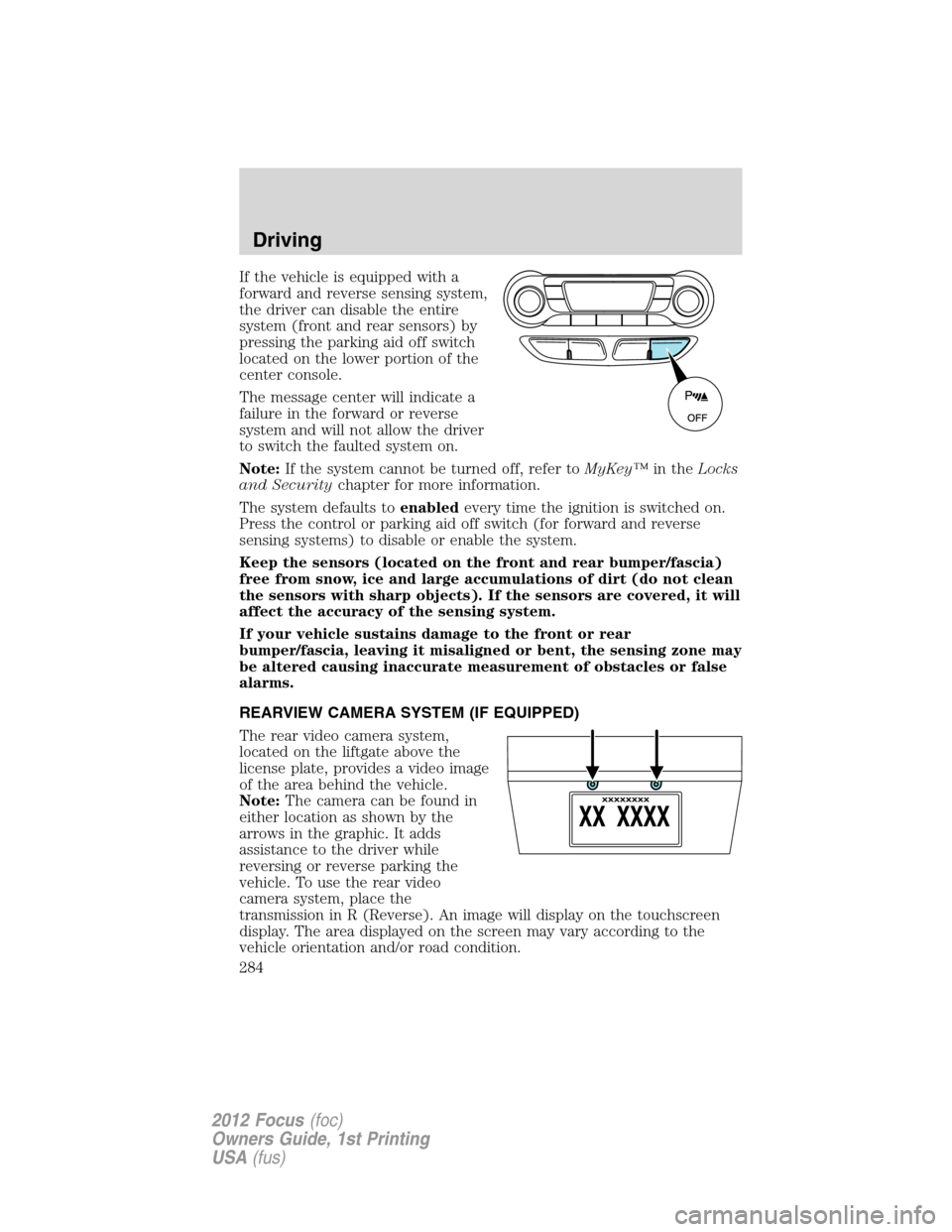
forward and reverse sensing system,
the driver can disable the entire
system (front and rear sensors) by
pressing the parking aid off switch
located on the lower portion of the
center console.
The message center will indicate a
failure in the forward or reverse
system and will not allow the driver
to switch the faulted system on.
Note:If the system cannot be turned off, refer toMyKey™in theLocks
and Securitychapter for more information.
The system defaults toenabledevery time the ignition is switched on.
Press the control or parking aid off switch (for forward and reverse
sensing systems) to disable or enable the system.
Keep the sensors (located on the front and rear bumper/fascia)
free from snow, ice and large accumulations of dirt (do not clean
the sensors with sharp objects). If the sensors are covered, it will
affect the accuracy of the sensing system.
If your vehicle sustains damage to the front or rear
bumper/fascia, leaving it misaligned or bent, the sensing zone may
be altered causing inaccurate measurement of obstacles or false
alarms.
REARVIEW CAMERA SYSTEM (IF EQUIPPED)
The rear video camera system,
located on the liftgate above the
license plate, provides a video image
of the area behind the vehicle.
Note:The camera can be found in
either location as shown by the
arrows in the graphic. It adds
assistance to the driver while
reversing or reverse parking the
vehicle. To use the rear video
camera system, place the
transmission in R (Reverse). An image will display on the touchscreen
display. The area displayed on the screen may vary according to the
vehicle orientation and/or road condition.
Driving
284
2012 Focus(foc)
Owners Guide, 1st Printing
USA(fus)
Page 285 of 406
The rear video camera includes the following features that will assist the
driver in reverse driving.
Active guidelines, fixed guidelines and centerline
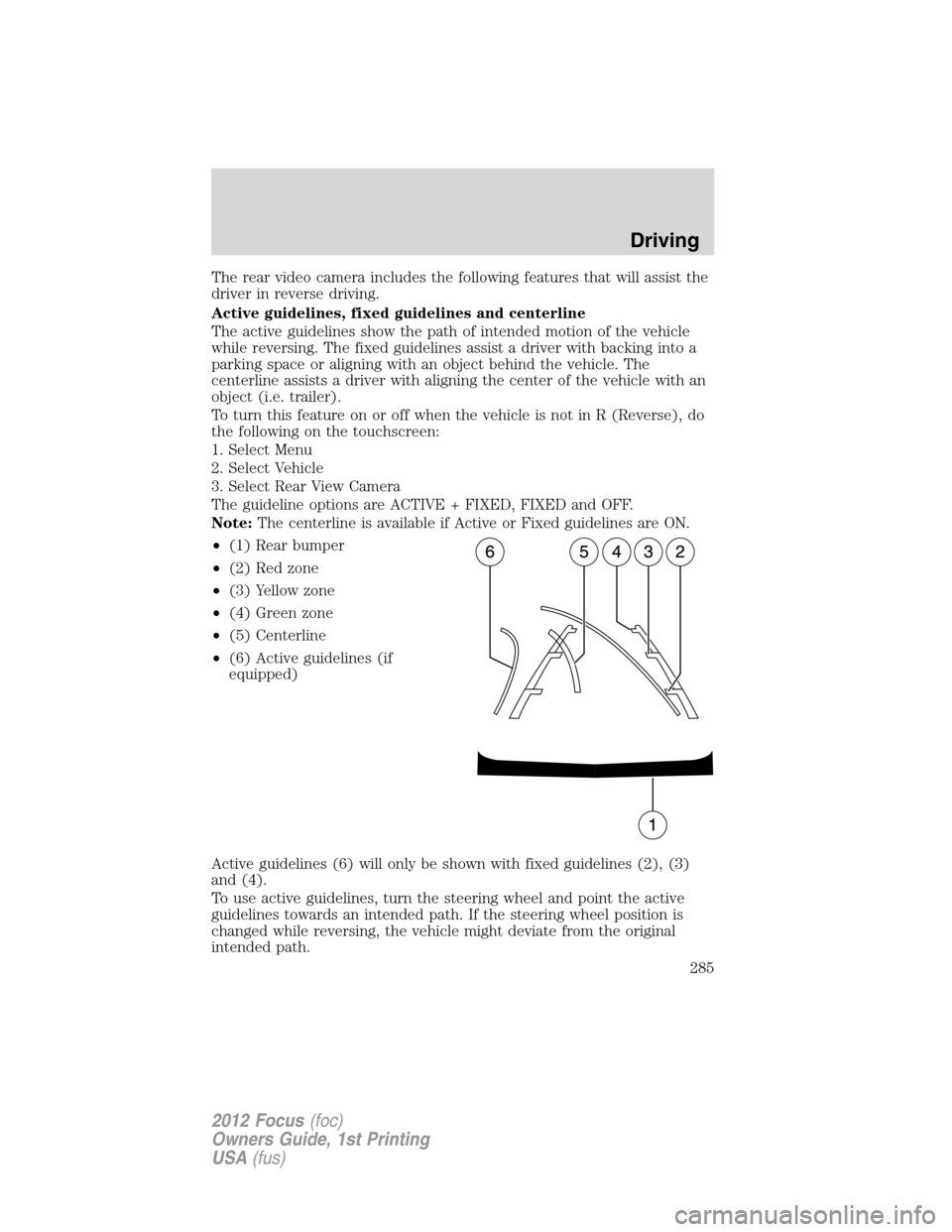
The active guidelines show the path of intended motion of the vehicle
while reversing. The fixed guidelines assist a driver with backing into a
parking space or aligning with an object behind the vehicle. The
centerline assists a driver with aligning the center of the vehicle with an
object (i.e. trailer).
To turn this feature on or off when the vehicle is not in R (Reverse), do
the following on the touchscreen:
1. Select Menu
2. Select Vehicle
3. Select Rear View Camera
The guideline options are ACTIVE + FIXED, FIXED and OFF.
Note:The centerline is available if Active or Fixed guidelines are ON.
•(1) Rear bumper
•(2) Red zone
•(3) Yellow zone
•(4) Green zone
•(5) Centerline
•(6) Active guidelines (if
equipped)
Active guidelines (6) will only be shown with fixed guidelines (2), (3)
and (4).
To use active guidelines, turn the steering wheel and point the active
guidelines towards an intended path. If the steering wheel position is
changed while reversing, the vehicle might deviate from the original
intended path.
Driving
285
2012 Focus(foc)
Owners Guide, 1st Printing
USA(fus)
Page 286 of 406
Active guidelines project the intended path of the vehicle. Fixed
guidelines show the actual direction the vehicle is moving. The fixed and
active guidelines will fade in and out depending on the steering wheel
position. When the steering wheel position is straight, the active
guidelines will not be shown.
Always use caution while backing. Objects in the red zone (2) are closest
to your vehicle and objects in the green zone (4) are further away.
Objects are getting closer to your vehicle as they move from the green
zone (4) to the yellow (3) or red zones (2). Use the side mirrors and
rearview mirror to get better coverage on both sides and rear of the
vehicle.
Visual park aid alert (if equipped)
Visual park aid alert allows the driver to see the area that is causing the
reverse sensing system to beep. The visual alerts are red, yellow or green
highlights which appear on top of the video image when an object is
detected by the reverse sensing system. The visual alert will highlight
the closest object detected by the reverse sensing system. The reverse
sensing alert can be disabled and if visual park aid alert is enabled,
highlighted areas will still be displayed.
To turn this feature on or off when the vehicle is not in R (Reverse), do
the following on the touchscreen:
1. Select Menu
2. Select Vehicle
3. Select Rear View Camera
The visual park aid alert options are ON and OFF.
Note:The reverse sensing system is not effective at speeds above 3 mph
(5 km/h) and may not detect certain angular or moving objects.
Manual zoom
The manual zoom feature assists drivers with connecting their vehicle to
a trailer for the purpose of towing. It allows the driver to manually zoom
closer to an object behind the vehicle. The zoomed image keeps the
bumper in the image to provide a reference.
Press
orto manually adjust the zoom levels. You can choose from
OFF, Level 1, Level 2 and Level 3. The selected level will appear between
the buttons (i.e. Level 1). When activating manual zoom mode, the
system always starts from OFF.
When enabled, Level 1, Level 2, or Level 3 will only be active while the
vehicle is in R (Reverse). The feature disables outside of R (Reverse)
and must be re-enabled the next time the vehicle shifts into R (Reverse).
Driving
286
2012 Focus(foc)
Owners Guide, 1st Printing
USA(fus)
Page 289 of 406
Servicing
•If the image comes on while the vehicle is not in R (Reverse), have
the system inspected by your authorized dealer.
•If the image is not clear, check if anything is covering the lens such as
dirt, mud, ice, snow, etc. If the image is still not clear after cleaning,
have your system inspected by your authorized dealer.
ACTIVE PARK ASSIST (APA) (IF EQUIPPED)
Active park assist (APA) will detect an available parallel parking space
and automatically steer the vehicle into the space (hands-free) while you
control the accelerator, gearshift and brakes. The system will visually
and/or audibly instruct the driver to park the vehicle.
WARNING:This system is designed to be a supplementary park
aid. It may not work in all conditions and is not intended to
replace the driver’s attention and judgment. The driver is responsible
for avoiding hazards and maintaining a safe distance and speed, even
when the APA is in use.
Conditions in which the system may not work:
•Something passes between the front bumper and the space such as a
pedestrian or cyclist
•The edge of the vehicle is high from the ground such as a bus, tow
truck, or flatbed truck
Automatic search for parking space
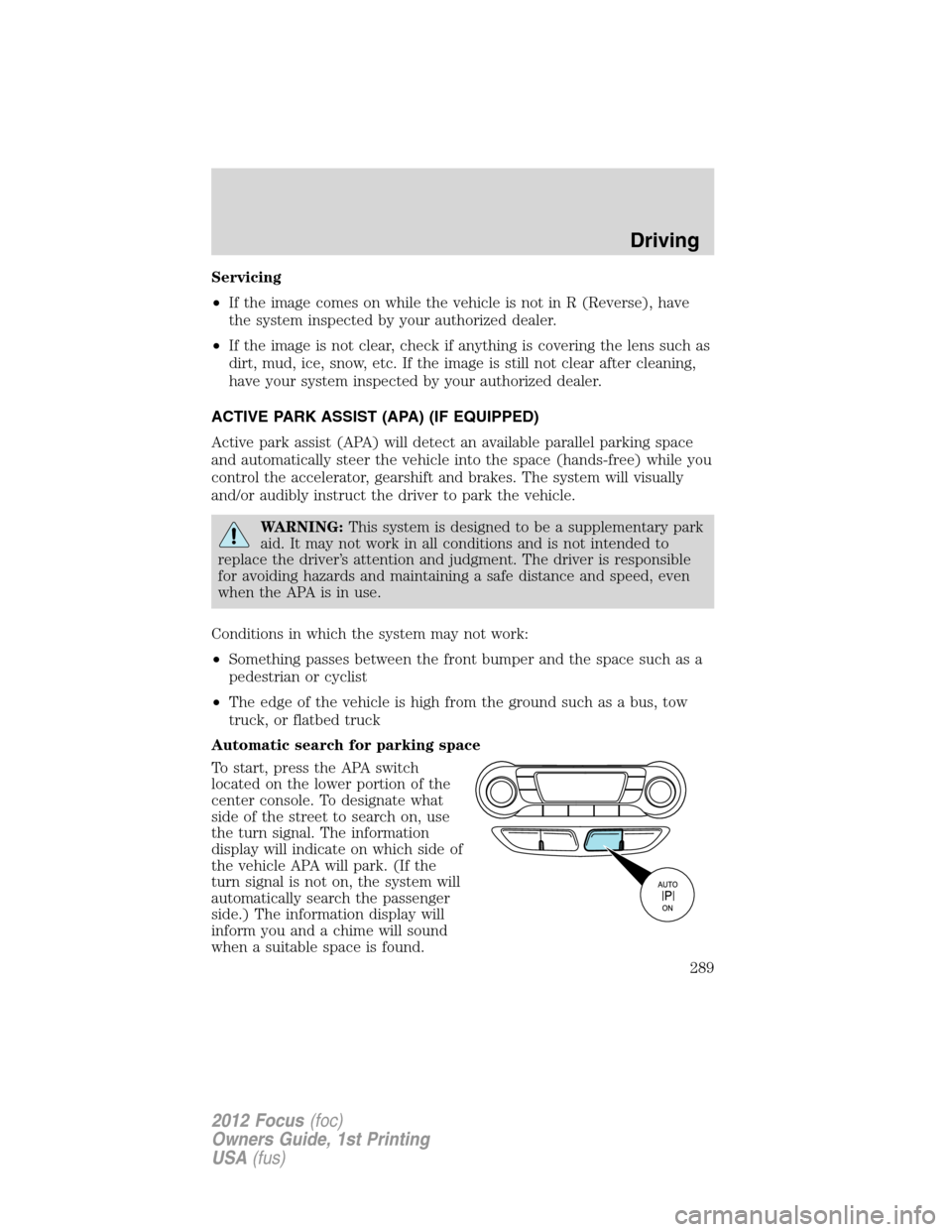
To start, press the APA switch
located on the lower portion of the
center console. To designate what
side of the street to search on, use
the turn signal. The information
display will indicate on which side of
the vehicle APA will park. (If the
turn signal is not on, the system will
automatically search the passenger
side.) The information display will
inform you and a chime will sound
when a suitable space is found.
Driving
289
2012 Focus(foc)
Owners Guide, 1st Printing
USA(fus)
Page 291 of 406
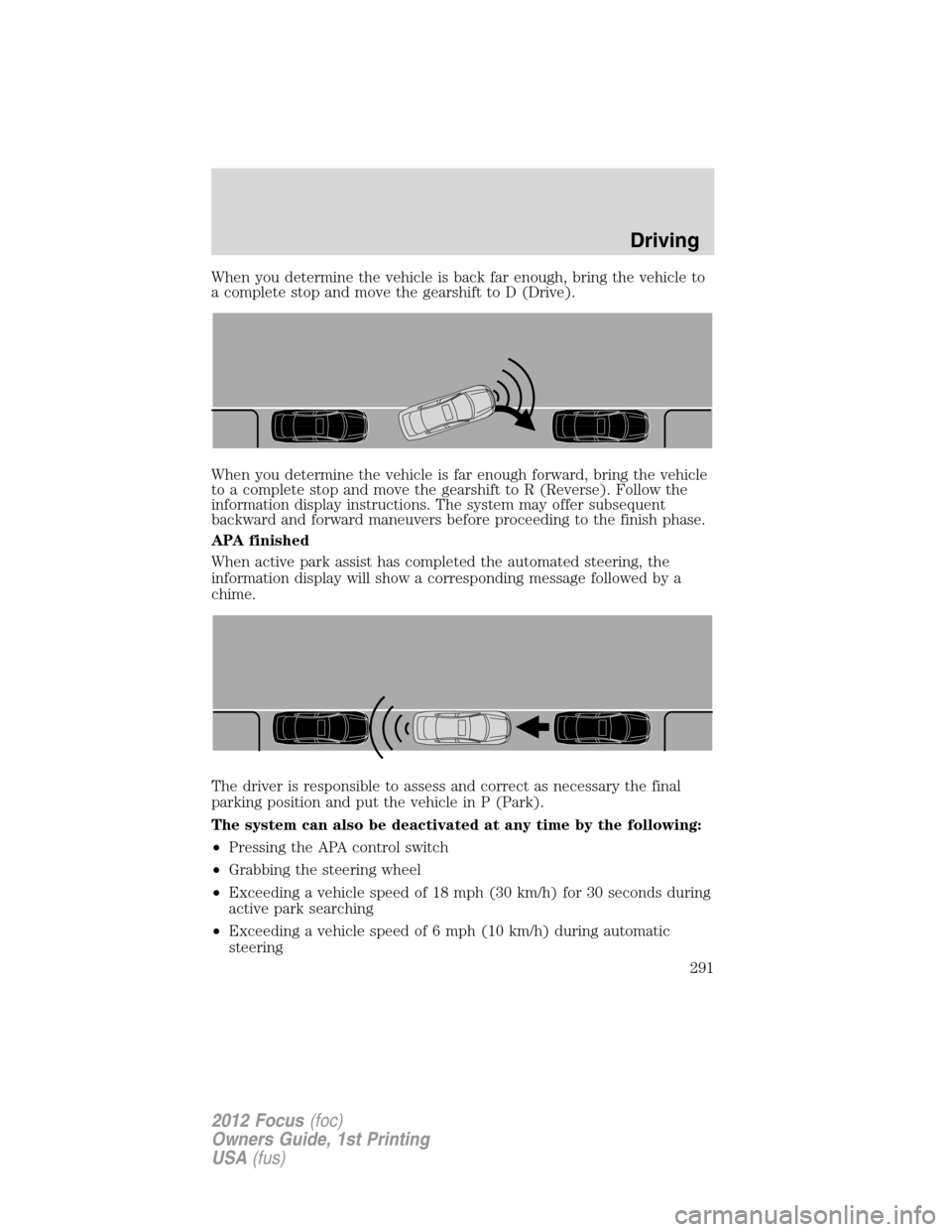
When you determine the vehicle is back far enough, bring the vehicle to
a complete stop and move the gearshift to D (Drive).
When you determine the vehicle is far enough forward, bring the vehicle
to a complete stop and move the gearshift to R (Reverse). Follow the
information display instructions. The system may offer subsequent
backward and forward maneuvers before proceeding to the finish phase.
APA finished
When active park assist has completed the automated steering, the
information display will show a corresponding message followed by a
chime.
The driver is responsible to assess and correct as necessary the final
parking position and put the vehicle in P (Park).
The system can also be deactivated at any time by the following:
•Pressing the APA control switch
•Grabbing the steering wheel
•Exceeding a vehicle speed of 18 mph (30 km/h) for 30 seconds during
active park searching
•Exceeding a vehicle speed of 6 mph (10 km/h) during automatic
steering
Driving
291
2012 Focus(foc)
Owners Guide, 1st Printing
USA(fus)