Page 16 of 406

Information:The message
indicator illuminates to supplement
some messages. It will be red or
amber depending on the severity of
the message and will remain on until
the cause of the message has been
rectified.
Turn signal:Illuminates when the
left or right turn signal or the
hazard lights are turned on. If the
indicators stay on or flash faster, check for a burned out bulb.
High beams:Illuminates when the
high beam headlamps are turned on.
Headlamps:Illuminates when the
low- beam headlamps are turned on.
Fog lamps (if equipped):
Illuminates when the front fog lamps
are turned on.
Key-in-ignition warning chime:Sounds when the key is left in the
ignition in the off or accessory position and the driver’s door is opened.
Headlamps on warning chime:Sounds when the headlamps or parking
lamps are on, the ignition is off (the key is not in the ignition) and the
driver’s door is opened.
Parking brake on chime:Sounds when the parking brake is left on and
the vehicle is driven. If the warning stays on after the park brake is off,
contact your authorized dealer as soon as possible.
Instrument Cluster
16
2012 Focus(foc)
Owners Guide, 1st Printing
USA(fus)
Page 17 of 406

GAUGES
Base cluster shown in standard measure; uplevel cluster and
metric similar.
1. Tachometer:Indicates the engine speed in revolutions per minute.
Driving with your tachometer pointer continuously at the top of the scale
may damage the engine.
2. Multifunction display:This is used to configure different vehicle
personalization options and display the status of various vehicle
functions. SeeBase and Up-level message centerin this chapter for
more information.
3. Speedometer:Indicates the current vehicle speed.
4. Engine coolant temperature gauge:Indicates engine coolant
temperature. At normal operating temperature, the needle will be in the
normal range (between H and C).If it enters the red section, the
engine is overheating. Stop the vehicle as soon as safely possible,
switch off the engine and let the engine cool.
5. Fuel gauge:Indicates approximately how much fuel is left in the fuel
tank (when the ignition is in the on position). The fuel gauge may vary
slightly when the vehicle is in motion or on a grade. The fuel icon and
arrow indicates which side of the vehicle the fuel filler door is located.
0 20406080
10 0
12 0
14 0
110
1013 0
15 0
10 012 0
14 0
16 0
18 0
0 20 40
306080
200
220
240
5070
90
5
123
4
Instrument Cluster
17
2012 Focus(foc)
Owners Guide, 1st Printing
USA(fus)
Page 18 of 406

Odometer :The odometer is displayed in the cluster and registers the
total accumulated distance the vehicle has traveled.
Trip odometer:Registers the distance of individual journeys.
•Standard instrument cluster:Press the reset stem once to switch
from the odometer to trip odometer . To reset the trip, press and hold
the reset stem.
•Optional instrument cluster:SeeBase message centerorUplevel
message centerin this chapter.
BASE MESSAGE CENTER (IF EQUIPPED)
WARNING:Driving while distracted can result in loss of vehicle
control, accident and injury. Ford strongly recommends that
drivers use extreme caution when using any device or feature that may
take their focus off the road. Your primary responsibility is the safe
operation of the vehicle. We recommend against the use of any
handheld device while driving and that you comply with all applicable
laws.
Your vehicle’s message center is capable of monitoring many vehicle
systems and will alert you to potential vehicle problems and various
conditions with informational messages and/or warnings.
The message center is also used to program/configure the different
features of your vehicle. The message center display is located in the
instrument cluster.
Use the left steering wheel controls
to navigate through the message
center.
Press the up/down arrow buttons to
move up/down through the message
center choices.
Press the left/right arrow buttons to
move left/right through the message
center choices.
Press the OK button to select
highlighted options and confirm
choices/messages.
Menu
Scroll up/down to highlight one of the options, then press the right arrow
key or OK to enter into that menu option.
Instrument Cluster
18
2012 Focus(foc)
Owners Guide, 1st Printing
USA(fus)
Page 20 of 406
Note:Some items are optional and may not appear.
Information
MyKey driven (distance driven) (if MyKey is programmed)
MyKey information (number of MyKeys and admin keys programmed)
Settings
Driver Assist Traction Ctrl On or Off
Hill start On or Off
Lighting Rain Light On or Off
Dimming Automatic or Manual
Hdlamp delay Manual or xx Seconds
Display Language Choose your applicable language
Distance Unit Standard or Metric
Temp Units Temperature Fahrenheit (°F) or
Celsius (°C)
Chimes Park Slot (park aid), Information, Warning
Convenience Compass Display On or Off
Calibrate Hold OK to
Calibrate
Zone (1–15) See the diagram
below to determine your magnetic
zone.
Determine which magnetic zone you
are in for your geographic location
by referring to the zone map, if
equipped.
1 2 3
4
5
6 7 8 9 101112 13 14 15
Instrument Cluster
20
2012 Focus(foc)
Owners Guide, 1st Printing
USA(fus)
Page 21 of 406

Settings (cont’d)
MyKey Create Hold OK to Create MyKey
Traction Ctrl Always On or User Selectable
Max Speed 80 MPH (130 km/h) or Off
Speed Warning 45 mph (75 km/h), 55 mph
(90 km/h), 65 mph (105 km/h) or
Off
Volume Limiter
Clear all Hold OK to Clear MyKeys
System Reset Hold OK to Reset System to Factory Default
Note:Some items are optional and may not appear.
System Check
The number of warnings will be listed first. All active warnings will
display first if applicable. The system check menu may appear different
based upon equipment options and current vehicle status. Use the
up/down arrow buttons to scroll through the list; press the right arrow
button to display specific information on the highlighted warning.
System warnings and status messages
SeeSystem warning and status messageslater in this chapter for more
information.
UP-LEVEL MESSAGE CENTER (IF EQUIPPED)
WARNING:Driving while distracted can result in loss of vehicle
control, accident and injury. Ford strongly recommends that
drivers use extreme caution when using any device or feature that may
take their focus off the road. Your primary responsibility is the safe
operation of the vehicle. We recommend against the use of any
handheld device while driving and that you comply with all applicable
laws.
Your vehicle’s message center is capable of monitoring many vehicle
systems and will alert you to potential vehicle problems and various
conditions with informational messages and/or warnings.
The message center is also used to program/configure the different
features of your vehicle. The message center display is located in the
instrument cluster.
Instrument Cluster
21
2012 Focus(foc)
Owners Guide, 1st Printing
USA(fus)
Page 22 of 406
Use the left steering wheel controls
to navigate through the message
center.
Press the up/down arrow buttons to
move up/down through the message
center choices.
Press the left/right arrow buttons to
move left/right through the message
center choices.
Press the OK button to select
highlighted options and confirm
choices/messages.
Main menu
Scroll up/down to highlight one of the options, then press the right arrow
key or OK to enter into that menu option.
Trip 1 and 2
Trip odometer — shows the accumulated trip distance. Displayed in
the lower line denoted by a 1: or 2:.
Trip timer — shows the elapsed trip time. This timer will stop when
the vehicle is turned off and will restart when the vehicle is restarted.
Distance to empty — shows the approximate distance the vehicle can
travel before running out of fuel.
Instrument Cluster
22
2012 Focus(foc)
Owners Guide, 1st Printing
USA(fus)
Page 24 of 406
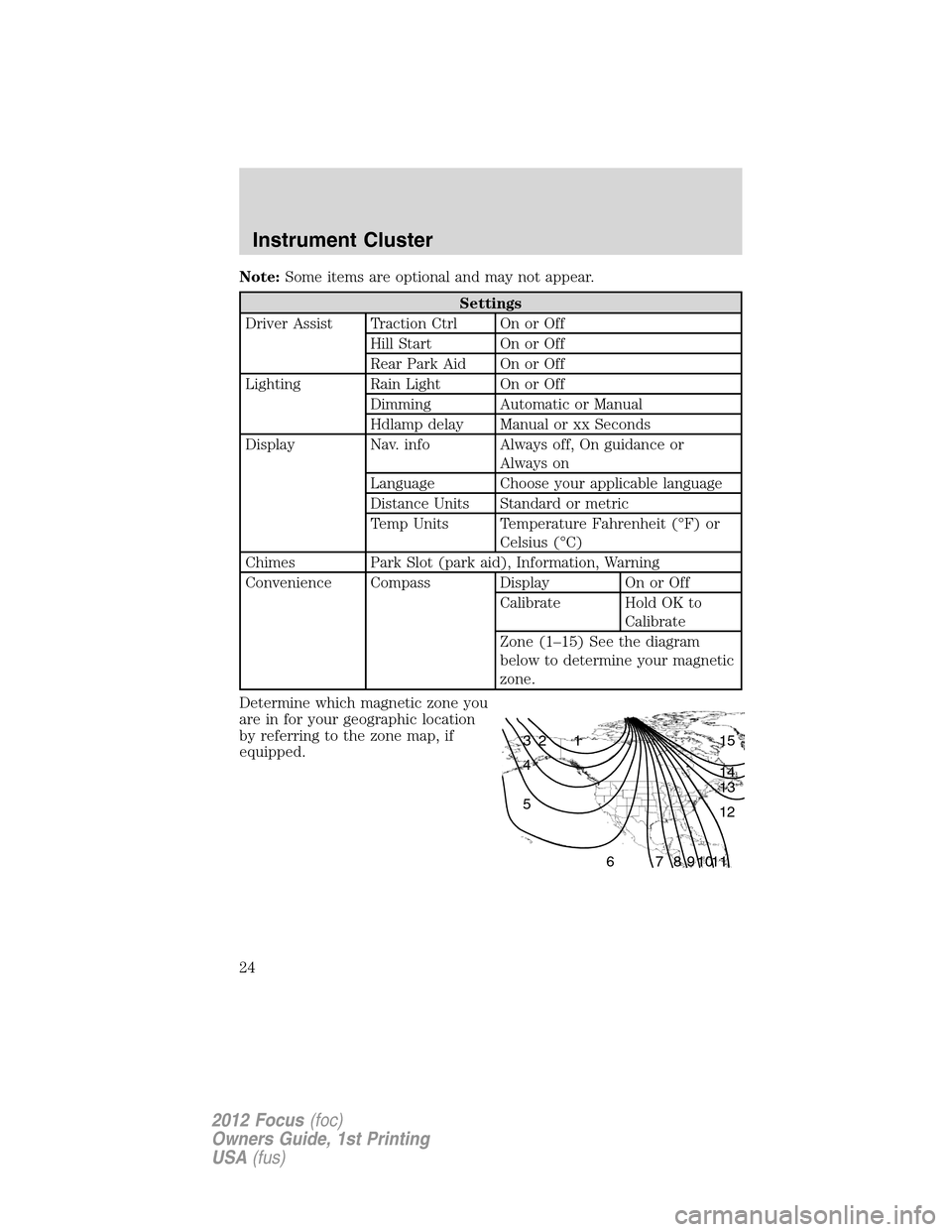
Note:Some items are optional and may not appear.
Settings
Driver Assist Traction Ctrl On or Off
Hill Start On or Off
Rear Park Aid On or Off
Lighting Rain Light On or Off
Dimming Automatic or Manual
Hdlamp delay Manual or xx Seconds
Display Nav. info Always off, On guidance or
Always on
Language Choose your applicable language
Distance Units Standard or metric
Temp Units Temperature Fahrenheit (°F) or
Celsius (°C)
Chimes Park Slot (park aid), Information, Warning
Convenience Compass Display On or Off
Calibrate Hold OK to
Calibrate
Zone (1–15) See the diagram
below to determine your magnetic
zone.
Determine which magnetic zone you
are in for your geographic location
by referring to the zone map, if
equipped.
1 2 3
4
5
6 7 8 9 101112 13 14 15
Instrument Cluster
24
2012 Focus(foc)
Owners Guide, 1st Printing
USA(fus)
Page 25 of 406
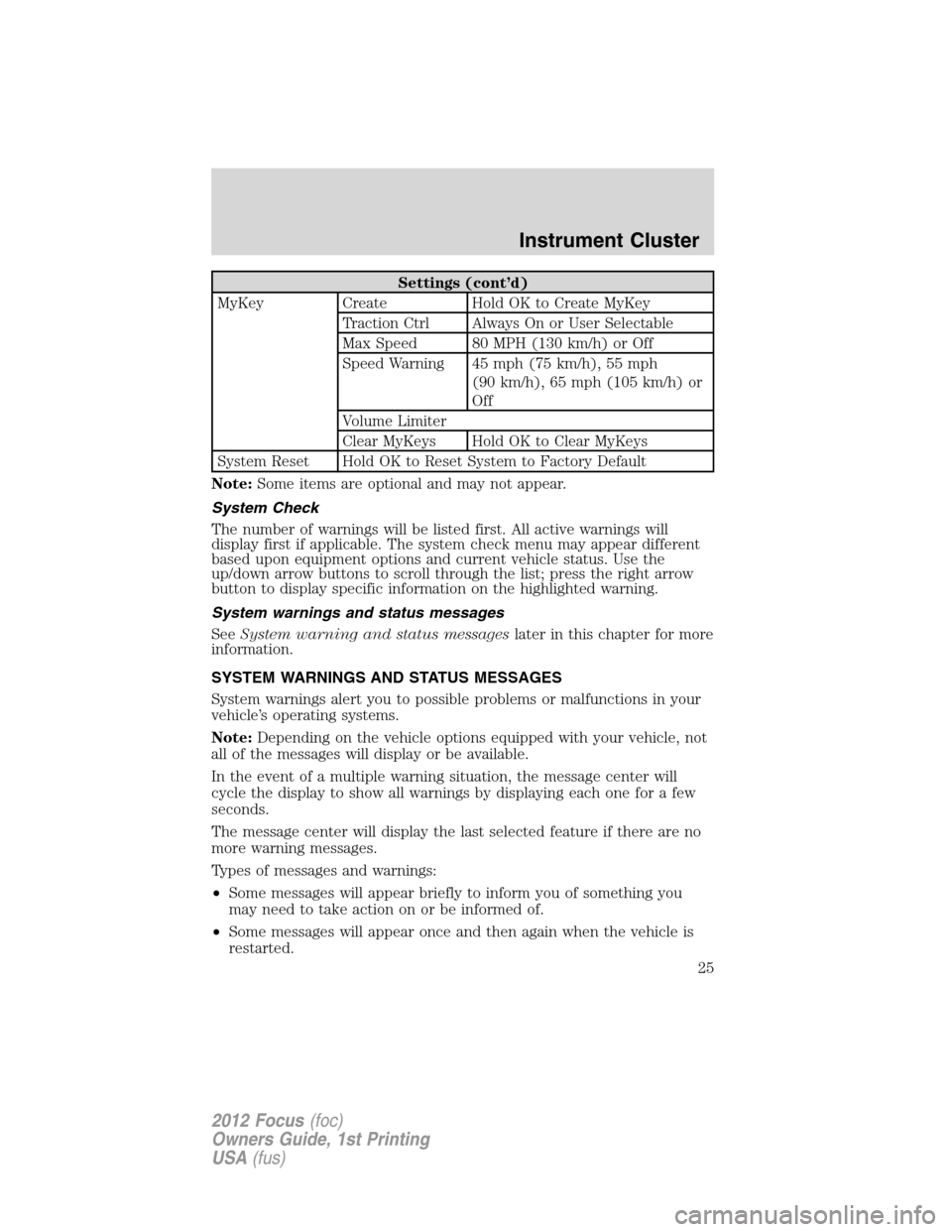
Settings (cont’d)
MyKey Create Hold OK to Create MyKey
Traction Ctrl Always On or User Selectable
Max Speed 80 MPH (130 km/h) or Off
Speed Warning 45 mph (75 km/h), 55 mph
(90 km/h), 65 mph (105 km/h) or
Off
Volume Limiter
Clear MyKeys Hold OK to Clear MyKeys
System Reset Hold OK to Reset System to Factory Default
Note:Some items are optional and may not appear.
System Check
The number of warnings will be listed first. All active warnings will
display first if applicable. The system check menu may appear different
based upon equipment options and current vehicle status. Use the
up/down arrow buttons to scroll through the list; press the right arrow
button to display specific information on the highlighted warning.
System warnings and status messages
SeeSystem warning and status messageslater in this chapter for more
information.
SYSTEM WARNINGS AND STATUS MESSAGES
System warnings alert you to possible problems or malfunctions in your
vehicle’s operating systems.
Note:Depending on the vehicle options equipped with your vehicle, not
all of the messages will display or be available.
In the event of a multiple warning situation, the message center will
cycle the display to show all warnings by displaying each one for a few
seconds.
The message center will display the last selected feature if there are no
more warning messages.
Types of messages and warnings:
•Some messages will appear briefly to inform you of something you
may need to take action on or be informed of.
•Some messages will appear once and then again when the vehicle is
restarted.
Instrument Cluster
25
2012 Focus(foc)
Owners Guide, 1st Printing
USA(fus)