Page 2 of 356
Locks and Security 130
Keys 130
Locks 132
Anti-theft system 143
Seating and Safety Restraints 146
Seating 146
Personal Safety System™ 154
Safety belt system 158
Airbags 168
Child restraints 184
Tires, Wheels and Loading 202
Tire information 202
Tire inflation 204
Tire Pressure Monitoring System (TPMS) 217
Vehicle loading 221
Trailer towing 227
Recreational towing 227
Driving 230
Starting 230
Brakes 237
AdvanceTrac�240
Transmission operation 246
Roadside Emergencies 255
Getting roadside assistance 255
Hazard flasher control 256
Fuel pump shut-off 257
Fuses and relays 257
Changing tires 265
Wheel lug nut torque 270
Jump starting 271
Wrecker towing 274
Table of Contents
2
2012 Fiesta(fie)
Owners Guide, 1st Printing
USA(fus)
Page 16 of 356

AdvanceTrac�/Traction control
(if equipped):Displays when the
AdvanceTrac�/Traction control is
active. If the light remains on, have
the system serviced immediately, refer to theDrivingchapter for more
information.
AdvanceTrac�/Traction control
off light (if equipped):Illuminates
when AdvanceTrac�/Traction control
has been disabled by the driver.
Refer to theDrivingchapter for
more information.
Speed control (if equipped):
Illuminates when the speed control
system is in use.
Anti-theft system:Flashes when
the SecuriLock�Passive Anti-theft
System has been activated.
Turn signal:Illuminates when the
left or right turn signal or the
hazard lights are turned on. If the
indicators stay on or flash faster, check for a burned out bulb.
High beams:Illuminates when the
high beam headlamps are turned on.
Key-in-ignition warning chime:Sounds when the key is left in the
ignition in the off or accessory position and the driver’s door is opened.
Headlamps on warning chime:Sounds when the headlamps or parking
lamps are on, the ignition is off (the key is not in the ignition) and the
driver’s door is opened.
OFF
Instrument Cluster
16
2012 Fiesta(fie)
Owners Guide, 1st Printing
USA(fus)
Page 20 of 356
Message Warning Lamp at
Instrument ClusterSystem
INTERIOR SCAN
DEACTIVATED—Anti-theft security
system
IMMOBILIZER
MALFUNCTION
SERVICE NOW—Anti-theft security
system
ALARM TRIGGERED
CHECK VEHICLE—Anti-theft security
system
LEFT/RIGHT
INDICATOR
MALFUNCTION
CHANGE BULB— Lights
HILL START ASSIST
NOT AVAILABLE
Transmission
STEERING LOCK
ENGAGED TURN
STEERING WHEEL—Passive Entry/Passive
Start
STEERING
MALFUNCTION
SERVICE NOW—Passive Entry/Passive
Start
STEERING
MALFUNCTION
STOP SAFELY—Passive Entry/Passive
Start
POWER STEERING
MALFUNCTION
SERVICE NOW— Power Steering
KEY NOT
DETECTED—Passive entry/passive
start system
TURN IGNITION
OFF USE POWER
BUTTON—Passive entry/passive
start system
KEY OUTSIDE CAR
—Passive entry/passive
start system
Instrument Cluster
20
2012 Fiesta(fie)
Owners Guide, 1st Printing
USA(fus)
Page 21 of 356
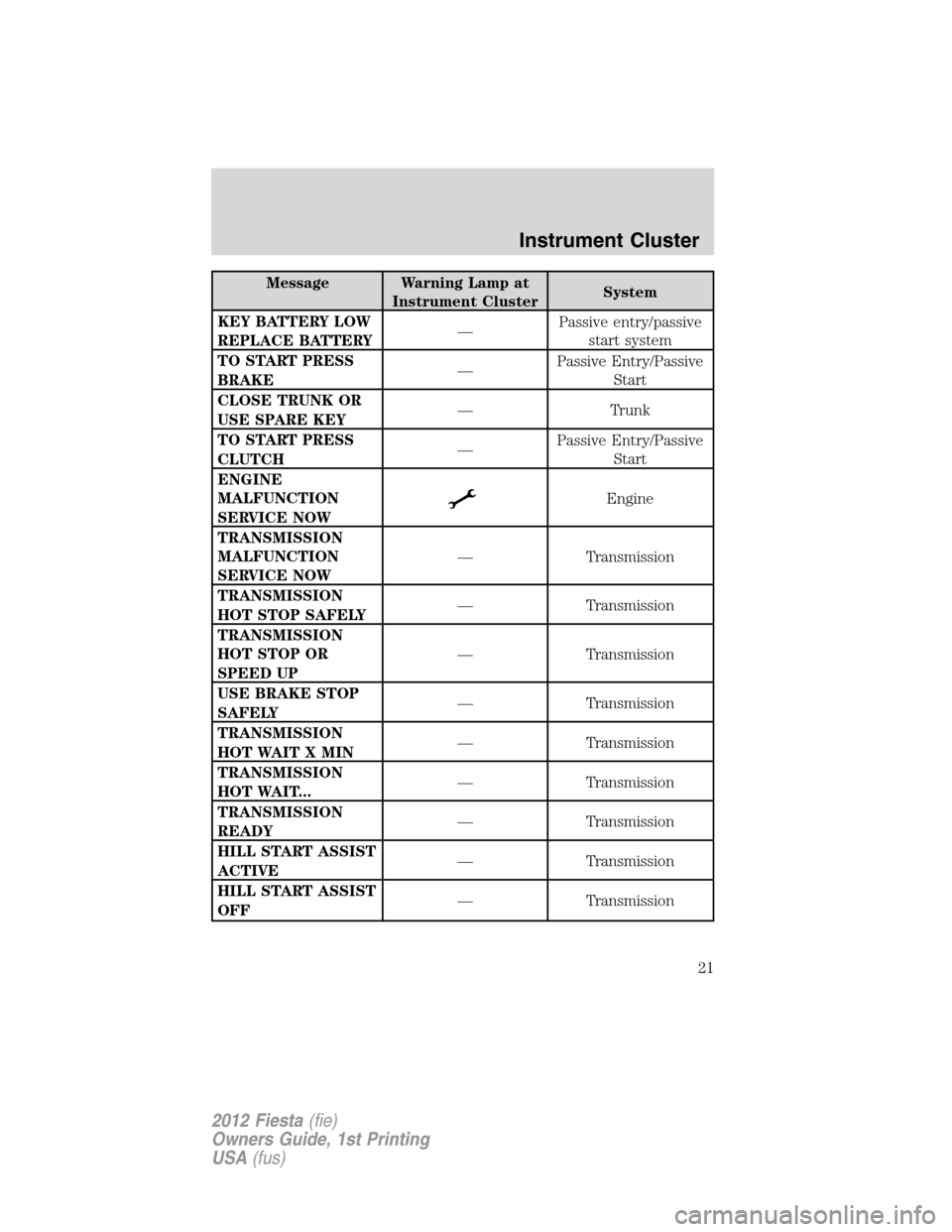
Message Warning Lamp at
Instrument ClusterSystem
KEY BATTERY LOW
REPLACE BATTERY—Passive entry/passive
start system
TO START PRESS
BRAKE—Passive Entry/Passive
Start
CLOSE TRUNK OR
USE SPARE KEY— Trunk
TO START PRESS
CLUTCH—Passive Entry/Passive
Start
ENGINE
MALFUNCTION
SERVICE NOW
Engine
TRANSMISSION
MALFUNCTION
SERVICE NOW— Transmission
TRANSMISSION
HOT STOP SAFELY— Transmission
TRANSMISSION
HOT STOP OR
SPEED UP— Transmission
USE BRAKE STOP
SAFELY— Transmission
TRANSMISSION
HOT WAIT X MIN— Transmission
TRANSMISSION
HOT WAIT...— Transmission
TRANSMISSION
READY— Transmission
HILL START ASSIST
ACTIVE— Transmission
HILL START ASSIST
OFF— Transmission
Instrument Cluster
21
2012 Fiesta(fie)
Owners Guide, 1st Printing
USA(fus)
Page 22 of 356

Message Warning Lamp at
Instrument ClusterSystem
VEHICLE NOT IN
PARK SELECT P— Starting/Transmission
VEHICLE NOT IN
PARK SELECT P— Starting/Transmission
DOOR OPEN APPLY
BRAKE— Doors
X DOOR OPEN
Doors
TRUNK OPEN
Doors
HOOD OPEN
Hood
AIRBAG
MALFUNCTION
SERVICE NOW
Airbag
ENGINE OIL
CHANGE DUE NEXT
SERVICE
Engine Oil (SeeOil
life monitoring
system resetlater in
this section)
ENGINE OIL
PRESSURE LOW
STOP SAFELY
Engine Oil
BRAKE FLUID
LEVEL LOW
SERVICE NOWBRAKE or
Brakes
Oil life monitoring system reset
To reset the oil service light and clear the oil change message after
servicing use the following procedure:
1. Begin with the ignition off.
2. Turn the key to the accessory position for keyed vehicles and for push
button start vehicles press the Start/Stop button once quickly. DO NOT
attempt to start the engine.
3. Press the accelerator and brake pedals fully for 20 seconds.
4.ENGINE OIL CHANGE DUE NEXT SERVICEand
will display.
5. Turn the vehicle off. The message and lights will be cleared.
Instrument Cluster
22
2012 Fiesta(fie)
Owners Guide, 1st Printing
USA(fus)
Page 31 of 356
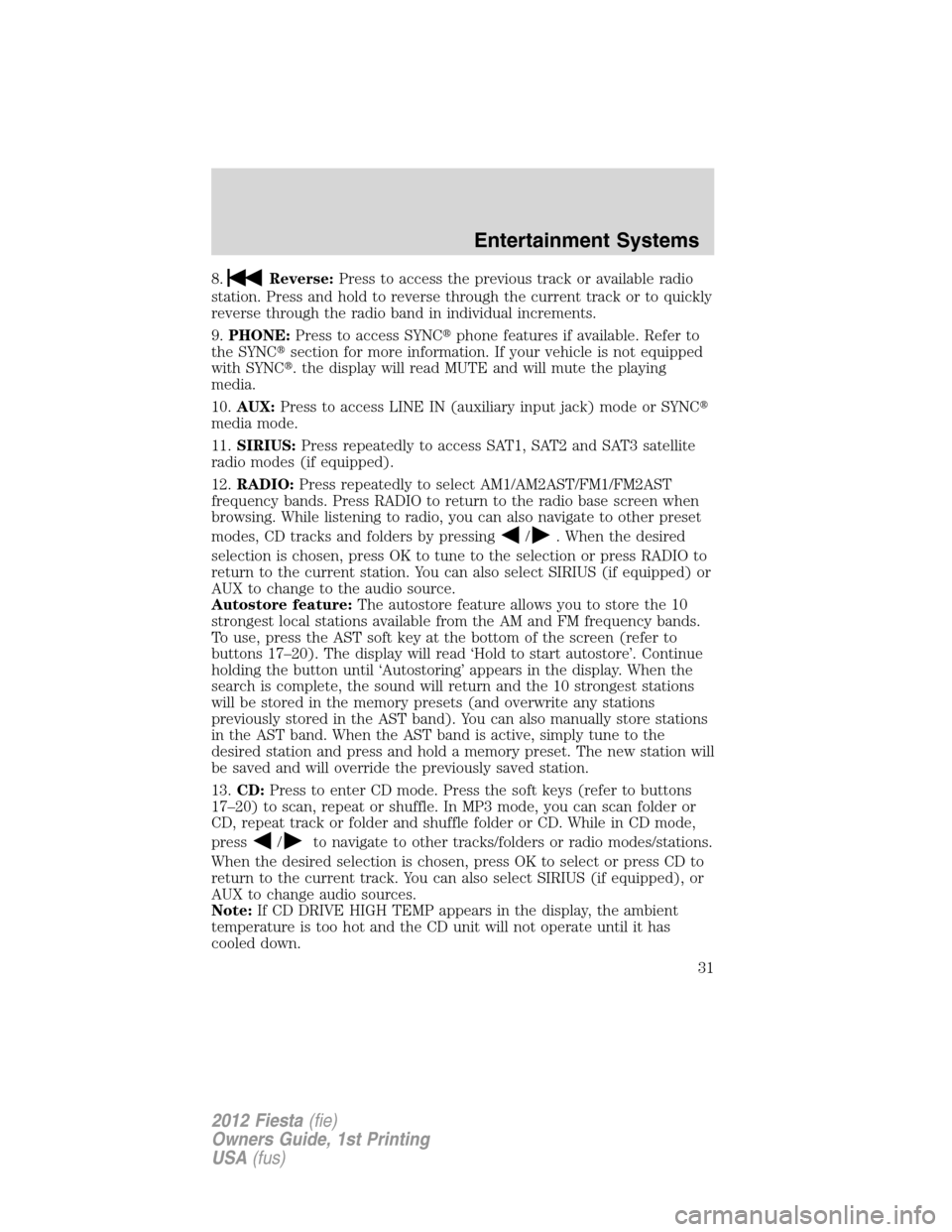
8.Reverse:Press to access the previous track or available radio
station. Press and hold to reverse through the current track or to quickly
reverse through the radio band in individual increments.
9.PHONE:Press to access SYNC�phone features if available. Refer to
the SYNC�section for more information. If your vehicle is not equipped
with SYNC�. the display will read MUTE and will mute the playing
media.
10.AUX:Press to access LINE IN (auxiliary input jack) mode or SYNC�
media mode.
11.SIRIUS:Press repeatedly to access SAT1, SAT2 and SAT3 satellite
radio modes (if equipped).
12.RADIO:Press repeatedly to select AM1/AM2AST/FM1/FM2AST
frequency bands. Press RADIO to return to the radio base screen when
browsing. While listening to radio, you can also navigate to other preset
modes, CD tracks and folders by pressing
/. When the desired
selection is chosen, press OK to tune to the selection or press RADIO to
return to the current station. You can also select SIRIUS (if equipped) or
AUX to change to the audio source.
Autostore feature:The autostore feature allows you to store the 10
strongest local stations available from the AM and FM frequency bands.
To use, press the AST soft key at the bottom of the screen (refer to
buttons 17–20). The display will read ‘Hold to start autostore’. Continue
holding the button until ‘Autostoring’ appears in the display. When the
search is complete, the sound will return and the 10 strongest stations
will be stored in the memory presets (and overwrite any stations
previously stored in the AST band). You can also manually store stations
in the AST band. When the AST band is active, simply tune to the
desired station and press and hold a memory preset. The new station will
be saved and will override the previously saved station.
13.CD:Press to enter CD mode. Press the soft keys (refer to buttons
17–20) to scan, repeat or shuffle. In MP3 mode, you can scan folder or
CD, repeat track or folder and shuffle folder or CD. While in CD mode,
press
/to navigate to other tracks/folders or radio modes/stations.
When the desired selection is chosen, press OK to select or press CD to
return to the current track. You can also select SIRIUS (if equipped), or
AUX to change audio sources.
Note:If CD DRIVE HIGH TEMP appears in the display, the ambient
temperature is too hot and the CD unit will not operate until it has
cooled down.
Entertainment Systems
31
2012 Fiesta(fie)
Owners Guide, 1st Printing
USA(fus)
Page 32 of 356
14.(Eject):Press to eject a CD.
15.Cursor controls:Use to cycle through various menu selections.
Note:You can either press the arrows or move the OK knob in the
desired direction.
16.Sound menu:Press access Treble, Bass, Fade (if equipped) and
Balance menu options. Use
/to cycle through the various options.
When the desired option is chosen, press
/to increase or
decrease the levels. Press OK to set or MENU to exit. Sound settings can
be set for each audio source independently.
17–20Soft keys:Press these soft
keys to access the corresponding
functions on the screen.
20191817
Entertainment Systems
32
2012 Fiesta(fie)
Owners Guide, 1st Printing
USA(fus)
Page 39 of 356
Satellite Radio Electronic Serial Number (ESN):This 12-digit
Satellite Serial Number is needed to activate, modify or track your
satellite radio account. You will need this number when communicating
with SIRIUS. While in Satellite Radio mode, you can view this number on
the radio display by pressing the SIRIUS and Preset 1 buttons at the
same time.
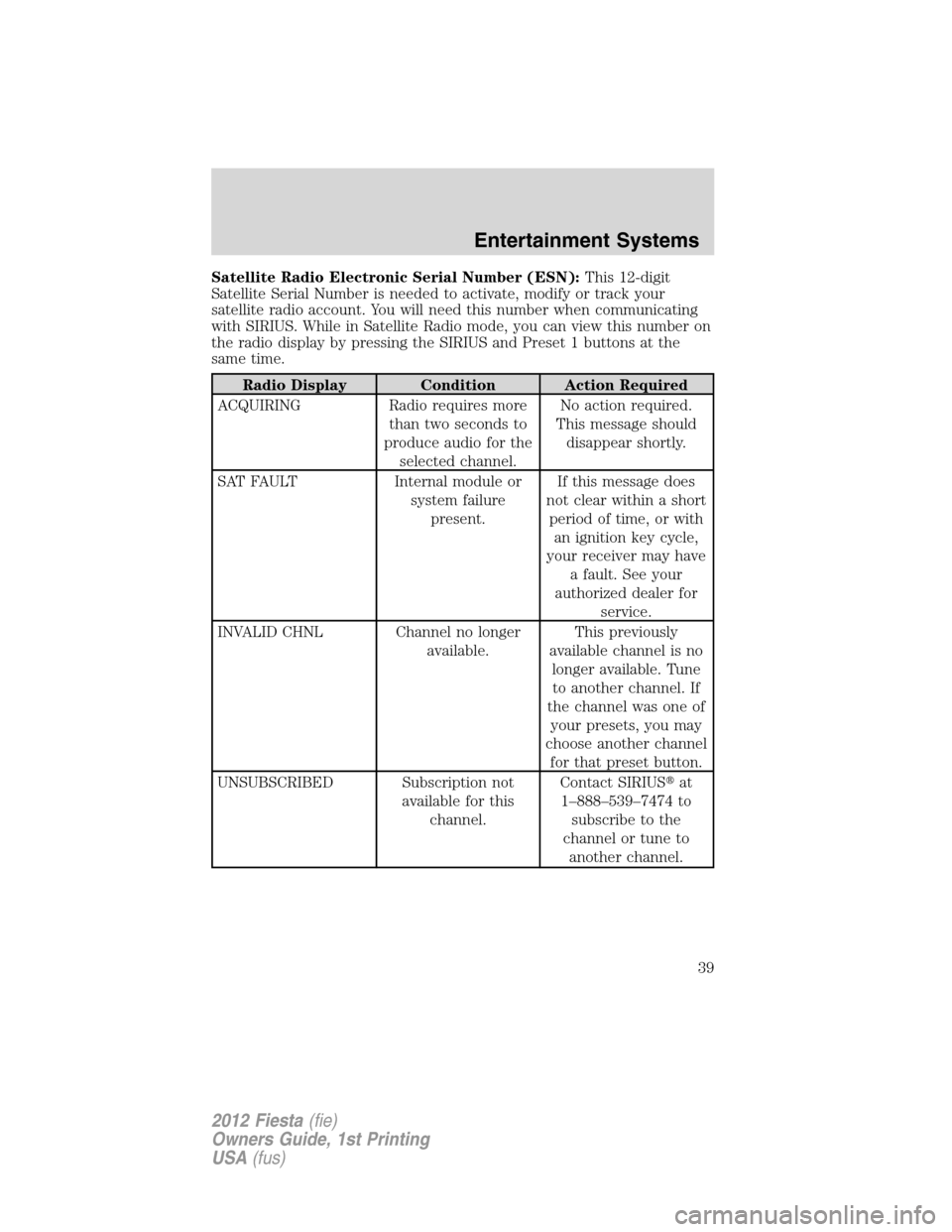
Radio Display Condition Action Required
ACQUIRING Radio requires more
than two seconds to
produce audio for the
selected channel.No action required.
This message should
disappear shortly.
SAT FAULT Internal module or
system failure
present.If this message does
not clear within a short
period of time, or with
an ignition key cycle,
your receiver may have
a fault. See your
authorized dealer for
service.
INVALID CHNL Channel no longer
available.This previously
available channel is no
longer available. Tune
to another channel. If
the channel was one of
your presets, you may
choose another channel
for that preset button.
UNSUBSCRIBED Subscription not
available for this
channel.Contact SIRIUS�at
1–888–539–7474 to
subscribe to the
channel or tune to
another channel.
Entertainment Systems
39
2012 Fiesta(fie)
Owners Guide, 1st Printing
USA(fus)