2012 FORD F150 tow bar
[x] Cancel search: tow barPage 125 of 462
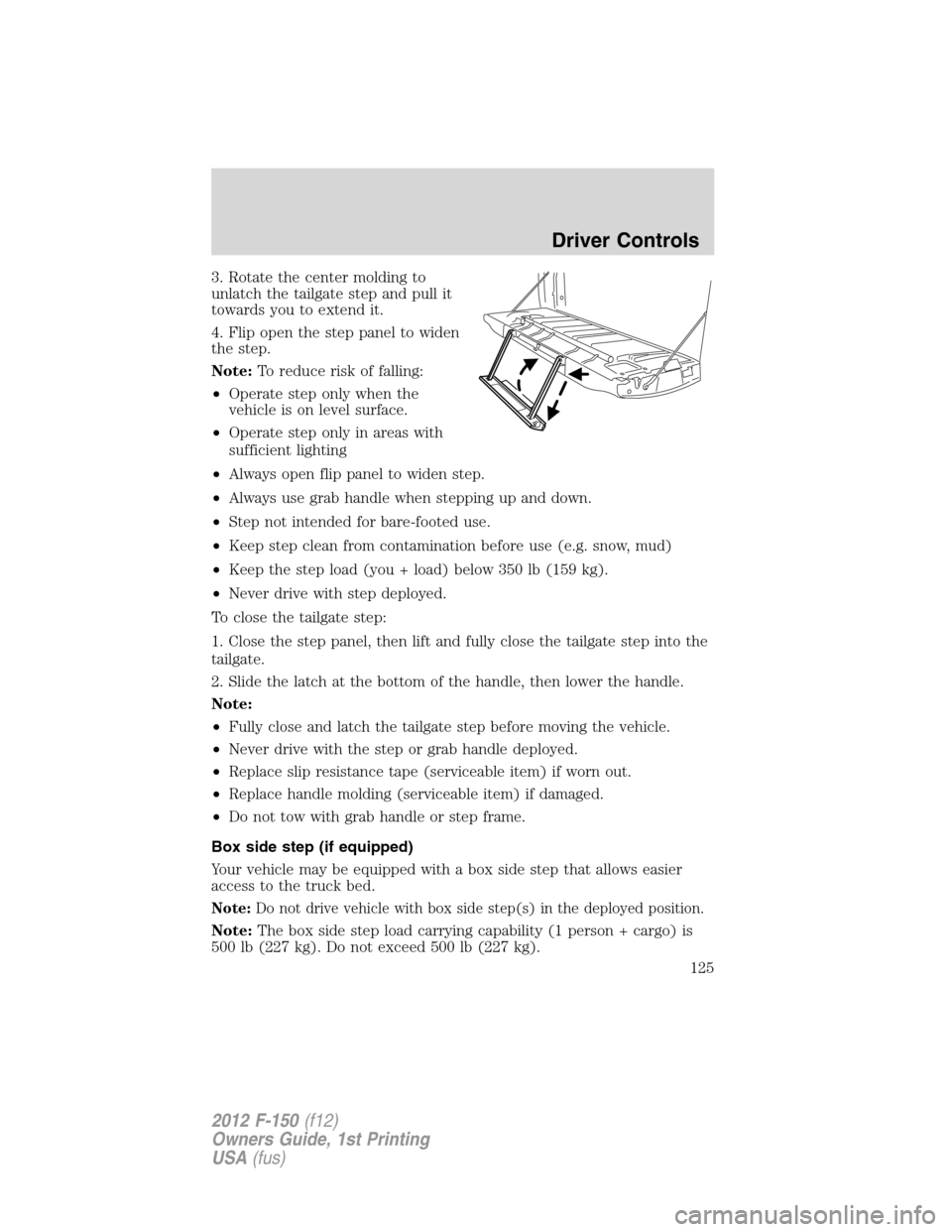
3. Rotate the center molding to
unlatch the tailgate step and pull it
towards you to extend it.
4. Flip open the step panel to widen
the step.
Note:To reduce risk of falling:
•Operate step only when the
vehicle is on level surface.
•Operate step only in areas with
sufficient lighting
•Always open flip panel to widen step.
•Always use grab handle when stepping up and down.
•Step not intended for bare-footed use.
•Keep step clean from contamination before use (e.g. snow, mud)
•Keep the step load (you + load) below 350 lb (159 kg).
•Never drive with step deployed.
To close the tailgate step:
1. Close the step panel, then lift and fully close the tailgate step into the
tailgate.
2. Slide the latch at the bottom of the handle, then lower the handle.
Note:
•Fully close and latch the tailgate step before moving the vehicle.
•Never drive with the step or grab handle deployed.
•Replace slip resistance tape (serviceable item) if worn out.
•Replace handle molding (serviceable item) if damaged.
•Do not tow with grab handle or step frame.
Box side step (if equipped)
Your vehicle may be equipped with a box side step that allows easier
access to the truck bed.
Note:Do not drive vehicle with box side step(s) in the deployed position.
Note:The box side step load carrying capability (1 person + cargo) is
500 lb (227 kg). Do not exceed 500 lb (227 kg).
Driver Controls
125
2012 F-150(f12)
Owners Guide, 1st Printing
USA(fus)
Page 166 of 462

•To gain access to the storage
compartment (if equipped) under
the center seat cushion, lift the
latch to open the lid.
Using the manual lumbar support (if equipped)
For more lumbar support, turn the
lumbar support control toward the
front of vehicle.
For less lumbar support, turn the
lumbar support control toward the
rear of vehicle.
Seating and Safety Restraints
166
2012 F-150(f12)
Owners Guide, 1st Printing
USA(fus)
Page 167 of 462

Using the power lumbar support (if equipped)
The power lumbar control is located on the outboard side of the seat.
Press the forward side of the control
for additional support.
Press the rear side of the control to
reduce support.
Adjusting the front power seat (if equipped)
WARNING:Never adjust the driver’s seat or seatback when the
vehicle is moving.
WARNING:Always drive and ride with your seatback upright
and the lap belt snug and low across the hips.
WARNING:Reclining the seatback can cause an occupant to
slide under the seat’s safety belt, resulting in severe personal
injuries in the event of a collision.
WARNING:Sitting improperly out of position or with the seat
back reclined too far can take off weight from the seat cushion
and affect the decision of the passenger sensing system, resulting in
serious injury or death in a crash. Always sit upright against your
seatback, with your feet on the floor.
WARNING:To reduce the risk of possible serious injury: Do not
hang objects off seat back or stow objects in the seatback map
pocket (if equipped) when a child is in the front passenger seat. Do not
place objects underneath the front passenger seat or between the seat
and the center console (if equipped). Check the “passenger airbag off” or
“pass airbag off” indicator lamp for proper airbag status. Refer toFront
passenger sensing systemin theAirbag supplemental restraint
system (SRS)section for additional details. Failure to follow these
instructions may interfere with the front passenger seat sensing system.
Seating and Safety Restraints
167
2012 F-150(f12)
Owners Guide, 1st Printing
USA(fus)
Page 271 of 462
The trailer brake controller (TBC) is designed to display three items of
information in the instrument cluster message center. These are: gain
setting, output bar graph, and trailer connectivity status. They appear in
the message center as follows:
•TBC GAIN = XX.X NO TRAILER:The instrument cluster message
center displays the current gain setting during a given ignition cycle
and when adjusting the gain. This message is also displayed during
manual activation without a trailer connected or when gain
adjustments are made with no trailer connected.
•TBC GAIN = XX.X OUTPUT = //////:When the vehicle’s brake pedal
is pushed, or when the manual control is activated, bar indicators
illuminate in the instrument cluster message center to indicate the
amount of power going to the trailer brakes relative to the brake pedal
or manual control input. One bar indicates the least amount of output
with six bars indicating maximum output.
•TRAILER CONNECTED:This message is displayed when a correct
trailer wiring connection (a trailer with electric trailer brakes) has
been sensed during a given ignition cycle.
•TRAILER DISCONNECTED:This message is displayed and
accompanied by a single chime, when a trailer connection was
determined and then a disconnection, either intentionally or
unintentionally, has been sensed during a given ignition cycle. It is also
displayed if a truck or trailer wiring fault occurs causing the trailer to
appear disconnected. This message is also displayed during manual
activation without a trailer connected.
2.Manual control lever:Slide the control lever to the left to activate
power to the trailer’s electric brakes independent of the tow vehicle’s
brakes (see the followingProcedure for adjusting GAINsection for
instructions on proper use of this feature). If the manual control is
activated while the brake is also applied, the greater of the two inputs
determines the power sent to the trailer brakes.
•Stop lamps:Activating the TBC manual control lever illuminates both
the trailer brake lamps and the tow vehicle brake lamps except the
center high-mount stop lamp (presuming proper trailer electrical
connection). Pressing the vehicle brake pedal also illuminates both
trailer and vehicle brake lamps.
Tires, Wheels and Loading
271
2012 F-150(f12)
Owners Guide, 1st Printing
USA(fus)
Page 402 of 462
•Warming up a vehicle on cold mornings is not required and may
reduce fuel economy.
•Resting your foot on the brake pedal while driving may reduce fuel
economy.
•Combine errands and minimize stop-and-go driving.
Maintenance
•Keep tires properly inflated and use only recommended size.
•Operating a vehicle with the wheels out of alignment will reduce fuel
economy.
•Use recommended engine oil. Refer toMaintenance product
specifications and capacitiesin this chapter.
•Perform all regularly scheduled maintenance items. Follow the
recommended maintenance schedule and owner maintenance checks
found inscheduled maintenance information.
Conditions
•Heavily loading a vehicle or towing a trailer may reduce fuel economy
at any speed.
•Carrying unnecessary weight may reduce fuel economy (approximately
1 mpg [0.4 km/L] is lost for every 400 lb [180 kg] of weight carried).
•Adding certain accessories to your vehicle (for example bug
deflectors, rollbars/light bars, running boards, ski/luggage racks) may
reduce fuel economy.
•To maximize the fuel economy, drive with the tonneau cover installed
(if equipped).
•Using fuel blended with alcohol may lower fuel economy.
•Fuel economy may decrease with lower temperatures during the first
8–10 miles (12–16 km) of driving.
•Driving on flat terrain offers improved fuel economy as compared to
driving on hilly terrain.
•Transmissions give their best fuel economy when operated in the top
cruise gear and with steady pressure on the gas pedal.
•Four-wheel-drive operation (if equipped) is less fuel efficient than
two-wheel-drive operation.
•Close windows for high speed driving.
Maintenance and Specifications
402
2012 F-150(f12)
Owners Guide, 1st Printing
USA(fus)
Page 425 of 462
Lifestyle
•Ash cup / smoker’s package•Racks and carriers*
•Bedliners and bedmats•Truck bed camping tent*
•Bed side step•Sportliner cargo liner*
•Towing mirrors•Rear seat entertainment*
•Bed extender•Trailer brake controller
•Tonneau covers*•Hitch balls and towbars
•Interior cargo organization and management
•Truck bed cargo organization and management
•Trailer hitches, wiring harnesses and accessories
Peace of mind
•Keyless entry keypad•Remote start
•Vehicle security systems•Wheel locks
•Bed step*•Bed hooks*
•Protective seat covers*•Back up alarm*
•Cable lock*•Tool/cargo boxes*
•Locking gas plug for capless fuel system
•Bumper and hitch mounted parking sensors*
*Ford Licensed Accessories (FLA) are warranted by the accessory
manufacturer’s warranty. Ford Licensed Accessories are fully designed
and developed by the accessory manufacturer and have not been
designed or tested to Ford Motor Company engineering requirements.
Contact your Ford dealer for details regarding the manufacturer’s limited
warranty and/or a copy of the FLA product limited warranty offered by
the accessory manufacturer.
For maximum vehicle performance, keep the following information in
mind when adding accessories or equipment to your vehicle:
•When adding accessories, equipment, passengers and luggage to your
vehicle, do not exceed the total weight capacity of the vehicle or of
the front or rear axle (GVWR or GAWR as indicated on the Safety
Compliance Certification label). Consult your authorized dealer for
specific weight information.
Accessories
425
2012 F-150(f12)
Owners Guide, 1st Printing
USA(fus)