2012 FORD F150 wheel
[x] Cancel search: wheelPage 309 of 462
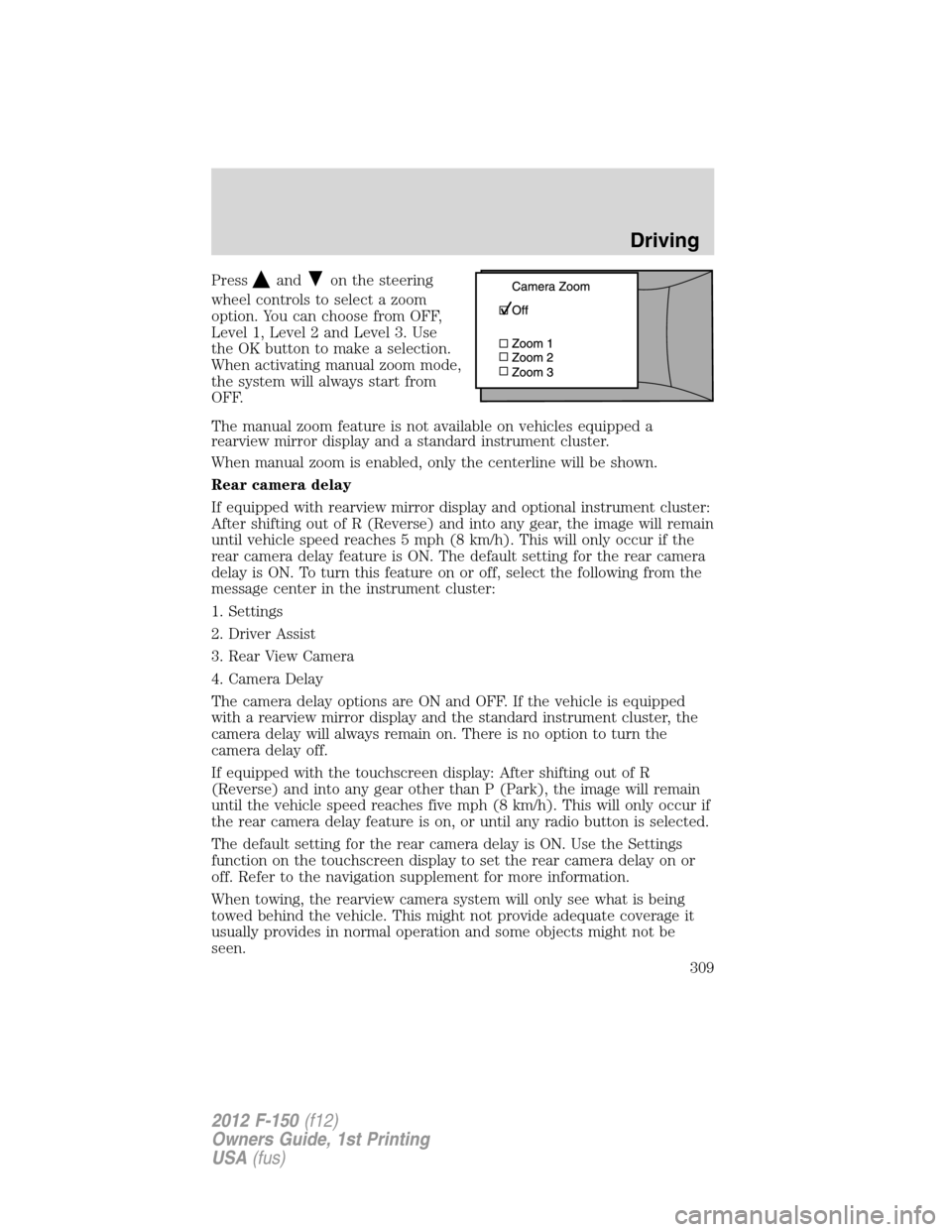
Pressandon the steering
wheel controls to select a zoom
option. You can choose from OFF,
Level 1, Level 2 and Level 3. Use
the OK button to make a selection.
When activating manual zoom mode,
the system will always start from
OFF.
The manual zoom feature is not available on vehicles equipped a
rearview mirror display and a standard instrument cluster.
When manual zoom is enabled, only the centerline will be shown.
Rear camera delay
If equipped with rearview mirror display and optional instrument cluster:
After shifting out of R (Reverse) and into any gear, the image will remain
until vehicle speed reaches 5 mph (8 km/h). This will only occur if the
rear camera delay feature is ON. The default setting for the rear camera
delay is ON. To turn this feature on or off, select the following from the
message center in the instrument cluster:
1. Settings
2. Driver Assist
3. Rear View Camera
4. Camera Delay
The camera delay options are ON and OFF. If the vehicle is equipped
with a rearview mirror display and the standard instrument cluster, the
camera delay will always remain on. There is no option to turn the
camera delay off.
If equipped with the touchscreen display: After shifting out of R
(Reverse) and into any gear other than P (Park), the image will remain
until the vehicle speed reaches five mph (8 km/h). This will only occur if
the rear camera delay feature is on, or until any radio button is selected.
The default setting for the rear camera delay is ON. Use the Settings
function on the touchscreen display to set the rear camera delay on or
off. Refer to the navigation supplement for more information.
When towing, the rearview camera system will only see what is being
towed behind the vehicle. This might not provide adequate coverage it
usually provides in normal operation and some objects might not be
seen.
Driving
309
2012 F-150(f12)
Owners Guide, 1st Printing
USA(fus)
Page 312 of 462
FOUR-WHEEL DRIVE (4WD) OPERATION (IF EQUIPPED)
WARNING:For important information regarding safe operation
of this type of vehicle, seePreparing to drive your vehiclein
this chapter.
Note:If 4X4 low is selected while the vehicle is moving above 3 mph
(5 km/h), the 4WD system will not perform a shift. This is normal and
should be no reason for concern. Refer toShifting to/from 4L (4X4
Low)for proper operation.
4WD indicator lights
The indicator lights illuminate in the message center in the
reconfigurable telltale (RTT) location under the following conditions.
Refer toWarning lights and chimesin theInstrument Clusterchapter.
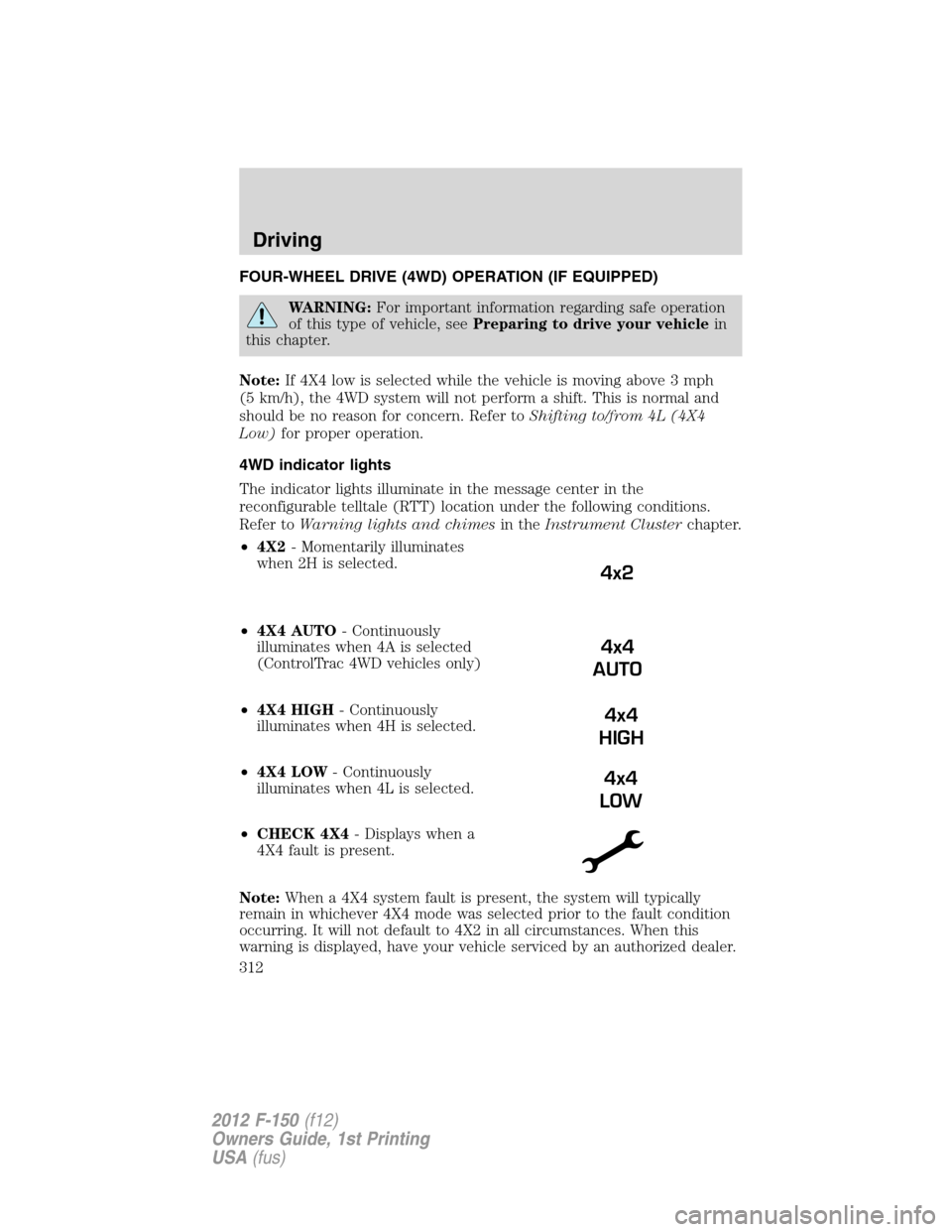
•4X2- Momentarily illuminates
when 2H is selected.
•4X4 AUTO- Continuously
illuminates when 4A is selected
(ControlTrac 4WD vehicles only)
•4X4 HIGH- Continuously
illuminates when 4H is selected.
•4X4 LOW- Continuously
illuminates when 4L is selected.
•CHECK 4X4- Displays when a
4X4 fault is present.
Note:When a 4X4 system fault is present, the system will typically
remain in whichever 4X4 mode was selected prior to the fault condition
occurring. It will not default to 4X2 in all circumstances. When this
warning is displayed, have your vehicle serviced by an authorized dealer.
4x2
4x4
AUTO
4x4
HIGH
4x4
LOW
Driving
312
2012 F-150(f12)
Owners Guide, 1st Printing
USA(fus)
Page 313 of 462

Using the electronic shift on the fly (ESOF) 4WD system (if equipped)
2H (4X2)- Delivers power to the
rear wheels only. This mode is
appropriate for normal on-road
driving and provides the best fuel
economy and smoothness.
4H (4X4 HIGH)- provides
mechanically locked four-wheel
drive power to the front and rear
wheels. This position is not
recommended for use on dry
pavement. This position is only
intended for off-road or winter conditions, such as deep snow, ice or
shallow sand.
Note:Do not use 4H (4X4 HIGH) on dry, hard surfaced roads. Doing so
can produce excessive noise and increased tire wear. 4H (4X4 HIGH) is
only intended for consistently slippery or loose surfaces.
4L (4X4 LOW)- Provides mechanically locked four-wheel drive when
extra power at reduced speeds is required. This position is not
recommended for use on dry pavement. Use this position for off-road
low-speed operation or when extra power is required, such as climbing
steep grades, going through deep sand or pulling a boat out of the water.
4L (4X4 LOW) will not engage while the vehicle is moving above 3 mph
(5 km/h); this is normal and should be no reason for concern. Refer to
Shifting to/from 4L (4X4 LOW) for proper operation.
Note:Do not use 4L (4X4 LOW) on dry, hard surfaced roads. Doing so
can produce excessive noise and increased tire wear. 4L (4X4 LOW) is
only intended for consistently slippery or loose surfaces.
Shifting between 2H (4X2) and 4H (4X4 High)
Move the 4WD control between 2H (4X2) and 4H (4X4 HIGH) at any
forward speed. The message center will display4X4 SHIFT IN
PROGRESSduring the system shift.4X4 HIGHwill display in the
message center if 4H is selected and4X2will momentarily display in the
message center if 2H is selected.
IfSHIFT DELAYED PULL FORWARDis displayed in the message
center during the mode shift, transfer case gear tooth blockage is
present. To alleviate this condition, place the transmission in a forward
gear and move the vehicle forward approximately 5 feet (2 meters) to
allow the transfer case to complete the mode shift.
Driving
313
2012 F-150(f12)
Owners Guide, 1st Printing
USA(fus)
Page 314 of 462

Note:Momentarily releasing the accelerator pedal while performing a
shift will improve engagement/disengagement times.
Note:Do not perform this operation if the rear wheels are slipping.
Note:Some noise may be heard as the system shifts or engages; this is
normal.
Note:4X4 high mode is not intended for use on dry pavement.
Shifting to/from 4L (4X4 low)
1. Bring the vehicle to a speed of 3 mph (5 km/h) or less.
2. Place the transmission in N (Neutral).
3. Move the 4WD control to the desired position.
The message center will display4X4 SHIFT IN PROGRESSduring the
shift. The message center will then display the system mode selected. If
any of the above shift conditions are not met, the shift will not occur and
the message center will display information guiding the driver through
the proper shifting procedures.
IfSHIFT DELAYED PULL FORWARDis displayed in the message
center, transfer case gear tooth blockage is present. To alleviate this
condition, place the transmission in a forward gear, move the vehicle
forward approximately 5 feet (1.5 m), and shift the transmission back to
neutral to allow the transfer case to complete the range shift.
Note:Some noise may be heard as the system shifts or engages; this is
normal.
Note:4x4 low mode is not intended for use on dry pavement.
Using the ControlTrac 4WD system (if equipped)
This system includes an
electronically controlled transfer
case with a high capacity clutch.
The system is interactive with the
road, continually monitoring and
adjusting torque delivery to the
front and rear wheels to optimize
traction.
•2H (4X2)- delivers power to the
rear wheels only. This mode is
appropriate for normal on-road
driving on dry pavement and provides best fuel economy and
smoothness.
Driving
314
2012 F-150(f12)
Owners Guide, 1st Printing
USA(fus)
Page 315 of 462

•4A (Two-speed automatic 4WD)- provides electronic control
four-wheel drive with power delivered to the front and rear wheels, as
required, for increased traction. This is appropriate for all on-road
driving conditions, including as dry road surfaces, but is especially
useful on wet pavement, snow, dirt, or gravel.
•4H (4X4 HIGH)- provides electronically locked four-wheel drive
power to front and rear wheels. This position is not recommended for
use on dry pavement. This position is only intended for severe winter
or off-road conditions, such as deep snow, ice or shallow sand.Note:
Do not use 4H (4X4 HIGH) on dry, hard surfaced roads. Doing so can
produce excessive noise and increased tire wear. 4H (4X4 HIGH) is
only intended for consistently slippery or loose surfaces. Use of 4H
(4X4 HIGH) on these surfaces may produce some noise (such as
occasional clunks), but will not damage drive components.
•
4L (4X4 LOW)- provides electronically locked four-wheel drive when
extra power at reduced speeds is required. This position is not
recommended for use on dry pavement. Use this position for off-road
low-speed operation or when extra power is required, such as climbing
steep grades, going through deep sand or pulling a boat out of the water.
4L (4X4 LOW) will not engage while the vehicle is moving above 3 mph
(5 km/h); this is normal and should be no reason for concern. Refer to
Shifting to/from 4L (4X4 LOW)for proper operation.Note:Do not use
4L (4X4 LOW) on dry, hard surfaced roads. Doing so can produce
excessive noise and increased tire wear. 4L (4X4 LOW) is only intended
for consistently slippery or loose surfaces. Use of 4L (4X4 LOW) on
these surfaces may produce some noise (such as occasional clunks), but
will not damage drive components.
Note:The AdvanceTrac system has the ability to take over control of the
transfer case clutch and disable it during driving maneuvers when necessary.
Shifting between 2H (4X2) and 4A (Two-speed automatic 4WD) or
4H (4X4 HIGH )
Move the control from 2H to 4A or 4H at a stop or while driving at any
forward speed. The message center may display4X4 SHIFT IN
PROGRESSduring the system shift. The message center will then display
4X4 AUTOif 4A has been selected or4X4 HIGHif 4H is selected. The
message center will momentarily display4X2if 2H has been selected.
Note:Do not perform this operation if the rear wheels are slipping.
Note:Some noise may be heard as the system shifts or engages; this is
normal.
Note:4X4 high mode is not intended for use on dry pavement.
Driving
315
2012 F-150(f12)
Owners Guide, 1st Printing
USA(fus)
Page 316 of 462

Shifting between 4A (Two-speed automatic 4WD) and 4H (4X4 HIGH)
Move the control from 4A to 4H at a stop or while driving at any speed.
The message center will display4X4 AUTOif 4A has been selected and
4X4 HIGHif 4H has been selected.
Note:4x4 High mode is not intended for use on dry pavement.
Shifting to/from 4L (4X4 LOW)
1. Bring the vehicle to a rolling speed of 3 mph (5 km/h) or less.
2. Place the gearshift in N (Neutral).
3. Move the 4WD control to the desired position.
The message center will display4X4 SHIFT IN PROGRESSduring the
shift. The message center will then display the system mode selected.
If any of the above shift conditions are not met, the shift will not occur
and the message center will display information guiding the driver
through the proper range of shifting procedures.
IfSHIFT DELAYED PULL FORWARDis displayed in the message
center, transfer case gear tooth blockage is present. To alleviate this
condition, place the transmission in a forward gear, move the vehicle
forward approximately 5 feet (2 meters), and shift the transmission back
to neutral to allow the transfer case to complete the range shift.
Note:Some noise may be heard as the system shifts or engages; this is
normal.
Note:4x4 low mode is not intended for use on dry pavement
Electronic locking differential (ELD) (if equipped)
The electronic locking differential (ELD) is a device housed in the rear
axle which allows both rear wheels to turn at the same speed. The ELD
can provide additional traction should the vehicle become stuck. The
ELD is electronically activated by the driver and can be shifted on the fly
within the ELD operating speed range. It is intended for use in mud,
rocks, sand, or any off-road condition where maximum traction is
needed. It is not intended for use on dry pavement.
The ELD is affected by the following conditions:
•The ELD will not engage if the vehicle speed is above 20 mph
(30 km/h) in 4x2, 4x4 Auto, or 4x4 High modes.
•The ELD will not engage if the vehicle speed is above or 56 mph
(90 km/h) in 4X4 Low.
Driving
316
2012 F-150(f12)
Owners Guide, 1st Printing
USA(fus)
Page 318 of 462

Activating the electronic locking differential (ELD)
The ELD can be turned on by
pulling the 4WD control knob
toward you (4x4 vehicles) or by
turning the ELD control knob from
OFF to ON (4x2 vehicles).
Once the indicator light is displayed
in the message center, both rear
wheel axle shafts will be locked
together providing added traction.
If the indicator does not come on, or the indicator turns off while
driving, one of the following has occurred:
•The vehicle speed is too high.
•The left and right rear wheel speed difference is too high during an
engagement attempt.
•The system has malfunctioned and will be accompanied by aCHECK
LOCKING DIFFERENTIALmessage in the message center.
Note:If the ELD has difficulty disengaging, release the accelerator pedal
and turn the steering wheel in the opposite direction while rolling.
Basic operating principles
Do not use 4WD on dry, hard surfaced roads. Doing so will produce
excessive noise and vibration and increase tire wear. 4WD modes are
only intended for consistently slippery or loose surfaces.
Parking
On 4WD vehicles, when the transfer case is in the N (Neutral) position
for recreational towing purposes, the engine and transmission are
disconnected from the rest of the driveline. Therefore, the vehicle is free
to roll even if the automatic transmission is in P (Park) or the manual
transmission is in gear. Do not leave the vehicle unattended with the
transfer case in the N (Neutral) position. Always set the parking brake
fully and turn off the ignition when leaving the vehicle. Refer to
Recreational towingfor more information.
Driving
318
2012 F-150(f12)
Owners Guide, 1st Printing
USA(fus)
Page 319 of 462

Driving off-road with truck and utility vehicles
4WD vehicles are specially equipped for driving on sand, snow, mud and
rough terrain and have operating characteristics that are somewhat
different from conventional vehicles, both on and off the road.
Your vehicle may be equipped with a front air dam that can become
damaged (due to reduced ground clearance) when taking your vehicle
off-road. This air dam can be taken off by removing two bolts.
For vehicles equipped with a 3.5L Ecoboost™ engine:
Your vehicle is equipped with an underbody transmission shield and
brackets that may become damaged (due to reduced ground clearance)
when taking your vehicle off-road. Remove the shield by disengaging the
fasteners at each corner of the shield. Then, remove the shield rear
brackets by removing the bracket to frame bolts, or have your authorized
dealer perform the work for you
How your vehicle differs from other vehicles
Truck and utility vehicles can differ from some other vehicles. Your
vehicle may be higher to allow it to travel over rough terrain without
getting hung up or damaging underbody components.
The differences that make your vehicle so versatile also make it handle
differently than an ordinary passenger car.
Maintain steering wheel control at all times, especially in rough terrain.
Since sudden changes in terrain can result in abrupt steering wheel
motion, make sure you grip the steering wheel from the outside. Do not
grip the spokes.
Drive cautiously to avoid vehicle damage from concealed objects such as
rocks and stumps.
You should either know the terrain or examine maps of the area before
driving. Map out your route before driving in the area. To maintain
steering and braking control of your vehicle, you must have all four
wheels on the ground and they must be rolling, not sliding or spinning.
Basic operating principles
•
Do not use 4WD on dry, hard surfaced roads. Doing so will produce
excessive noise, increase tire wear and may damage drive components.
4WD modes are only intended for consistently slippery or loose surfaces.
•Drive slower in strong crosswinds which can affect the normal steering
characteristics of your vehicle.
•Be extremely careful when driving on pavement made slippery by
loose sand, water, gravel, snow or ice.
Driving
319
2012 F-150(f12)
Owners Guide, 1st Printing
USA(fus)