2012 FORD F150 tow
[x] Cancel search: towPage 301 of 462
To deactivate the tow/haul feature and return to normal driving mode,
press the button on the end of the gearshift lever. The TOW HAUL light
will no longer be illuminated. Tow/haul will also deactivate when the
vehicle is powered down.
WARNING:Do not use the tow/haul feature when driving in icy
or slippery conditions as the increased engine braking can cause
the rear wheels to slide and the vehicle to swing around with the
possible loss of vehicle control.
3 (Third) (column-shift only) (For vehicles without SST)
Transmission operates in third gear only.
Used for improved traction on slippery roads.
2 (Second)
Transmission operates in 2nd gear only.
Use 2 (Second) to start-up on slippery roads.
1 (First)
•Transmission operates in 1st gear only.
•Provides maximum engine braking.
•Allows upshifts by moving gearshift lever.
•Will not downshift into 1 (First) at high speeds; allows for 1 (First)
when vehicle reaches slower speeds.
Forced downshifts
•Allowed in D (Drive) only.
•Press the accelerator to the floor.
•Allows transmission to select an appropriate gear.
Understanding your SelectShift Automatic™ transmission (SST)
gearshift lever (if equipped)
This vehicle may be equipped with a SelectShift Automatic™
transmission (SST) gearshift lever. The SST is an automatic transmission
with the ability for the driver to change gears up or down (without a
clutch) as desired. The SST feature has two modes: PRS and M mode.
Driving
301
2012 F-150(f12)
Owners Guide, 1st Printing
USA(fus)
Page 308 of 462
When towing, the reverse camera system will only see what is being
towed behind the vehicle. This might not provide adequate coverage as it
usually provides in normal operation and some objects might not be
seen.
Fixed guidelines and visual park aid alert features are only available
when the vehicle is in R (Reverse).
Manual zoom
The manual zoom feature assists drivers with connecting their vehicle to
a trailer for the purpose of towing. It allows the driver to manually zoom
closer to an object behind the vehicle. The zoomed image keeps the
bumper in the image to provide a reference.
If equipped with touch screen display: To turn the manual zoom feature
on or off, do the following:
1. Place the vehicle in R (Reverse).
2. Select Zoom on the touch screen display.
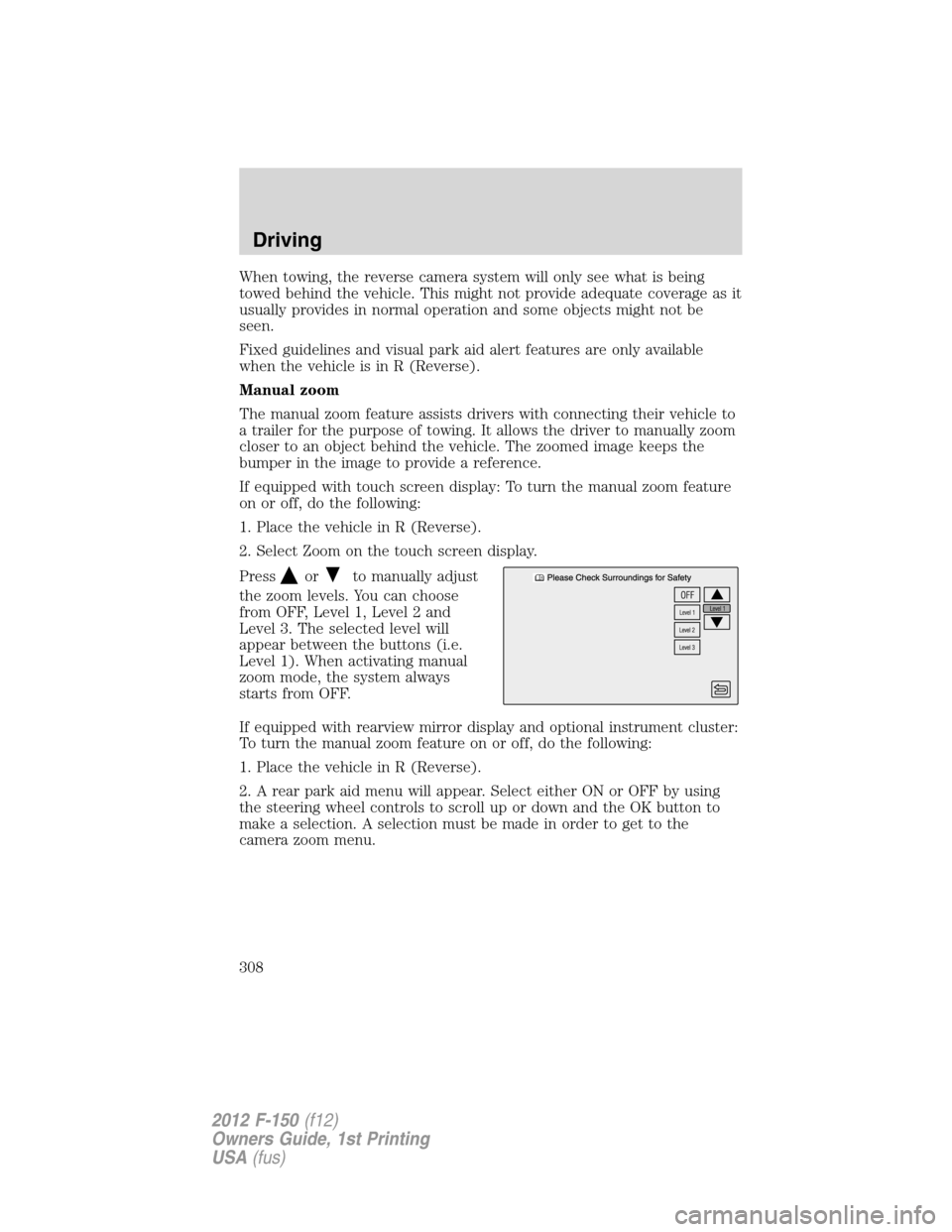
Press
orto manually adjust
the zoom levels. You can choose
from OFF, Level 1, Level 2 and
Level 3. The selected level will
appear between the buttons (i.e.
Level 1). When activating manual
zoom mode, the system always
starts from OFF.
If equipped with rearview mirror display and optional instrument cluster:
To turn the manual zoom feature on or off, do the following:
1. Place the vehicle in R (Reverse).
2. A rear park aid menu will appear. Select either ON or OFF by using
the steering wheel controls to scroll up or down and the OK button to
make a selection. A selection must be made in order to get to the
camera zoom menu.
Driving
308
2012 F-150(f12)
Owners Guide, 1st Printing
USA(fus)
Page 309 of 462
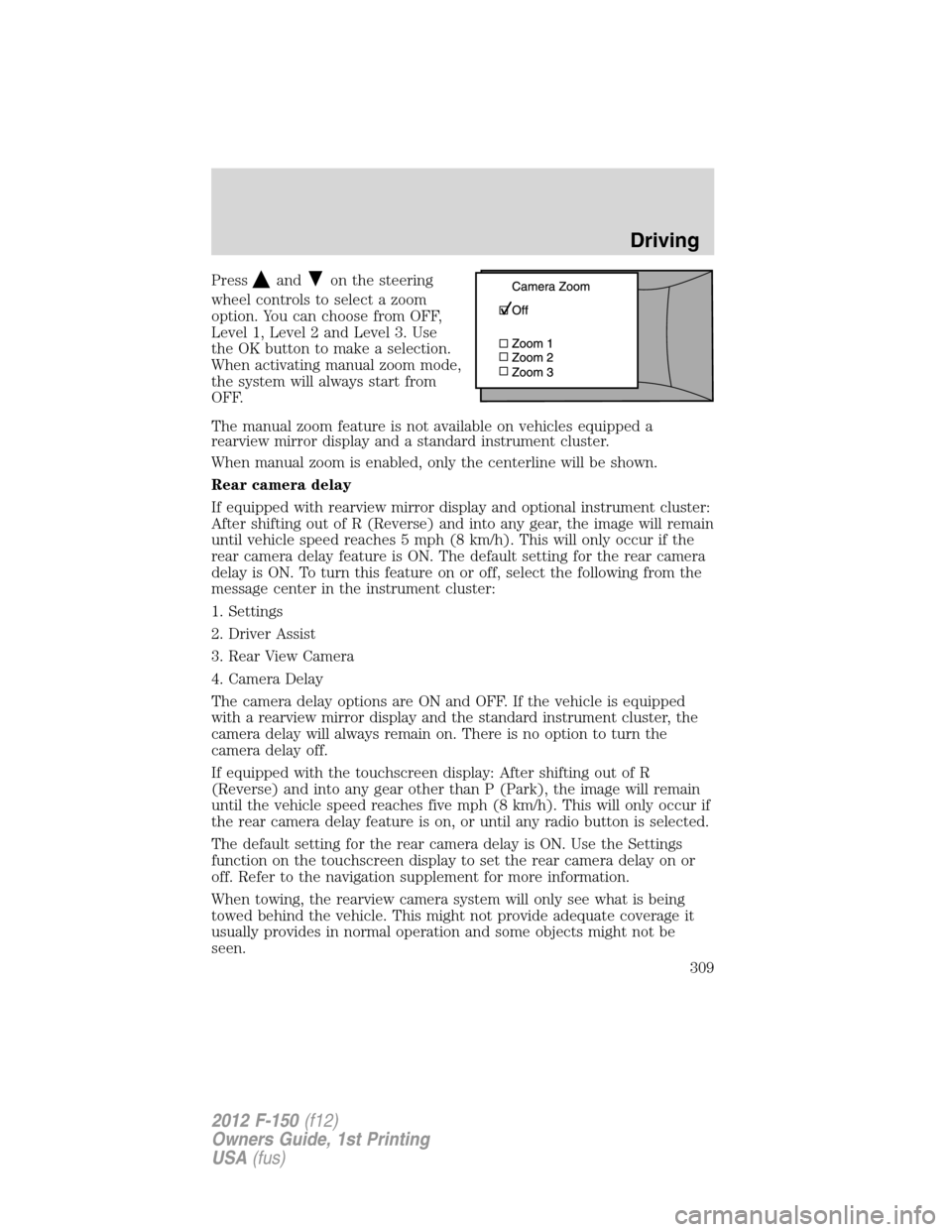
Pressandon the steering
wheel controls to select a zoom
option. You can choose from OFF,
Level 1, Level 2 and Level 3. Use
the OK button to make a selection.
When activating manual zoom mode,
the system will always start from
OFF.
The manual zoom feature is not available on vehicles equipped a
rearview mirror display and a standard instrument cluster.
When manual zoom is enabled, only the centerline will be shown.
Rear camera delay
If equipped with rearview mirror display and optional instrument cluster:
After shifting out of R (Reverse) and into any gear, the image will remain
until vehicle speed reaches 5 mph (8 km/h). This will only occur if the
rear camera delay feature is ON. The default setting for the rear camera
delay is ON. To turn this feature on or off, select the following from the
message center in the instrument cluster:
1. Settings
2. Driver Assist
3. Rear View Camera
4. Camera Delay
The camera delay options are ON and OFF. If the vehicle is equipped
with a rearview mirror display and the standard instrument cluster, the
camera delay will always remain on. There is no option to turn the
camera delay off.
If equipped with the touchscreen display: After shifting out of R
(Reverse) and into any gear other than P (Park), the image will remain
until the vehicle speed reaches five mph (8 km/h). This will only occur if
the rear camera delay feature is on, or until any radio button is selected.
The default setting for the rear camera delay is ON. Use the Settings
function on the touchscreen display to set the rear camera delay on or
off. Refer to the navigation supplement for more information.
When towing, the rearview camera system will only see what is being
towed behind the vehicle. This might not provide adequate coverage it
usually provides in normal operation and some objects might not be
seen.
Driving
309
2012 F-150(f12)
Owners Guide, 1st Printing
USA(fus)
Page 312 of 462
FOUR-WHEEL DRIVE (4WD) OPERATION (IF EQUIPPED)
WARNING:For important information regarding safe operation
of this type of vehicle, seePreparing to drive your vehiclein
this chapter.
Note:If 4X4 low is selected while the vehicle is moving above 3 mph
(5 km/h), the 4WD system will not perform a shift. This is normal and
should be no reason for concern. Refer toShifting to/from 4L (4X4
Low)for proper operation.
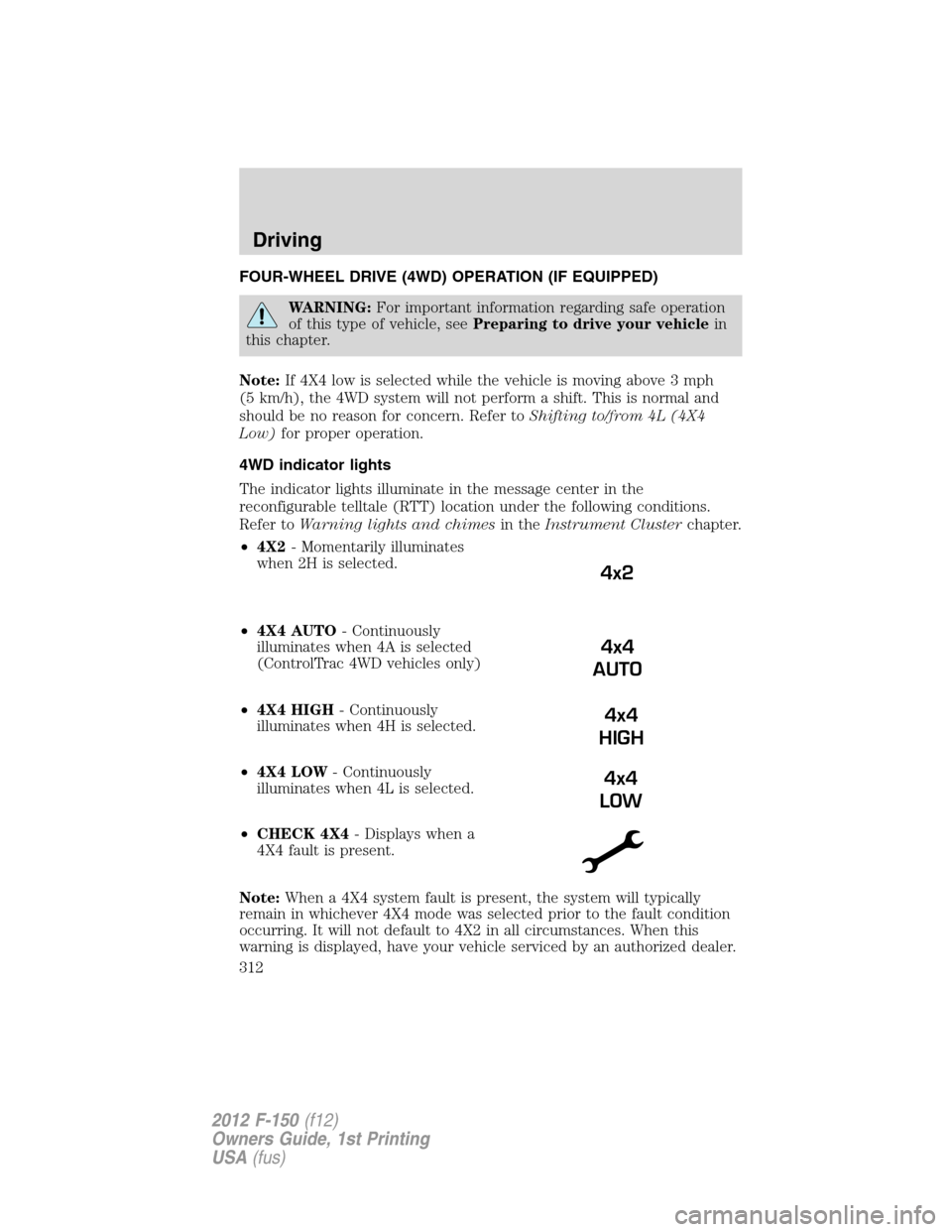
4WD indicator lights
The indicator lights illuminate in the message center in the
reconfigurable telltale (RTT) location under the following conditions.
Refer toWarning lights and chimesin theInstrument Clusterchapter.
•4X2- Momentarily illuminates
when 2H is selected.
•4X4 AUTO- Continuously
illuminates when 4A is selected
(ControlTrac 4WD vehicles only)
•4X4 HIGH- Continuously
illuminates when 4H is selected.
•4X4 LOW- Continuously
illuminates when 4L is selected.
•CHECK 4X4- Displays when a
4X4 fault is present.
Note:When a 4X4 system fault is present, the system will typically
remain in whichever 4X4 mode was selected prior to the fault condition
occurring. It will not default to 4X2 in all circumstances. When this
warning is displayed, have your vehicle serviced by an authorized dealer.
4x2
4x4
AUTO
4x4
HIGH
4x4
LOW
Driving
312
2012 F-150(f12)
Owners Guide, 1st Printing
USA(fus)
Page 318 of 462

Activating the electronic locking differential (ELD)
The ELD can be turned on by
pulling the 4WD control knob
toward you (4x4 vehicles) or by
turning the ELD control knob from
OFF to ON (4x2 vehicles).
Once the indicator light is displayed
in the message center, both rear
wheel axle shafts will be locked
together providing added traction.
If the indicator does not come on, or the indicator turns off while
driving, one of the following has occurred:
•The vehicle speed is too high.
•The left and right rear wheel speed difference is too high during an
engagement attempt.
•The system has malfunctioned and will be accompanied by aCHECK
LOCKING DIFFERENTIALmessage in the message center.
Note:If the ELD has difficulty disengaging, release the accelerator pedal
and turn the steering wheel in the opposite direction while rolling.
Basic operating principles
Do not use 4WD on dry, hard surfaced roads. Doing so will produce
excessive noise and vibration and increase tire wear. 4WD modes are
only intended for consistently slippery or loose surfaces.
Parking
On 4WD vehicles, when the transfer case is in the N (Neutral) position
for recreational towing purposes, the engine and transmission are
disconnected from the rest of the driveline. Therefore, the vehicle is free
to roll even if the automatic transmission is in P (Park) or the manual
transmission is in gear. Do not leave the vehicle unattended with the
transfer case in the N (Neutral) position. Always set the parking brake
fully and turn off the ignition when leaving the vehicle. Refer to
Recreational towingfor more information.
Driving
318
2012 F-150(f12)
Owners Guide, 1st Printing
USA(fus)
Page 326 of 462

ROADSIDE ASSISTANCE
Vehicles sold in the U.S. : Getting roadside assistance
To fully assist you should you have a vehicle concern, Ford Motor
Company offers a complimentary roadside assistance program. This
program is separate from the New Vehicle Limited Warranty. The service
is available:
•24-hours, seven days a week
•for the coverage period listed on the Roadside Assistance Card
included in your Owner Guide portfolio.
Roadside assistance will cover:
•a flat tire change with a good spare (except vehicles that have been
supplied with a tire inflation kit)
•battery jump start
•lock-out assistance (key replacement cost is the customer’s
responsibility)
•fuel delivery – Independent Service Contractors, if not prohibited by
state, local or municipal law shall deliver up to 2.0 gallons (7.5L) of
gasoline or 5.0 gallons (18.9L) of diesel fuel to a disabled vehicle. Fuel
delivery service is limited to two no-charge occurrences within a
12-month period.
•winch out – available within 100 feet (30.5 meters) of a paved or
county maintained road, no recoveries.
•towing – Ford and Lincoln eligible vehicles towed to an authorized
dealer within 35 miles (56 km) of the disablement location or to the
nearest authorized dealer. If a member requests to be towed to an
authorized dealer more than 35 miles (56 km) from the disablement
location, the member shall be responsible for any mileage costs in
excess of 35 miles (56 km).
Trailers shall be covered up to $200 if the disabled eligible vehicle
requires service at the nearest authorized dealer. If the trailer is disabled,
but the towing vehicle is operational, the trailer does not qualify for any
roadside services.
Roadside Emergencies
326
2012 F-150(f12)
Owners Guide, 1st Printing
USA(fus)
Page 327 of 462

Vehicles sold in the U.S. : Using roadside assistance
Complete the roadside assistance identification card and place it in your
wallet for quick reference. This card is found in the Owner’s Guide
portfolio in the glove compartment.
U.S. Ford vehicle customers who require Roadside Assistance, call
1-800-241-3673.
If you need to arrange roadside assistance for yourself, Ford Motor
Company will reimburse a reasonable amount for towing to the nearest
dealership within 35 miles (56 km). To obtain reimbursement
information, U.S. Ford vehicle customers call 1-800-241-3673. Customers
will be asked to submit their original receipts.
Vehicles sold in Canada : Getting roadside assistance
Canadian customers who require roadside assistance, call 1–800–665–2006.
Vehicles sold in Canada : Using roadside assistance
Complete the roadside assistance identification card and place it in your
wallet for quick reference. In Canada, the card is found in the Warranty
Guide in the glove box.
Canadian Roadside coverage and benefits may differ from the U.S.
coverage. Please refer to your Warranty Guide or visit our website at
www.ford.ca for information on Canadian services and benefits.
Canadian customers who need to obtain roadside information, call
1-800-665-2006 or visit our website at www.ford.ca.
HAZARD FLASHER CONTROL
The hazard flasher control is located
on the instrument panel by the
radio. The hazard flashers will
operate when the ignition is in any
position or if the key is not in the
ignition.
•Press the flasher control and all front and rear direction signals will
flash.
•Press the flasher control again to turn them off.
Use it when your vehicle is disabled and is creating a safety hazard for
other motorists.
Note:With extended use, the flasher may run down your battery.
Roadside Emergencies
327
2012 F-150(f12)
Owners Guide, 1st Printing
USA(fus)
Page 329 of 462
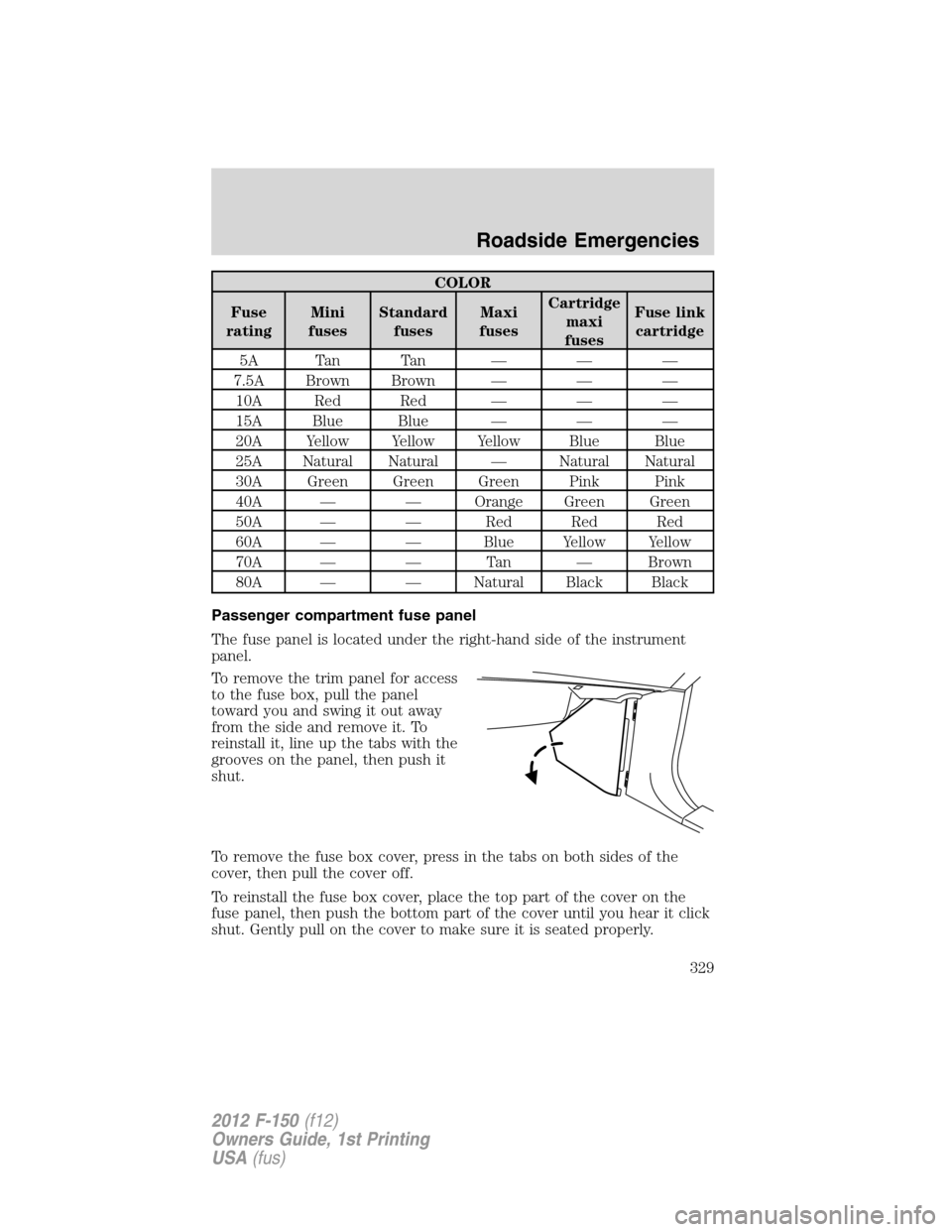
COLOR
Fuse
ratingMini
fusesStandard
fusesMaxi
fusesCartridge
maxi
fusesFuse link
cartridge
5A Tan Tan — — —
7.5A Brown Brown — — —
10A Red Red — — —
15A Blue Blue — — —
20A Yellow Yellow Yellow Blue Blue
25A Natural Natural — Natural Natural
30A Green Green Green Pink Pink
40A — — Orange Green Green
50A — — Red Red Red
60A — — Blue Yellow Yellow
70A — — Tan — Brown
80A — — Natural Black Black
Passenger compartment fuse panel
The fuse panel is located under the right-hand side of the instrument
panel.
To remove the trim panel for access
to the fuse box, pull the panel
toward you and swing it out away
from the side and remove it. To
reinstall it, line up the tabs with the
grooves on the panel, then push it
shut.
To remove the fuse box cover, press in the tabs on both sides of the
cover, then pull the cover off.
To reinstall the fuse box cover, place the top part of the cover on the
fuse panel, then push the bottom part of the cover until you hear it click
shut. Gently pull on the cover to make sure it is seated properly.
Roadside Emergencies
329
2012 F-150(f12)
Owners Guide, 1st Printing
USA(fus)