Page 25 of 361

CHECK FUEL FILL INLET— Displayed when the fuel fill inlet may
not be properly closed. Refer toEasy Fuel�“no cap” fuel systemin the
Maintenance and Specificationschapter.
BRAKE FLUID LEVEL LOW— Indicates the brake fluid level is low
and the brake system should be inspected immediately. Refer toBrake
fluidin theMaintenance and Specificationschapter.
LOW TIRE PRESSURE— Displayed when one or more tires on your
vehicle have low tire pressure. Refer toInflating your tiresin theTires,
Wheels and Loadingchapter.
TIRE PRESSURE MONITOR FAULT— Displayed when the Tire
Pressure Monitoring System is malfunctioning. If the warning stays on or
continues to come on, contact your authorized dealer as soon as
possible.
TIRE PRESSURE SENSOR FAULT— Displayed when a tire pressure
sensor is malfunctioning, or your spare tire is in use. For more
information on how the system operates under these conditions, refer to
Tire Pressure Monitoring System (TPMS)in theTires, Wheels and
Loadingchapter. If the warning stays on or continues to come on,
contact your authorized dealer as soon as possible.
ENGINE OIL CHANGE SOON— Displayed when the engine oil life
remaining is 10% or less.
OIL CHANGE REQUIRED— Displayed when the oil life left reaches
0%.
MYKEY ACTIVE DRIVE SAFELY— Displayed at startup when
MyKey�is in use. Refer toMyKey�in theLocks and Securitychapter
for more information.
KEY COULD NOT PROGRAM— Displayed when an attempt is made
to program a spare key using two existing MyKeys. Refer toMyKey�in
theLocks and Securitychapter for more information.
VEHICLE SPEED 80 MPH MAX— Displayed when a MyKey�is in
use and the Admin has enabled the MyKey speed limit and the vehicle
speed is 80 mph (130 km/h). Refer toMyKey�in theLocks and
Securitychapter for more information.
SPEED LIMITED TO 80 MPH— Displayed when starting the vehicle
and MyKey�is in use and the MyKey speed limit is on. Refer toMyKey�
in theLocks and Securitychapter for more information.
CHECK SPEED DRIVE SAFELY— Displayed when a MyKey�is in
use and the optional setting is on and the vehicle exceeds a preselected
speed. Refer toMyKey�in theLocks and Securitychapter for more
information.
Instrument Cluster
25
2012 Escape(204)
Owners Guide, 1st Printing
USA(fus)
Page 28 of 361

AUDIO SYSTEMS
AM/FM single CD/MP3 satellite compatible sound system
WARNING:Driving while distracted can result in loss of vehicle
control, accident and injury. Ford strongly recommends that
drivers use extreme caution when using any device or feature that may
take their focus off the road. Your primary responsibility is the safe
operation of the vehicle. We recommend against the use of any
handheld device while driving, encourage the use of voice-operated
systems when possible and that you become aware of applicable state
and local laws that may affect use of electronic devices while driving.
Accessory delay:Your vehicle is equipped with accessory delay. With
this feature, the radio and other electrical accessories may be used for
up to ten minutes after the ignition is turned off or until either front
door is opened.
Setting the clock
To set the time, press CLOCK. The display will read SET TIME. Use the
memory preset numbers (0–9) to enter in the desired time–hours and
minutes and press OK. The clock will then begin from that time.
Note:If your vehicle is equipped with a navigation system, refer to
Setting the clockin yourNavigation supplement.
Entertainment Systems
28
2012 Escape(204)
Owners Guide, 1st Printing
USA(fus)
Page 37 of 361

Auxiliary input jack (Line in)
WARNING:Driving while distracted can result in loss of vehicle
control, accident and injury. Ford strongly recommends that
drivers use extreme caution when using any device or feature that may
take their focus off the road. Your primary responsibility is the safe
operation of the vehicle. We recommend against the use of any
handheld device while driving, encourage the use of voice-operated
systems when possible and that you become aware of applicable state
and local laws that may affect use of electronic devices while driving.
Your vehicle is equipped with an
Auxiliary Input Jack (AIJ). The
Auxiliary Input Jack provides a way
to connect your portable music
player to the in-vehicle audio
system. This allows the audio from a
portable music player to be played
through the vehicle speakers with
high fidelity. To achieve optimal
performance, please observe the
following instructions when
attaching your portable music
device to the audio system.
If your vehicle is equipped with a
navigation system, refer to
Auxiliary input jacksection in the
Audio featureschapter of your
Navigation systemsupplement.
Required equipment:
1. Any portable music player designed to be used with headphones
2. An audio extension cable with stereo male 1/8 in. (3.5 mm)
connectors at each end
To play your portable music player using the auxiliary input jack:
1. Begin with the vehicle parked and the radio turned off.
2. Ensure that the battery in your portable music player is new or fully
charged and that the device is turned off.
Entertainment Systems
37
2012 Escape(204)
Owners Guide, 1st Printing
USA(fus)
Page 39 of 361
USB port (if equipped)
WARNING:Driving while distracted can result in loss of vehicle
control, accident and injury. Ford strongly recommends that
drivers use extreme caution when using any device that may take their
focus off the road. Your primary responsibility is the safe operation of
the vehicle. We recommend against the use of any handheld device
while driving, encourage the use of voice-operated systems when
possible and that you become aware of applicable state and local laws
that may affect the use of electronic devices while driving.
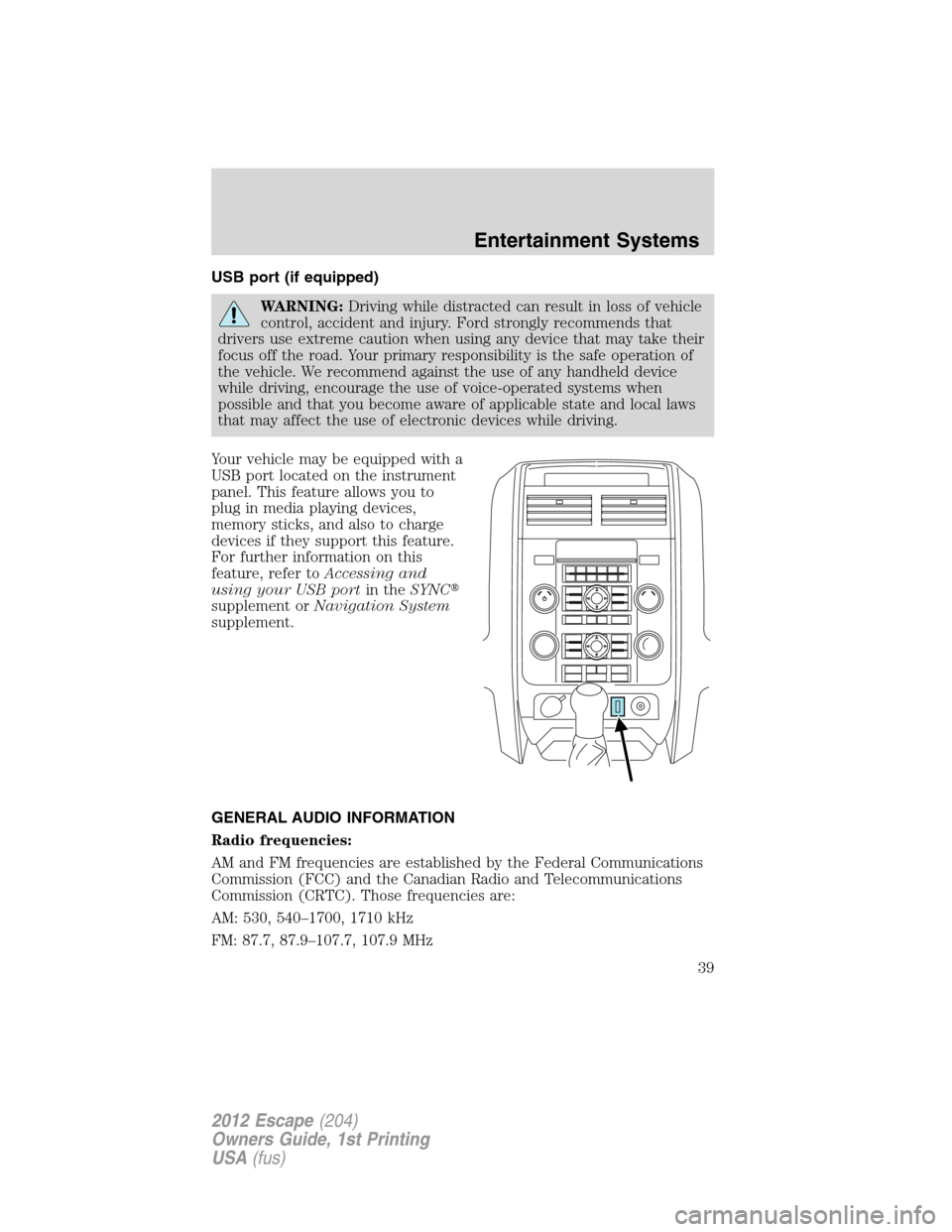
Your vehicle may be equipped with a
USB port located on the instrument
panel. This feature allows you to
plug in media playing devices,
memory sticks, and also to charge
devices if they support this feature.
For further information on this
feature, refer toAccessing and
using your USB portin theSYNC�
supplement orNavigation System
supplement.
GENERAL AUDIO INFORMATION
Radio frequencies:
AM and FM frequencies are established by the Federal Communications
Commission (FCC) and the Canadian Radio and Telecommunications
Commission (CRTC). Those frequencies are:
AM: 530, 540–1700, 1710 kHz
FM: 87.7, 87.9–107.7, 107.9 MHz
Entertainment Systems
39
2012 Escape(204)
Owners Guide, 1st Printing
USA(fus)
Page 55 of 361

Daytime running lamps (DRL) (if equipped)
Turns the low beam headlamps on with a reduced output.
To activate:
•the ignition must be in the on position.
•the headlamp control must be in the off, parking lamps or autolamp
position.
•with automatic transmission, the transmission is not in P (Park),
•with manual transmission, the parking brake must be released.
WARNING:Always remember to turn on your headlamps at
dusk or during inclement weather. The Daytime Running Lamp
(DRL) system does not activate the tail lamps and generally may not
provide adequate lighting during these conditions. Failure to activate
your headlamps under these conditions may result in a collision.
PANEL DIMMER CONTROL
Use to adjust the brightness of the
instrument panel and all applicable
switches in the vehicle during
headlamp and parking lamp
operation.
•Move the control to the full
upright position, past detent, to
turn on the interior lamps.
•Rotate to full down position (past
detent) to prevent interior lamps
from illuminating when the doors are opened.
Note:If the battery is disconnected, discharged, or a new battery is
installed, the dimmer switch requires re-calibration. Rotate the dimmer
switch from the full dim position to the full dome/on position to reset.
This will ensure that your displays are visible under all lighting
conditions.
Lights
55
2012 Escape(204)
Owners Guide, 1st Printing
USA(fus)
Page 61 of 361
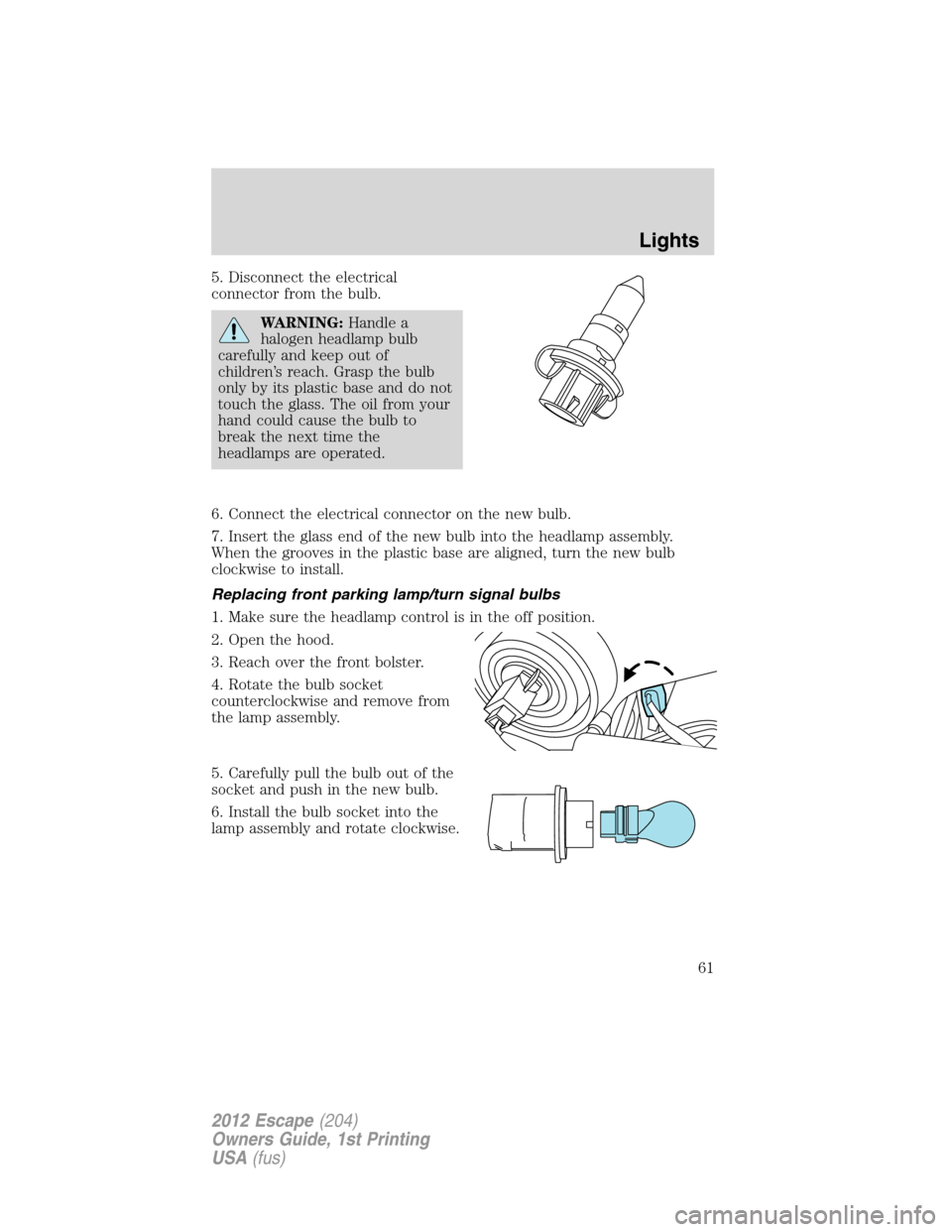
5. Disconnect the electrical
connector from the bulb.
WARNING:Handle a
halogen headlamp bulb
carefully and keep out of
children’s reach. Grasp the bulb
only by its plastic base and do not
touch the glass. The oil from your
hand could cause the bulb to
break the next time the
headlamps are operated.
6. Connect the electrical connector on the new bulb.
7. Insert the glass end of the new bulb into the headlamp assembly.
When the grooves in the plastic base are aligned, turn the new bulb
clockwise to install.
Replacing front parking lamp/turn signal bulbs
1. Make sure the headlamp control is in the off position.
2. Open the hood.
3. Reach over the front bolster.
4. Rotate the bulb socket
counterclockwise and remove from
the lamp assembly.
5. Carefully pull the bulb out of the
socket and push in the new bulb.
6. Install the bulb socket into the
lamp assembly and rotate clockwise.
Lights
61
2012 Escape(204)
Owners Guide, 1st Printing
USA(fus)
Page 66 of 361
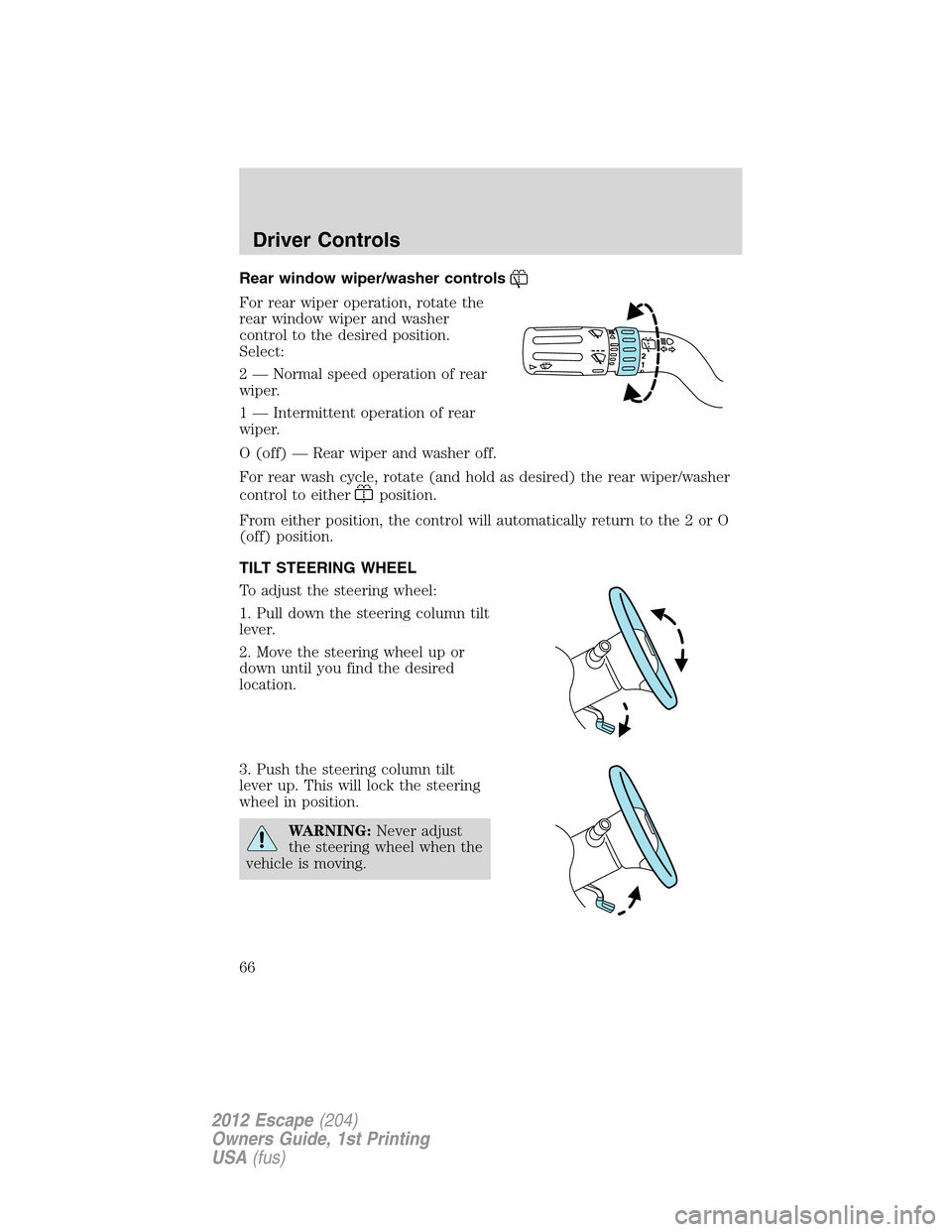
Rear window wiper/washer controls
For rear wiper operation, rotate the
rear window wiper and washer
control to the desired position.
Select:
2 — Normal speed operation of rear
wiper.
1 — Intermittent operation of rear
wiper.
O (off) — Rear wiper and washer off.
For rear wash cycle, rotate (and hold as desired) the rear wiper/washer
control to either
position.
From either position, the control will automatically return to the 2 or O
(off) position.
TILT STEERING WHEEL
To adjust the steering wheel:
1. Pull down the steering column tilt
lever.
2. Move the steering wheel up or
down until you find the desired
location.
3. Push the steering column tilt
lever up. This will lock the steering
wheel in position.
WARNING:Never adjust
the steering wheel when the
vehicle is moving.
Driver Controls
66
2012 Escape(204)
Owners Guide, 1st Printing
USA(fus)
Page 70 of 361

WARNING:Use only soft cups in the cupholders. Hard objects
can injure you in a collision.
The tray and inside bin can be
removed to open up space to fit a
laptop computer, MP3 players, CDs
or handbags. To remove, open the
console lid and pull the bin straight
up and out from the console
housing.
The sliding tray and inside bin can
be hooked on the side or rear of the
console for extra storage.
AUXILIARY POWER POINT (12V DC)
Power outlets are designed for accessory plugs only. Do not insert
any other object in the power outlet as this will damage the
outlet and blow the fuse. Do not hang any type of accessory or
accessory bracket from the plug. Improper use of the power
outlet can cause damage not covered by your warranty.
Auxiliary power points can be found in the following locations:
•On the instrument panel
•On the rear side of the center console
Do not use the power point for operating the cigarette lighter element (if
equipped).
Driver Controls
70
2012 Escape(204)
Owners Guide, 1st Printing
USA(fus)