2012 FORD B MAX parking brake
[x] Cancel search: parking brakePage 4 of 256

Downloaded from www.Manualslib.com manuals search engine Warning Lamps and Indicators.................53
Audible Warnings and Indicators.............56
Information Displays
General Information.....................................58
Clock....................................................................61
Trip Computer..................................................61
Personalised Settings..................................62
Information Messages..................................62
Climate Control
Principle of Operation..................................68
Air Vents............................................................68
Manual Climate Control..............................69
Automatic Climate Control........................70
Hints on Controlling the InteriorClimate...........................................................72
Heated Windows and Mirrors....................75
Seats
Sitting in the Correct Position....................76
Head Restraints..............................................76
Manual Seats...................................................78
Rear Seats.........................................................79
Heated Seats...................................................80
Front Seat Armrest.......................................80
Auxiliary Power Points
Auxiliary Power Points..................................81
Cigar Lighter......................................................81
Storage Compartments
Cup Holders......................................................82
Glasses Holder................................................82
Starting and Stopping theEngine
General Information......................................83
Ignition Switch................................................83
Keyless Starting..............................................83
Steering Wheel Lock.....................................85
Starting a Petrol Engine..............................85
Starting a Diesel Engine..............................86
Diesel Particulate Filter................................87
Switching Off the Engine............................88
Unique Driving Character-istics
Start-Stop........................................................89
Fuel and Refuelling
Safety Precautions.........................................91
Fuel Quality - Petrol......................................92
Fuel Quality - Diesel......................................92
Running Out of Fuel......................................92
Catalytic Converter........................................93
Refuelling..........................................................93
Fuel Consumption.........................................95
Technical Specifications.............................96
Transmission
Manual Transmission....................................97
Automatic Transmission.............................97
Hill Start Assist...............................................99
Brakes
General Information.....................................101
Hints on Driving With Anti-LockBrakes............................................................101
Parking Brake..................................................101
Stability Control
Principle of Operation.................................103
Using Stability Control...............................103
Parking Aids
Principle of Operation................................104
Parking Aid......................................................104
Rear View Camera.......................................106
2Table of Contents
Page 8 of 256

Downloaded from www.Manualslib.com manuals search engine Engine air filter
Engine coolant
Engine coolant temperature
Engine oil
Explosive gas
Fan warning
Fasten seat belt
Front airbag
Front fog lamps
Fuel pump reset
Fuse compartment
Hazard warning flashers
Heated rear window
Heated windscreen
Interior luggage compartmentrelease
Jack
Lighting control
Low tyre pressure warning
Maintain correct fluid level
Panic alarm
Parking aid
Parking brake
Power steering fluid
Power windows front/rear
Power window lockout
Service engine soon
Side airbag
Stability control
Windscreen wash and wipe
6Introduction
Page 11 of 256
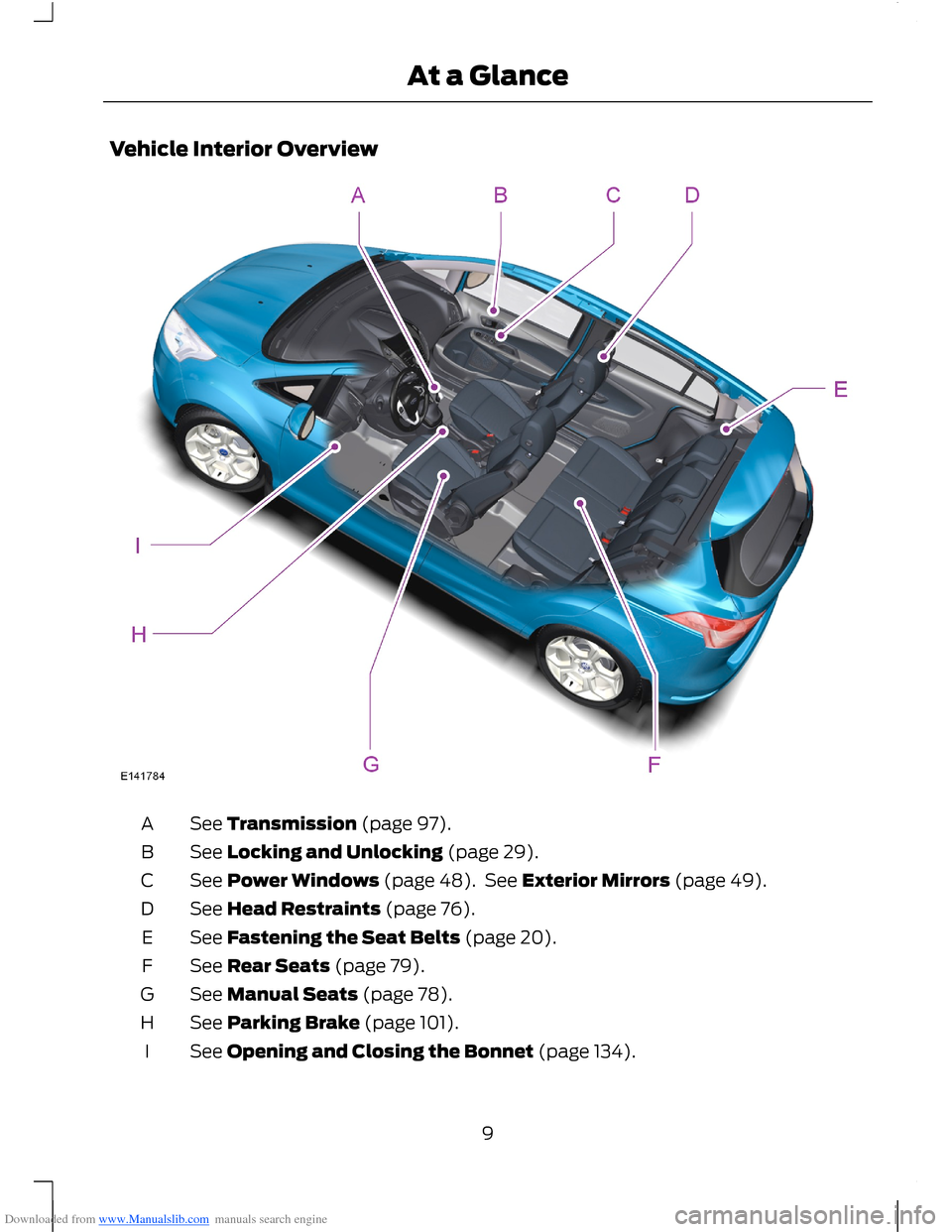
Downloaded from www.Manualslib.com manuals search engine Vehicle Interior Overview
See Transmission (page 97).A
See Locking and Unlocking (page 29).B
See Power Windows (page 48). See Exterior Mirrors (page 49).C
See Head Restraints (page 76).D
See Fastening the Seat Belts (page 20).E
See Rear Seats (page 79).F
See Manual Seats (page 78).G
See Parking Brake (page 101).H
See Opening and Closing the Bonnet (page 134).I
9At a Glance
Page 56 of 256

Downloaded from www.Manualslib.com manuals search engine When a warning lamp or indicator does notilluminate once you have switched theignition on, it indicates a malfunction. Havethe system checked by an authoriseddealer.
Anti-lock Braking System WarningLamp
If it illuminates when you aredriving, this indicates amalfunction. You will continueto have normal braking (without anti-lockbraking system). Have the system checkedby an authorised dealer as soon aspossible.
Brake System Warning Lamp
It illuminates when you apply theparking brake or when the brakefluid level is low.
WARNING
Reduce your speed gradually andstop your vehicle as soon as it is safeto do so. Use your brakes with care.
If it illuminates when you are driving, checkthat the parking brake is not applied. If theparking brake is not applied, this indicatesa malfunction. Have the system checkedby an authorised dealer immediately.
Coolant Temperature WarningLamp
WARNING
Do not resume your journey if itilluminates despite the level beingcorrect. Have the system checked bya an authorised dealer immediately.
If it stays on after starting orilluminates when driving, thisindicates a malfunction. Stopyour vehicle as soon as it is safe to do soand switch the engine off. Check thecoolant level. See Engine Coolant Check(page 140).
Cruise Control Indicator
It will illuminate when you haveset a speed using the cruisecontrol system. See UsingCruise Control (page 109).
Direction Indicator
Flashes during operation. Asudden increase in the rate offlashing warns of a failedindicator bulb. See Changing a Bulb(page 143).
Door Ajar Warning Lamp
Illuminates when you switch theignition on and remains on if anydoor, the bonnet or the liftgateis not closed properly.
Engine Warning Lamps
Malfunction Indicator Lamp
Powertrain Warning Lamp
54Instrument Cluster
Page 68 of 256

Downloaded from www.Manualslib.com manuals search engine Steering
ActionMessageindicatorMessage
Have the system checked by anauthorised dealer immediately.redSteering malfunctionService now
Have the system checked by anauthorised dealer immediately.redSteering malfunctionStop safely
Full steering will be maintained but youwill need to exert greater force on thesteering wheel. Have the systemchecked by an authorised dealer assoon as possible.
amberPower steering malfunctionService now
Transmission
ActionMessageindicatorMessage
Have the system checked by anauthorised dealer immediately.redTransmission malfunctionService now
Under certain driving conditions it ispossible that the clutches in the trans-mission can overheat. In these circum-stances it is necessary to press thebrake pedal and stop your vehicle toprevent damage to the transmission.Move the transmission selector leverto position N or P and apply theparking brake until the transmissionhas cooled and the message disap-pears from the display.
redTransmission overtemp.Stop safely
See Automatic Transmission (page97). See Starting and Stopping theEngine (page 83).-Vehicle not in ParkSelect P
See Automatic Transmission (page97). See Starting and Stopping theEngine (page 83).-To start select N or P
66Information Displays
Page 76 of 256

Downloaded from www.Manualslib.com manuals search engine Recommended Settings for Cooling
Vehicles With Automatic Climate ControlVehicles With Manual Climate Control
Press the AUTO button.Adjust the fan speed to the secondspeed setting.1
Adjust the temperature control to thedesired setting.Adjust the temperature control to themidway point of the cold settings.2
Open all instrument panel air vents anddirect as desired.Adjust the air distribution control to theinstrument panel air vents position.3
Vehicle Stationary for Extended Periods During Extreme High AmbientTemperatures
Vehicles With Automatic Climate ControlVehicles With Manual Climate Control
Apply the parking brake.Apply the parking brake.1
Move the transmission selector lever toposition P or neutral.Move the transmission selector lever toposition P or neutral.2
Press the MAX A/C button.Adjust the temperature control to theMAX A/C position.3
Adjust the fan speed to the lowest speedsetting.4
Side Window Defogging in Cold Weather
Vehicles With Automatic Climate ControlVehicles With Manual Climate Control
Press the windscreen defrosting anddefogging button.Adjust the air distribution control to theinstrument panel and footwell air ventspositions.
1
Adjust the temperature control to thedesired setting.Press the A/C button.2
Adjust the temperature control to thedesired setting.3
74Climate Control
Page 99 of 256

Downloaded from www.Manualslib.com manuals search engine MANUAL TRANSMISSION
Selecting Reverse Gear
Do not engage reverse gear when yourvehicle is moving. This can cause damageto the transmission.
AUTOMATIC TRANSMISSION
WARNING
Always set the parking brake fullyand make sure you move thetransmission selector lever toposition P. Switch the ignition off andremove the key whenever you leave yourvehicle.
Selector Lever Positions
ParkP
ReverseR
NeutralN
DriveD
Sport mode and manual shiftingS
Manual shift up+
Manual shift down-
WARNING
Apply the brakes before moving thetransmission selector lever and keepthem applied until you are ready tomove off.
Press the button on the transmissionselector lever to change to each position.
The transmission selector lever positionwill be shown in the information display.
P (Park)
WARNINGS
Move the transmission selector leverto park only when your vehicle isstationary.
Apply the parking brake and movethe transmission selector lever topark before leaving your vehicle.Make sure that the transmission selectorlever is latched in position.
Note:An audible warning will sound if youopen the driver's door and you have notmoved the transmission selector lever topark.
In this position, power is not transmittedto the drive wheels and the transmissionis locked. You can start the engine with thetransmission selector lever in this position.
R (Reverse)
WARNINGS
Move the transmission selector leverto reverse only when your vehicle isstationary and the engine is at idlespeed.
Always come to a complete stopbefore shifting the transmissionselector lever out of reverse.
97Transmission
Page 100 of 256

Downloaded from www.Manualslib.com manuals search engine Move the transmission selector lever toreverse to allow your vehicle to movebackward.
N (Neutral)
In this position, power is not transmittedto the drive wheels but the transmission isnot locked. You can start the engine withthe transmission selector lever in thisposition.
D (Drive)
Note:A shift will occur only when yourvehicle speed and the engine speed areappropriate.
Note:You may temporarily override thecurrent gear selected using the + and -buttons.
Select drive to shift automatically throughthe forward gears.
The transmission will select theappropriate gear for optimum performancebased on ambient temperature, roadgradient, vehicle load and your input.
Sport Mode and Manual Shifting
Sport Mode
Note:In sport mode the transmissionoperates as normal but gears are selectedmore quickly and at higher engine speeds.
Note:In sport mode S will be shown in theinformation display.
Switch on sport mode by moving thetransmission selector lever to position S.Sport mode will remain on until either youshift manually up or down the gears using+ and - or move the transmission selectorlever to position D.
Manual Shifting
WARNINGS
Do not hold the buttons permanentlyin - or +.
WARNINGS
The transmission will automaticallydownshift when the engine speed istoo low.
Press the - button to shift down and pressthe + button to shift up.
Gears may be skipped by pressing thebuttons repeatedly at short intervals.
Manual mode also provides a kickdownfunction. See Kickdown.
Hints on Driving With anAutomatic Transmission
WARNING
Do not idle the engine for longperiods of time in drive with thebrakes applied.
Moving Off
1.Release the parking brake.
2.Release the brake pedal and press theaccelerator pedal.
Stopping
1.Release the accelerator pedal andpress the brake pedal.
2.Apply the parking brake.
3.Move the transmission selector leverto N or P.
Kickdown
Press the accelerator pedal fully with thetransmission selector lever in the driveposition to select the next lowest gear foroptimum performance. Release theaccelerator pedal when you no longerrequire kickdown.
98Transmission