2012 FORD B MAX wheel
[x] Cancel search: wheelPage 168 of 256
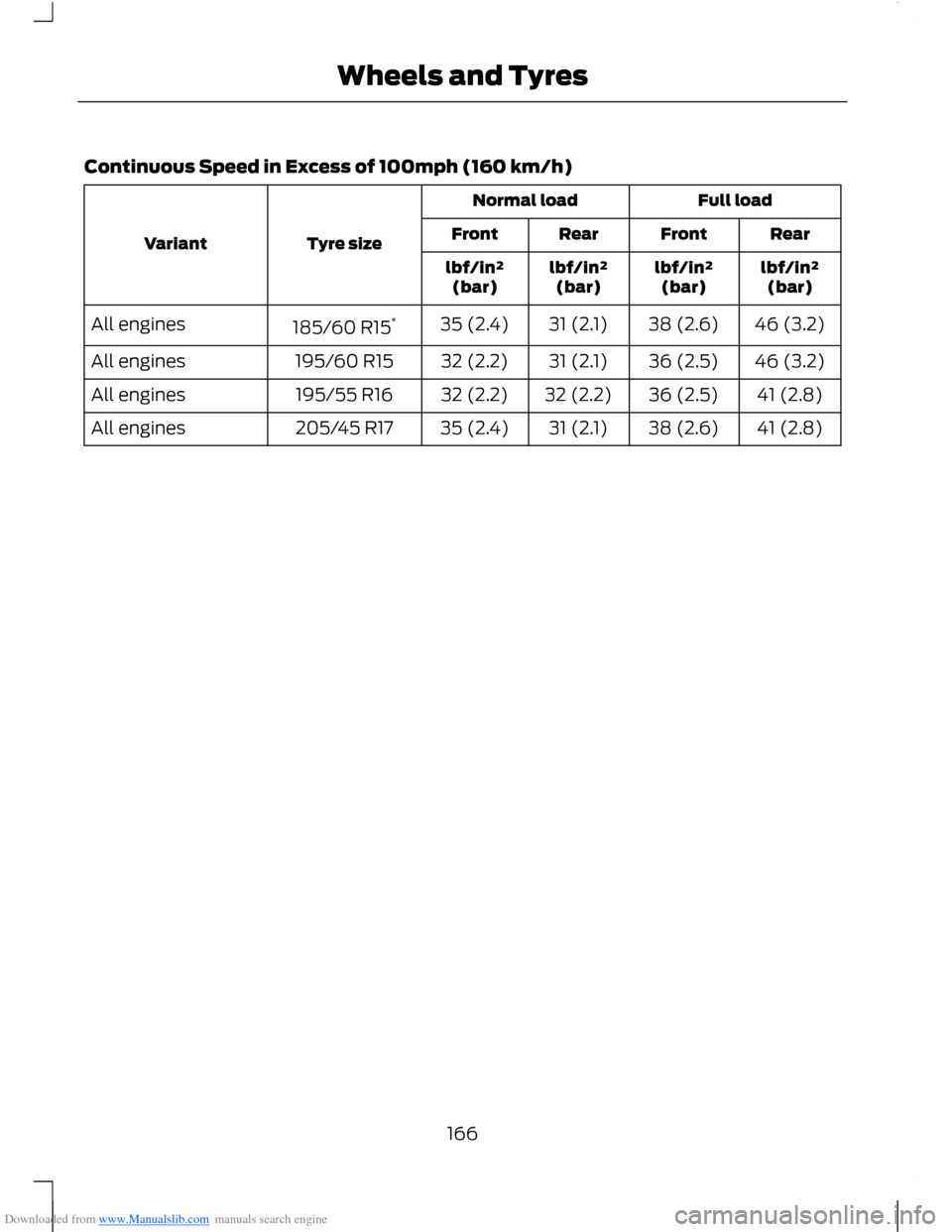
Downloaded from www.Manualslib.com manuals search engine Continuous Speed in Excess of 100mph (160 km/h)
Full loadNormal load
Tyre sizeVariantRearFrontRearFront
lbf/in²(bar)lbf/in²(bar)lbf/in²(bar)lbf/in²(bar)
46 (3.2)38 (2.6)31 (2.1)35 (2.4)185/60 R15*All engines
46 (3.2)36 (2.5)31 (2.1)32 (2.2)195/60 R15All engines
41 (2.8)36 (2.5)32 (2.2)32 (2.2)195/55 R16All engines
41 (2.8)38 (2.6)31 (2.1)35 (2.4)205/45 R17All engines
166Wheels and Tyres
Page 170 of 256

Downloaded from www.Manualslib.com manuals search engine VEHICLE IDENTIFICATION
NUMBER
Your vehicle identification number isstamped into the floor panel on theright-hand side, beside the front seat. It isalso shown on the left-hand side of theinstrument panel.
TECHNICAL SPECIFICATIONS
Vehicle dimensions
Dimension in inches (mm)Dimension description
160.5 (4077)Maximum length
81.4 (2067)Overall width including exterior mirrors
63.1 - 63.5 (1604 - 1613)Overall height - EC kerb weight
98.0 (2489)Wheelbase
58.5 - 58.7 (1487 - 1492)Front track
58.1 - 58.3 (1477 - 1482)Rear track
168Capacities and Specifications
Page 172 of 256

Downloaded from www.Manualslib.com manuals search engine Dimension in inches (mm)Dimension descriptionItem
3.1 (78)Bumper – end of tow ballA
0.7 (18)Attachment point – centre of tow ballB
33.3 (845)Wheel centre – centre of tow ballC
20.3 (516)Centre of tow ball – side memberD
40.6 (1032)Distance between side membersE
16.5 (419)Centre of tow ball – centre 1. attachmentpointF
26.3 (668)Centre of tow ball – centre 2. attachmentpointG
170Capacities and Specifications
Page 200 of 256
Downloaded from www.Manualslib.com manuals search engine USING VOICE RECOGNITION
This system helps you control manyfeatures using voice commands. Thisallows you to keep your hands on thewheel and focus on what is in front of you.
Helpful Hints
Make sure the interior of your vehicle is asquiet as possible. Wind noise from openwindows and road vibrations may preventthe system from correctly recognisingspoken commands.
Press the voice button and wait until thesystem voice announcement has finishedfollowed by a single beep before giving acommand. Any command spoken prior tothis does not register with the system.
Speak naturally, without long pausesbetween words.
You can interrupt the system at anytimewhile it is speaking by pressing the voiceicon. You can also cancel a voice sessionby pressing and holding the voice icon atany time.
Initiating a Voice Session
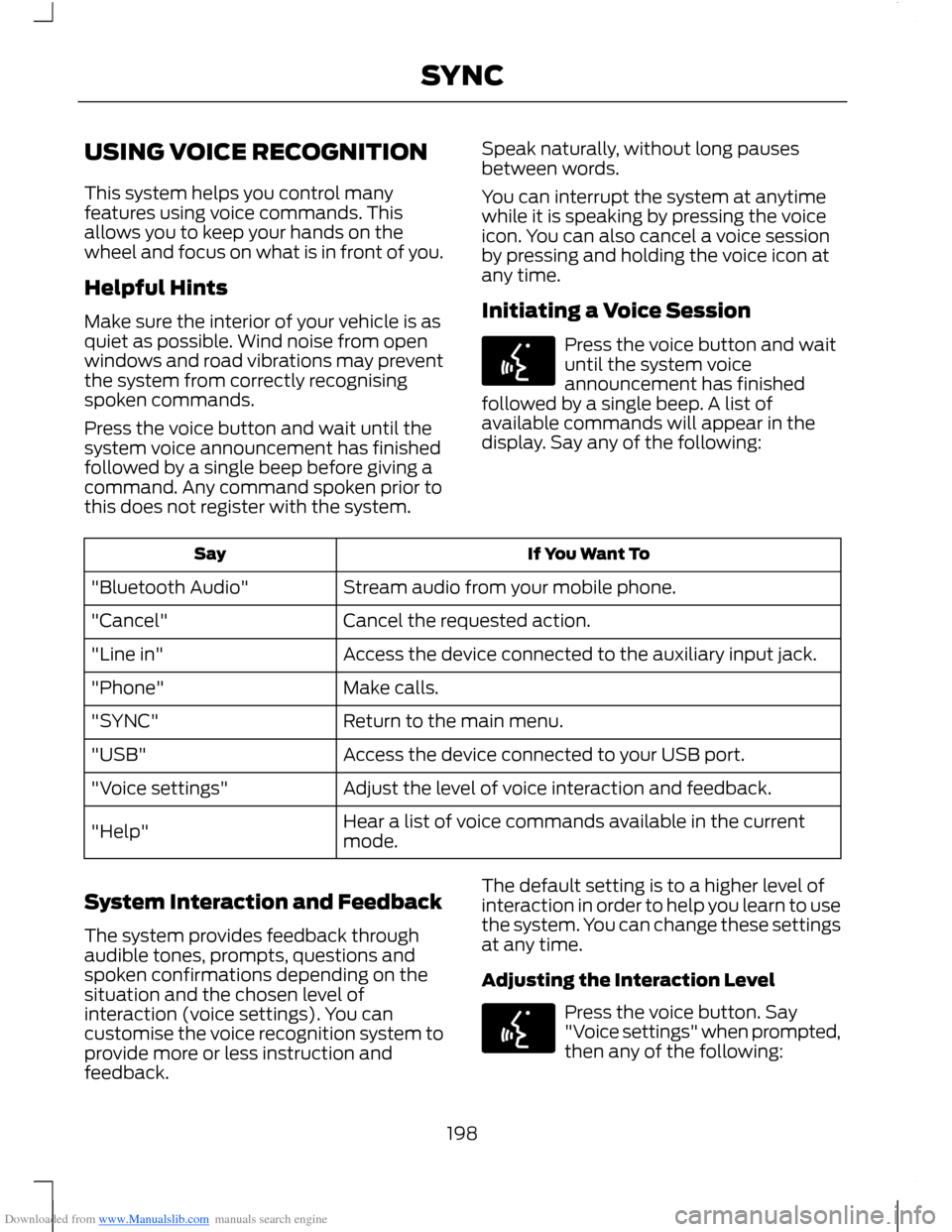
Press the voice button and waituntil the system voiceannouncement has finishedfollowed by a single beep. A list ofavailable commands will appear in thedisplay. Say any of the following:
If You Want ToSay
Stream audio from your mobile phone."Bluetooth Audio"
Cancel the requested action."Cancel"
Access the device connected to the auxiliary input jack."Line in"
Make calls."Phone"
Return to the main menu."SYNC"
Access the device connected to your USB port."USB"
Adjust the level of voice interaction and feedback."Voice settings"
Hear a list of voice commands available in the currentmode."Help"
System Interaction and Feedback
The system provides feedback throughaudible tones, prompts, questions andspoken confirmations depending on thesituation and the chosen level ofinteraction (voice settings). You cancustomise the voice recognition system toprovide more or less instruction andfeedback.
The default setting is to a higher level ofinteraction in order to help you learn to usethe system. You can change these settingsat any time.
Adjusting the Interaction Level
Press the voice button. Say"Voice settings" when prompted,then any of the following:
198SYNC
Page 205 of 256

Downloaded from www.Manualslib.com manuals search engine "MENU"
"(Phone) connections"
"(Phone) settings (message) notification off"
"(Phone) settings (message) notification on"
"(Phone) settings (set) phone ringer"
"(Phone) settings (set) ringer 1"
"(Phone) settings (set) ringer 2"
"(Phone) settings (set) ringer 3"
"(Phone) settings (set) ringer off"
"Phone name"
"Text message inbox"
Words in ( ) are optional and do not have to be spoken for the system to understandthe command.
Making Calls
Press the voice button and whenprompted say:
1."Call
2.When the system confirms the number,say "Dial" again to initiate the call.
To erase the last spoken digit, say "Delete"or press the left arrow button. To erase allspoken digits, say "Clear" or press and holdthe left arrow button.
To end the call, press the End Call buttonon the steering wheel or select End Callon the display and press OK.
Receiving Calls
When receiving a call, you can:
•Answer the call by pressing the AcceptCall button on the steering wheel orselect Accept Call on the display andpress OK.
•To reject the call press the Reject Callbutton on the steering wheel or selecton the display and press OK.
•Ignore the call by doing nothing.
Mobile Phone Options During anActive Call
During an active call, you have additionalmenu features which become availablesuch as putting a call on hold, joining calls,etc.
To access choose one of the optionsavailable at the bottom of the display orpress More.
203SYNC
Page 233 of 256

Downloaded from www.Manualslib.com manuals search engine End User Notice
Microsoft® Windows® Mobile forAutomotive Important SafetyInformation
This system Ford SYNC™ containssoftware that is licenced to ManufacturerFORD MOTOR COMPANY by an affiliateof Microsoft Corporation pursuant to alicence agreement. Any removal,reproduction, reverse engineering or otherunauthorised use of the software from thissystem in violation of the licenceagreement is strictly prohibited and maysubject you to legal action.
Read and follow instructions: Beforeusing your Windows Automotive- basedsystem, read and follow all instructionsand safety information provided in this enduser manual ("User's Guide"). Notfollowing precautions found in this User'sGuide can lead to an accident or otherserious consequences.
Keep User's Guide in vehicle: When keptin the vehicle, the User's Guide will be aready reference for you and other usersunfamiliar with the WindowsAutomotive-based system. Please makecertain that before using the system forthe first time, all persons have access tothe User's Guide and read its instructionsand safety information carefully.
WARNING
Operating certain parts of thissystem while driving can distractyour attention away from the road,and possibly cause an accident or otherserious consequences. Do not changesystem settings or enter data non-verbally(using your hands) while driving. Stop thevehicle in a safe and legal manner beforeattempting these operations. This isimportant since while setting up orchanging some functions you might berequired to distract your attention awayfrom the road and remove your hands fromthe wheel.
General Operation
Voice Command Control: Functionswithin the Windows Automotive-basedsystem may be accomplished using onlyvoice commands. Using voice commandswhile driving allows you to operate thesystem without removing your hands fromthe wheel.
Prolonged Views of Screen: Do notaccess any function requiring a prolongedview of the screen while you are driving.Pull over in a safe and legal manner beforeattempting to access a function of thesystem requiring prolonged attention. Evenoccasional short scans to the screen maybe hazardous if your attention has beendiverted away from your driving task at acritical time.
Volume Setting: Do not raise the volumeexcessively. Keep the volume at a levelwhere you can still hear outside traffic andemergency signals while driving. Drivingwhile unable to hear these sounds couldcause an accident.
231Appendices
Page 245 of 256

Downloaded from www.Manualslib.com manuals search engine A
A/CSee: Climate Control..........................................68About This Manual...........................................5Protecting the Environment...............................5ABSSee: Brakes............................................................101ABS driving hintsSee: Hints on Driving With Anti-LockBrakes.................................................................101AccessoriesSee: Replacement PartsRecommendation..............................................7Active City Stop...............................................111General Information............................................111Laser Sensor Information.................................112Using Active City Stop.........................................111Adjusting the Steering Wheel...................38Air ConditioningSee: Climate Control..........................................68Air Vents............................................................68Centre Air Vents....................................................68Side Air Vent..........................................................68AlarmSee: Anti-Theft Alarm........................................35Anti-Theft Alarm............................................35Alarm System........................................................35Arming the Alarm.................................................36Disarming the Alarm............................................37Full and Reduced Guard....................................36Triggering the Alarm............................................36Appendices....................................................225At a Glance..........................................................8Front Exterior Overview........................................8Instrument Panel Overview..............................10Rear Exterior Overview........................................13Vehicle Interior Overview.....................................9Audible Warnings and Indicators.............56Automatic Transmission...................................56Headlamps On......................................................56Key Outside Car....................................................56Low Fuel...................................................................57Seat Belt Minder....................................................57Audio Control...................................................38.....................................................................................38Audio System..................................................171General Information............................................171
Audio System Security................................187Audio Troubleshooting...............................195Audio unit - Vehicles With:AM/FM/CD/Bluetooth..............................177Alternative Frequencies....................................181Automatic Volume Control............................180Autostore Control..............................................180News Broadcasts.................................................181Regional Mode......................................................181Sound Button.......................................................179Station Preset Buttons.....................................179Station Tuning Control......................................179Traffic Information Control.............................180Waveband Button..............................................179Audio unit - Vehicles With:AM/FM/CD...................................................172Alternative Frequencies....................................176Automatic Volume Control.............................175Autostore Control...............................................175News Broadcasts................................................176Regional Mode.....................................................176Sound Button.......................................................174Station Preset Buttons......................................174Station Tuning Control......................................174Traffic Information Control..............................175Waveband Button...............................................174Audio unit - Vehicles With: SonyAM/FM/CD...................................................182Alternative Frequencies...................................186Automatic Volume Control............................186Autostore Control...............................................185Digital Signal Processing.................................186News Broadcasts...............................................186Regional Mode.....................................................187Sound Button......................................................184Station Preset Buttons.....................................184Station Tuning Control.....................................184Traffic Information Control.............................185Waveband Button..............................................184Autolamps........................................................43Automatic Climate Control........................70Temperature Control...........................................72
243Index
Page 246 of 256

Downloaded from www.Manualslib.com manuals search engine Automatic Transmission.............................97Emergency Park Position ReleaseLever....................................................................99Hints on Driving With an AutomaticTransmission....................................................98Selector Lever Positions....................................97Sport Mode and Manual Shifting..................98Autowipers.......................................................40Auxiliary Input Socket.................................194Auxiliary Power Points..................................81Location....................................................................81
B
Bonnet LockSee: Opening and Closing the Bonnet.......134Brake and Clutch Fluid Check...................141Brakes................................................................101General Information...........................................101Bulb Specification Chart...........................149
C
Capacities and Specifications.................167Technical Specifications.................................168Cargo Nets........................................................114Installing and Removing the Net...................114Car WashSee: Cleaning the Exterior...............................153Catalytic Converter........................................93Driving with a Catalytic Converter.................93Changing a Bulb............................................143Approach Lamp..................................................145Central High Mounted Brake Lamp..............147Front Fog Lamps.................................................145Headlamp..............................................................143Interior Lamp........................................................148Licence Plate Lamp...........................................148Luggage Compartment Lamp, FootwellLamp and Liftgate Lamp............................149Reading Lamps...................................................148Rear Lamps..........................................................146Side Lamp.............................................................144Side Repeater......................................................144Changing a Fuse............................................133
Changing a Road Wheel............................160Assembling the Wheel Brace.........................162Installing a Road Wheel...................................163Jacking and Lifting Points.................................161Removing a Road Wheel.................................163Removing the Wheel Trim...............................162Vehicle Jack..........................................................160Vehicles With a Spare Wheel........................160Wheel Nuts...........................................................160Changing the 12V Battery...........................141Changing the Wiper Blades.......................141Rear Window Wiper Blade..............................142Windscreen Wiper Blades................................141Checking the Wiper Blades........................141Childminder Mirror.........................................50Child Safety.......................................................14Child Safety Locks..........................................19Left-Hand Side......................................................19Right-Hand Side....................................................19Child Seat Positioning...................................16Cigar Lighter......................................................81Cleaning the Alloy Wheels........................154Cleaning the Exterior...................................153Body Paintwork Preservation.........................153Cleaning the Chrome Trim..............................153Cleaning the Headlamps.................................153Cleaning the Rear Window.............................153Cleaning the Interior....................................153Instrument Cluster Screens, LCD Screensand Radio Screens........................................154Rear Windows......................................................154Seat Belts..............................................................153Climate Control..............................................68Principle of Operation........................................68Clock....................................................................61Type 1.........................................................................61Type 2........................................................................61Cold Weather Precautions.........................121
244Index