Page 133 of 358

normal, turn the engine off immediately and call for
service. Refer to “If Your Engine Overheats” in “What To
Do In Emergencies” for further information.
20. Brake Warning LightThis light monitors various brake functions,
including brake fluid level and parking brake
application. If the Brake Warning Light turns
on it may indicate that the parking brake is
applied, that the brake fluid level is low, or that there is
a problem with the brake system reservoir.
The light will remain on until the cause is corrected.
If brake failure is indicated, immediate repair is neces-
sary.WARNING!
Driving a vehicle with the red brake light on is
dangerous. You could have a collision. Have the
vehicle checked immediately.
Vehicles equipped with the Anti-Lock Brake System
(ABS), are also equipped with Electronic Brake Force
Distribution (EBD). In the event of an EBD failure, the
Brake Warning Light will turn on along with the ABS
Light. Immediate repair to the ABS system is required.
Operation of the Brake Warning Light can be checked by
turning the ignition switch from the OFF/LOCK position
to the ON/RUN position. The light should illuminate for
approximately two seconds. The light should then turn
off unless the parking brake is applied or a brake fault is
detected. If the light does not illuminate, have the light
inspected by an authorized dealer.
4
UNDERSTANDING YOUR INSTRUMENT PANEL 131
Page 134 of 358
The light also will turn on when the parking brake is
applied with the ignition switch in the ON/RUN posi-
tion.
NOTE:This light shows only that the parking brake is
applied. It does not show the degree of brake application.
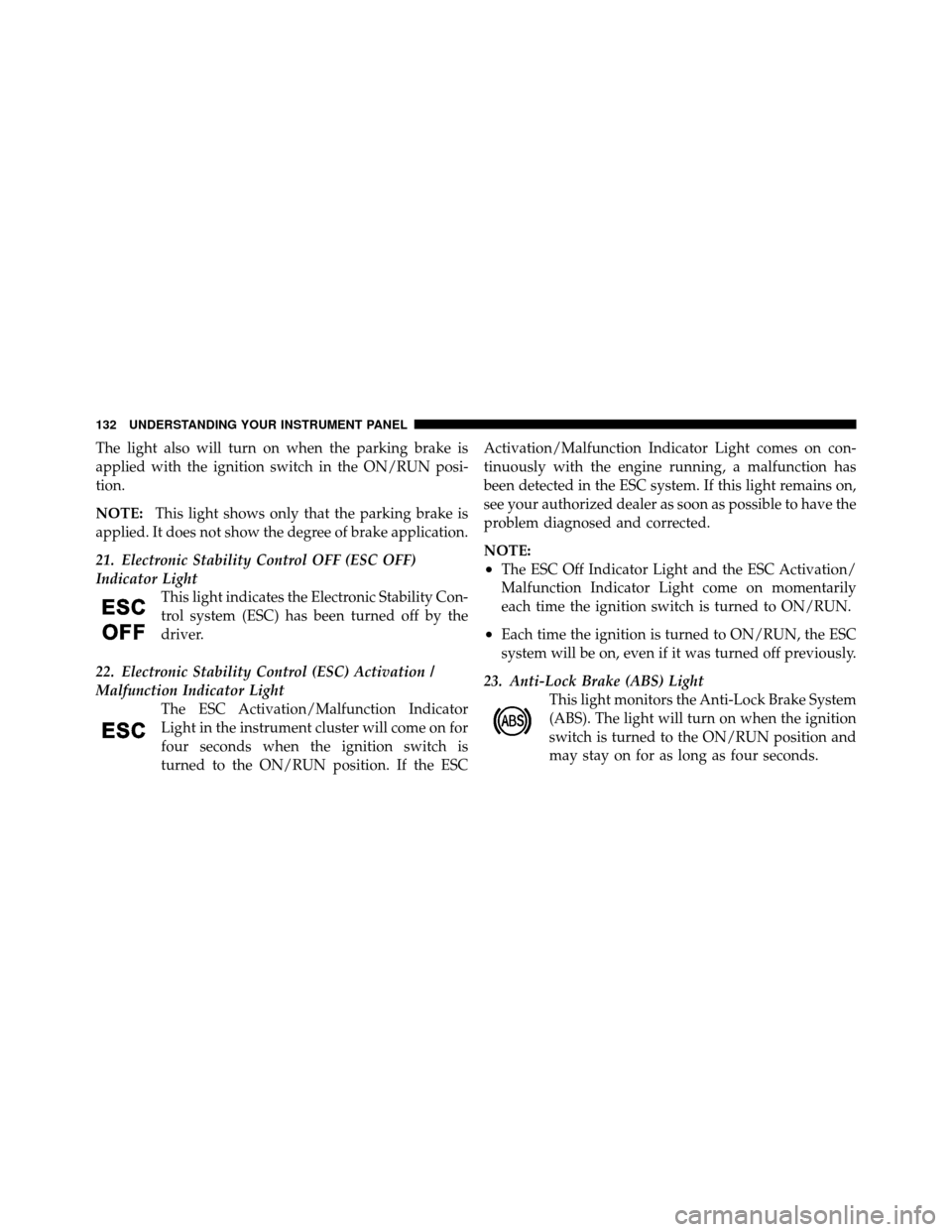
21. Electronic Stability Control OFF (ESC OFF)
Indicator Light This light indicates the Electronic Stability Con-
trol system (ESC) has been turned off by the
driver.
22. Electronic Stability Control (ESC) Activation /
Malfunction Indicator Light The ESC Activation/Malfunction Indicator
Light in the instrument cluster will come on for
four seconds when the ignition switch is
turned to the ON/RUN position. If the ESC Activation/Malfunction Indicator Light comes on con-
tinuously with the engine running, a malfunction has
been detected in the ESC system. If this light remains on,
see your authorized dealer as soon as possible to have the
problem diagnosed and corrected.
NOTE:
•The ESC Off Indicator Light and the ESC Activation/
Malfunction Indicator Light come on momentarily
each time the ignition switch is turned to ON/RUN.
•Each time the ignition is turned to ON/RUN, the ESC
system will be on, even if it was turned off previously.
23. Anti-Lock Brake (ABS) Light This light monitors the Anti-Lock Brake System
(ABS). The light will turn on when the ignition
switch is turned to the ON/RUN position and
may stay on for as long as four seconds.
132 UNDERSTANDING YOUR INSTRUMENT PANEL
Page 135 of 358

If the ABS light remains on or turns on while driving, it
indicates that the Anti-Lock portion of the brake system
is not functioning and that service is required. However,
the conventional brake system will continue to operate
normally if the BRAKE warning light is not on.
If the ABS light is on, the brake system should be serviced
as soon as possible to restore the benefits of Anti-Lock
brakes. If the ABS light does not turn on when the
ignition switch is turned to the ON/RUN position, have
the light inspected by an authorized dealer.
24. Door AjarThis light will turn on to indicate that one or
more doors or the trunk may be ajar. 25. Temperature Gauge
The temperature digital scale shows engine coolant tem-
perature. Any reading within the normal range indicates
that the engine cooling system is operating satisfactorily.
The gauge pointer will likely indicate a higher tempera-
ture when driving in hot weather, up mountain grades,
or when towing a trailer. It should not be allowed to
exceed the upper limits of the normal operating range.
CAUTION!
Driving with a hot engine cooling system could
damage your vehicle. If all the segments of the
temperature gauge are lit, pull over and stop the
vehicle. Idle the vehicle with the air conditioner
turned off until the pointer drops back into the
normal range. If you hear continuous chimes, turn
the engine off immediately and call an authorized
dealer for service.
4
UNDERSTANDING YOUR INSTRUMENT PANEL 133
Page 138 of 358
The EVIC consists of the following:
•System Status
•Vehicle Information Warning Message Displays
•Personal Settings (Customer-Programmable Features)
•Outside Temperature Display
•Trip Computer Functions
EVIC Control Buttons
Press theMENU ESC button briefly to access the menu
and/or go to next screen or to confirm the required menu
option. Press and hold the MENU ESCbutton (approxi-
mately one second) to return to the main screen.
Press the +button to scroll upward through the dis-
played menu and the related options or to increase the
displayed value. Press the
–button to scroll downward through the
displayed menu and the related options or to decrease
the value displayed.
NOTE: Buttons+and –activate different functions
according to the following situations:
•To scroll the menu options upwards or downwards.
•To increase or decrease values during settings.
NOTE: When opening one of the front doors, the EVIC
display will turn on the clock and the miles or kilometers
covered (for versions/markets, where provided) for a
few seconds.
Electronic Vehicle Information Center (EVIC)
Setup Menu
The menu comprises a series of functions arranged in a
cycle. Press the +and –buttons to access the different
options and settings (setup).
136 UNDERSTANDING YOUR INSTRUMENT PANEL
Page 141 of 358
2. Fully depress the accelerator pedal slowly, three times
within 10 seconds.
3. Turn the ignition switch to the OFF/LOCK position.
NOTE:If the indicator message illuminates when you
start the vehicle, the oil change indicator system did not
reset. If necessary, repeat this procedure.
Trip Computer
The Trip Computer is located in the instrument cluster. It
features a driver-interactive display (displays informa-
tion such as; trip information, range, fuel consumption,
average speed and travel time).
Trip Button
The TRIP button, located on the right steering column
stalk, can be used to display and to reset the previously
described values.
•A short button press displays the different values.
•A long button press resets the system and then starts a
new trip.
New Trip
To reset:
•Press and hold the TRIPbutton to reset the system
manually.
•When the “Trip distance” reaches 9999.9 miles or
kilometers or when the “Travel time” reaches 99.59
(99 hours and 59 minutes), the system is reset auto-
matically.
•Disconnecting/Reconnecting the battery resets the
system.
NOTE: If the reset operation occurs in the presence of
the screens concerning Trip A or Trip B, only the infor-
mation associated with Trip A or Trip B functions will be
reset.
4
UNDERSTANDING YOUR INSTRUMENT PANEL 139
Page 146 of 358
Set Time (Clock)
This function may be used to set the clock through two
sub-menu items: “Time” and “Mode.”
Proceed as follows:
1. Briefly press theMENU ESCbutton. The display will
show the two sub-menu items “Time” and “Mode.”
2. Press the +or –button to navigate the two sub-menu
items.
3. Select the required option and then press the MENU
ESC button.
4. When accessing the “Time” sub-menu item, briefly
press the MENU ESC button and “hours” will flash on
the display.
5. Press the +or –button for setting.
6. Briefly press the MENU ESCbutton and “minutes”
will flash on the display. 7. Press the
+or –button for setting.
NOTE:
•The setting will increase or decrease by one unit each
time the +or –button is pressed. Press and hold the
button to increase/decrease the setting rapidly. Save
the setting by briefly pressing the button when you
approach the required setting.
•Briefly press the MENU ESC button to return to the
“Time” sub-function.
•When accessing the “Mode” submenu, briefly press
the MENU ESC button. The previously set display
format will flash on the display.
•Press the +or –button to select “24h” or “12h.”
When you have selected the required settings, briefly
press the MENU ESC button to go back to the Time,
Mode sub-menu screen, or press and hold the MENU
ESC button (approximately one second) to go back to the
main screen without storing the settings.
144 UNDERSTANDING YOUR INSTRUMENT PANEL
Page 148 of 358
To activate (On) or to deactivate (Off) the sound system
info displaying proceed as follows:
1. Briefly press theMENU ESCbutton “On” or “Off”
will flash on the display (according to the previous
setting).
2. Press the +or –button for setting.
3. Briefly press the MENU ESCbutton to go back to the
menu screen, or press and hold the MENU ESCbutton
(approximately one second) to go back to the main screen
without storing the settings.
If the radio has BLUE&ME™, refer to the appropriate
“BLUE&ME™ User ’s Manual” for further information.
Speed Display
When this function is activated the cluster will display
the vehicle speed (MPH or km/h). To activate (On) or to deactivate (Off) the speed display
feature, proceed as follows:
1. Briefly press the
MENU ESCbutton. “MPH”, “km/
h”, then “Off” will flash on the display (according to
previous setting).
2. Press the +or –button to select display deactivation
“Off”, “MPH” or “km/h”.
3. Briefly press the MENU ESCbutton to go back to the
menu screen, or press and hold the MENU ESCbutton
(approximately one second) to go back to the main
screen.
Autoclose
With this function active, the doors will automatically
lock at when the vehicle’s speed exceeds 15 mph
(24 km/h).
146 UNDERSTANDING YOUR INSTRUMENT PANEL
Page 196 of 358
�Brake System ........................ 205
▫ Four-Wheel Anti-Lock Brake System (ABS) . . 205
� Electronic Brake Control System ........... 207
▫ Anti-Lock Brake System (ABS) ........... 207
▫ Brake Assist System (BAS) .............. 207
▫ Traction Control System (TCS) ........... 208
▫ Hill Start Assist (HSA) ................ 209
▫ Electronic Stability Control (ESC) ......... 210
▫ ESC Activation/Malfunction Indicator Light
And ESC Off Indicator Light ............ 212
� Tire Safety Information ................. 214
▫ Tire Markings ....................... 214
▫ Tire Identification Number (TIN) ......... 217▫
Tire Terminology And Definitions ......... 218
▫ Tire Loading And Tire Pressure .......... 219
� Tires — General Information ............. 223
▫ Tire Pressure ....................... 223
▫ Tire Inflation Pressures ................ 224
▫ Tire Pressures For High Speed Operation . . . 225
▫ Radial-Ply Tires ..................... 226
▫ All Season Tires — If Equipped .......... 226
▫ Snow Tires ......................... 226
▫ Summer Or Three Season Tires — If
Equipped .......................... 227
▫ Spare Tire Matching Original Equipped Tire
And Wheel — If Equipped ............. 227
▫ Tire Spinning ....................... 228
194 STARTING AND OPERATING