Page 139 of 358
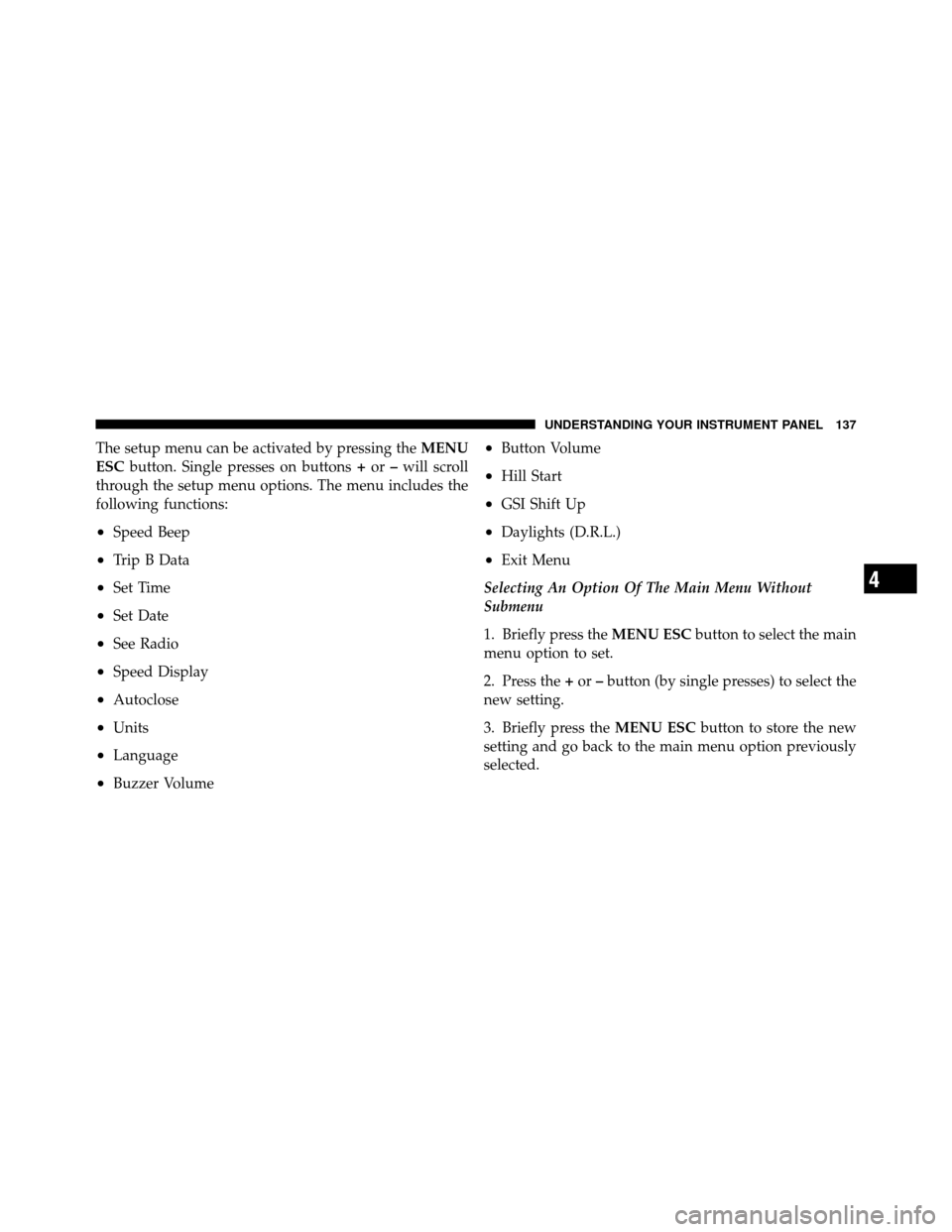
The setup menu can be activated by pressing theMENU
ESC button. Single presses on buttons +or –will scroll
through the setup menu options. The menu includes the
following functions:
•Speed Beep
•Trip B Data
•Set Time
•Set Date
•See Radio
•Speed Display
•Autoclose
•Units
•Language
•Buzzer Volume
•Button Volume
•Hill Start
•GSI Shift Up
•Daylights (D.R.L.)
•Exit Menu
Selecting An Option Of The Main Menu Without
Submenu
1. Briefly press the MENU ESCbutton to select the main
menu option to set.
2. Press the +or –button (by single presses) to select the
new setting.
3. Briefly press the MENU ESCbutton to store the new
setting and go back to the main menu option previously
selected.
4
UNDERSTANDING YOUR INSTRUMENT PANEL 137
Page 147 of 358
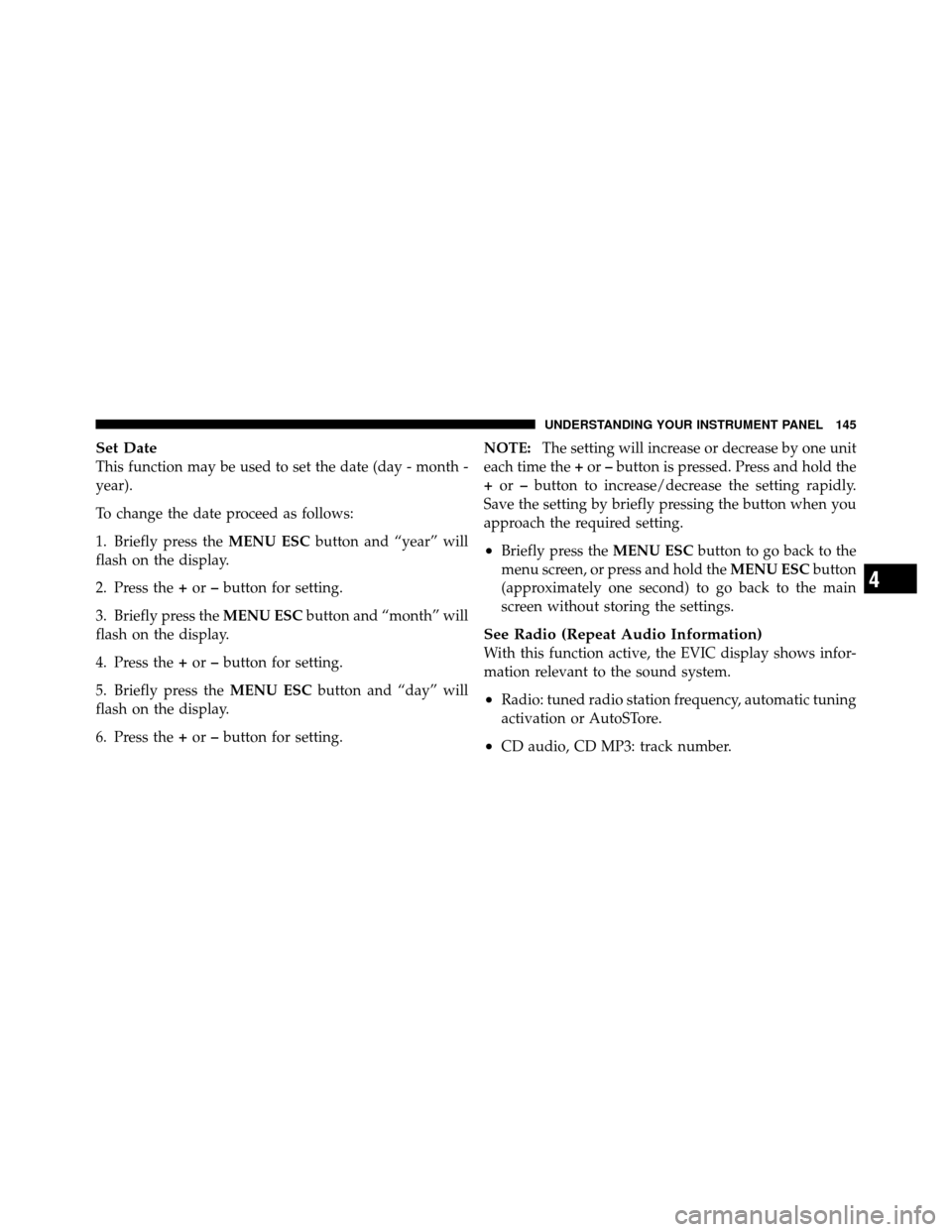
Set Date
This function may be used to set the date (day - month -
year).
To change the date proceed as follows:
1. Briefly press theMENU ESCbutton and “year” will
flash on the display.
2. Press the +or –button for setting.
3. Briefly press the MENU ESCbutton and “month” will
flash on the display.
4. Press the +or –button for setting.
5. Briefly press the MENU ESCbutton and “day” will
flash on the display.
6. Press the +or –button for setting. NOTE:
The setting will increase or decrease by one unit
each time the +or –button is pressed. Press and hold the
+ or –button to increase/decrease the setting rapidly.
Save the setting by briefly pressing the button when you
approach the required setting.
•Briefly press the MENU ESCbutton to go back to the
menu screen, or press and hold the MENU ESCbutton
(approximately one second) to go back to the main
screen without storing the settings.
See Radio (Repeat Audio Information)
With this function active, the EVIC display shows infor-
mation relevant to the sound system.
•Radio: tuned radio station frequency, automatic tuning
activation or AutoSTore.
•CD audio, CD MP3: track number.
4
UNDERSTANDING YOUR INSTRUMENT PANEL 145
Page 148 of 358
To activate (On) or to deactivate (Off) the sound system
info displaying proceed as follows:
1. Briefly press theMENU ESCbutton “On” or “Off”
will flash on the display (according to the previous
setting).
2. Press the +or –button for setting.
3. Briefly press the MENU ESCbutton to go back to the
menu screen, or press and hold the MENU ESCbutton
(approximately one second) to go back to the main screen
without storing the settings.
If the radio has BLUE&ME™, refer to the appropriate
“BLUE&ME™ User ’s Manual” for further information.
Speed Display
When this function is activated the cluster will display
the vehicle speed (MPH or km/h). To activate (On) or to deactivate (Off) the speed display
feature, proceed as follows:
1. Briefly press the
MENU ESCbutton. “MPH”, “km/
h”, then “Off” will flash on the display (according to
previous setting).
2. Press the +or –button to select display deactivation
“Off”, “MPH” or “km/h”.
3. Briefly press the MENU ESCbutton to go back to the
menu screen, or press and hold the MENU ESCbutton
(approximately one second) to go back to the main
screen.
Autoclose
With this function active, the doors will automatically
lock at when the vehicle’s speed exceeds 15 mph
(24 km/h).
146 UNDERSTANDING YOUR INSTRUMENT PANEL
Page 153 of 358
4. Briefly press theMENU ESCbutton to go back to the
menu screen, or press and hold the button (approxi-
mately one second) to go back to the main screen without
storing the settings.
Exit Menu
This function closes the initial menu screen.
Briefly press the MENU ESCbutton to go back to the
main screen.
Press the –button to return to the first menu option
(Speed Beep).
Press the +button to return to the last menu option
(Daylights).
SALES CODE (RAB) RADIO
Introduction
The radio has been designed according to the specifica-
tions of the passenger compartment, with a personalized
design to match the style of the dashboard.
If the radio has BLUE&ME™, refer to the appropriate
“BLUE&ME™ User ’s Manual” for further information.
4
UNDERSTANDING YOUR INSTRUMENT PANEL 151
Page 154 of 358
The instructions for use are given below and we recom-
mend you to read them carefully.
Suggestions
Road Safety
Please, learn how to use all different radio functions (e.g.
store stations) before beginning to drive.
Reception Conditions
Reception conditions change constantly while driving.
Reception may be interfered with by the presence of
mountains, buildings or bridges, or when you are far
away from the broadcaster.
WARNING!
Having the volume turned up high can cause the
driver to no be able to hear important traffic sounds,
i.e. sirens, horns, etc. This could cause an accident.
Always adjust the volume so that you can still hear
background noises.
Care And Maintenance
Clean the cover with a soft antistatic cloth only. Cleaning
and polishing products could damage the surface.
CDs
The presence of dirt, scratches or distortions on the CDs
could cause skipping and poor sound quality while it is
playing. For optimal playback conditions, follow these
guidelines:
•Only use branded CDs.
152 UNDERSTANDING YOUR INSTRUMENT PANEL
Page 156 of 358
Technical Specifications
The complete system consists of:
•Two 165 mm diameter midwoofer speakers, one
speaker in each of the front doors.
•Two 22 mm diameter tweeter speakers, one speaker in
each of the front pillars.
•Two 100 mm diameter full range speakers, one speaker
in each of the rear side panels.
•Antenna on the car roof.
•Radio with CD/MP3 player.With Bose�
Premium Audio system (if equipped):
•Two 165 mm diameter midwoofer speakers.
•Two 11 mm tweeter speakers in the front pillars.
•Two 100 mm full range speakers, one speaker in each
of the rear side panels.
•A subwoofer under the right front seat.
•An amplifier in the trunk on the right-hand side panel.
•Antenna on the car roof.
•Radio with CD/MP3 player.
154 UNDERSTANDING YOUR INSTRUMENT PANEL
Page 157 of 358
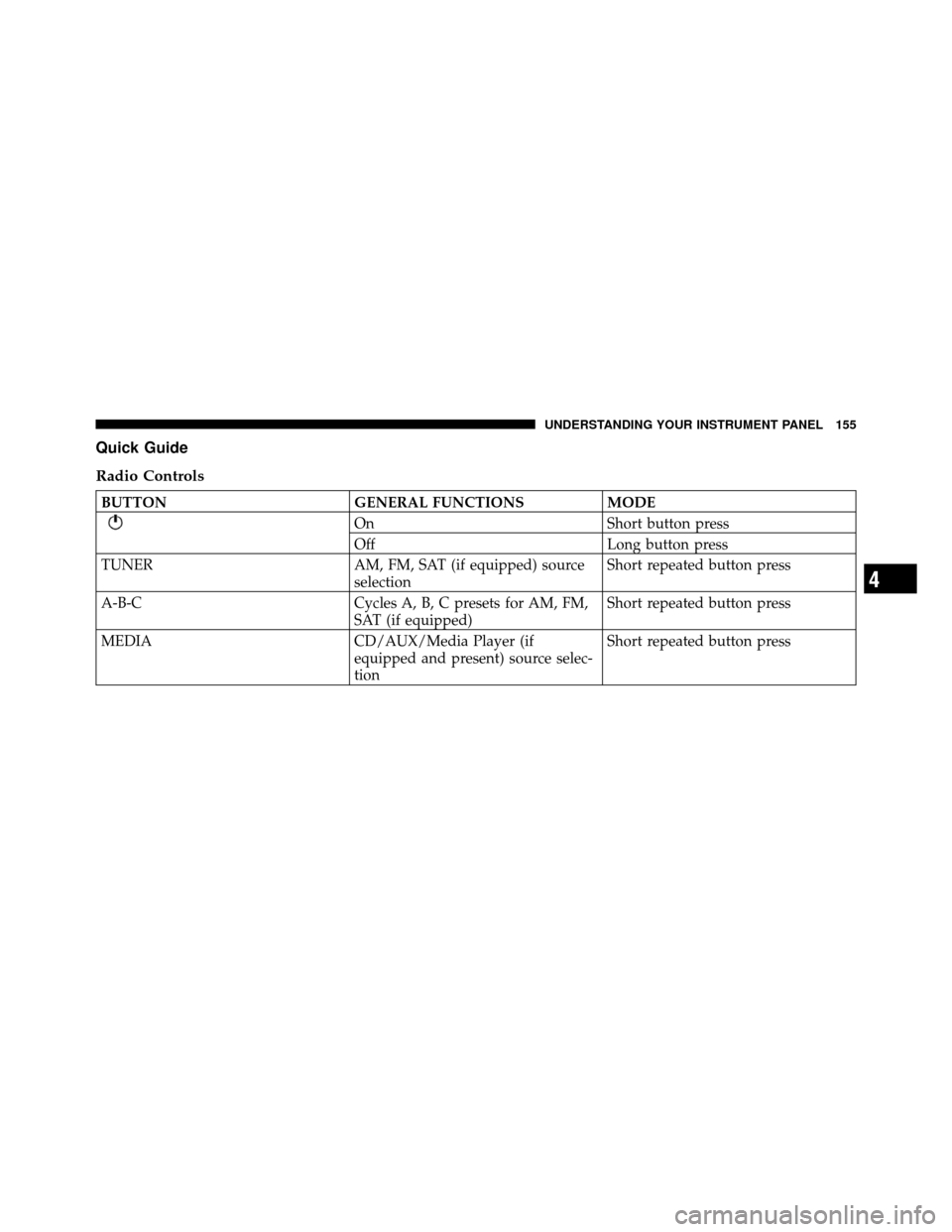
Quick Guide
Radio Controls
BUTTONGENERAL FUNCTIONSMODE
OnShort button press
Off Long button press
TUNER AM, FM, SAT (if equipped) source
selectionShort repeated button press
A-B-C Cycles A, B, C presets for AM, FM,
SAT (if equipped)Short repeated button press
MEDIA CD/AUX/Media Player (if
equipped and present) source selec-
tionShort repeated button press
4
UNDERSTANDING YOUR INSTRUMENT PANEL 155
Page 159 of 358
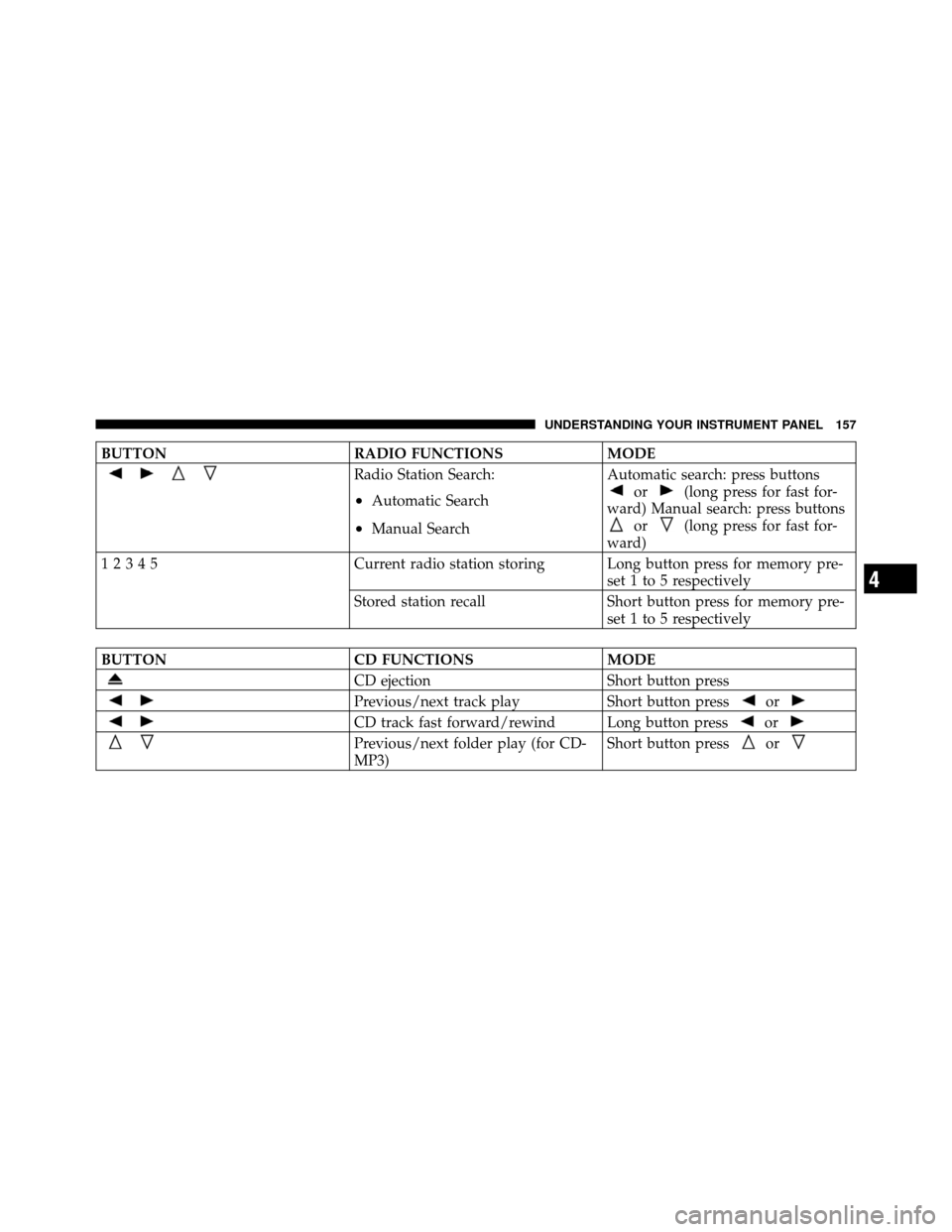
BUTTONRADIO FUNCTIONSMODE
Radio Station Search:
•Automatic Search
•Manual SearchAutomatic search: press buttons
or(long press for fast for-
ward) Manual search: press buttons
or(long press for fast for-
ward)
12345 Current radio station storing Long button press for memory pre-
set 1 to 5 respectively
Stored station recall Short button press for memory pre-
set 1 to 5 respectively
BUTTON CD FUNCTIONSMODE
CD ejectionShort button press
Previous/next track playShort button pressor
CD track fast forward/rewind Long button pressor
Previous/next folder play (for CD-
MP3)Short button pressor
4
UNDERSTANDING YOUR INSTRUMENT PANEL 157