Page 157 of 594
•Performance, such as audio clarity, echo, and loudness
to a large degree rely on the phone and network, and
not the Uconnect™ Phone.
•Echo at the far end can sometimes be reduced by
lowering the in-vehicle audio volume.
•In a convertible vehicle, system performance may be
compromised with the convertible top down.
SMS
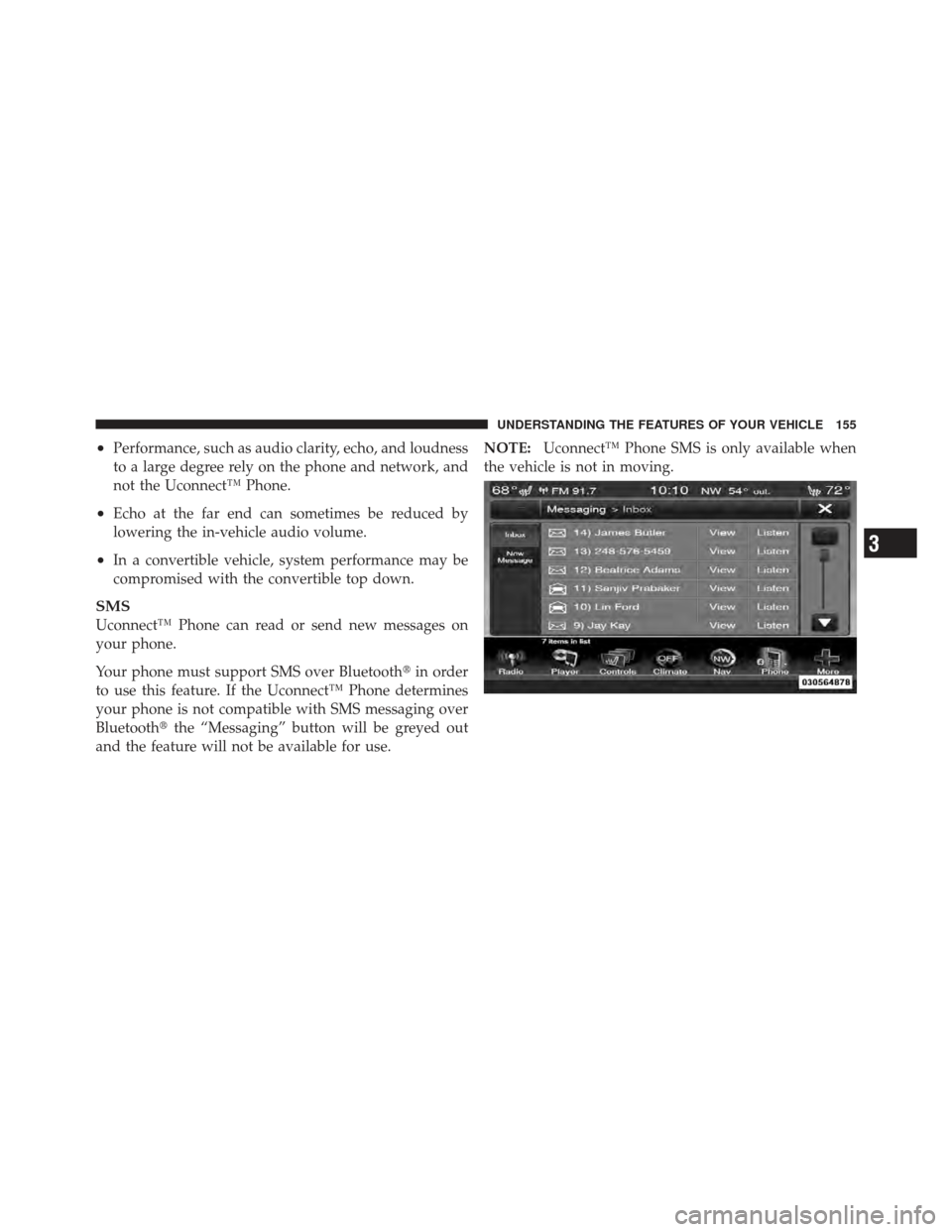
Uconnect™ Phone can read or send new messages on
your phone.
Your phone must support SMS over Bluetooth�in order
to use this feature. If the Uconnect™ Phone determines
your phone is not compatible with SMS messaging over
Bluetooth� the “Messaging” button will be greyed out
and the feature will not be available for use. NOTE:
Uconnect™ Phone SMS is only available when
the vehicle is not in moving.
3
UNDERSTANDING THE FEATURES OF YOUR VEHICLE 155
Page 158 of 594
Read Messages:
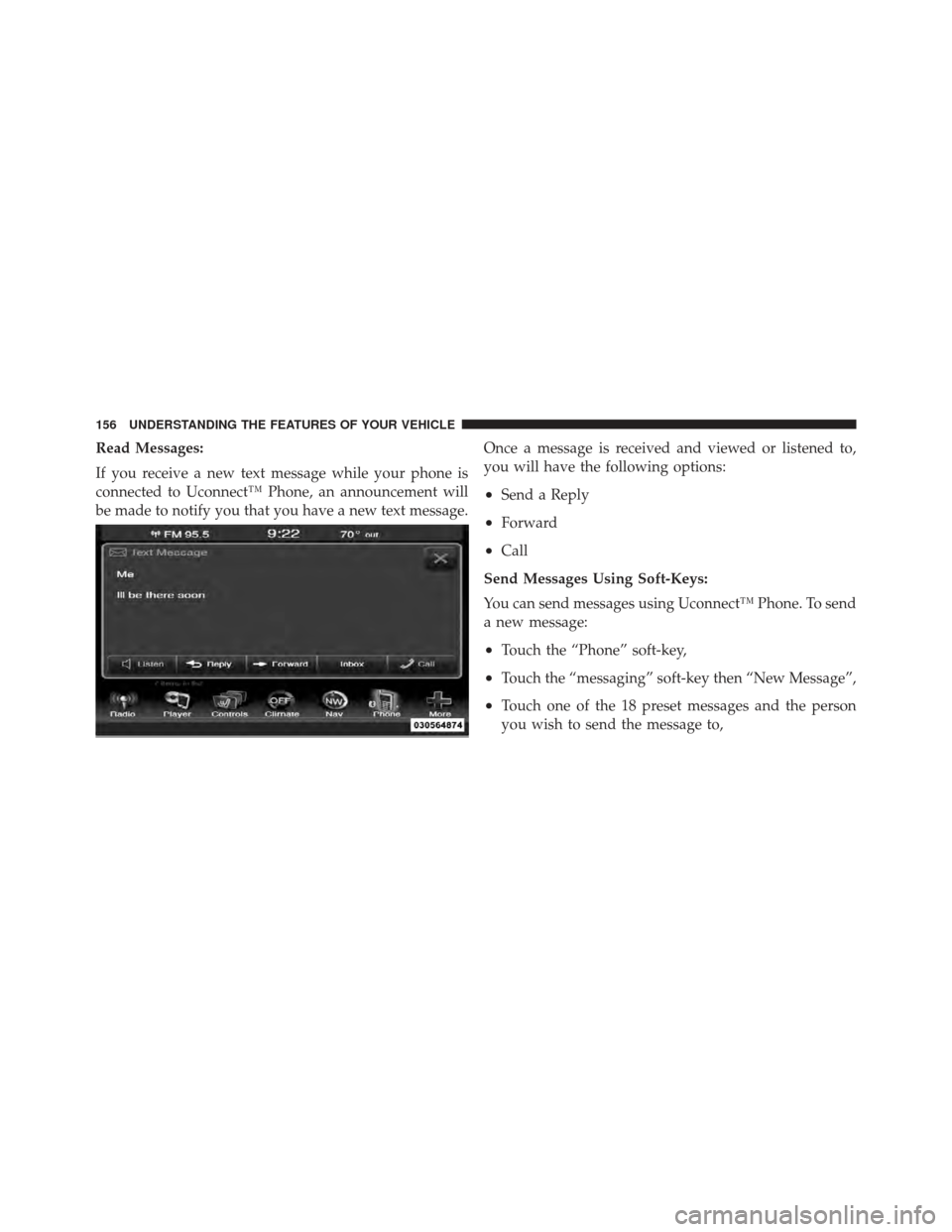
If you receive a new text message while your phone is
connected to Uconnect™ Phone, an announcement will
be made to notify you that you have a new text message.Once a message is received and viewed or listened to,
you will have the following options:
•Send a Reply
•Forward
•Call
Send Messages Using Soft-Keys:
You can send messages using Uconnect™ Phone. To send
a new message:
•Touch the “Phone” soft-key,
•Touch the “messaging” soft-key then “New Message”,
•Touch one of the 18 preset messages and the person
you wish to send the message to,
156 UNDERSTANDING THE FEATURES OF YOUR VEHICLE
Page 161 of 594
10. I will be minutes late.
11. See you in minutes.
12. Stuck in traffic.
13. Start without me.
14. Where are you?
15. Are you there yet?
16. I need directions.
17. I’m lost.
18. See you later.Bluetooth�Communication Link
Mobile phones have been found to lose connection to the
Uconnect™ Phone. When this happens, the connection
can generally be reestablished by switching the phone
OFF/ON. Your mobile phone is recommended to remain
in Bluetooth� ON mode.
Power-Up
After switching the ignition key from OFF to either the
ON or ACC position, or after a language change, you
must wait at least 15 seconds prior to using the system.
3
UNDERSTANDING THE FEATURES OF YOUR VEHICLE 159
Page 163 of 594
NOTE:
•You can replace “John Smith” with any name in your
mobile or favorite phone book. You can also say “Send
a message to John Smith” and the system will ask you
which phone number you want to send a message to
for John Smith.
•You can replace “Mobile” with “Home”, “Work” or
“Other”.
•You can replace “Incoming Calls” with “Outgoing
Calls” or “Missed Calls”.
•Messaging commands only work if the Uconnect
system is equipped with this feature and the mobile
phone supports messaging over Bluetooth.
•You can replace “248 555 1212” with any phone
number supported by your Mobile phone.
•You can replace “4” with any message number shown
on the screen.
•If your phone does not support phonebook download
or call log download over Bluetooth than these com-
mands will return a response that the contact does not
exist in the phonebook.
•Available Voice Commands are shown in bold face and
underlined in the gray shaded boxes.
3
UNDERSTANDING THE FEATURES OF YOUR VEHICLE 161
Page 165 of 594
NOTE:
•You can replace “John Smith” with any name in your
mobile or favorite phone book. You can also say “Send
a message to John Smith” and the system will ask you
which phone number you want to send a message to
for John Smith.
•You can replace “Mobile” with “Home”, “Work” or
“Other”.
•You can replace “Incoming Calls” with “Outgoing
Calls” or “Missed Calls”.
•Messaging commands only work if the Uconnect
system is equipped with this feature and the mobile
phone supports messaging over Bluetooth.
•You can replace “248 555 1212” with any phone
number supported by your Mobile phone.
•You can replace “4” with any message number shown
on the screen.
•If your phone does not support phonebook download
or call log download over Bluetooth than these com-
mands will return a response that the contact does not
exist in the phonebook.
•Available Voice Commands are shown in bold face and
underlined in the gray shaded boxes.
General Information
This device complies with Part 15 of the FCC rules and
RSS 210 of Industry Canada. Operation is subject to the
following conditions:
•Changes or modifications not expressly approved by
the party responsible for compliance could void the
user’s authority to operate the equipment.
•This device may not cause harmful interference.
•This device must accept any interference received,
including interference that may cause undesired
operation.
3
UNDERSTANDING THE FEATURES OF YOUR VEHICLE 163
Page 168 of 594
The system handles multiple inputs in the same phrase
or sentence such as “make a phone call” and “to Kelly
Smith”. For multiple inputs in the same phrase or sen-
tence, the system identifies the topic or context and
provides the associated follow-up prompt such as “Who
do you want to call?” in the case where a phone call was
requested but the specific name was not recognized.
The system utilizes continuous dialog; when the system
requires more information from the user it will ask a
question to which the user can respond without pressing
the Uconnect™ Voice Command
button.
Uconnect™ Voice Commands
The Uconnect™ Voice Command system understands
two types of commands. Universal commands are avail-
able at all times. Local commands are available if the
supported radio mode is active.
Start a dialogue by pressing the Uconnect™ Voice Com-
mand
button.
166 UNDERSTANDING THE FEATURES OF YOUR VEHICLE
Page 177 of 594
NOTE:
1. Only available with Navigation equipped vehicles.
2. You can replace “Player” with “Radio”, “Navigation”,
“Phone”, “Climate”, “More” or “Settings”.3. Navigation commands only work if equipped with
Navigation.
4. Available Voice Commands are shown in bold face
and shaded grey.
3
UNDERSTANDING THE FEATURES OF YOUR VEHICLE 175
Page 276 of 594
CAUTION!
•Many accessories that can be plugged in draw
power from the vehicle’s battery even when not in
use (i.e., cellular phones, etc.). Eventually, if
plugged in long enough, the vehicle’s battery will
discharge sufficiently to degrade battery life
and/or prevent the engine from starting.
•Accessories that draw higher power (i.e., coolers,
vacuum cleaners, lights, etc.) will degrade the
battery even more quickly. Only use these inter-
mittently and with greater caution.(Continued)
CAUTION! (Continued)
•After the use of high power draw accessories or
long periods of the vehicle not being started (with
accessories still plugged in), the vehicle must be
driven a sufficient length of time to allow the
alternator to recharge the vehicle’s battery.
•Power outlets are designed for accessory plugs
only. Do not hang any type of accessory or acces-
sory bracket from the plug. Improper use of the
power outlet can cause damage.
274 UNDERSTANDING THE FEATURES OF YOUR VEHICLE