Page 240 of 594
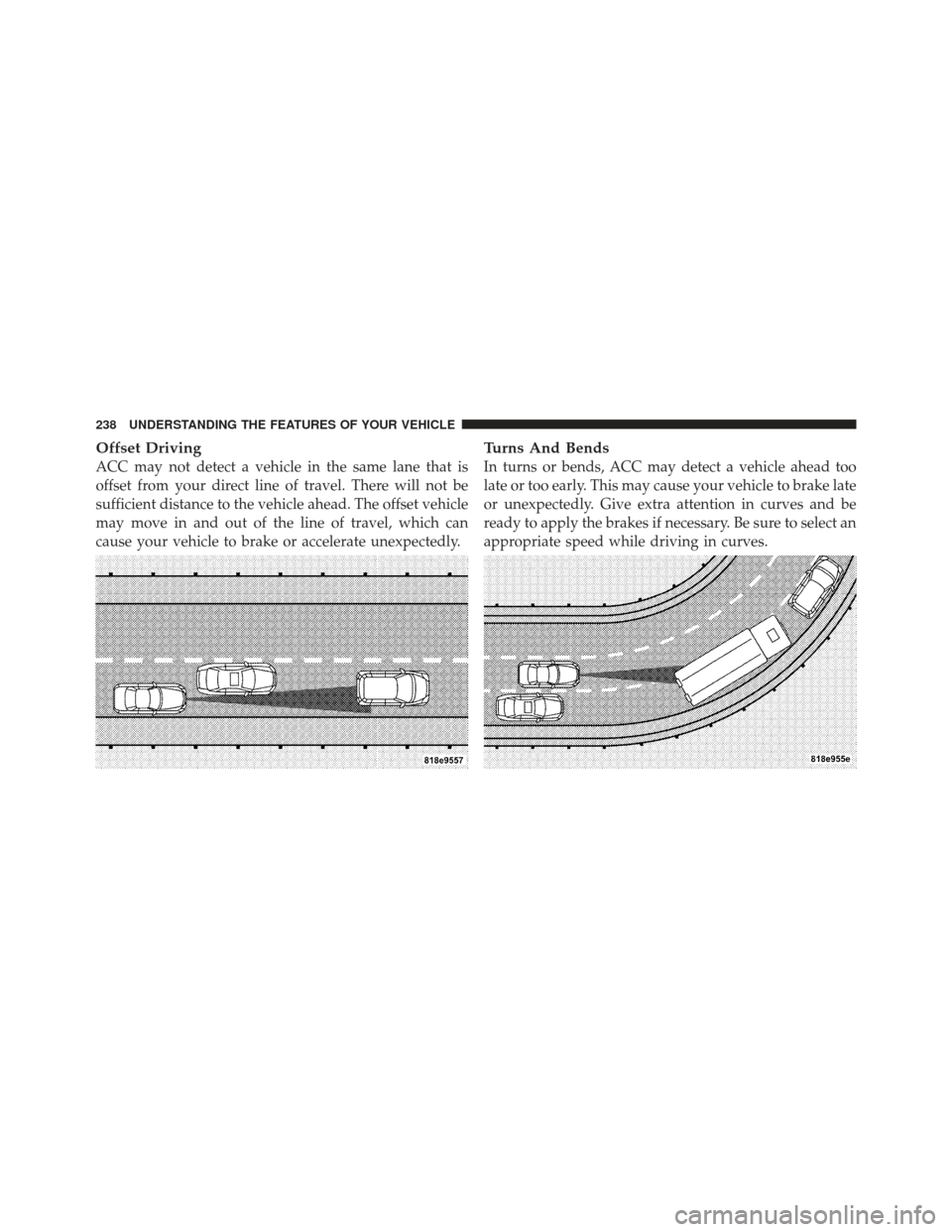
Offset Driving
ACC may not detect a vehicle in the same lane that is
offset from your direct line of travel. There will not be
sufficient distance to the vehicle ahead. The offset vehicle
may move in and out of the line of travel, which can
cause your vehicle to brake or accelerate unexpectedly.
Turns And Bends
In turns or bends, ACC may detect a vehicle ahead too
late or too early. This may cause your vehicle to brake late
or unexpectedly. Give extra attention in curves and be
ready to apply the brakes if necessary. Be sure to select an
appropriate speed while driving in curves.
238 UNDERSTANDING THE FEATURES OF YOUR VEHICLE
Page 242 of 594
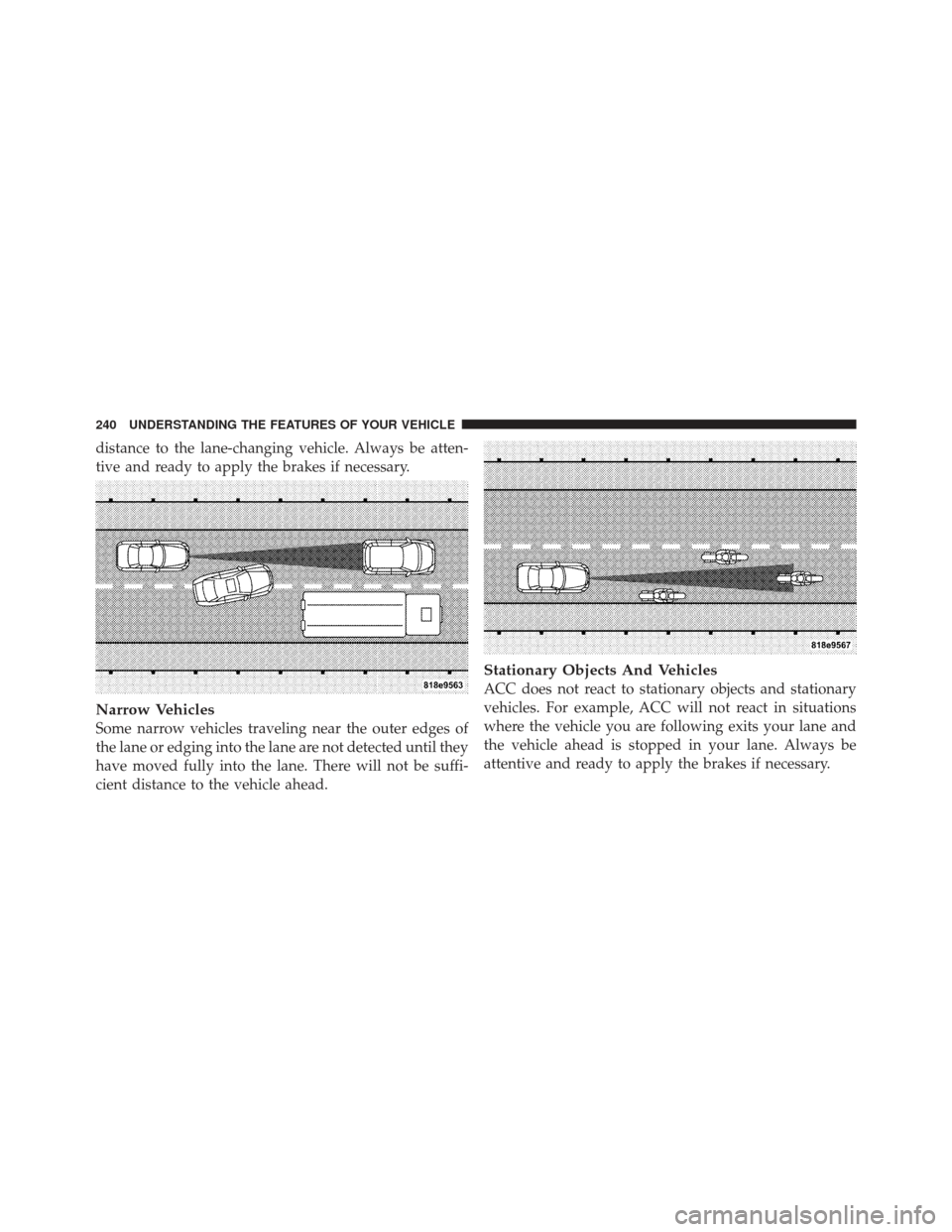
distance to the lane-changing vehicle. Always be atten-
tive and ready to apply the brakes if necessary.
Narrow Vehicles
Some narrow vehicles traveling near the outer edges of
the lane or edging into the lane are not detected until they
have moved fully into the lane. There will not be suffi-
cient distance to the vehicle ahead.
Stationary Objects And Vehicles
ACC does not react to stationary objects and stationary
vehicles. For example, ACC will not react in situations
where the vehicle you are following exits your lane and
the vehicle ahead is stopped in your lane. Always be
attentive and ready to apply the brakes if necessary.
240 UNDERSTANDING THE FEATURES OF YOUR VEHICLE
Page 244 of 594
WARNING!
In the normal Cruise Control mode, the system will
not react to vehicles ahead. In addition, the proximity
warning does not activate and no alarm will sound
even if you are too close to the vehicle ahead since
neither the presence of the vehicle ahead nor the
vehicle-to vehicle distance is detected. Be sure to
maintain a safe distance between your vehicle and
the vehicle ahead. Always be aware which mode is
selected.
To Set A Desired Speed
When the vehicle reaches the speed desired, press the
SET-button and release. The EVIC will display the set
speed.
NOTE: You must observe the display when setting or
changing speed, not the speedometer.
To Vary The Speed Setting
There are two ways to change the set speed:
•Use the accelerator pedal to adjust the vehicle to the
desired speed and press the SET -button.
•Tap the RES +or SET -button to increase or decrease
the set speed in 1 mph (1.6 km/h) increments respec-
tively. Hold the RES +or SET -button for 5 mph
(8 km/h) increments.
To Cancel
The system will disable normal Cruise Control without
erasing the memory if:
•You softly tap or depress the brake pedal.
•You press the CANCEL button.
•The Electronic Stability Control/Traction Control Sys-
tem (ESC/TCS) activates.
242 UNDERSTANDING THE FEATURES OF YOUR VEHICLE
Page 245 of 594
To Resume
Press the RES+button and then remove your foot from
the accelerator pedal. The EVIC will display the last set
speed.
To Turn Off
The system will turn off and erase the set speed in
memory if:
•You push and release the ON/OFF button.
•You turn off the ignition.
•You switch off ESC.
If the Cruise Control system is turned off and reactivated,
the system will return to the last driver setting (ACC or
Normal Cruise Control).
Forward Collision Warning — If Equipped
Forward Collision Warning (FCW) warns the driver of a
potential collision with the vehicle in front of you and
prompts the driver to take action in order to avoid the
collision.
FCW monitors the information from the forward looking
sensor as well as the Electronic Brake Controller (EBC),
wheel speed sensors, i.e., to calculate a probable rear-end
collision. When the system determines that a rear-end
collision is probable a warning message (both audible
and visual) will be displayed on the EVIC. When the
system determines a collision with the vehicle in front of
you is no longer probable, the warning message will be
deactivated.
NOTE: The minimum speed for FCW activation is
10 mph (16 km/h).
3
UNDERSTANDING THE FEATURES OF YOUR VEHICLE 243
Page 293 of 594

U.S. Federal regulations require that upon transfer of
vehicle ownership, the seller certify to the purchaser the
correct mileage that the vehicle has been driven. If your
odometer needs to be repaired or serviced, the repair
technician should leave the odometer reading the same
as it was before the repair or service. If s/he cannot do so,
then the odometer must be set at zero, and a sticker must
be placed in the door jamb stating what the mileage was
before the repair or service. It is a good idea for you to
make a record of the odometer reading before the repair/
service, so that you can be sure that it is properly reset, or
that the door jamb sticker is accurate if the odometer
must be reset at zero.
Electronic Vehicle Information Center (EVIC) Display
The Electronic Vehicle Information Center (EVIC) fea-
tures a driver-interactive display that is located in the
instrument cluster. For further information, refer to
“Electronic Vehicle Information Center (EVIC)”.The Shift Lever Indicator is self-contained within the
EVIC display. It displays the gear position of the auto-
matic transmission.
NOTE:
•You must apply the brakes before shifting from PARK.
•The highest available transmission gear is displayed in
the lower right corner of the Electronic Vehicle Infor-
mation Center (EVIC) whenever the Electronic Range
Select (ERS) feature is active. Use the +/- selector on
the shift lever to activate ERS. Refer to “Automatic
Transmission” in “Starting And Operating” for further
information.
8. Tire Pressure Monitoring Telltale Light — If
Equipped Each tire, including the spare (if provided),
should be checked monthly when cold and
inflated to the inflation pressure recommended
by the vehicle manufacturer on the vehicle
4
UNDERSTANDING YOUR INSTRUMENT PANEL 291
Page 297 of 594

dealer as soon as possible. Refer to “Occupant Restraints”
in “Things To Know Before Starting Your Vehicle” for
further information.
14. Anti-Lock Brake (ABS) LightThis light monitors the Anti-Lock Brake System
(ABS). The light will turn on when the ignition
switch is turned to the ON/RUN position and
may stay on for as long as four seconds.
If the ABS light remains on or turns on while driving, it
indicates that the Anti-Lock portion of the brake system
is not functioning and that service is required. However,
the conventional brake system will continue to operate
normally if the BRAKE warning light is not on.
If the ABS light is on, the brake system should be serviced
as soon as possible to restore the benefits of Anti-Lock
brakes. If the ABS light does not turn on when the
ignition switch is turned to the ON/RUN position, have
the light inspected by an authorized dealer. 15. Sport Mode — If Equipped
This light will illuminate when the sport mode
is selected. This mode provides performance
based tuning. For further information, refer to
”Sport Mode” in “Starting And Operating”.
16. Vehicle Security Light — If Equipped This light will flash at a fast rate for approxi-
mately 15 seconds, when the vehicle security
alarm is arming, and then will flash slowly
until the vehicle is disarmed.
17. Electronic Stability Control (ESC) OFF Indicator
Light — If Equipped This light indicates the Electronic Stability Con-
trol (ESC) is off.
4
UNDERSTANDING YOUR INSTRUMENT PANEL 295
Page 298 of 594
18. Brake Warning LightThis light monitors various brake functions,
including brake fluid level and parking brake
application. If the brake light turns on it may
indicate that the parking brake is applied, that
the brake fluid level is low, or that there is a problem with
the anti-lock brake system reservoir.
If the light remains on when the parking brake has been
disengaged, and the fluid level is at the full mark on the
master cylinder reservoir, it indicates a possible brake
hydraulic system malfunction or that a problem with the
Brake Booster has been detected by the Anti-Lock Brake
System (ABS) / Electronic Stability Control (ESC) system.
In this case, the light will remain on until the condition
has been corrected. If the problem is related to the brake
booster, the ABS pump will run when applying the brake
and a brake pedal pulsation may be felt during each stop. The dual brake system provides a reserve braking capac-
ity in the event of a failure to a portion of the hydraulic
system. A leak in either half of the dual brake system is
indicated by the Brake Warning Light, which will turn on
when the brake fluid level in the master cylinder has
dropped below a specified level.
The light will remain on until the cause is corrected.
NOTE:
The light may flash momentarily during sharp
cornering maneuvers, which change fluid level condi-
tions. The vehicle should have service performed, and
the brake fluid level checked.
If brake failure is indicated, immediate repair is neces-
sary.
296 UNDERSTANDING YOUR INSTRUMENT PANEL
Page 299 of 594

WARNING!
Driving a vehicle with the red brake light on is
dangerous. Part of the brake system may have failed.
It will take longer to stop the vehicle. You could have
a collision. Have the vehicle checked immediately.
Vehicles equipped with the Anti-Lock Brake System
(ABS), are also equipped with Electronic Brake Force
Distribution (EBD). In the event of an EBD failure, the
Brake Warning Light will turn on along with the ABS
Light. Immediate repair to the ABS system is required.
Operation of the Brake Warning Light can be checked by
turning the ignition switch from the OFF position to the
ON/RUN position. The light should illuminate for ap-
proximately two seconds. The light should then turn off
unless the parking brake is applied or a brake fault is
detected. If the light does not illuminate, have the light
inspected by an authorized dealer. The light also will turn on when the parking brake is
applied with the ignition switch in the ON/RUN posi-
tion.
NOTE:
This light shows only that the parking brake is
applied. It does not show the degree of brake application.
19. Electronic Stability Control (ESC) Activation/
Malfunction Indicator Light — If Equipped The “ESC Activation/Malfunction Indicator
Light” in the instrument cluster will come on
when the ignition switch is turned to the
ON/RUN position. It should go out with the
engine running. If the “ESC Activation/Malfunction In-
dicator Light” comes on continuously with the engine
running, a malfunction has been detected in the ESC
system. If this light remains on after several ignition
cycles, and the vehicle has been driven several miles
(kilometers) at speeds greater than 30 mph (48 km/h), see
your authorized dealer as soon as possible to have the
problem diagnosed and corrected.
4
UNDERSTANDING YOUR INSTRUMENT PANEL 297