Page 102 of 514

mobile phone’s audio is transmitted through your vehi-
cle’s audio system; the system will automatically mute
your radio when using the Uconnect™ Phone.
NOTE:The Uconnect™ Phone requires a mobile phone
equipped with the Bluetooth� “Hands-Free Profile”, Ver-
sion 0.96 or higher. See the Uconnect™ website for
supported phones.
For Uconnect™ customer support, visit the following
websites:
•www.chrysler.com/uconnect
•www.dodge.com/uconnect
•www.jeep.com/uconnect
•or call 1–877–855–8400 Uconnect™ Phone allows you to transfer calls between
the system and your mobile phone as you enter or exit
your vehicle and enables you to mute the system’s
microphone for private conversation.
The Uconnect™ Phone is driven through your
Bluetooth�
“Hands-Free Profile” mobile phone.
Uconnect™ features Bluetooth� technology - the global
standard that enables different electronic devices to con-
nect to each other without wires or a docking station, so
Uconnect™ Phone works no matter where you stow your
mobile phone (be it your purse, pocket, or briefcase), as
long as your phone is turned on and has been paired to
the vehicle’s Uconnect™ Phone. The Uconnect™ Phone
allows up to seven mobile phones to be linked to the
system. Only one linked (or paired) mobile phone can be
used with the system at a time. The system is available in
English, Spanish, or French languages.
100 UNDERSTANDING THE FEATURES OF YOUR VEHICLE
Page 107 of 514
Add Names To Your Uconnect™ Phonebook
NOTE:Adding names to the Uconnect™ Phonebook is
recommended when the vehicle is not in motion.
•Press thebutton to begin.
•After the “Ready” prompt and the following beep, say
“Phonebook New Entry”.
•When prompted, say the name of the new entry. Use of
long names helps the Voice Command and it is recom-
mended. For example, say “Robert Smith” or “Robert”
instead of “Bob”.
•When prompted, enter the number designation (e.g.,
“Home”, “Work”, “Mobile”, or “Other”). This will
allow you to store multiple numbers for each phone-
book entry, if desired.
•When prompted, recite the phone number for the
phonebook entry that you are adding. After you are finished adding an entry into the phone-
book, you will be given the opportunity to add more
phone numbers to the current entry or to return to the
main menu.
The Uconnect™ Phone will allow you to enter up to 32
names in the phonebook with each name having up to
four associated phone numbers and designations. Each
language has a separate 32-name phonebook accessible
only in that language. In addition, if equipped and
supported by your phone, Uconnect™ Phone automati-
cally downloads your mobile phone’s phonebook.
Phonebook Download – Automatic Phonebook
Transfer From Mobile Phone
If equipped and specifically supported by your phone,
Uconnect™ Phone automatically downloads names (text
names) and number entries from your mobile phone’s
3
UNDERSTANDING THE FEATURES OF YOUR VEHICLE 105
Page 110 of 514
from the list, press thebutton while the
Uconnect™ Phone is playing the desired entry and say
“Delete”.
•After you enter the name, the Uconnect™ Phone will
ask you which designation you wish to delete: home,
work, mobile, other, or all. Say the designation you
wish to delete.
•Note that only the phonebook entry in the current
language is deleted.
•Automatic downloaded phonebook entries cannot be
deleted or edited.
Delete/Erase “All” Uconnect™ Phonebook Entries
•
Press thebutton to begin.
•After the “Ready” prompt and the following beep, say
“Phonebook Erase All”.
•The Uconnect™ Phone will ask you to verify that you
wish to delete all the entries from the phonebook.
•After confirmation, the phonebook entries will be
deleted.
•Note that only the phonebook in the current language
is deleted.
•Automatic downloaded phonebook entries cannot be
deleted or edited.
List All Names In The Uconnect™ Phonebook
•
Press thebutton to begin.
•After the “Ready” prompt and the following beep, say
“Phonebook List Names”.
•The Uconnect™ Phone will play the names of all the
phonebook entries, including the downloaded phone-
book entries, if available.
108 UNDERSTANDING THE FEATURES OF YOUR VEHICLE
Page 114 of 514
Uconnect™ Phone Features
Language Selection
To change the language that the Uconnect™ Phone is
using:
•Press thebutton to begin.
•After the “Ready” prompt and the following beep, say
the name of the language you wish to switch to
English, Espanol, or Francais.
•Continue to follow the system prompts to complete
the language selection.
After selecting one of the languages, all prompts and
voice commands will be in that language.
NOTE: After every Uconnect™ Phone language change
operation, only the language-specific 32-name phone-
book is usable. The paired phone name is not language-
specific and is usable across all languages.
Emergency Assistance
If you are in an emergency and the mobile phone is
reachable:
•Pick up the phone and manually dial the emergency
number for your area.
If the phone is not reachable and the Uconnect™ Phone is
operational, you may reach the emergency number as
follows:
•Press thebutton to begin.
•After the “Ready” prompt and the following beep, say
“Emergency” and the Uconnect™ Phone will instruct
the paired mobile phone to call the emergency num-
ber. This feature is supported in the U.S., Canada, and
Mexico.
NOTE:
•The emergency number dialed is based on the country
where the vehicle is purchased (911 for the U.S. and
112 UNDERSTANDING THE FEATURES OF YOUR VEHICLE
Page 121 of 514
You can either press the Uconnect™ Phone button to
restore the factory setting or repeat the words and
phrases when prompted by the Uconnect™ Phone. For
best results, the Voice Training session should be com-
pleted when the vehicle is parked with the engine
running, all windows closed, and the blower fan
switched off.
This procedure may be repeated with a new user. The
system will adapt to the last trained voice only.
Reset
•
press thebutton.
•After the “Ready” prompt, and the following beep, say
“Setup”, then “Reset”.
This will delete all phone pairing, phone book entries,
and other settings in all language modes. The System will
prompt you before resetting to factory settings.
Voice Command
•
For best performance, adjust the rearview mirror to
provide at least12in (1 cm) gap between the overhead
console (if equipped) and the mirror.
•Always wait for the beep before speaking.
•Speak normally, without pausing, just as you would
speak to a person sitting a few feet/meters away from
you.
•Make sure that no one other than you is speaking
during a Voice Command period.
•Performance is maximized under:
•low-to-medium blower setting,
•low-to-medium vehicle speed,
•low road noise,
•smooth road surface,
3
UNDERSTANDING THE FEATURES OF YOUR VEHICLE 119
Page 125 of 514
13. I’ll be late
14. Are you there yet?
15. Where are we meeting?
16. Can this wait?
17. Bye for now
18. When can we meet
19. Send number to call
20. Start without me
Turn SMS Incoming Announcement ON/OFF
Turning the SMS Incoming Announcement OFF will stop
the system from announcing the new incoming mes-
sages.
•Press thebutton.
•After the “Ready” prompt and the following beep, say
“Setup, SMS Incoming Message Announcement,” you
will then be given a choice to change it.
Bluetooth�Communication Link
Mobile phones have been found to lose connection to the
Uconnect™ Phone. When this happens, the connection
can generally be reestablished by switching the phone
off/on. Your mobile phone is recommended to remain in
Bluetooth�ON mode.
Power-Up
After switching the ignition key from OFF to either the
ON or ACC position, or after a language change, you
must wait at least fifteen seconds prior to using the
system.
3
UNDERSTANDING THE FEATURES OF YOUR VEHICLE 123
Page 130 of 514
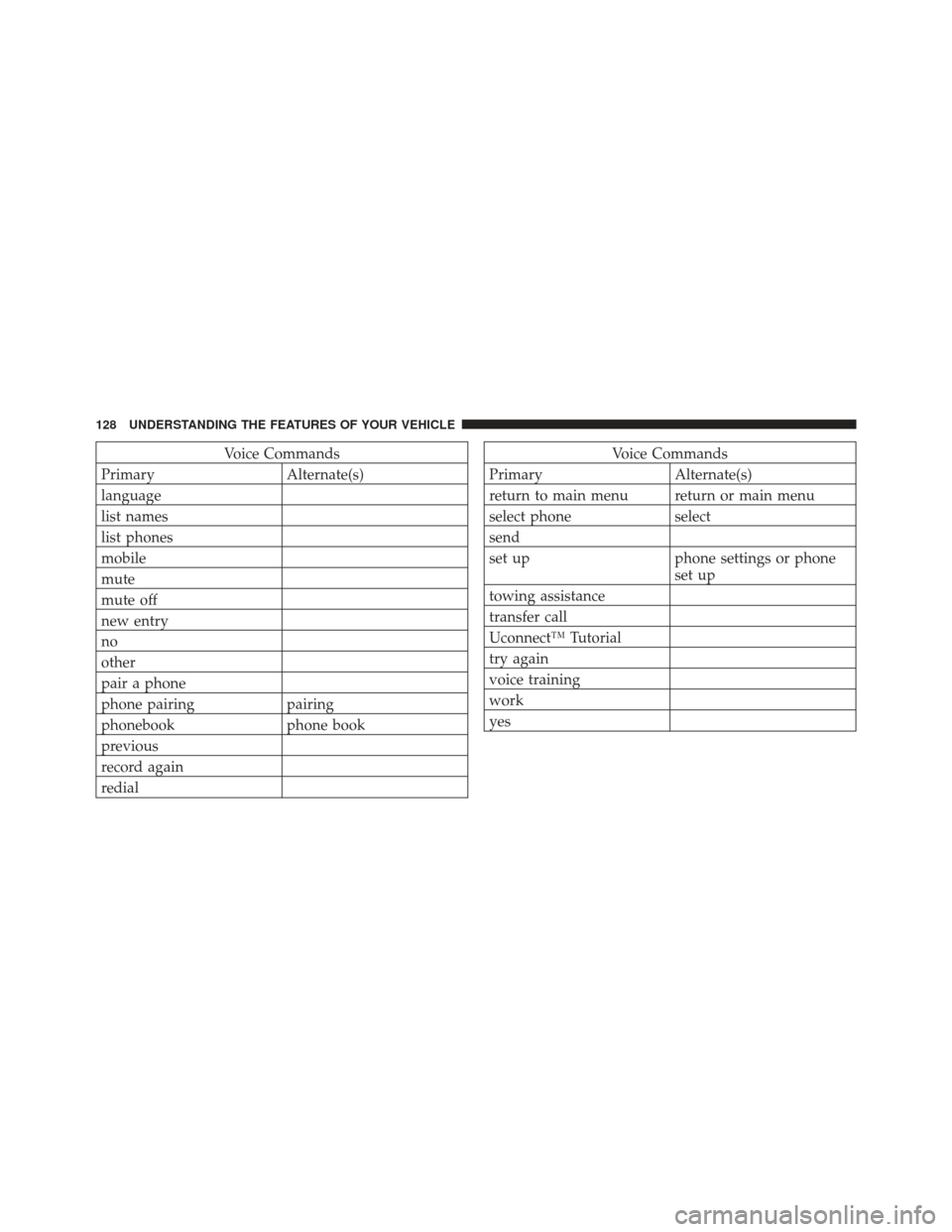
Voice Commands
Primary Alternate(s)
language
list names
list phones
mobile
mute
mute off
new entry
no
other
pair a phone
phone pairing pairing
phonebook phone book
previous
record again
redialVoice Commands
Primary Alternate(s)
return to main menu return or main menu
select phone select
send
set up phone settings or phone set up
towing assistance
transfer call
Uconnect™ Tutorial
try again
voice training
work
yes
128 UNDERSTANDING THE FEATURES OF YOUR VEHICLE
Page 135 of 514
Memo
To switch to the voice recorder mode, say “Memo”. In
this mode, you may say the following commands:
•“New Memo” (to record a new memo) — During the
recording, you may press the Voice Command
button to stop recording. You proceed by saying one of
the following commands:
“Save” (to save the memo)
“Continue” (to continue recording)
“Delete” (to delete the recording)
•“Play Memos” (to play previously recorded memos)
— During the playback you may press the Voice
Command
button to stop playing memos. You
proceed by saying one of the following commands:
“Repeat” (to repeat a memo)
“Next” (to play the next memo)
“Previous” (to play the previous memo)
“Delete” (to delete a memo)
•“Delete All” (to delete all memos)
Setup
To switch to system setup, you may say on of the
following:
•“Change to setup”
•“Switch to system setup”
•“Change to setup”
•“Main menu setup” or
•“Switch to setup”
In this mode, you may say the following commands:
•“Language English”
•“Language French”
3
UNDERSTANDING THE FEATURES OF YOUR VEHICLE 133