Page 56 of 514
CAUTION!
All occupants, including the driver, should not oper-
ate a vehicle or sit in a vehicle’s seat until the head
restraints are placed in their proper positions in order
to minimize the risk of neck injury in the event of a
collision.
NOTE: For more information on properly adjusting and
positioning the head restraint, refer to “Adjusting Active
Head Restraints” in “Understanding The Features Of
Your Vehicle”.
Resetting Active Head Restraints (AHR)
If the Active Head Restraints are triggered in a collision,
you must reset the head restraint on the driver ’s and
front passenger seat. You can recognize when the Active
Head Restraint has been triggered by the fact that they
have moved forward (as shown in step three of the
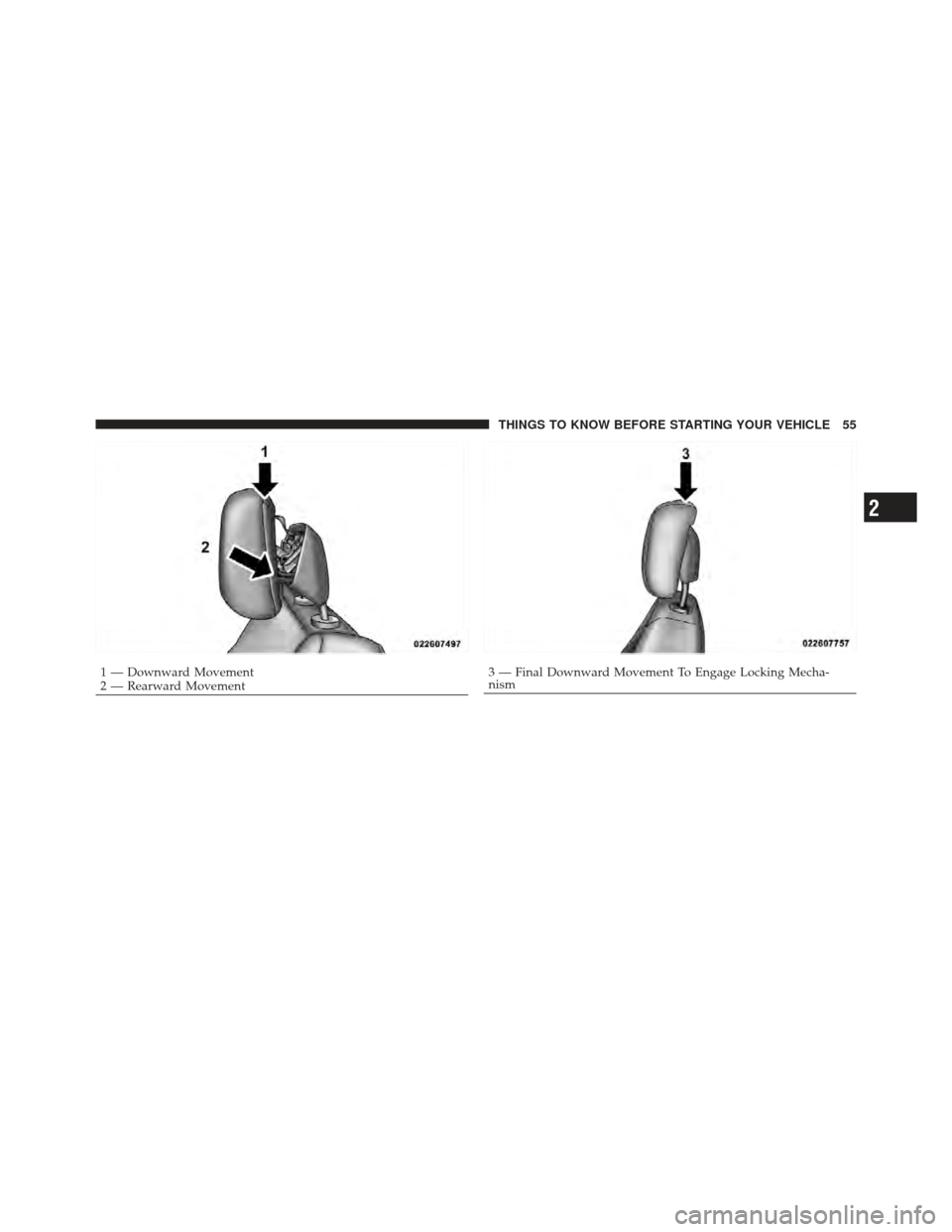
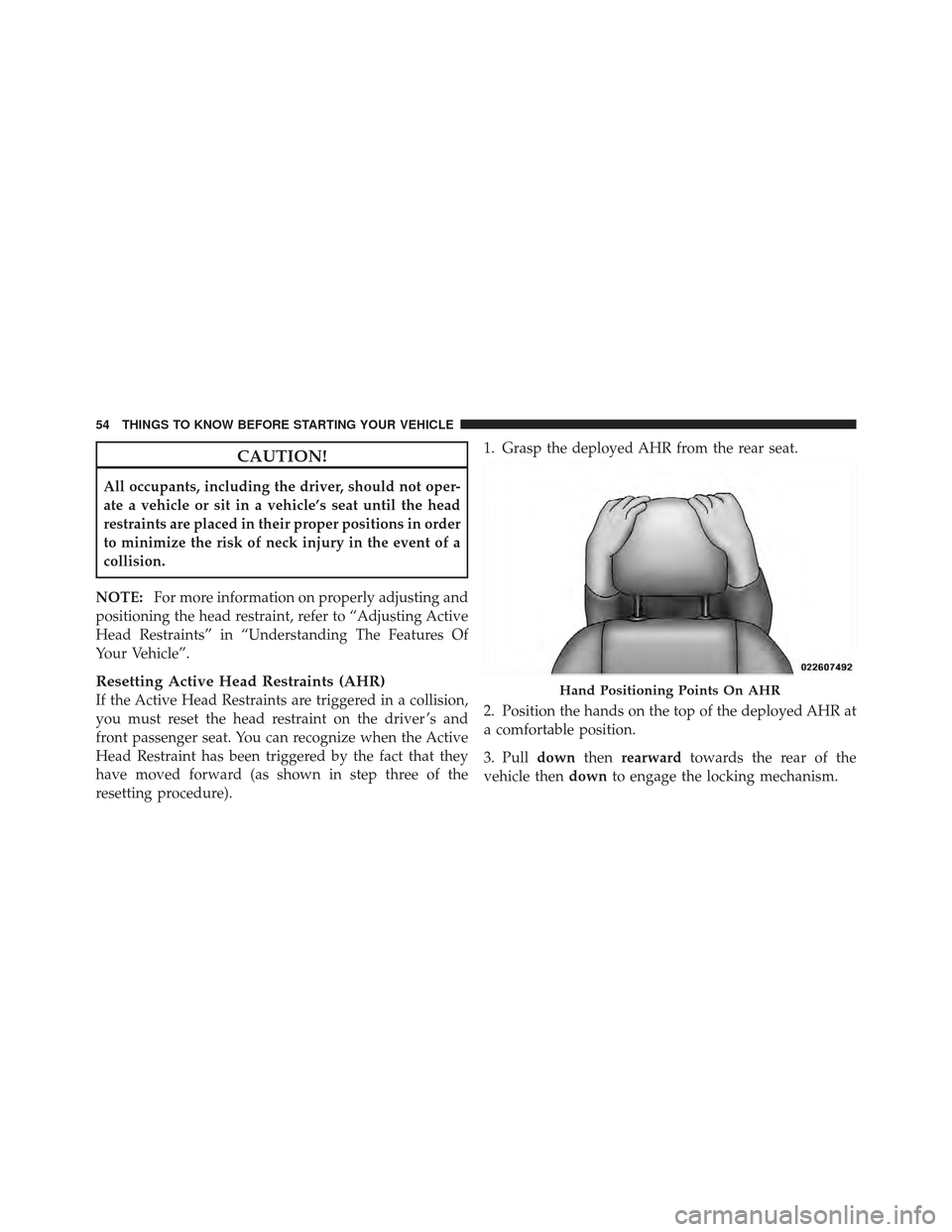
resetting procedure). 1. Grasp the deployed AHR from the rear seat.
2. Position the hands on the top of the deployed AHR at
a comfortable position.
3. Pull
downthenrearward towards the rear of the
vehicle then downto engage the locking mechanism.Hand Positioning Points On AHR
54 THINGS TO KNOW BEFORE STARTING YOUR VEHICLE
Page 57 of 514
1 — Downward Movement
2 — Rearward Movement3 — Final Downward Movement To Engage Locking Mecha-
nism
2
THINGS TO KNOW BEFORE STARTING YOUR VEHICLE 55
Page 58 of 514
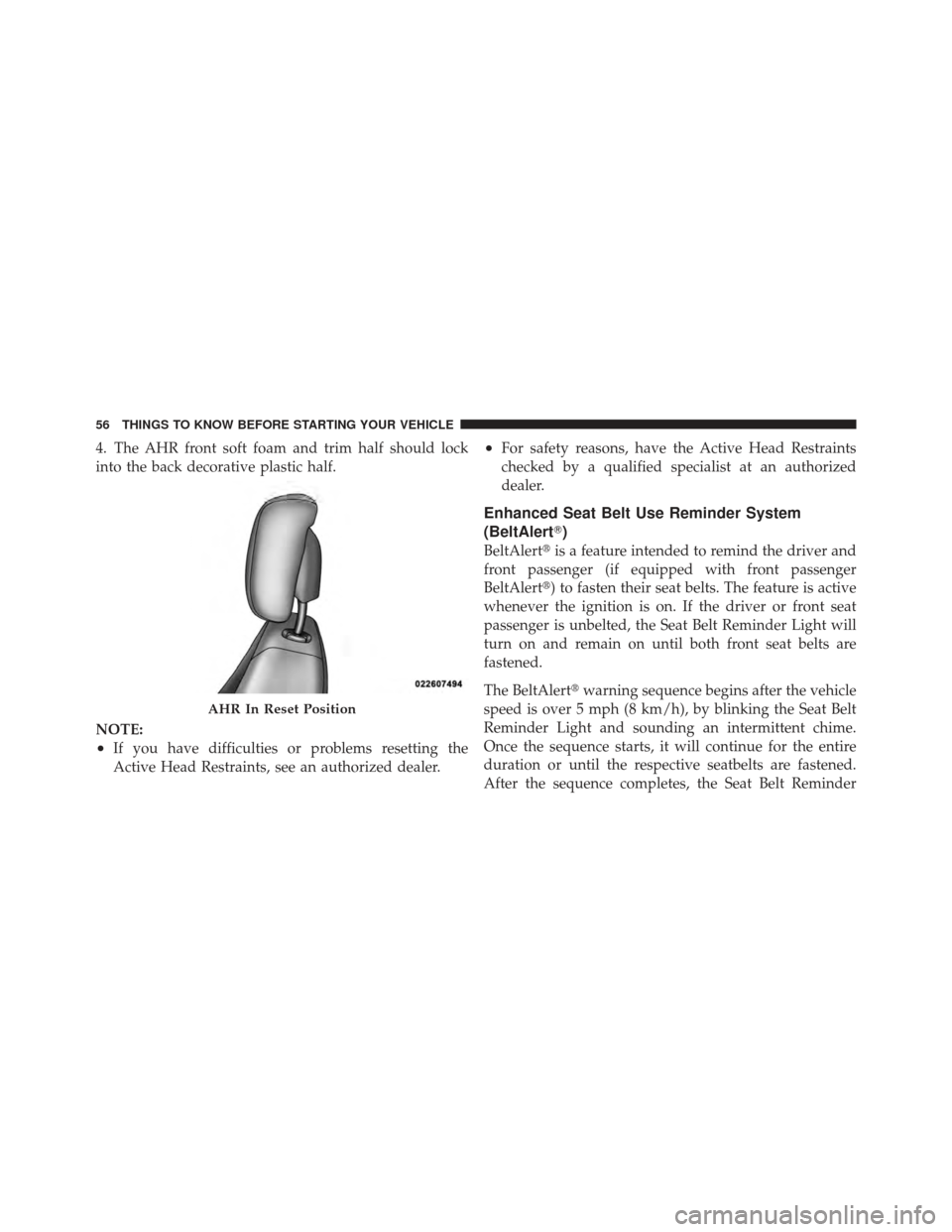
4. The AHR front soft foam and trim half should lock
into the back decorative plastic half.
NOTE:
•If you have difficulties or problems resetting the
Active Head Restraints, see an authorized dealer.
•For safety reasons, have the Active Head Restraints
checked by a qualified specialist at an authorized
dealer.
Enhanced Seat Belt Use Reminder System
(BeltAlert�)
BeltAlert�is a feature intended to remind the driver and
front passenger (if equipped with front passenger
BeltAlert�) to fasten their seat belts. The feature is active
whenever the ignition is on. If the driver or front seat
passenger is unbelted, the Seat Belt Reminder Light will
turn on and remain on until both front seat belts are
fastened.
The BeltAlert� warning sequence begins after the vehicle
speed is over 5 mph (8 km/h), by blinking the Seat Belt
Reminder Light and sounding an intermittent chime.
Once the sequence starts, it will continue for the entire
duration or until the respective seatbelts are fastened.
After the sequence completes, the Seat Belt Reminder
AHR In Reset Position
56 THINGS TO KNOW BEFORE STARTING YOUR VEHICLE
Page 65 of 514

The system includes side impact sensors that are cali-
brated to deploy the side air bags during impacts that
require air bag occupant protection.
WARNING!
•If your vehicle is equipped with left and right
Supplemental Side Air Bag Inflatable Curtain
(SABIC), do not stack luggage or other cargo up
high enough to block the location of the SABIC.
The area where the SABIC is located should re-
main free from any obstructions.
•Do not use accessory seat covers or place objects
between you and the side air bags; the perfor-
mance could be adversely affected and/or objects
could be pushed into you, causing serious injury.(Continued)
WARNING! (Continued)
•If your vehicle is equipped with SABIC air bags,
do not have any accessory items installed which
will alter the roof, including adding a sunroof to
your vehicle. Do not add roof racks that require
permanent attachments (bolts or screws) for instal-
lation on the vehicle roof. Do not drill into the roof
of the vehicle for any reason.
Knee Impact Bolsters
The Knee Impact Bolsters help protect the knees of the
driver and the front passenger, and position front occu-
pants for the best interaction with the Advanced Front
Air Bags.
2
THINGS TO KNOW BEFORE STARTING YOUR VEHICLE 63
Page 70 of 514
Enhanced Accident Response System
In the event of an impact causing air bag deployment, if
the communication network remains intact, and the
power remains intact, depending on the nature of the
event the ORC will determine whether to have the
Enhanced Accident Response System perform the follow-
ing functions:
•Cut off fuel to the engine.
•Flash hazard lights as long as the battery has power or
until the ignition key is turned off.
•Turn on the interior lights, which remain on as long as
the battery has power or until the ignition key is
removed.
•Unlock the doors automatically.
In order to reset the Enhanced Accident Response System
functions after an event, the ignition switch must be
changed from IGN ON to IGN OFF.
If A Deployment Occurs
The Advanced Front Air Bags are designed to deflate
immediately after deployment.
NOTE: Front and/or side air bags will not deploy in all
collisions. This does not mean something is wrong with
the air bag system.
If you do have a collision, which deploys the air bags, any
or all of the following may occur:
•The nylon air bag material may sometimes cause
abrasions and/or skin reddening to the driver and
front passenger as the air bags deploy and unfold. The
abrasions are similar to friction rope burns or those
you might get sliding along a carpet or gymnasium
floor. They are not caused by contact with chemicals.
They are not permanent and normally heal quickly.
However, if you haven’t healed significantly within a
few days, or if you have any blistering, see your doctor
immediately.
68 THINGS TO KNOW BEFORE STARTING YOUR VEHICLE
Page 73 of 514

Air Bag Warning Light
You will want to have the air bags ready to
inflate for your protection in a collision. The
Air Bag Warning Light monitors the internal
circuits and interconnecting wiring associated
with air bag system electrical components. While the air
bag system is designed to be maintenance free, if any of
the following occurs, have an authorized dealer service
the air bag system immediately.
•The Air Bag Warning Light does not come on during
the four to eight seconds when the ignition switch is
first turned to the ON/RUN position.
•The Air Bag Warning Light remains on after the four to
eight-second interval.
•The Air Bag Warning Light comes on intermittently or
remains on while driving.
NOTE:
If the speedometer, tachometer, or any engine
related gauges are not working, the Occupant Restraint Controller (ORC) may also be disabled. The air bags may
not be ready to inflate for your protection. Promptly check
the fuse block for blown fuses. Refer to the label located on
the inside of the fuse block cover for the proper air bag
fuses. See your authorized dealer if the fuse is good.
Event Data Recorder (EDR)
This vehicle is equipped with an event data recorder
(EDR). The main purpose of an EDR is to record, in
certain crash or near crash-like situations, such as an air
bag deployment or hitting a road obstacle, data that will
assist in understanding how a vehicle’s systems per-
formed. The EDR is designed to record data related to
vehicle dynamics and safety systems for a short period of
time, typically 30 seconds or less. The EDR in this vehicle
is designed to record such data as:
•How various systems in your vehicle were operating;
•Whether or not the driver and passenger safety belts
were buckled/fastened;
2
THINGS TO KNOW BEFORE STARTING YOUR VEHICLE 71
Page 78 of 514

•Carefully follow the instructions that come with the
restraint. If you install the restraint improperly, it may
not work when you need it.
•All passenger seating positions contain automatic
locking retractors. However, any seat belt system will
loosen with time, so check the belt occasionally and
pull it tight if necessary.
•In the rear seat, you may have trouble tightening the
lap/shoulder belt on the child restraint because the
buckle or latch plate is too close to the belt path
opening on the restraint. Disconnect the latch plate
from the buckle and twist the short buckle end of the
belt several times to shorten it. Insert the latch plate
into the buckle with the release button facing out.
•If the belt still can’t be tightened, or if pulling and
pushing on the restraint loosens the belt, disconnect
the latch plate from the buckle, turn the latch platearound, and insert the latch plate into the buckle
again. If you still can’t make the child restraint secure,
try a different seating position.
•Buckle the child into the seat according to the child
restraint manufacturer’s directions.
WARNING!
When your child restraint is not in use, secure it in
the vehicle with the seat belt or remove it from the
vehicle. Do not leave it loose in the vehicle. In a
sudden stop or accident, it could strike the occupants
or seatbacks and cause serious personal injury.
NOTE: For additional information, refer to
www.seatcheck.org or call 1–866–SEATCHECK. Cana-
dian residents should refer to Transport Canada’s web-
site for additional information: http://www.tc.gc.ca/
roadsafety/safedrivers/childsafety/index.htm
76 THINGS TO KNOW BEFORE STARTING YOUR VEHICLE
Page 84 of 514
between the two posts. If not possible, lower the head
restraint and pass the tether strap around the outboard
side of the head restraint.
3. Attach the tether strap hook (A) of the child restraint
to the anchor (B) and remove slack in the tether strap
according to the child restraint manufacturer’s
instructions.
WARNING!
An incorrectly anchored tether strap could lead to
increased head motion and possible injury to the
child. Use only the anchor positions directly behind
the child seat to secure a child restraint top tether
strap.
Installing Child Restraints Using The Vehicle Seat
Belt
The seat belts in the passenger seating positions are
equipped with an Automatic Locking Retractor to secure
a Child Restraint System (CRS). These types of seat belts
are designed to keep the lap portion of the seat belt tight
around the child restraint so that it is not necessary to use
a locking clip. The ALR will make a ratcheting noise if
you extract the entire belt from the retractor and then
allow the belt to retract into the retractor. For additional
information on ALR, refer to “Automatic Locking Mode”
description under “Seat Belts In Passenger Seating Posi-
tions” section. The chart below defines the seating posi-
tions with an Automatic Locking Retractor (ALR) or a
cinching latch plate.
82 THINGS TO KNOW BEFORE STARTING YOUR VEHICLE