Page 102 of 514

mobile phone’s audio is transmitted through your vehi-
cle’s audio system; the system will automatically mute
your radio when using the Uconnect™ Phone.
NOTE:The Uconnect™ Phone requires a mobile phone
equipped with the Bluetooth� “Hands-Free Profile”, Ver-
sion 0.96 or higher. See the Uconnect™ website for
supported phones.
For Uconnect™ customer support, visit the following
websites:
•www.chrysler.com/uconnect
•www.dodge.com/uconnect
•www.jeep.com/uconnect
•or call 1–877–855–8400 Uconnect™ Phone allows you to transfer calls between
the system and your mobile phone as you enter or exit
your vehicle and enables you to mute the system’s
microphone for private conversation.
The Uconnect™ Phone is driven through your
Bluetooth�
“Hands-Free Profile” mobile phone.
Uconnect™ features Bluetooth� technology - the global
standard that enables different electronic devices to con-
nect to each other without wires or a docking station, so
Uconnect™ Phone works no matter where you stow your
mobile phone (be it your purse, pocket, or briefcase), as
long as your phone is turned on and has been paired to
the vehicle’s Uconnect™ Phone. The Uconnect™ Phone
allows up to seven mobile phones to be linked to the
system. Only one linked (or paired) mobile phone can be
used with the system at a time. The system is available in
English, Spanish, or French languages.
100 UNDERSTANDING THE FEATURES OF YOUR VEHICLE
Page 115 of 514
Canada and 060 for Mexico). The number dialed may
not be applicable with the available mobile service and
area.
•If supported, this number may be programmable on
some systems. To do this, press the
button and say
“Setup”, followed by “Emergency”.
•The Uconnect™ Phone does slightly lower your
chances of successfully making a phone call as to that
for the mobile phone directly.
WARNING!
To use your Uconnect™ Phone System in an emer-
gency, your mobile phone must be:
•turned on,
•paired to the Uconnect™ System,
•and have network coverage.
Towing Assistance
If you need towing assistance:
•Press thebutton to begin.
•After the “Ready” prompt and the following beep, say
“Towing Assistance”.
NOTE:
•The towing assistance number dialed is based on the
country where the vehicle is purchased (1-800-528-
2069 for the U.S., 1-877-213-4525 for Canada, 55-14-
3454 for Mexico City and 1-800-712-3040 for outside
Mexico City in Mexico). Please refer to the 24-Hour
“Towing Assistance” coverage details on the DVD in
the Warranty Information Booklet and the 24-Hour
Towing Assistance references.
•If supported, this number may be programmable on
some systems. To do this, press the
button and say
“Setup”, followed by “Towing Assistance”.
3
UNDERSTANDING THE FEATURES OF YOUR VEHICLE 113
Page 130 of 514
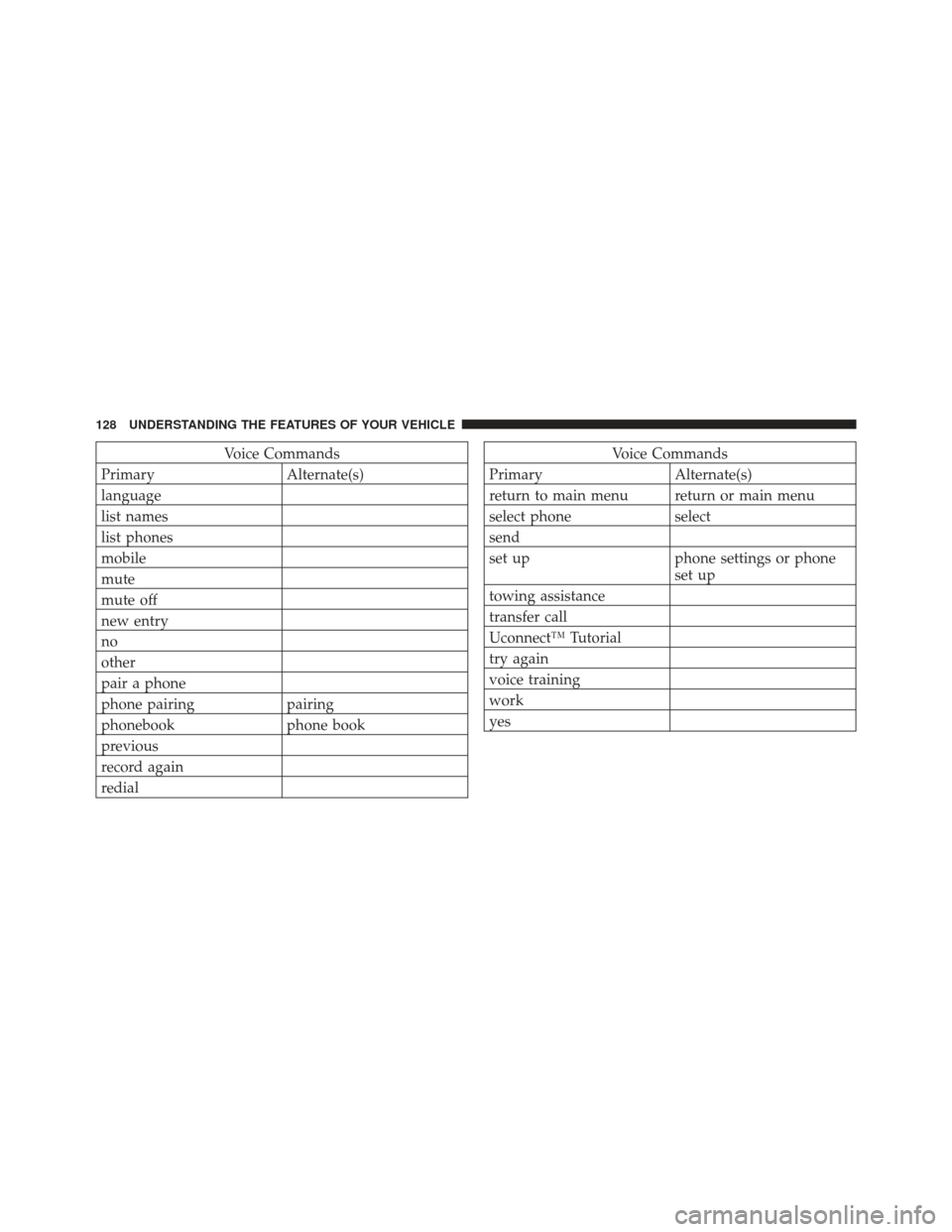
Voice Commands
Primary Alternate(s)
language
list names
list phones
mobile
mute
mute off
new entry
no
other
pair a phone
phone pairing pairing
phonebook phone book
previous
record again
redialVoice Commands
Primary Alternate(s)
return to main menu return or main menu
select phone select
send
set up phone settings or phone set up
towing assistance
transfer call
Uconnect™ Tutorial
try again
voice training
work
yes
128 UNDERSTANDING THE FEATURES OF YOUR VEHICLE
Page 151 of 514
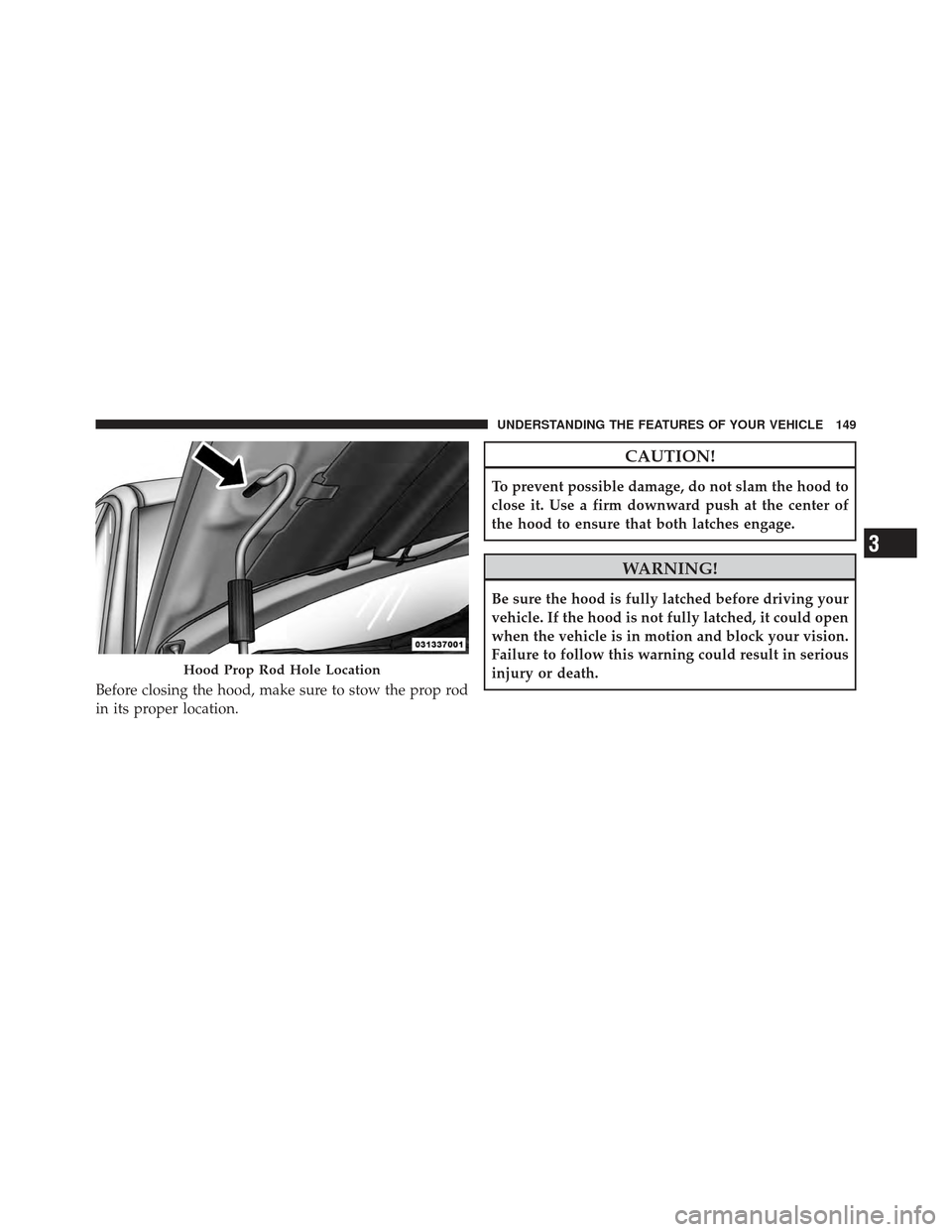
Before closing the hood, make sure to stow the prop rod
in its proper location.
CAUTION!
To prevent possible damage, do not slam the hood to
close it. Use a firm downward push at the center of
the hood to ensure that both latches engage.
WARNING!
Be sure the hood is fully latched before driving your
vehicle. If the hood is not fully latched, it could open
when the vehicle is in motion and block your vision.
Failure to follow this warning could result in serious
injury or death.
Hood Prop Rod Hole Location
3
UNDERSTANDING THE FEATURES OF YOUR VEHICLE 149
Page 154 of 514
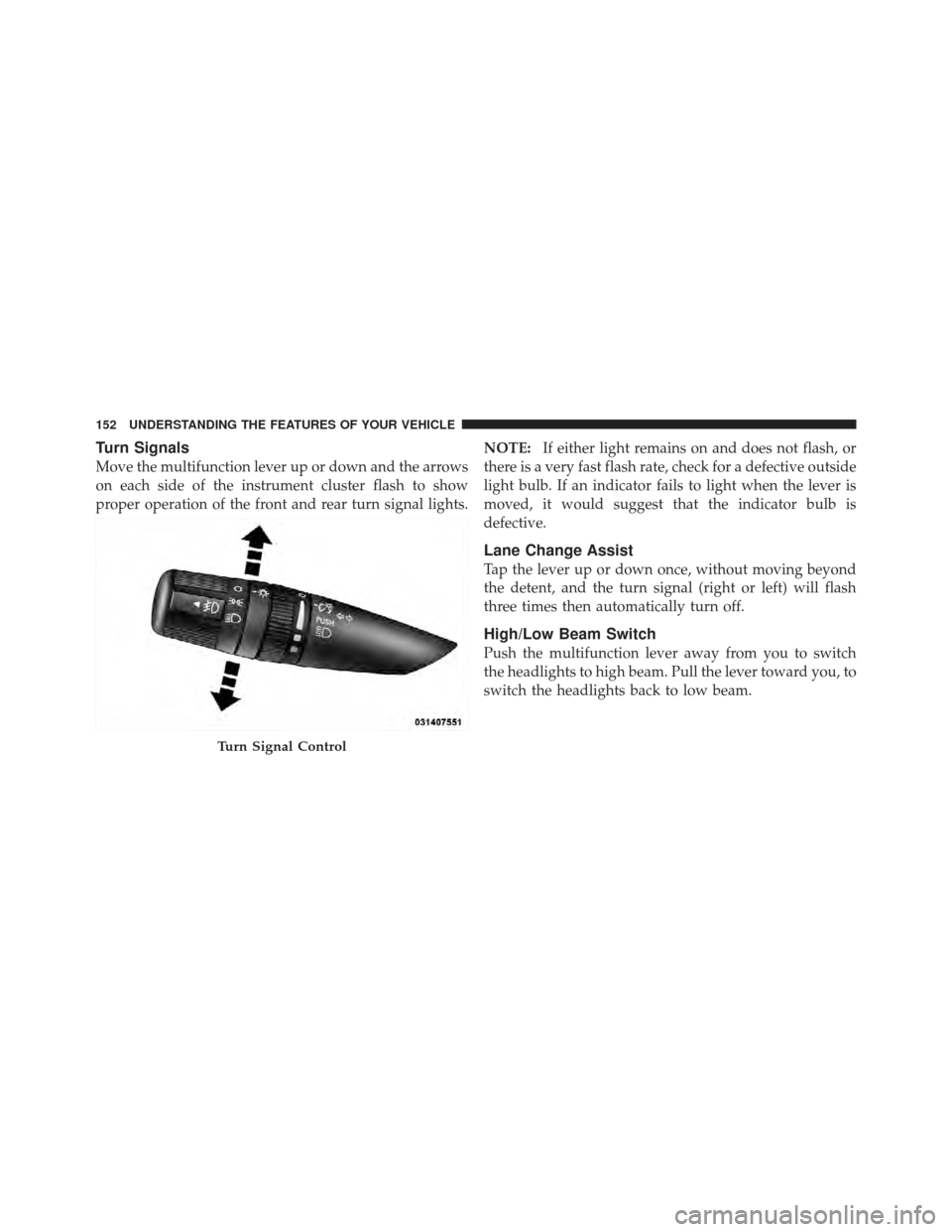
Turn Signals
Move the multifunction lever up or down and the arrows
on each side of the instrument cluster flash to show
proper operation of the front and rear turn signal lights.NOTE:
If either light remains on and does not flash, or
there is a very fast flash rate, check for a defective outside
light bulb. If an indicator fails to light when the lever is
moved, it would suggest that the indicator bulb is
defective.
Lane Change Assist
Tap the lever up or down once, without moving beyond
the detent, and the turn signal (right or left) will flash
three times then automatically turn off.
High/Low Beam Switch
Push the multifunction lever away from you to switch
the headlights to high beam. Pull the lever toward you, to
switch the headlights back to low beam.
Turn Signal Control
152 UNDERSTANDING THE FEATURES OF YOUR VEHICLE
Page 155 of 514
Flash-To-Pass
You can signal another vehicle with your headlights by
lightly pulling the multifunction lever toward you. This
will turn on the high beam headlights until the lever is
released.
NOTE:If the multifunction lever is held in the flash-to-
pass position for more than 15 seconds, the high beams
will shut off. If this occurs, wait 30 seconds for the next
flash-to-pass operation.
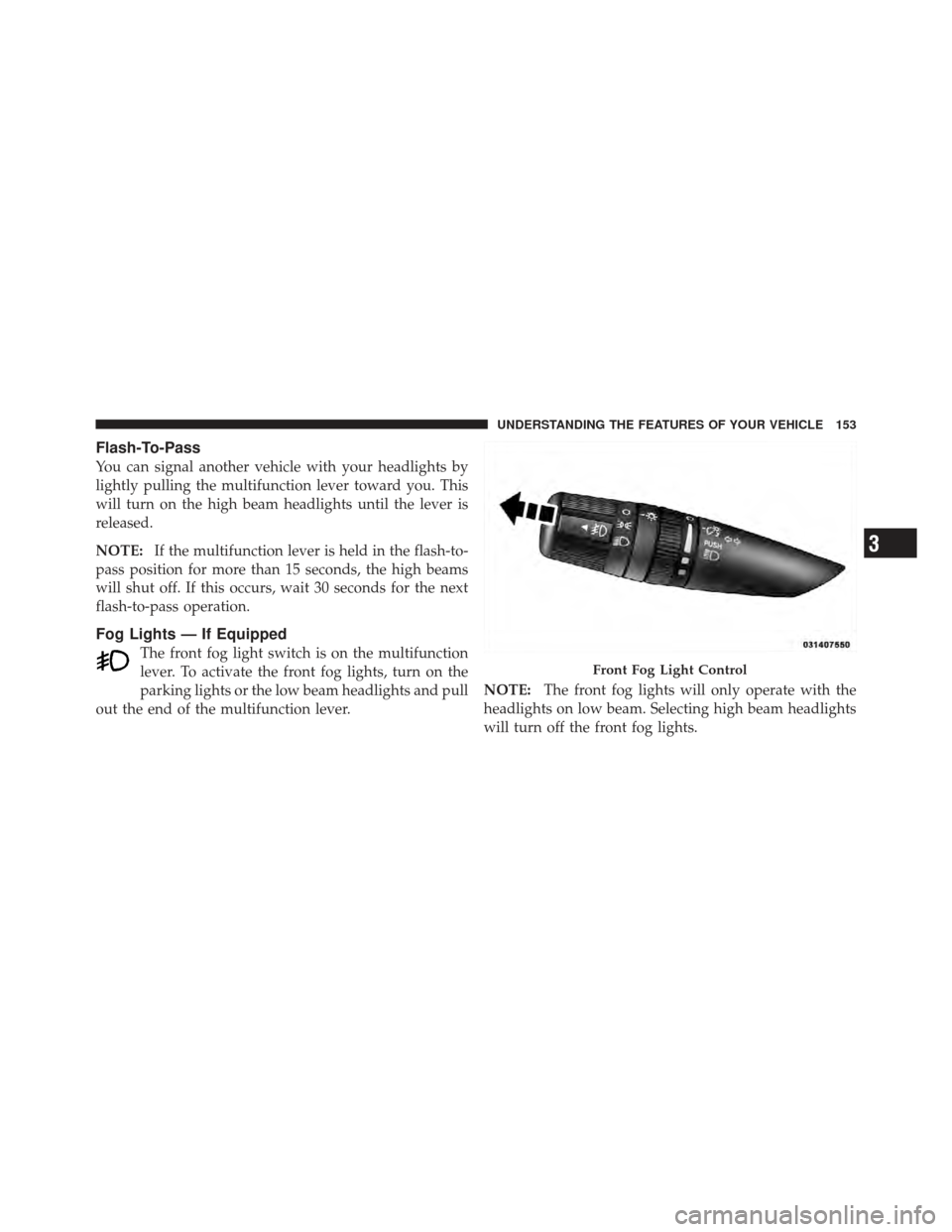
Fog Lights — If Equipped
The front fog light switch is on the multifunction
lever. To activate the front fog lights, turn on the
parking lights or the low beam headlights and pull
out the end of the multifunction lever. NOTE:
The front fog lights will only operate with the
headlights on low beam. Selecting high beam headlights
will turn off the front fog lights.
Front Fog Light Control
3
UNDERSTANDING THE FEATURES OF YOUR VEHICLE 153
Page 160 of 514
then turn the end of the lever to select the desired delay
interval. There are five delay settings, which allow you to
regulate the wipe interval from a minimum of one cycle
every second to a maximum of approximately 18 seconds
between cycles.NOTE:
The wiper delay times depend on vehicle speed.
If the vehicle is moving less than 10 mph (16 km/h),
delay times will be doubled.
Windshield Washers
To use the washer, pull the windshield wiper/washer
control lever toward you and hold it for as long as
washer spray is desired.
If you activate the washer while the wiper control is in
the delay range, the wipers will operate in low-speed for
two wipe cycles after releasing the lever and then resume
the intermittent interval previously selected.
If you activate the washer while the wiper control is in
the off position, the wipers will operate for two wipe
cycles and then turn off.
Changing Intermittent Settings
158 UNDERSTANDING THE FEATURES OF YOUR VEHICLE
Page 186 of 514
NOTE:
•A notch in the front of the console base allows for use
of a cellular phone while it is plugged into the power
outlet with the armrest latched down.
•The power outlet can also energize the cigar lighter in
the optional cup holder ash receiver.
WARNING!
Do not operate this vehicle with a console compart-
ment lid in the open position. Cellular phones, music
players, and other handheld electronic devices
should be stowed while driving. Use of these devices
while driving can cause an accident due to distrac-
tion, resulting in death or injury.
CARGO AREA FEATURES
The 60/40 split-folding rear seat provides cargo-carrying
versatility. The seatbacks fold down easily by pulling
nylon tabs between the seatbacks and the bolsters. When
the seats are folded down, they provide a continuous,
nearly flat extension of the load floor.
When the seatback is folded to the upright position, make
sure it is latched by strongly pulling on the top of the
seatback above the seat strap.
WARNING!
•Be certain that the seatback is securely locked into
position. If the seatback in not securely locked
into position, the seat will not provide the proper
stability for child seats and/or passengers. An
improperly latched seat could cause serious injury.(Continued)
184 UNDERSTANDING THE FEATURES OF YOUR VEHICLE