Page 280 of 358
05TRAFFIC INFORMATION
PRINCIPAL TMC SYMBOLS
Red and yellow triangle: traffi c information, for example:
Black and blue trian
gle: general information, for example:
RECEIVING TA MESSAGES
The TA (Traffi c Announcement) function gives priority to TA alert messages. To operate, this function needs good reception of a radio station transmitting this type of message. When a traffi c report
is transmitted, the current audio source (Radio, CD, USB, ...) isinterrupted automatically to play the TA message. Normal playbackof the audio source resumes at the end of the transmission of
the message.
Press RADIO
to display the menu.
Select " Guidance options " then confi rm.
Select " Activate / Deactivate TA" thenconfi rm.
The volume settin
g for TA messages can be adjusted only during the
transmission of this type of alert.
Activate or deactivate the function at any time by pressingthe button.
During a message, press the button to interrupt it.
Page 292 of 358
08
RADIO
Access to the "RADIO" menu
""""""""FM / DAB wavebandFM / DAB wavebandFM / DAB wavebandFM / DAB wavebandFM / DAB wavebandFM / DAB wavebandFM / DAB wavebandFM / DAB wavebandFM / DAB wavebandFM / DAB wavebandFM / DAB wavebandFM / DAB wavebandFM / DAB wavebandFM / DAB wavebandFM / DAB b dFM / DAB b dFM / DAB b dFM / DAB b dFM / DAB b d""""""""
Press �or �or use the rotary control to select the previous or next station in the list.
This list can also be displayed by pressing LIST
onthe steering mounted controls.
Go from the list to the menu (left/right).
or
A long press on LIST
refreshesthe list of stations received.
Press RADIO.
Page 293 of 358

08
291
RADIO
By alphabetical list
Pr
ess RADIOor LIST , select the station
of your choice and confi rm.
B
y automatic frequency search
Press �or �for the automatic searchfor a lower or higher radio frequency.
Or turn the thumb wheel at the steeringmounted controls.
B
y manual frequency search
Pr
ess �or �to adjust the radiofrequency step by step.
Pr
ess the button on the numerical keypad to recall a preset station.
Or press then turn the thumb wheel at
the steering mounted controls.
SELECTING A STATION
The external environment (hill, building, tunnel, underground car park...) may interfere with the reception, including in RDS station tracking mode.This phenomenon is a normal result of the way in which radio waves are transmitted and does not in any way indicate a fault with the audio system.
PRESETTING A STATION
After selecting a station, press one of
the buttons on the numerical keypad for 2 seconds to preset the current station.
An audible si
gnal confi rms that thestation has been preset. The qualit
y of reception is represented by the number of active waves in this symbol.
Page 294 of 358
08
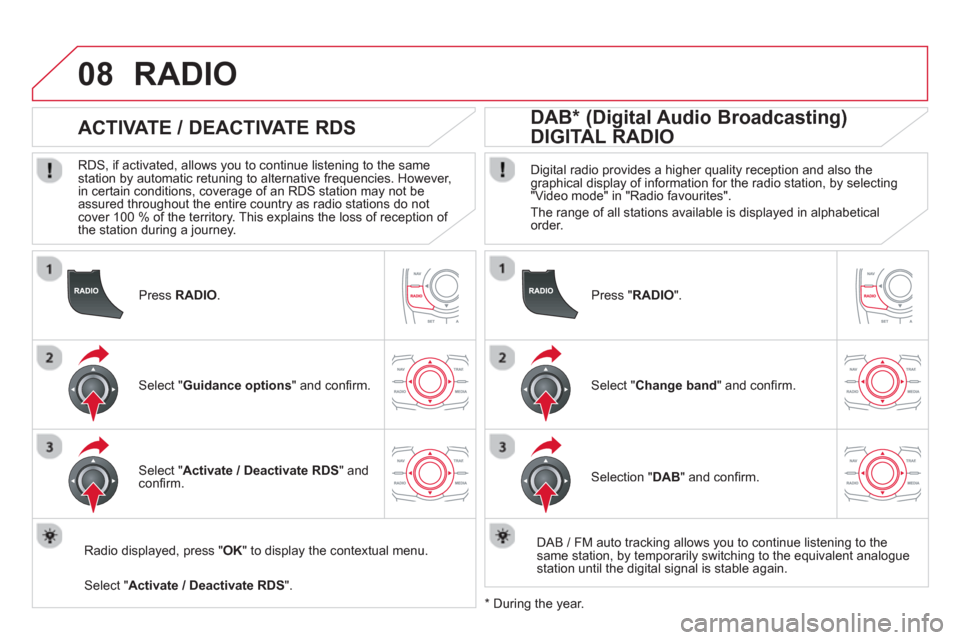
Press RADIO.
ACTIVATE / DEACTIVATE RDS
RDS, if activated, allows you to continue listening to the same station by automatic retuning to alternative frequencies. However,
in certain conditions, coverage of an RDS station may not be
assured throughout the entire country as radio stations do not cover 100 % of the territory. This explains the loss of reception of
the station during a journey.
Select "Guidance options" and confi rm.
Select "Activate / Deactivate RDS
" and confi rm.
RADIO
Select "Activate / Deactivate RDS".
Radio displayed, press " OK" to display the contextual menu.
Pr
ess " RADIO".
DAB * (Digital Audio Broadcasting)
DIGITAL RADIO
Digital radio provides a higher quality reception and also the graphical display of information for the radio station, by selecting "Video mode" in "Radio favourites".
The range o
f all stations available is displayed in alphabeticalorder.
Select "Change band
" and confi rm.
Selection "DAB
" and confi rm.
DAB
/ FM auto tracking allows you to continue listening to thesame station, by temporarily switching to the equivalent analoguestation until the digital signal is stable again.
*
During the year.
Page 297 of 358
09
SRC/
295
MUSIC MEDIA PLAYERS
SOURCES
Insert the CD in the pla
yer, insert the USB memorystick in the USB player or connect the USBperipheral to the USB port using a suitable cable (not supplied)
The system builds playlists (in temporary memory),
an operation which can take from a few seconds to several minutes at the fi rst connection.
R
educe the number of non-music fi les and the number of folders to reduce the waiting time.
The pla
ylists are updated every time the ignition isswitched off or connection of a USB memory stick. However, the system memorises these lists and
if they are not modifi ed, the loading time will be shorter.
Pla
y starts automatically after a period which
depends on the capacity of the USB memory stick.
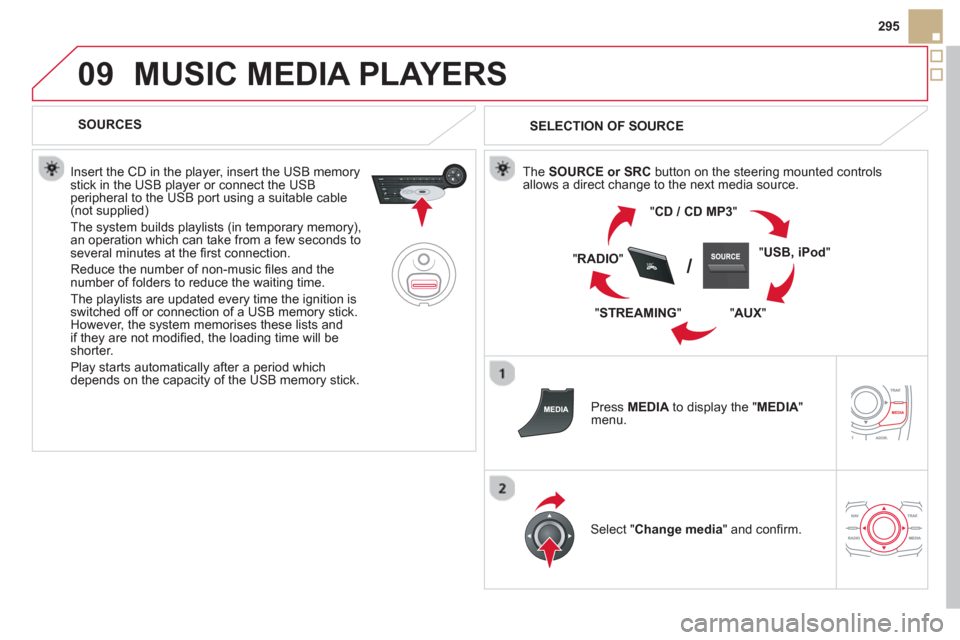
SELECTION OF SOURCE
The SOURCE or SRCbutton on the steering mounted controls
allows a direct change to the next media source.
"CD / CD MP
3"
"
USB, iPod
"
"
AUX"
" STREAMING" "
RADIO"
Press MEDIAto display the "MEDIA " menu.
Select "Change media" and confi rm.
Page 301 of 358
10
299
AUDIO SETTINGS
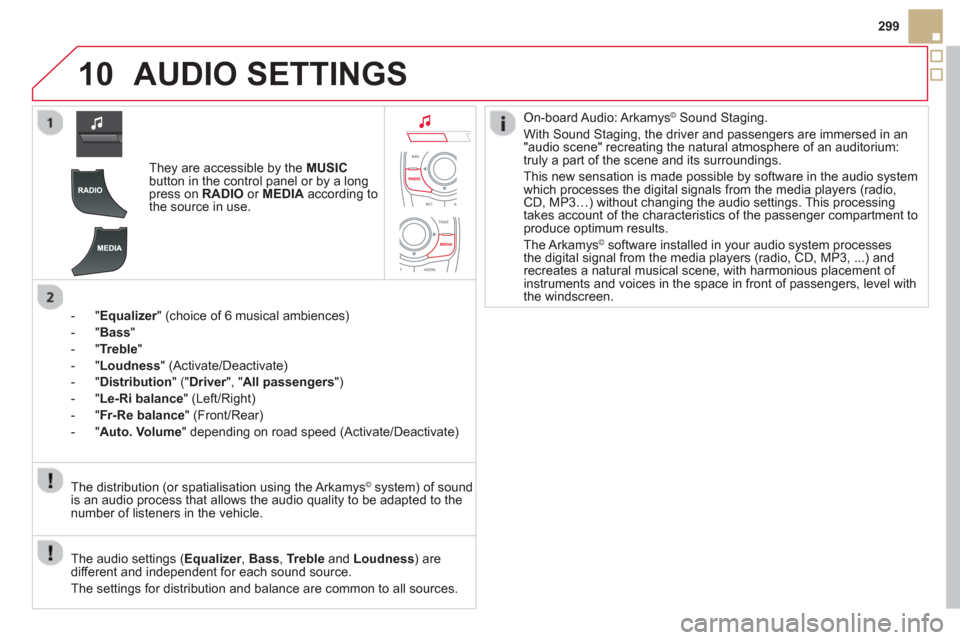
They are accessible by the MUSIC
button in the control panel or by a longpress on RADIO
or MEDIAaccording to
the source in use.
-
"Equalizer" (choice of 6 musical ambiences) r
-"Bass"
- " Treble "
- " Loudness"
(Activate/Deactivate)
- "
Distribution" (" Driver
", "rAll passengers
")
- " Le-Ri balanc
e
" (Left/Right)
-"Fr-Re balanc
e
" (Front/Rear)
-"Auto. Volume
" depending on road speed (Activate/Deactivate)
The audio settings ( Equalizer, rBass , Trebleand Loudness) are
different and independent for each sound source.
The settings
for distribution and balance are common to all sources. The distribution
(or spatialisation using the Arkamys©system) of sound
is an audio process that allows the audio quality to be adapted to the
number of listeners in the vehicle.
On-board Audio: Arkamys© Sound Staging.©
With Sound Staging, the driver and passengers are immersed in an"audio scene" recreating the natural atmosphere of an auditorium:
truly a part of the scene and its surroundings.
This new sensation is made possible b
y software in the audio system
which processes the digital signals from the media players (radio, CD, MP3…) without changing the audio settings. This processing
takes account of the characteristics of the passenger compartment toproduce optimum results.
The Arkam
ys© software installed in your audio system processes©
the digital signal from the media players (radio, CD, MP3, ...) andrecreates a natural musical scene, with harmonious placement of
instruments and voices in the space in front of passengers, level with
the windscreen.
Page 305 of 358
12
303
Dial
Director
y of contacts
Tele
phone options
Rin
g options
"Phone" MENU
1
2
1
1
3
3
2
1
3
3
2
2
1
2
2
2
1
1
2
2
2
1
3
3
3
3
1
2
2
1
1
3
3
3
3
3
3
2
Confi guration
Delete all contacts
Import all the entries
S
ynchronization options
No s
ynchronization
"Directory of contacts"
MENU
Display contacts
Open
Import
Delete
New contact
Equalizer
"RADIO" MENU
Following waveband
Options
Activate / Deactivate T
A
Activate / Deactivate RDS
Audio settings
Displa
y telephone contacts
Displa
y SIM card contacts
Contact mem. status
Displa
y all phone contacts
Bluetooth functions
List of the paired peripherals
Connect
Di
sconnect
D
elete
Peripherals search D
elete all
Rename radiotele
phone
None
Classical
Jazz
Rock
Techno
Vocal
Page 306 of 358
12 SCREEN MENU MAP
2
3
3
1
4
2
2
1
4
4
2
2
1
1
1
2
1
1
2
2
2
2
2
2
2
3
3
2
2
2
1
Random on all media
Repetition
Audio settin
gs (same as RADIO)
Activate / Deactivate AUX input
"MEDIA" MENU
Following media source
E
ject USB support
Read mode
Norma
l
Random
All passengers
Le-Ri balance
Fr-Re balance
Auto. Volume
Update radio list
Bass
Treble
Loudness
Distribution
Driv
er
Ni
ght mode
Auto Day/Night
Ad
just luminosity
Set date and time
"SETUP" MENU
Display confi guration
Choose colou
r
Harmony
Cartography
Da
y mode
Voice synthesis
Guidance instructions volume
Select male voice / Select female voice
1
Vehicle parameters
The parameters var
y according to the vehicle(see "Confi guration").


