2012 Citroen BERLINGO RHD change time
[x] Cancel search: change timePage 84 of 208
82
Parking sensors
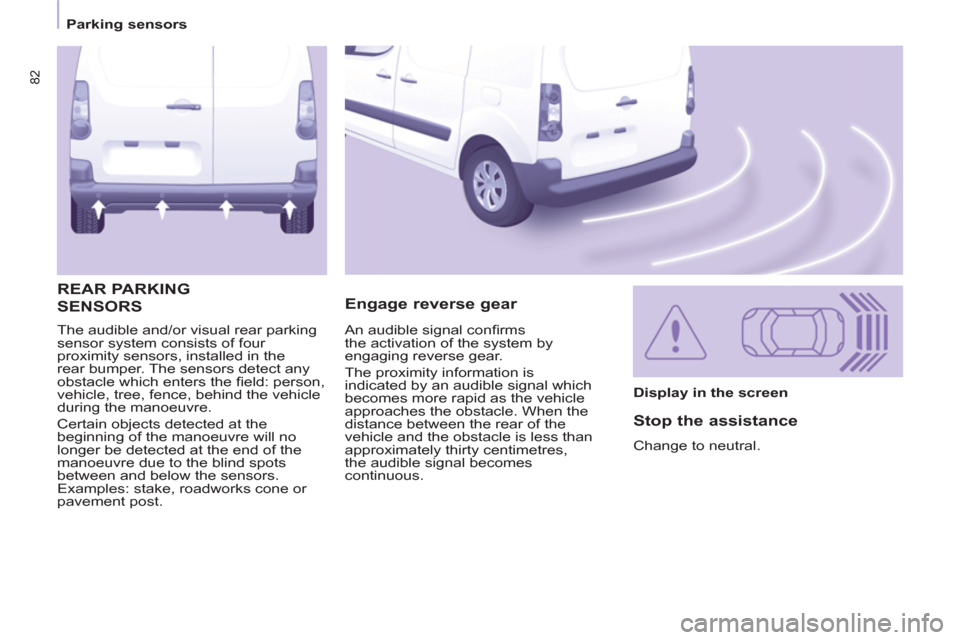
The audible and/or visual rear parking
sensor system consists of four
proximity sensors, installed in the
rear bumper. The sensors detect any
obstacle which enters the fi eld: person,
vehicle, tree, fence, behind the vehicle
during the manoeuvre.
Certain objects detected at the
beginning of the manoeuvre will no
longer be detected at the end of the
manoeuvre due to the blind spots
between and below the sensors.
Examples: stake, roadworks cone or
pavement post.
Engage reverse gear REAR PARKING
SENSORS
Display in the screen
Stop the assistance
Change to neutral. An audible signal confi rms
the activation of the system by
engaging reverse gear.
The proximity information is
indicated by an audible signal which
becomes more rapid as the vehicle
approaches the obstacle. When the
distance between the rear of the
vehicle and the obstacle is less than
approximately thirty centimetres,
the audible signal becomes
continuous.
Page 104 of 208

102
Equipment
Audio equipment, hands-free kit,
speakers, CD changer, satellite
navigation system, USB Box, Video kit, ...
Regardless of the audio and telematic
equipment offered on the market, the
technical constraints associated with the
fi tting of equipment of these families of
products mean that the special features of
the equipment and its compatibility with the
capacities of the your vehicle's standard
equipment must be taken into account.
Please contact a CITROËN dealer for more
information before fi tting such equipment.
To prevent the mat from becoming
caught under the pedals:
- ensure that the mat and its fi xings
are positioned correctly,
- never fi t one mat on top of another.
Maximum weights on bars
- Roof rack: 120 Kg.
- Transverse bars on roof: 100 Kg.
- Transverse bars on longitudinal
bars: 75 Kg.
Installation of radiocommunication
transmitters
Before installing accessory
radiocommunication transmitters with
an external aerial on your vehicle, you
are advised to contact a representative
of the CITROËN marque.
The CITROËN dealer network will
inform you of the specifi cations
(frequency band, maximum output
power, aerial position, specifi c
installation conditions) of the
transmitters which can be fi tted, in
accordance with the Motor Vehicle
Electromagnetic Compatibility Directive
(2004/104/CE).
Front mud fl aps, rear mud fl aps,
15/17 inch alloy wheels, wheelarch
trim, leather steering wheel, ...
Screenwash, interior and exterior
cleaning and maintenance products,
replacement bulbs, ...
The fi tting of electrical equipment
or accessories which are not
recommended by Automobiles
CITROËN may result in the failure
of your vehicle's electronic system.
Please note this specifi c warning. You
are advised to contact a representative
of the Marque to be shown the range
of recommended equipment and
accessories.
Depending on the country in which
the vehicle is sold or operated, it is
compulsory to have a high visibility
safety jacket, warning triangle and
replacement bulbs available in
the vehicle.
"Active Fleet Data" Telematic unit
Connected directly to the heart of
the vehicle ("Full CAN" multiplexed
network), as part of a comprehensive
service, the telematic unit allows the
sending in real time of information
such as:
- distance travelled,
- distance remaining before the next
service,
- warnings and faults (oil level,
coolant level, oil temperature,
coolant temperature, etc...).
This enables Fleet managers
to optimise the monitoring and
management of their business
vehicles.
Availability according to country;
contact a CITROËN dealer for more
information.
Page 112 of 208

11 0
Checks
To check the main levels
and certain components,
in accordance with the
manufacturer's servicing schedule,
refer to the pages of the servicing
booklet which correspond to your
vehicle's engine.
Bleeding water from the Diesel
filter
Manual gearbox
Have the level checked in accordance with
the manufacturer's servicing schedule.
Only use products recommended
by CITROËN or products
of equivalent quality and
specifi cation.
In order to optimise the operation
of units as important as the braking
system, CITROËN selects and offers
specifi c products.
In order to avoid damaging the
electrical units, high pressure washing
to clean the engine compartment is
strictly prohibited. If this warning lamp comes
on, bleed the fi lter. Otherwise
bleed regularly each time the
engine oil is changed.
To drain the water, unscrew the bleed
screw located on the fi lter.
Operate until all of the water no longer
fl ows in the transparent pipe, then
tighten the bleed screw.
HDi engines use advanced technology.
All work requires special training, which
is assured by a CITROËN dealer.
Depending on country of sale.
Page 117 of 208

11 5
7
Changing a wheel
QUICK HEL
P
1. PARKING THE VEHICLE
- The occupants must get out of the
vehicle and wait in a safe location.
- If possible, park the vehicle on
level, stable and non-slippery
ground.
- Apply the parking brake, switch
off the ignition and engage fi rst or
reverse gear.
- If available, place a chock under
the wheel diagonally opposite the
one to be changed.
If the vehicle is fi tted with a towbar,
it is sometimes necessary to raise
the vehicle slightly to make it easier
to remove the spare wheel from its
carrier.
On certain types of ground and/or
if considerable loads are being
transported, call a CITROËN dealer or
a qualifi ed workshop.
CHANGING A WHEEL
2. TOOLS
- The tools are stowed in a storage
compartment located under the
front seat. If necessary, move the
seat forward to access the storage
compartment from the rear.
- Unscrew the nut then take out the
jack and the wheelbrace.
1.
Wheelbrace.
2.
Jack.
3.
Alloy wheel embellisher remover.
4.
Chock.
The jack and the tool kit are specifi c to
your vehicle. Do not use them for other
purposes.
Page 122 of 208

120
Changing a bulb
CHANGING A BULB
Ty p e B
Bayonet bulb: press
on the bulb then turn it
anticlockwise.
Ty p e A
All glass bulb: pull gently
as it is fi tted by pressure.
Open the bonnet. To access the bulbs,
reach behind the headlamp unit.
Carry out the operations in reverse
order to refi t each bulb and check that
the bonnet is closed securely.
Ty p e C
Halogen bulb: release
the retaining spring from
its housing.
Halogen bulbs must be changed
with the headlamp off. Wait a few
minutes (risk of serious burns).
Do not touch the bulb directly with your
fi ngers, use lint-free cloths.
It is normal for condensation to form
inside the headlamps. Regular use of
the vehicle eliminates this misting. The bulbs must be changed with
the ignition off or with the battery
disconnected. Wait approximately
3 minutes after changing the bulb
before reconnecting the battery.
Check that the lamps operate correctly
after each operation.
High pressure washing
Types of bulb
Various types of bulb are fi tted to your
vehicle. To remove them: When using this type of washing
on stubborn dirt, do not persist on
the headlamps, the lamps and their
edges to avoid damaging their coating
and seals.
Ty p e D
Light emitting diode
(LED): for replacement
of the daytime running
lamps, contact a
CITROËN dealer or a
qualifi ed workshop.
Page 125 of 208

123
7
Changing a bulb
QUICK HELP
For more information concerning the
bulbs, refer to the "Types of bulb".
1.
Brake lamps / sidelamps
Type B
, P21/5W - 21/5W
2.
Direction indicators
Type B
, PY21W - 21W (amber)
3.
Reversing lamps
Type B
, P21W - 21W
4.
Foglamps
Type B
, P21W - 21W
- Identify the faulty bulb then open
the rear doors to 180°.
Refer to the "Access" section of
chapter 2.
- Remove the two fi xing bolts using
the screwdriver stored in the tool kit
under the right-hand seat.
- Pull the lamp unit from the outside.
- Holding the lamp, disconnect the
electrical connector.
- Move aside the 4 tabs then extract
the bulb holder.
- Remove the faulty bulb by
pressing it lightly while turning it
anticlockwise.
- Change the bulb.
When removing the lamp unit:
- with tailgate, pull the lamp unit
towards the centre of the vehicle,
- with hinged doors, pull the lamp
unit towards you.
When refi tting, take care to
reposition the tabs and the supply
wire correctly to avoid trapping
the wire.
After changing the rear direction
indicator bulb, the reinitialisation time
is above 2 minutes.
REAR LAMPS
High pressure washing
When using this type of washing
on stubborn dirt, do not persist on
the headlamps, the other lamps
and their edges to avoid damaging
their coating and seals.
Page 163 of 208

08
1
2
3
4
9.23
BLUETOOTH® TELEPHONE®
*
The services available depend on the network, the SIM card and thecompatibility of the Bluetooth telephone used. Check the telephone
manual and with your network provider for details of the servicesavailable to you.
PAIRING A TELEPHONE /
FIRST CONNECTION
For reasons of safety and because they require prolonged attentionon the part of the driver, the operations for pairing the Bluetooth mobile telephone to the hands-free system of the MyWay must be carried out with the vehicle stationary. The ignition must be on.
Activate the telephone's Bluetooth
function
and ensure that it is "visible to all" (refer to the
telephone instructions). Enter the authentication code on the tele
phone.
The code to be entered is displayed on the screen
of the system.
Some telephones offer automatic reconnection o
f
the telephone every time the ignition is switched on.
A messa
ge confi rms the pairing.
To change the telephone connected, press the PHONE button, then select Phone Menu and press the dial toconfi rm.
Once the telephone has been connected, MyWay can synchronise
the address book and the call list. This synchronisation may take a few minutes * . Pairin
g can also be started from the telephone (refer to the
telephone instructions). Visit www.citroen.co.uk
for more information (compatibility, more
help, ...).
Press the PH
ONE button.
For a
fi rst connection, select"Search phone" and press the dial to confi rm. Then select the name of thetelephone.
Search
phone
Page 167 of 208

10
1
9.27
TRIP COMPUTER
TRIP COMPUTER
Press the MODE button several
times in succession until the tripcomputer is displayed.Ran
ge: displays the distance which can travelled with the
remaining fuel detected in the tank, based on the average fuel consumption over the last few miles (kilometres).
This displa
yed value may vary signifi cantly following a change in
the vehicle speed or the relief of the route.
When the ran
ge falls below 20 miles (30 km), dashes are
displayed. After fi lling with at least 10 litres of fuel, the range is
recalculated and is displayed when it exceeds 60 miles (100 km).
If, whilst driving, dashes are displayed continuously in place of the digits, contact a CITROÀN dealer.,g, p
Each press of the button at the end of the wiper stalk displays the
different trip computer information in succession, according to the screen.
A FEW DEFINITIONS
- The "vehicle" tab:
The ran
ge, the current fuelconsumption and the distance remaining.
- The "1"
(trip 1) tab with:
The average speed, the average fuel consumption and the distance travelled calculatedover route "1".
- The "2"
(trip 2) tab with the same functions for a second route. Current fuel consum
ption:only calculated and displayed above
20 mph (30 km/h).
Avera
ge fuel consumption:this is the average fuel consumption since the last trip computer zero reset.
Distance travelled:calculated since the last trip computer zero reset.
Distance remaining to the destination:calculated with referenceto the fi nal destination, entered by the user. If guidance is activated,
the navigation system calculates it as a current value.
Average speed:this is the average speed calculated since the last
trip computer zero reset (ignition on).