Page 121 of 208

11 9
QUICK HEL
P
7
Snow screen
REMOVABLE SNOW SCREEN
According to country, the removable
snow screen is installed on the lower
part of the front bumper to prevent the
accumulation of snow at the radiator
cooling fan.
Do not forget to remove the snow
screen when the exterior temperature
is higher than 10°C (no risk of snowfall)
and when towing.
FITTING
REMOVAL
- Pass a screwdriver into the hole
located near each of the clips.
- Use the screwdriver as a lever to
unclip the four clips B
in turn.
- Offer up the snow screen facing its
centring pin A
on the front bumper.
- Put it in place by pressing at each
clip B
located in the four corners.
6. REFITTING THE REPAIRED
WHEEL
The wheel is refi tted as described in
step 5, not forgetting to refi t the wheel
trim.
Refer to the "Identifi cation
markings" section of chapter 8 to
locate the tyre label.
Refer to the "Instruments and
controls" section of chapter 2,
"Tyre under-infl ation detection"
part, for recommendations after
changing a wheel fi tted with a tyre
under-infl ation detection sensor.
The spare wheel is not designed
to be used over long distances.
Have the tightening of the bolts
and the tyre pressure checked by
a CITROËN dealer or a qualifi ed
workshop as soon as possible. Have
the original wheel repaired and refi tted
by a CITROËN dealer or a qualifi ed
workshop as soon as possible.
Page 124 of 208
122
Changing a bulb
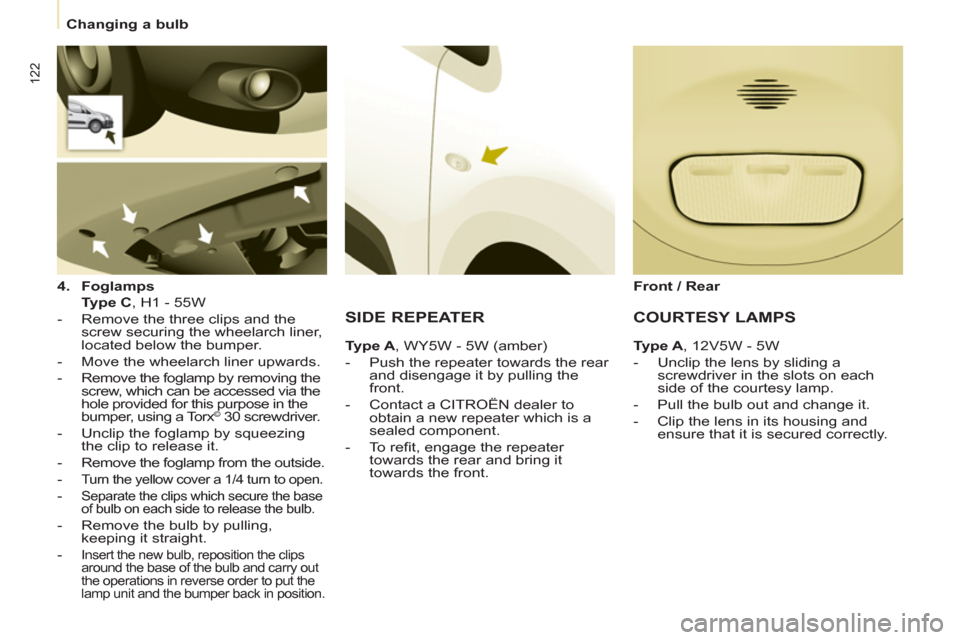
4.
Foglamps
Type C
, H1 - 55W
- Remove the three clips and the
screw securing the wheelarch liner,
located below the bumper.
- Move the wheelarch liner upwards.
- Remove the foglamp by removing the
screw, which can be accessed via the
hole provided for this purpose in the
bumper, using a Torx
© 30 screwdriver.
- Unclip the foglamp by squeezing
the clip to release it.
- Remove the foglamp from the outside.
-
Turn the yellow cover a 1/4 turn to open.
- Separate the clips which secure the base
of bulb on each side to release the bulb.
- Remove the bulb by pulling,
keeping it straight.
-
Insert the new bulb, reposition the clips
around the base of the bulb and carry out
the operations in reverse order to put the
lamp unit and the bumper back in position.
SIDE REPEATER
Ty p e A
, WY5W - 5W (amber)
- Push the repeater towards the rear
and disengage it by pulling the
front.
- Contact a CITROËN dealer to
obtain a new repeater which is a
sealed component.
- To refi t, engage the repeater
towards the rear and bring it
towards the front.
Front / Rear
COURTESY LAMPS
Type A
, 12V5W - 5W
- Unclip the lens by sliding a
screwdriver in the slots on each
side of the courtesy lamp.
- Pull the bulb out and change it.
- Clip the lens in its housing and
ensure that it is secured correctly.
Page 125 of 208

123
QUICK HELP
7
Changing a bulb
For more information concerning the
bulbs, refer to the "Types of bulb".
1.
Brake lamps / sidelamps
Type B
, P21/5W - 21/5W
2.
Direction indicators
Type B
, PY21W - 21W (amber)
3.
Reversing lamps
Type B
, P21W - 21W
4.
Foglamps
Type B
, P21W - 21W
- Identify the faulty bulb then open
the rear doors to 180°.
Refer to the "Access" section of
chapter 2.
- Remove the two fi xing bolts using
the screwdriver stored in the tool kit
under the right-hand seat.
- Pull the lamp unit from the outside.
- Holding the lamp, disconnect the
electrical connector.
- Move aside the 4 tabs then extract
the bulb holder.
- Remove the faulty bulb by
pressing it lightly while turning it
anticlockwise.
- Change the bulb.
When removing the lamp unit:
- with tailgate, pull the lamp unit
towards the centre of the vehicle,
- with hinged doors, pull the lamp
unit towards you.
When refi tting, take care to
reposition the tabs and the supply
wire correctly to avoid trapping the
wire.
After changing the rear direction
indicator bulb, the reinitialisation time
is above 2 minutes.
REAR LAMPS
High pressure washing
When using this type of washing
on stubborn dirt, do not persist on
the headlamps, the other lamps
and their edges to avoid damaging
their coating and seals.
Page 127 of 208

125
QUICK HEL
P
7
Changing a fuse
CHANGING A FUSE
The fuseboxes are located:
- in the lower dashboard on the left-
hand side (behind the cover),
- under the bonnet (near the battery).
If fi tted on your vehicle, an additional
fusebox is used for towing, the
towbar and the connections for
the coachbuilder and platform cab
modifi cations. It is located on the right
behind the load retaining partition.
The indications communicated
are only those fuses which can be
changed by the user using the tweezer,
located behind the dashboard storage
compartment on the right-hand side.
For any other work, visit a CITROËN
dealer or a qualifi ed workshop.
Removing and fitting a fuse
Always replace a failed fuse with a
fuse of the same rating.
CITROËN will not accept responsibility
for the cost incurred in repairing
your vehicle or for rectifying the
malfunctions resulting from the
installation of accessories not
supplied and not recommended by the
CITROËN network and not installed
in accordance with its instructions,
in particular when the combined
consumption of all of the additional
equipment connected exceeds
10 milliamperes. Motor trade technicians: for
complete information on the fuses
and relays, refer to the "Repair
manual" diagram via the dealer
network. Before replacing a fuse, the cause
of the incident must be found and
rectifi ed.
- Use the tweezer.
Page 129 of 208
127
QUICK HEL
P
7
Changing a fuse
PASSENGER COMPARTMENT FUSES
Fuses
F
Amperes
A
Allocation
1 - Spare
2 20 Heated seats
3 - Spare
4 15 Folding mirrors relay
5 15 Refrigeration equipment socket relay
TOWING / TOWBAR /
COACHBUILDERS / PLATFORM
CAB FUSES
The designations communicated are
an indication only as this additional
box relates to other information which
depends on the converter-coachbuilder
for which the handbook cannot be
used as a technical support.
Fuses
F
Amperes
A
Allocation
1 15 Spare
2 15 Ignition, generator operating relay
3 15 Trailer 12V supply
4 15 Permanent supply for the modifi ers
5 40 Hazard warning lamps
Page 132 of 208
130
Having your vehicle towed
Without lifting (4 wheels on the
road)
You should always use a towing bar.
BEING TOWED
From the front
- Unclip the cover by pressing the
bottom part.
- Fully screw in the removable
towing eye.
From the rear
- Unclip the cover using a coin or the
fl at part of the towing eye,
- Fully screw in the removable
towing eye.
When towing with the engine
switched off, there is no braking or
steering assistance.
Lifting (2 wheels on the road
only)
It is preferable to raise the vehicle
using professional lifting equipment. The towing eye is stored in the tool kit,
located under the right-hand seat.
Vehicles fitted with a manual
gearbox (Diesel version)
In the case of vehicles fi tted with a
manual gearbox, the gear lever must
be in the neutral position, failure to
observe this special condition may
result in damage to transmission and
braking components and the absence
of braking assistance when the engine
is started again.
Page 139 of 208

137
TECHNICAL DAT
A
8
Weights
WEIGHTS AND TOWED LOADS (KG)
General points
The GTW and towed load values
indicated are valid up to a maximum
altitude of 1000 metres; the towed load
mentioned must be reduced by 10%
for each additional 1000 metres.
The speed of a towing vehicle must not
exceed 50 mph (80 km/h) (comply with
the legislation in force in your country).
With load trransfer, the braked towed
weight can be increased, on condition
that the equivalent of this load is
removed from the vehicle so that the
GTW is not exceeded. Warning: towing
with a lightly loaded towing vehicle
may have an adverse effect on its road
holding. High ambient temperatures may result
in a reduction in the performance
of the vehicle in order to protect the
engine; when the ambient temperature
is higher than 37 °C, limit the towed
weight.
The kerb weight is equal to the weight
without load + driver (75 kg) + fuel tank
fi lled to 90%. For more information, refer to your
registration certifi cate.
In each country, it is imperative that
the towed loads authorised by local
legislation are complied with. To fi nd
out your vehicle's towing capacities
and its gross train weight, consult a
CITROËN dealer.
Page 149 of 208

04
1
2
3
5
6
4
9.9
NAVIGATION - GUIDANCE
SELECTING A DESTINATION
Press the NAV button again or select
the Navigation Menu function and
press the dial to confi rm.
Select the "Destination in
put"
function and press the dial to
confi rm. Pr
ess the NAV button.
Select the letters of the town one
by one confi rming each time by pressing the dial.
Once the country has been selected,
turn the dial and select the townfunction. Press the dial to confi rm. Insert the
SD card in the front panel reader and leave it there to use the
Navigation functions.
The navi
gation SD card data must not be modifi ed.
Map data updates are available from CITROÀN dealers.
A pre-set list (by entering the fi rst few letters) of the towns in thecountry selected can be accessed via the LIST button on the virtual
keypad.
Select the "Address input" function
and press the dial to confi rm.
The list o
f the last 20 destinations appears under the NavigationMenu function.
Navigation Menu
Destination input
Address input

