Page 225 of 576
The default status of FCW is the “Far” setting, this allows
the system to warn you of a possible collision with the
vehicle in front of you when you are farther away. This
gives you the most reaction time.
Changing the FCW status to the “Near” setting, allows
the system to warn you of a possible collision with the
vehicle in front of you when you are much closer. This
setting provides less reaction time than the “Far” setting,
which allows for a more dynamic driving experience.
Changing the FCW status to “Off” prevents the system
from warning you of a possible collision with the vehicle
in front of you.NOTE:
•In the “Off” setting FCW OFF will be displayed on the
Uconnect Touch™ display.
•The system will retain the last setting selected by the
driver after ignition shut down.
•FCW will not react to irrelevant objects such as over-
head objects, ground reflections, objects not in the path
of the car, stationary objects that are far away, oncom-
ing traffic, or leading vehicles with the same or higher
rate of speed.
•FCW will be disabled like ACC below with the un-
available screens.
3
UNDERSTANDING THE FEATURES OF YOUR VEHICLE 223
Page 227 of 576

PARKSENSE�PARK ASSIST — IF EQUIPPED
The ParkSense�Park Assist system provides visual and
audible indications of the distance between the rear
and/or front fascia and a detected obstacle when backing
up or moving forward, e.g. during a parking maneuver.
Refer to ParkSense�System Usage Precautions for limi-
tations of this system and recommendations.
ParkSense�will retain the last system state (enabled or
disabled) from the last ignition cycle when the ignition is
changed to the ON/RUN position.
ParkSense�can be active only when the shift lever is in
REVERSE or DRIVE. If ParkSense�is enabled at one of
these shift lever positions, the system will remain active
until the vehicle speed is increased to approximately
7 mph (11 km/h) or above. The system will become
active again if the vehicle speed is decreased to speeds
less than approximately 6 mph (9 km/h).
ParkSense�Sensors
The four ParkSense�sensors, located in the rear fascia/
bumper, monitor the area behind the vehicle that is
within the sensors’ field of view. The sensors can detect
obstacles from approximately 12 in (30 cm) up to 79 in
(200 cm) from the rear fascia/bumper in the horizontal
direction, depending on the location, type and orienta-
tion of the obstacle.
The six ParkSense�sensors, located in the front fascia/
bumper, monitor the area in front of the vehicle that is
within the sensors’ field of view. The sensors can detect
obstacles from approximately 12 in (30 cm) up to 47 in
(120 cm) from the front fascia/bumper in the horizontal
direction, depending on the location, type and orienta-
tion of the obstacle.
3
UNDERSTANDING THE FEATURES OF YOUR VEHICLE 225
Page 233 of 576

Front Park Assist Audible Alerts
ParkSense�will turn off the Front Park Assist audible
alert (chime) after approximately 3 seconds when an
obstacle has been detected, the vehicle is stationary, and
brake pedal is applied.
Enabling And Disabling ParkSense�
ParkSense�can be enabled and disabled using the
Uconnect Touch™ System. The available choices are: Off,
Sound Only, or Sound and Display. Refer to “Uconnect
Touch™ Settings” in “Understanding Your Instrument
Panel” for further information.
When the ParkSense�soft-key is pressed to disable the
system, the EVIC will display the “PARK ASSIST SYS-
TEM OFF” message for approximately five seconds.
Refer to “Electronic Vehicle Information Center (EVIC)”
in “Understanding Your Instrument Panel” for further
information. When the shift lever is moved to REVERSE
or to DRIVE (at or below 7 mph [11 km/h]) and thesystem is disabled, the EVIC will display the “PARK
ASSIST SYSTEM OFF” message for approximately five
seconds in REVERSE or for 5 seconds when the vehicle is
in DRIVE.
Service The ParkSense�Park Assist System
When the ParkSense�Park Assist System is malfunction-
ing, the instrument cluster will actuate a single chime,
once per ignition cycle. The instrument cluster will
display the “CLEAN PARK ASSIST” message when any
of the rear or front sensor(s) are blocked by snow, mud, or
ice and the vehicle is shifted into REVERSE or DRIVE.
The instrument cluster will display the “SERVICE PARK
ASSIST” message when any of the rear or front sensors
are damaged and require service. When the shift lever is
moved to REVERSE or DRIVE and the system has
detected a faulted condition, the EVIC will display the
“CLEAN PARK ASSIST”, “SERVICE PARK ASSIST” or
the “SERVICE PARK ASSIST SYSTEM” message for as
long as the vehicle is in REVERSE or DRIVE (at speeds3
UNDERSTANDING THE FEATURES OF YOUR VEHICLE 231
Page 234 of 576
![CHRYSLER 300 2012 2.G Owners Manual less than 7 mph [11 km/h]). Under this condition
ParkSense�will not operate. Refer to “Electronic Vehicle
Information Center (EVIC)” in “Understanding Your
Instrument Panel” for further inform](/manual-img/25/8421/w960_8421-233.png "CHRYSLER 300 2012 2.G Owners Manual less than 7 mph [11 km/h]). Under this condition
ParkSense�will not operate. Refer to “Electronic Vehicle
Information Center (EVIC)” in “Understanding Your
Instrument Panel” for further inform")
less than 7 mph [11 km/h]). Under this condition
ParkSense�will not operate. Refer to “Electronic Vehicle
Information Center (EVIC)” in “Understanding Your
Instrument Panel” for further information.
If “CLEAN PARK ASSIST” appears in the Electronic
Vehicle Information Center (EVIC) make sure the outer
surface and the underside of the rear fascia/bumper
and/or front fascia/bumper is clean and clear of snow,
ice, mud, dirt or other obstruction and then cycle the
ignition. If the message continues to appear see an
authorized dealer.
If “SERVICE PARK ASSIST�or “SERVICE PARK ASSIST
SYSTEM” appears in the EVIC, see an authorized dealer.
Cleaning The ParkSense�System
Clean the ParkSense�sensors with water, car wash soap
and a soft cloth. Do not use rough or hard cloths. Do not
scratch or poke the sensors. Otherwise, you could dam-
age the sensors.
ParkSense�System Usage Precautions
NOTE:
•Ensure that the front and rear bumper are free of snow,
ice, mud, dirt and debris to keep the ParkSense�
system operating properly.
•Jackhammers, large trucks, and other vibrations could
affect the performance of ParkSense�.
•When you turn ParkSense�off, the EVIC will display
“PARK ASSIST SYSTEM OFF.” Furthermore, once you
turn ParkSense�off, it remains off until you turn it on
again, even if you cycle the ignition key.
•When you move the shift lever to the REVERSE or
DRIVE position and ParkSense�is turned off, the
EVIC will display “PARK ASSIST SYSTEM OFF”
message for approximately five seconds in REVERSE
or for 5 seconds when the vehicle is in DRIVE.
232 UNDERSTANDING THE FEATURES OF YOUR VEHICLE
Page 242 of 576
Before You Begin Programming HomeLink�
Be sure that your vehicle is parked outside of the garage
before you begin programming.
For more efficient programming and accurate transmis-
sion of the radio-frequency signal it is recommended that
a new battery be placed in the hand-held transmitter of
the device that is being programmed to the HomeLink�
system.
Erase all channels before you begin programming. To
erase the channels place the ignition in the ON/RUN
position and press and hold the two outside HomeLink�
buttons (I and III) for up 20 seconds or until the red
indicator flashes.NOTE:•Erasing all channels should only be performed when
programming HomeLink�for the first time. Do not
erase channels when programming additional buttons.
•If you have any problems, or require assistance, please
call toll-free 1–800–355–3515 or, on the Internet at
www.HomeLink.com for information or assistance.
Programming A Rolling Code
For programming garage door openers that were manu-
factured after 1995. These garage door openers can be
identified by the “LEARN” or “TRAIN” button located
where the hanging antenna is attached to the garage door
opener. It is NOT the button that is normally used to
open and close the door. The name and color of the
button may vary by manufacturer.
240 UNDERSTANDING THE FEATURES OF YOUR VEHICLE
Page 243 of 576
1. Turn the ignition switch to the ON/RUN position.
2. Place the hand-held transmitter 1 to 3 in (3 to 8 cm)
away from the HomeLink�button you wish to program
while keeping the HomeLink�indicator light in view.3. Simultaneously press and hold both the Homelink�
button you want to program and the hand-held transmit-
ter button.
4. Continue to hold both buttons and observe the indi-
cator light. The Homelink�indicator will flash slowly
and then rapidly after Homelink�has received the fre-
quency signal from the hand-held transmitter. Release
both buttons after the indicator light changes from slow
to rapid.
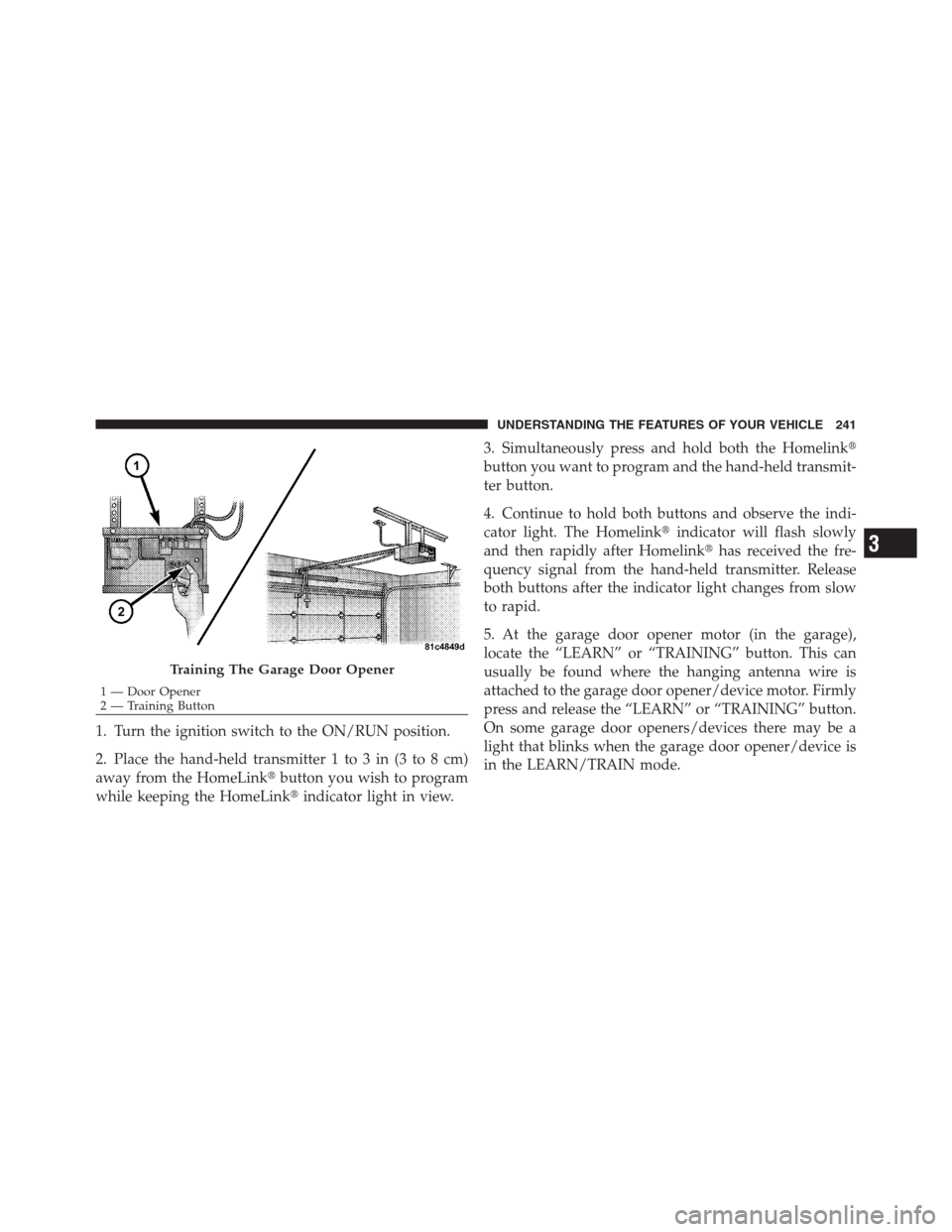
5. At the garage door opener motor (in the garage),
locate the “LEARN” or “TRAINING” button. This can
usually be found where the hanging antenna wire is
attached to the garage door opener/device motor. Firmly
press and release the “LEARN” or “TRAINING” button.
On some garage door openers/devices there may be a
light that blinks when the garage door opener/device is
in the LEARN/TRAIN mode.
Training The Garage Door Opener
1 — Door Opener
2 — Training Button
3
UNDERSTANDING THE FEATURES OF YOUR VEHICLE 241
Page 244 of 576
NOTE:You have 30 seconds in which to initiate the next
step after the LEARN button has been pressed.
6. Return to the vehicle and press the programmed
HomeLink�button twice (holding the button for two
seconds each time). If the garage door opener/device
activates, programming is complete.
NOTE:If the garage door opener/device does not
activate, press the button a third time (for two seconds) to
complete the training.
To program the remaining two HomeLink�buttons,
repeat each step for each remaining button. DO NOT
erase the channels.
Reprogramming A Single HomeLink�Button
To reprogram a channel that has been previously trained,
follow these steps:
1. Turn the ignition switch to the ON/RUN position.2. Press and hold the desired HomeLink�button until
the indicator light begins to flash after 20 seconds.Do not
release the button.
3.Without releasing the buttonproceed with “Program-
ming A Rolling Code” Step 2 and follow all remaining
steps.
Programming A Non-Rolling Code
For programming Garage Door Openers manufactured
before 1995.
1. Turn the ignition switch to the ON/RUN position.
2. Place the hand-held transmitter 1 to 3 in (3 to 8 cm)
away from the HomeLink�button you wish to program
while keeping the HomeLink�indicator light in view.
3. Simultaneously press and hold both the Homelink�
button you want to program and the hand-held transmit-
ter button.
242 UNDERSTANDING THE FEATURES OF YOUR VEHICLE
Page 245 of 576
4. Continue to hold both buttons and observe the indi-
cator light. The Homelink�indicator will flash slowly
and then rapidly after Homelink�has received the fre-
quency signal from the hand-held transmitter. Release
both buttons after the indicator light changes from slow
to rapid.
5. Press and hold the programmed HomeLink�button
and observe the indicator light.
•If the indicator light stays on constantly, program-
ming is complete and the garage door/device
should activate when the HomeLink�button is
pressed.
•To program the two remaining HomeLink�buttons,
repeat each step for each remaining button. DO
NOT erase the channels.
Reprogramming A Single HomeLink�Button
To reprogram a channel that has been previously trained,
follow these steps:
1. Turn the ignition switch to the ON/RUN position.
2. Press and hold the desired HomeLink�button until
the indicator light begins to flash after 20 seconds.Do not
release the button.
3.Without releasing the buttonproceed with “Program-
ming A Non-Rolling Code” Step 2 and follow all remain-
ing steps.
3
UNDERSTANDING THE FEATURES OF YOUR VEHICLE 243