Page 255 of 576
Opening Power Shade — Manual Mode
To open the shade, press and hold the switch rearward to
full open. Any release of the switch will stop the move-
ment and the shade will remain in a partially opened
condition until the switch is pushed and held rearward
again.
Closing Power Shade — Express
Press the switch forward and release it within one-half
second and the shade will close automatically from any
position. The shade will close fully and stop automatically.
This is called “Express Close”. During Express Close
operation, any movement of the switch will stop the shade.
Closing Power Shade — Manual Mode
To close the shade, press and hold the switch in the
forward position. Any release of the switch will stop the
movement and the shade will remain in a partially closed
condition until the switch is pushed and held forward
again.
Pinch Protect Feature
This feature will detect an obstruction in the opening of
the sunroof during Express Close operation. If an ob-
struction is detected, the sunroof will automatically re-
tract. Remove the obstruction if this occurs. Next, press
the switch forward and release to Express Close.
NOTE:If three consecutive sunroof close attempts re-
sult in Pinch Protect reversals, the fourth close attempt
will be a Manual Close movement with Pinch Protect
disabled.
Wind Buffeting
Wind buffeting can be described as the perception of
pressure on the ears or a helicopter-type sound in the
ears. Your vehicle may exhibit wind buffeting with the
windows down, or the sunroof (if equipped) in certain
open or partially open positions. This is a normal occur-
rence and can be minimized. If the buffeting occurs with
the rear windows open, open the front and rear windows
3
UNDERSTANDING THE FEATURES OF YOUR VEHICLE 253
Page 256 of 576
together to minimize the buffeting. If the buffeting occurs
with the sunroof open, adjust the sunroof opening to
minimize the buffeting or open any window.
Sunroof Maintenance
Use only a non-abrasive cleaner and a soft cloth to clean
the glass panel.
Ignition Off Operation
For vehicles not equipped with the Electronic Vehicle
Information Center (EVIC), the power sunroof switch
will remain active for 45 seconds after the ignition switch
is turned to the LOCK position. Opening either front
door will cancel this feature.
NOTE:
•For vehicles equipped with the EVIC, the power
sunroof switch will remain active for up to approxi-
mately ten minutes after the ignition switch is turned
to the LOCK position. Opening either front door will
cancel this feature.
•The Ignition Off time is programmable using the
Uconnect Touch™ System. Refer to “Uconnect
Touch™ Settings” in “Understanding Your Instrument
Panel” for further information.
Sunroof Fully Closed
Press the switch forward and release to ensure that the
sunroof is fully closed.
ELECTRICAL POWER OUTLETS
There are three 12 Volt (13 Amp) electrical power outlets
on this vehicle. The power outlets are protected by a fuse.
Insert cigar lighter or accessory plug into the power
outlets for use to ensure proper operation.
NOTE:To ensure proper operation, a MOPAR�knob
and element must be used.
254 UNDERSTANDING THE FEATURES OF YOUR VEHICLE
Page 269 of 576
GROCERY BAG HOOKS
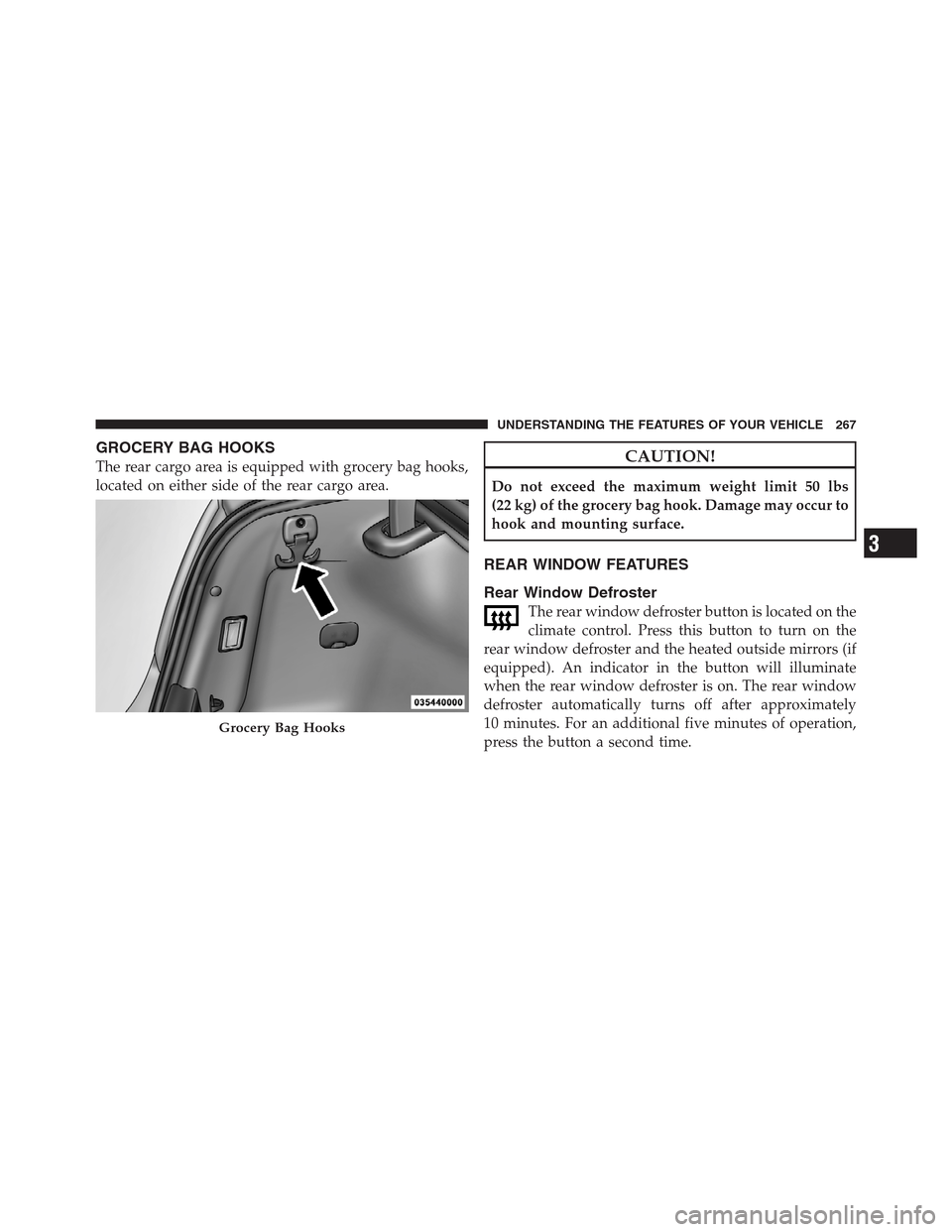
The rear cargo area is equipped with grocery bag hooks,
located on either side of the rear cargo area.CAUTION!
Do not exceed the maximum weight limit 50 lbs
(22 kg) of the grocery bag hook. Damage may occur to
hook and mounting surface.
REAR WINDOW FEATURES
Rear Window Defroster
The rear window defroster button is located on the
climate control. Press this button to turn on the
rear window defroster and the heated outside mirrors (if
equipped). An indicator in the button will illuminate
when the rear window defroster is on. The rear window
defroster automatically turns off after approximately
10 minutes. For an additional five minutes of operation,
press the button a second time.
Grocery Bag Hooks
3
UNDERSTANDING THE FEATURES OF YOUR VEHICLE 267
Page 270 of 576

CAUTION!
Failure to follow these cautions can cause damage to
the heating elements:
•Use care when washing the inside of the rear
window. Do not use abrasive window cleaners on
the interior surface of the window. Use a soft cloth
and a mild washing solution, wiping parallel to
the heating elements. Labels can be peeled off
after soaking with warm water.
•Do not use scrapers, sharp instruments, or abra-
sive window cleaners on the interior surface of the
window.
•Keep all objects a safe distance from the window.
Power Sunshade — If Equipped
Your vehicle may be equipped with a power sunshade
that will reduce the amount of sunlight that will shine
through the rear windshield.
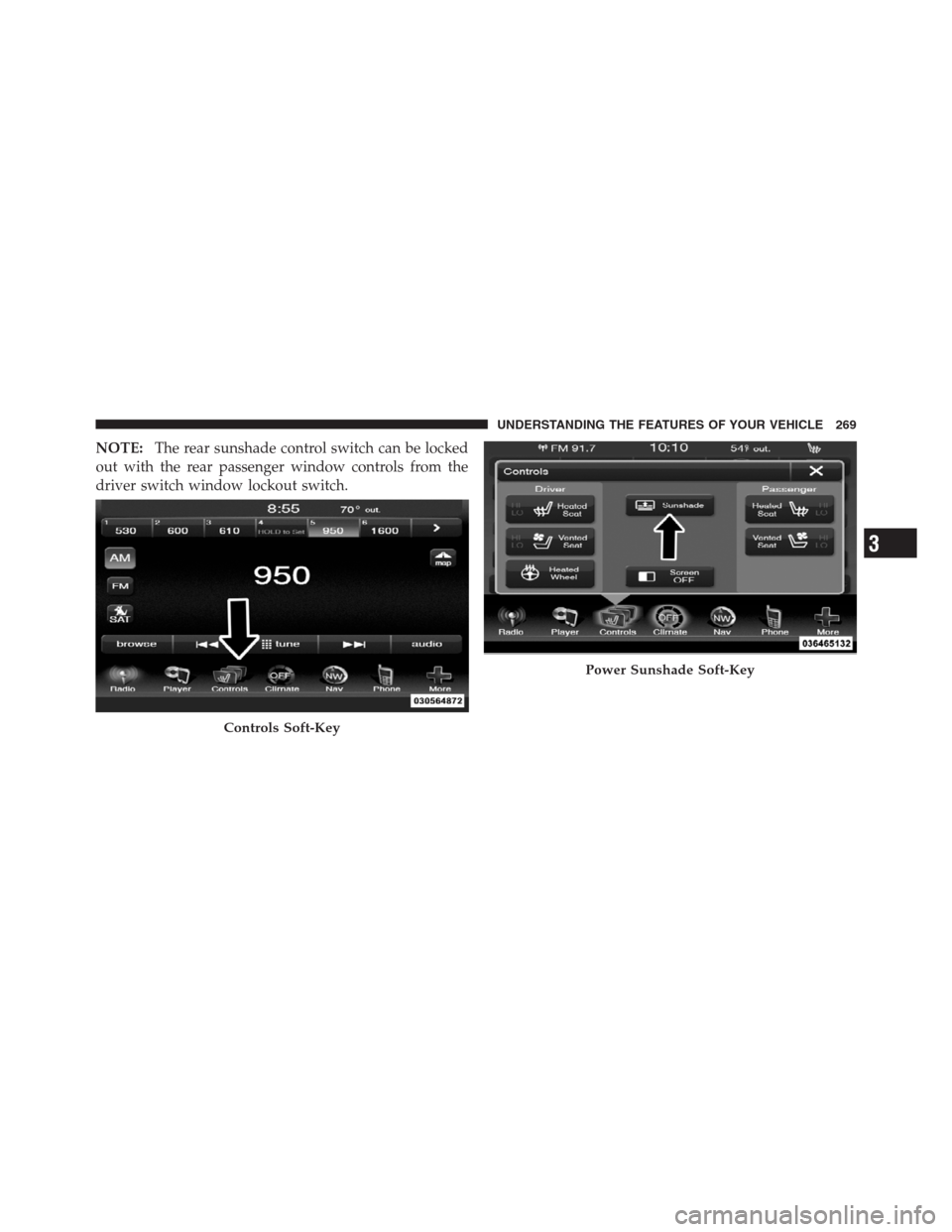
The power sunshade can be operated using the Uconnect
Touch™ System.
Press the “Controls” soft-key and then press the “Sun-
shade” soft-key to raise the power sunscreen. Press the
“Sunshade” soft-key a second time to lower the sun-
shade.
If the sunshade is in the raised position and the vehicle is
placed in REVERSE, the sunshade will automatically
fully lower. When the transmission is shifted out of
REVERSE the sunshade will automatically return to the
fully raised position after approximately five seconds.
268 UNDERSTANDING THE FEATURES OF YOUR VEHICLE
Page 271 of 576
NOTE:The rear sunshade control switch can be locked
out with the rear passenger window controls from the
driver switch window lockout switch.
Controls Soft-Key
Power Sunshade Soft-Key
3
UNDERSTANDING THE FEATURES OF YOUR VEHICLE 269
Page 312 of 576

•Engine Off Power Delay
Touch the Engine Off Power Delay soft-key to change this
display. When this feature is selected, the power window
switches, radio, Uconnect™ phone system (if equipped),
DVD video system (if equipped), power sunroof (if
equipped), and power outlets will remain active for up to
10 minutes after the ignition is cycled to OFF. Opening
either front door will cancel this feature. To change the
Engine Off Power Delay status, touch the 0 seconds,
45 seconds, 5 minutes or 10 minutes soft-key. Then touch
the arrow back soft-key.Compass Settings
•
Variance
Touch the Variance soft-key to change this display. Com-
pass Variance is the difference between Magnetic North
and Geographic North. To compensate for the differences,
the variance should be set for the zone where the vehicle is
driven, per the zone map. Once properly set, the compass
will automatically compensate for the differences, and
provide the most accurate compass heading.
NOTE:Keep magnetic materials away from the top of
the instrument panel, such as iPod’s, Mobile Phones,
Laptops and Radar Detectors. This is where the compass
module is located, and it can cause interference with the
compass sensor, and it may give false readings.
310 UNDERSTANDING YOUR INSTRUMENT PANEL
Page 326 of 576

•Auto-On Driver Heated/Ventilated Seat & Steering
Wheel With Vehicle Start — If Equipped
When this feature is selected the driver’s heated seat and
heated steering wheel will automatically turn on when
temperatures are below 40° F (4.4° C). When tempera-
tures are above 80° F (26.7° C) the driver vented seat will
turn on. To make your selection, touch the Auto Heated
Seats soft-key, until a check-mark appears next to setting,
showing that setting has been selected. Touch the back
arrow soft-key to return to the previous menu.
Engine Off Options
After pressing the Engine Off Options soft-key the fol-
lowing settings will be available.
•Easy Exit Seat
This feature provides automatic driver seat positioning to
enhance driver mobility when entering and exiting the
vehicle. To make your selection, touch the Easy Exit Seats
soft-key, until a check-mark appears next to setting,showing that setting has been selected. Touch the back
arrow soft-key to return to the previous menu.
•Engine Off Power Delay
When this feature is selected, the power window
switches, radio, Uconnect™ phone system (if equipped),
DVD video system (if equipped), power sunroof (if
equipped), and power outlets will remain active for up to
10 minutes after the ignition is cycled to OFF. Opening
either front door will cancel this feature. To change the
Engine Off Power Delay status touch the 0 seconds,
45 seconds, 5 minutes or 10 minutes soft-key. Then touch
the arrow back soft-key.
•Headlight Off Delay
When this feature is selected, the driver can choose to
have the headlights remain on for 0, 30, 60, or 90 seconds
when exiting the vehicle. To change the Headlight Off
Delay status touch the + or - soft-key to select your
desired time interval. Touch the back arrow soft-key to
return to the previous menu.
324 UNDERSTANDING YOUR INSTRUMENT PANEL
Page 338 of 576
Soft-key — Uconnect Touch™ System 8.4
Use the small blower icon to reduce the blower setting
and the large blower icon to increase the blower setting.
Blower can also be selected by pressing the blower bar
area between the icons.
4. Front Defrost Button
Press and release to change the current airflow setting to
Defrost mode. The indicator illuminates when this fea-
ture is ON. Performing this function will cause the ATC
to switch into manual mode. The blower speed may
increase when Defrost mode is selected. If the front
defrost mode is turned off the climate system will return
the previous setting.
5. Rear Defrost Button
Press and release this button to turn on the rear window
defroster and the heated outside mirrors (if equipped).An indicator will illuminate when the rear window
defroster is on. The rear window defroster automatically
turns off after 10 minutes.
CAUTION!
Failure to follow these cautions can cause damage to
the heating elements:
•Use care when washing the inside of the rear
window. Do not use abrasive window cleaners on
the interior surface of the window. Use a soft cloth
and a mild washing solution, wiping parallel to
the heating elements. Labels can be peeled off
after soaking with warm water.
•Do not use scrapers, sharp instruments, or abra-
sive window cleaners on the interior surface of the
window.
•Keep all objects a safe distance from the window.
336 UNDERSTANDING YOUR INSTRUMENT PANEL