Page 32 of 576
If the door lock knob is down when you shut the door,
the door will lock. Therefore, make sure the Key Fob is
not inside the vehicle before closing the door.
WARNING!
•For personal security and safety in the event of an
accident, lock the vehicle doors before you drive as
well as when you park and leave the vehicle.
•Never leave children alone in a vehicle, or with
access to an unlocked vehicle.
•Allowing children to be in a vehicle unattended is
dangerous for a number of reasons. A child or
others could be seriously or fatally injured. Chil-
dren should be warned not to touch the parking
brake, brake pedal or the shift lever.
(Continued)
WARNING! (Continued)
•Do not leave the key fob in or near the vehicle, and
do not leave Keyless Enter-N-Go in the ACC or
ON/RUN mode. A child could operate power win-
dows, other controls, or move the vehicle.
30 THINGS TO KNOW BEFORE STARTING YOUR VEHICLE
Page 33 of 576
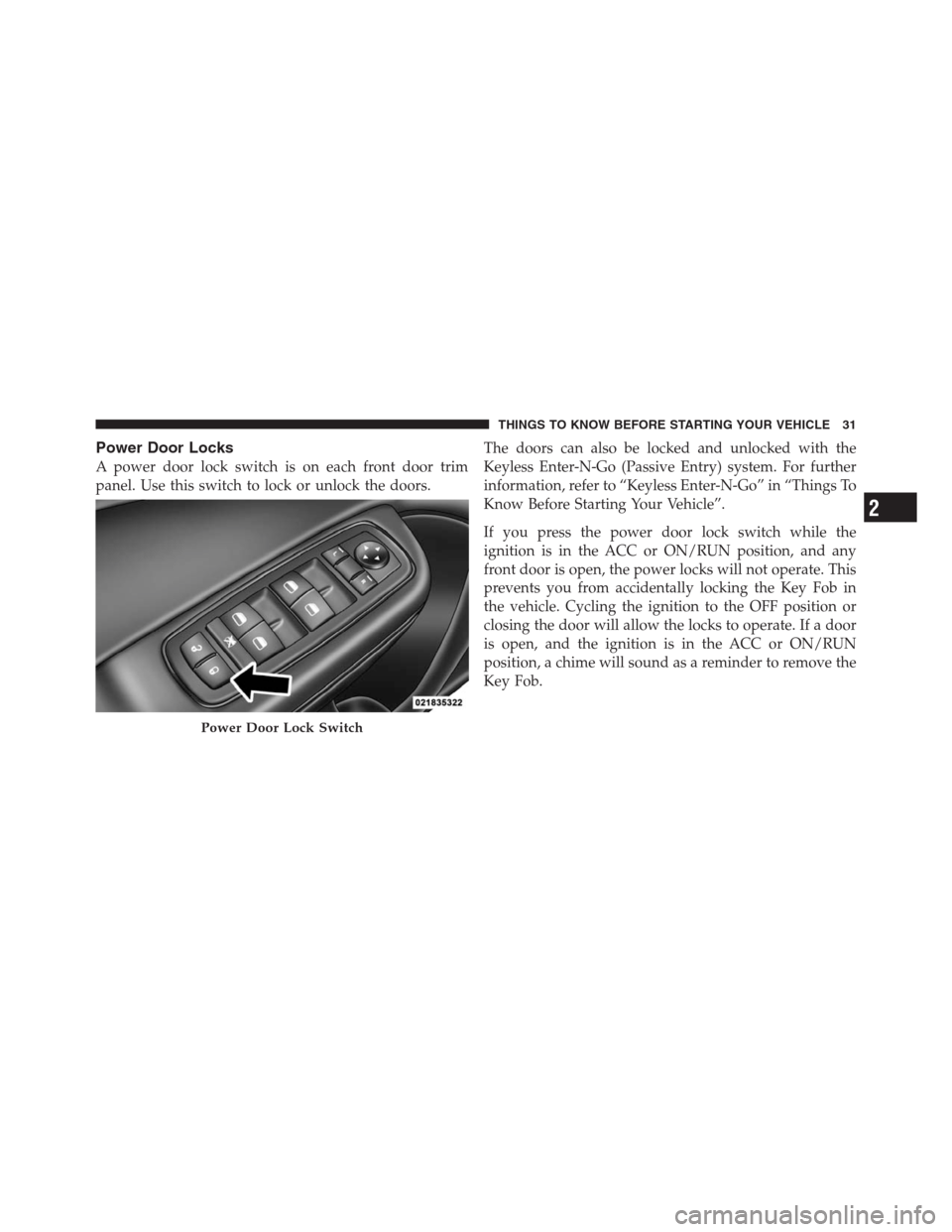
Power Door Locks
A power door lock switch is on each front door trim
panel. Use this switch to lock or unlock the doors.The doors can also be locked and unlocked with the
Keyless Enter-N-Go (Passive Entry) system. For further
information, refer to “Keyless Enter-N-Go” in “Things To
Know Before Starting Your Vehicle”.
If you press the power door lock switch while the
ignition is in the ACC or ON/RUN position, and any
front door is open, the power locks will not operate. This
prevents you from accidentally locking the Key Fob in
the vehicle. Cycling the ignition to the OFF position or
closing the door will allow the locks to operate. If a door
is open, and the ignition is in the ACC or ON/RUN
position, a chime will sound as a reminder to remove the
Key Fob.
Power Door Lock Switch
2
THINGS TO KNOW BEFORE STARTING YOUR VEHICLE 31
Page 36 of 576

KEYLESS ENTER-N-GO™
The Passive Entry system is an enhancement to the
vehicle’s Remote Keyless Entry (RKE) system and a
feature of Keyless Enter-N-Go™. This feature allows you
to lock and unlock the vehicle’s door(s) without having to
press the RKE transmitter lock or unlock buttons.
NOTE:
•Passive Entry may be programmed ON/OFF; refer to
“Uconnect Touch™ Settings” in “Understanding Your
Instrument Panel” for further information.
•If wearing gloves on your hands, or if it has been
raining on the Passive Entry door handle, the unlock
sensitivity can be affected, resulting in a slower re-
sponse time.
•If the vehicle is unlocked by the RKE transmitter or
Passive Entry and no door goes ajar within 60 seconds,
the vehicle will re-lock and if equipped will arm the
theft alarm.To Unlock From The Driver’s Side:
With a valid Passive Entry RKE transmitter within 5 ft
(1.5 m) of the driver’s door handle, grab the front driver
door handle to unlock the driver’s door automatically.
The interior door panel lock knob will raise when the
door is unlocked.
Grabbing The Driver’s Door Handle
34 THINGS TO KNOW BEFORE STARTING YOUR VEHICLE
Page 44 of 576
The trunk lid can be released from
outside the vehicle by pressing the
TRUNK button on the Remote
Keyless Entry (RKE) transmitter
twice within five seconds or by
using the external release switch
located on the underside of the
decklid overhang. The release fea-
ture will function only when the
vehicle is in the unlock condition.
With the ignition in the ON/RUN position, the Trunk
Open symbol will display in the instrument cluster
indicating that the trunk is open. The odometer display
will reappear once the trunk is closed.
With the ignition in the OFF position, the Trunk Open
symbol will display until the trunk is closed.Refer to “Keyless Enter-N-Go” in “Things To Know
Before Starting Your Vehicle” for more information on
trunk operation with the Passive Entry feature.
TRUNK SAFETY WARNING
WARNING!
Do not allow children to have access to the trunk,
either by climbing into the trunk from outside, or
through the inside of the vehicle. Always close the
trunk lid when your vehicle is unattended. Once in
the trunk, young children may not be able to escape,
even if they entered through the rear seat. If trapped
in the trunk, children can die from suffocation or
heat stroke.Trunk Release
Button
42 THINGS TO KNOW BEFORE STARTING YOUR VEHICLE
Page 69 of 576
•Turn on the interior lights, which remain on as long as
the battery has power, until the ignition key is re-
moved or the ignition switch is changed to OFF using
the Keyless Go Start/Stop button.
•Unlock the doors automatically.
In order to reset the Enhanced Accident Response System
functions after an event, the ignition switch must be
changed from IGN ON to IGN OFF.
If A Deployment Occurs
The Advanced Front Air Bags are designed to deflate
immediately after deployment.
NOTE:Front and/or side air bags will not deploy in all
collisions. This does not mean something is wrong with
the air bag system.
If you do have a collision which deploys the air bags, any
or all of the following may occur:
•The nylon air bag material may sometimes cause abra-
sions and/or skin reddening to the driver and front
passenger as the air bags deploy and unfold. The
abrasions are similar to friction rope burns or those you
might get sliding along a carpet or gymnasium floor.
They are not caused by contact with chemicals. They are
not permanent and normally heal quickly. However, if
you haven’t healed significantly within a few days, or if
you have any blistering, see your doctor immediately.
•As the air bags deflate, you may see some smoke-like
particles. The particles are a normal by-product of the
process that generates the non-toxic gas used for air bag
inflation. These airborne particles may irritate the skin,
eyes, nose, or throat. If you have skin or eye irritation,
rinse the area with cool water. For nose or throat irrita-
tion, move to fresh air. If the irritation continues, see your
doctor. If these particles settle on your clothing, follow
the garment manufacturer’s instructions for cleaning.
2
THINGS TO KNOW BEFORE STARTING YOUR VEHICLE 67
Page 90 of 576

�Uconnect™ Phone (8.4/8.4N)............. 108
▫Uconnect Touch™ 8.4/8.4 NAV.......... 108
▫Operation......................... 110
▫Phone Call Features.................. 122
▫Uconnect™ Phone Features............. 126
▫Advanced Phone Connectivity........... 131
▫Things You Should Know About Your
Uconnect™ Phone.................... 131
▫General Information.................. 141
�Voice Command...................... 142
▫Uconnect Touch™ 8.4/8.4 NAV.......... 142
▫Uconnect™ Voice Commands........... 144
▫Voice Tree......................... 146�Seats.............................. 157
▫Power Seats........................ 157
▫Power Lumbar — If Equipped........... 160
▫Heated Seats — If Equipped............ 160
▫Ventilated Seats — If Equipped.......... 163
▫Head Restraints..................... 165
▫Folding Rear Seat.................... 168
�Driver Memory Seat — If Equipped........ 169
▫Programming The Memory Feature....... 170
▫Linking And Unlinking The Remote Keyless
Entry Transmitter To Memory........... 171
▫Memory Position Recall................ 171
▫Easy Entry/Exit Seat (Available With
Memory Seat Only)................... 172
88 UNDERSTANDING THE FEATURES OF YOUR VEHICLE
Page 98 of 576

Three of the LEDs are turn signal indicators, which flash
with the corresponding turn signal lights in the front and
rear of the vehicle. Turning on the Hazard Warning
flashers will also activate these LEDs.
The fourth LED supplies illuminated entry lighting,
which turns on in both mirrors when you use the Remote
Keyless Entry (RKE) transmitter or open any door. This
LED shines outward to illuminate the front and rear door
handles. It also shines downward to illuminate the area
in front of the doors.
The Illuminated Entry lighting fades to off after about
30 seconds or it will fade to off immediately once the
ignition is placed into the RUN position.
NOTE:The approach lighting will not function when
the shift lever is moved out of the PARK position.Tilt Mirrors In Reverse — If Equipped
Tilt Mirrors in Reverse provides automatic outside mirror
positioning which will aid the driver ’s view of the
ground rearward of the front doors. The outside mirrors
will move slightly downward from the present position
when the vehicle is shifted into REVERSE. The outside
mirrors will then return to the original position when the
vehicle is shifted out of the REVERSE position. Each
stored memory setting will have an associated Tilt Mir-
rors in Reverse position.
NOTE:
•The Tilt Mirrors in Reverse feature is not turned on
when delivered from the factory. The Tilt Mirrors in
Reverse feature can be turned on and off using the
Uconnect Touch™ System.
•Refer to “Uconnect Touch™ Settings” in “Understand-
ing Your Instrument Panel” for further information.
96 UNDERSTANDING THE FEATURES OF YOUR VEHICLE
Page 171 of 576

WARNING!
•Be certain that the seatback is securely locked into
position. If the seatback is not securely locked into
position, the seat will not provide the proper
stability for child seats and/or passengers. An
improperly latched seat could cause serious injury.
•The cargo area in the rear of the vehicle (with the
rear seatbacks in the locked-up or folded down
position) should not be used as a play area by
children when the vehicle is in motion. They could
be seriously injured in a collision. Children
should be seated and using the proper restraint
system.
DRIVER MEMORY SEAT — IF EQUIPPED
This feature allows the driver to store up to two different
memory profiles for easy recall through a memory
switch. Each memory profile contains desired position
settings for the driver seat, side mirrors, adjustable
pedals (if equipped), and power tilt and telescopic steer-
ing column (if equipped) and a set of desired radio
station presets. Your Remote Keyless Entry (RKE) trans-
mitter can also be programmed to recall the same posi-
tions when the UNLOCK button is pressed.
NOTE:
•Only one RKE transmitter can be linked to each of the
memory positions.
•Passive Entry door handles cannot be linked to the
memory function. Use either the memory recall switch
or the RKE transmitter (if linked to the memory
feature) to recall memory positions 1 or 2.
3
UNDERSTANDING THE FEATURES OF YOUR VEHICLE 169