Page 145 of 576
If a command is not spoken a second time, the system
will respond with an error and give some direction as
what can be said based on the context you are in. After
three consecutive failures of a spoken command the VR
session with end.
Pressing the Uconnect™ Voice Command
button
while the system is speaking is known as “barging in.”
The system will be interrupted, and after the beep, you
can say a command. This will become helpful once you
start to learn the options.
NOTE:At any time, you can say the words “Cancel” or
“Help”.
These commands are universal and can be used from any
menu. All other commands can be used depending upon
the active application.When using this system, you should speak clearly and at
a normal speaking volume.
The system will best recognize your speech if the win-
dows are closed, and the heater/air conditioning fan is
set to low.
At any point, if the system does not recognize one of your
commands, you will be prompted to repeat it.
To hear available commands, press the Uconnect™ Voice
Command
button and say “Help”. You will hear
available commands for the screen displayed.
3
UNDERSTANDING THE FEATURES OF YOUR VEHICLE 143
Page 163 of 576
WARNING! (Continued)
•Do not place anything on the seat that insulates
against heat, such as a blanket or cushion. This
may cause the seat heater to overheat. Sitting in a
seat that has been overheated could cause serious
burns due to the increased surface temperature of
the seat.
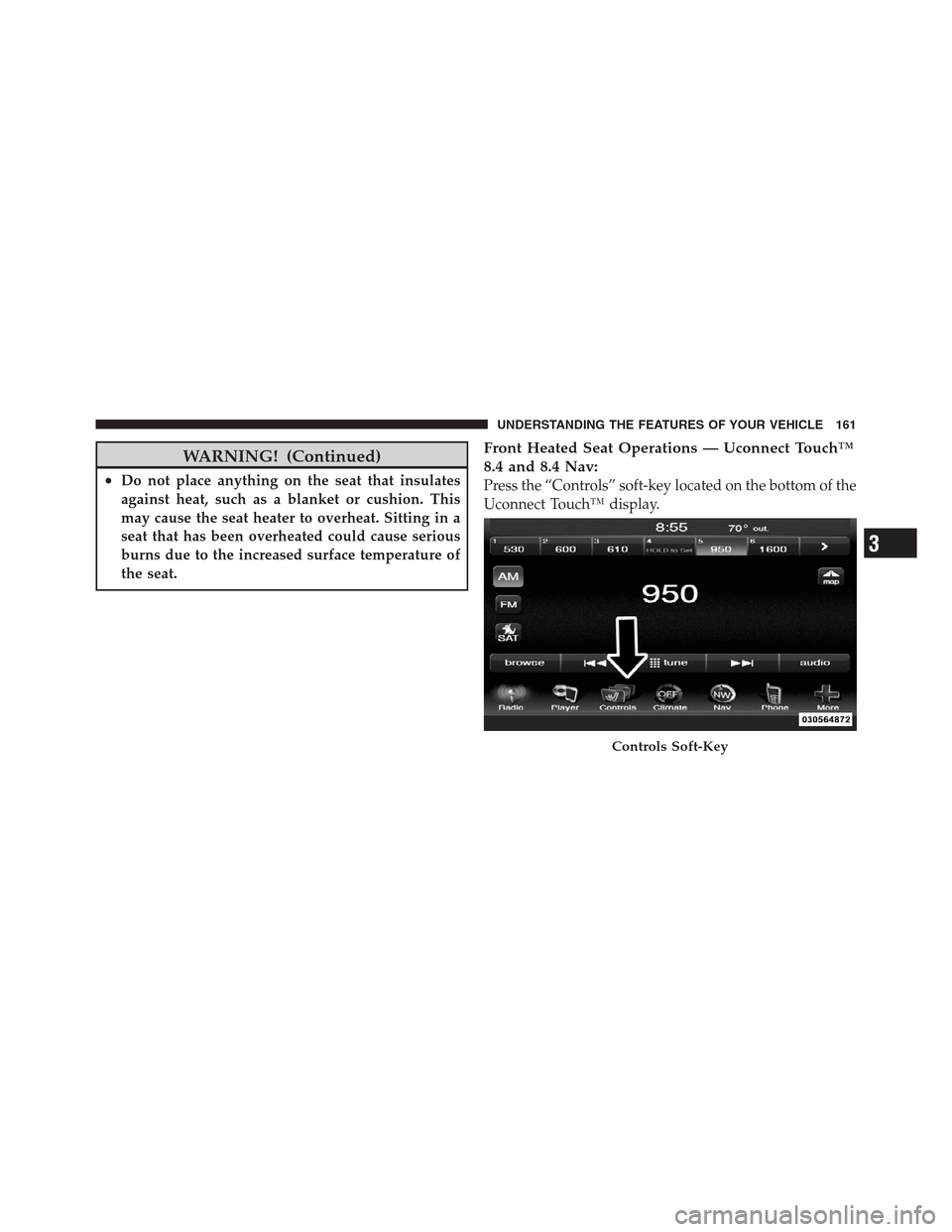
Front Heated Seat Operations — Uconnect Touch™
8.4 and 8.4 Nav:
Press the “Controls” soft-key located on the bottom of the
Uconnect Touch™ display.
Controls Soft-Key
3
UNDERSTANDING THE FEATURES OF YOUR VEHICLE 161
Page 164 of 576
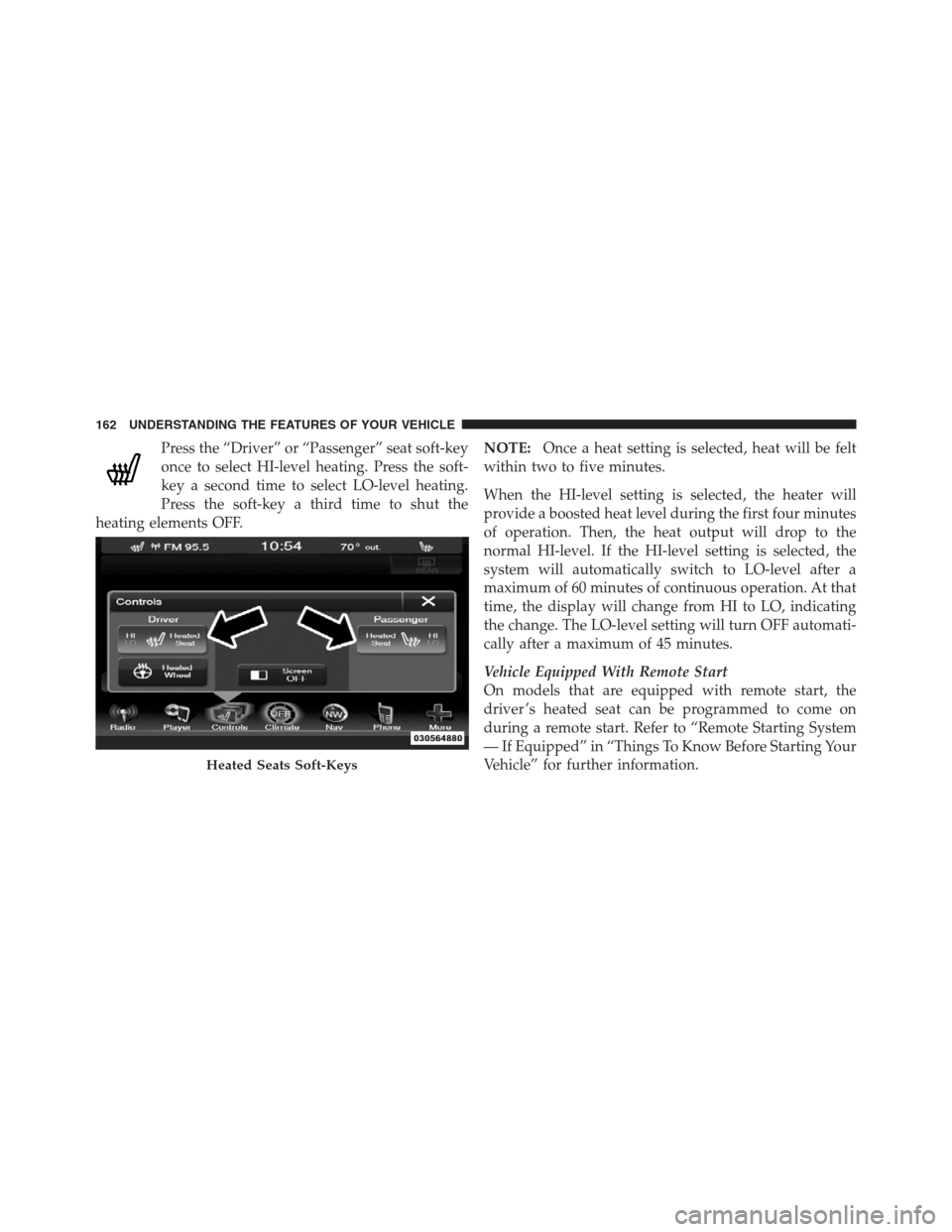
Press the “Driver” or “Passenger” seat soft-key
once to select HI-level heating. Press the soft-
key a second time to select LO-level heating.
Press the soft-key a third time to shut the
heating elements OFF.NOTE:Once a heat setting is selected, heat will be felt
within two to five minutes.
When the HI-level setting is selected, the heater will
provide a boosted heat level during the first four minutes
of operation. Then, the heat output will drop to the
normal HI-level. If the HI-level setting is selected, the
system will automatically switch to LO-level after a
maximum of 60 minutes of continuous operation. At that
time, the display will change from HI to LO, indicating
the change. The LO-level setting will turn OFF automati-
cally after a maximum of 45 minutes.
Vehicle Equipped With Remote Start
On models that are equipped with remote start, the
driver ’s heated seat can be programmed to come on
during a remote start. Refer to “Remote Starting System
— If Equipped” in “Things To Know Before Starting Your
Vehicle” for further information.
Heated Seats Soft-Keys
162 UNDERSTANDING THE FEATURES OF YOUR VEHICLE
Page 166 of 576
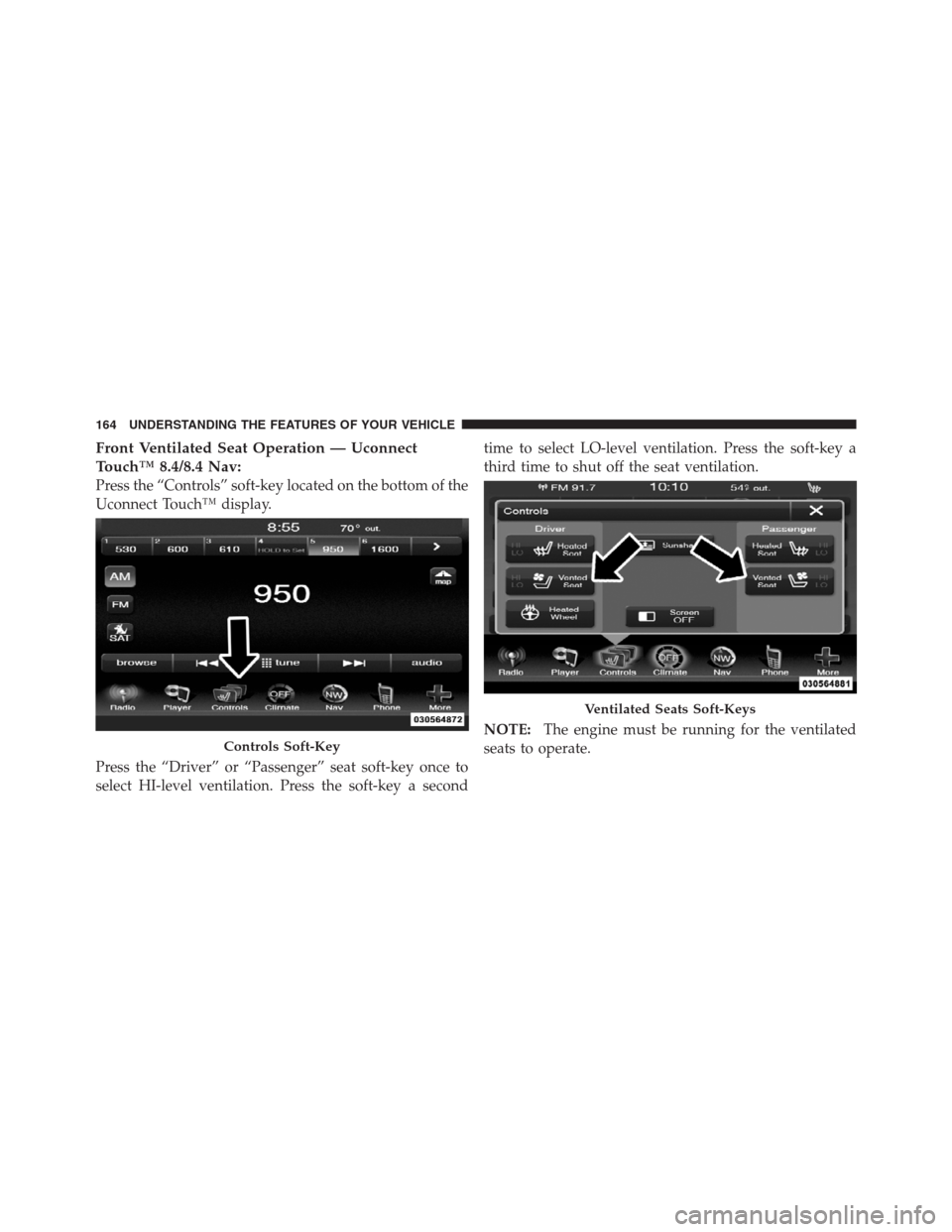
Front Ventilated Seat Operation — Uconnect
Touch™ 8.4/8.4 Nav:
Press the “Controls” soft-key located on the bottom of the
Uconnect Touch™ display.
Press the “Driver” or “Passenger” seat soft-key once to
select HI-level ventilation. Press the soft-key a secondtime to select LO-level ventilation. Press the soft-key a
third time to shut off the seat ventilation.
NOTE:The engine must be running for the ventilated
seats to operate.
Controls Soft-Key
Ventilated Seats Soft-Keys
164 UNDERSTANDING THE FEATURES OF YOUR VEHICLE
Page 172 of 576

The memory seat switch is located on the driver ’s door
trim panel. The switch consists of three buttons: The (S)
button, which is used to activate the memory save
function and the (1) and (2) buttons which are used to
recall either of two pre-programmed memory profiles.Programming The Memory Feature
To create a new memory profile, perform the following:
1. Place the ignition into the RUN position.
2. Adjust all memory profile settings to desired prefer-
ences (i.e., seat, side mirror, adjustable pedals [if
equipped], power tilt and telescopic steering column [if
equipped], and radio station presets).
3. Press and release the S (Set) button on the memory
switch.
4. Within five seconds, press and release either of the
memory buttons (1) or (2). The Electronic Vehicle Infor-
mation Center (EVIC) will display which memory posi-
tion has been set.
NOTE:
•Memory profiles can be set without the vehicle in
PARK, but the vehicle must be in PARK to recall a
memory profile.Memory Seat Switch
170 UNDERSTANDING THE FEATURES OF YOUR VEHICLE
Page 173 of 576
•The Recall Memory with Remote Key Unlock feature
can be enabled through the Uconnect Touch™ System,
refer to “Uconnect Touch™ Settings” in “Understand-
ing Your Instrument Panel” for further information.
Linking And Unlinking The Remote Keyless Entry
Transmitter To Memory
Your RKE transmitters can be programmed to recall one
of two pre-programmed memory profiles by pressing the
UNLOCK button on the RKE transmitter.
To program your RKE transmitters, perform the follow-
ing:
1. Remove the Key Fob from the ignition (or change the
ignition to OFF, for vehicles equipped with Keyless
Enter-N-Go).
2. Select desired memory profile (1) or (2).
3. Once the profile has been recalled, press and release
the SET (S) button on the memory switch, then press andrelease button (1) or (2) accordingly. “Memory Profile
Set” (1 or 2) will display in the instrument cluster on
vehicles equipped with the EVIC.
4. Press and release the LOCK button on the RKE
transmitter within 10 seconds.
NOTE:Your RKE transmitters can be unlinked to your
memory settings by pressing the SET (S) button followed
by the UNLOCK button on the RKE transmitter in Step 4
above.
Memory Position Recall
NOTE:The vehicle must be in PARK to recall memory
positions. If a recall is attempted when the vehicle is not in
PARK, a message will display in the EVIC (if equipped).
To recall the memory settings for driver one, press
MEMORY button number (1) on the driver’s door or the
UNLOCK button on the RKE transmitter linked to
memory position 1.
3
UNDERSTANDING THE FEATURES OF YOUR VEHICLE 171
Page 188 of 576
Dome Light Position
Rotate the dimmer control completely upward to the
second detent to turn on the interior lights. The interior
lights will remain on when the dimmer control is in this
position.
Interior Light Defeat (OFF)
Rotate the dimmer control to the extreme bottom OFF
position. The interior lights will remain off when the
doors are open.
Parade Mode (Daytime Brightness Feature)
Rotate the dimmer control upward to the first detent.
This feature brightens all text displays such as the
odometer, EVIC (if equipped), and radio when the park-
ing lights or headlights are on.
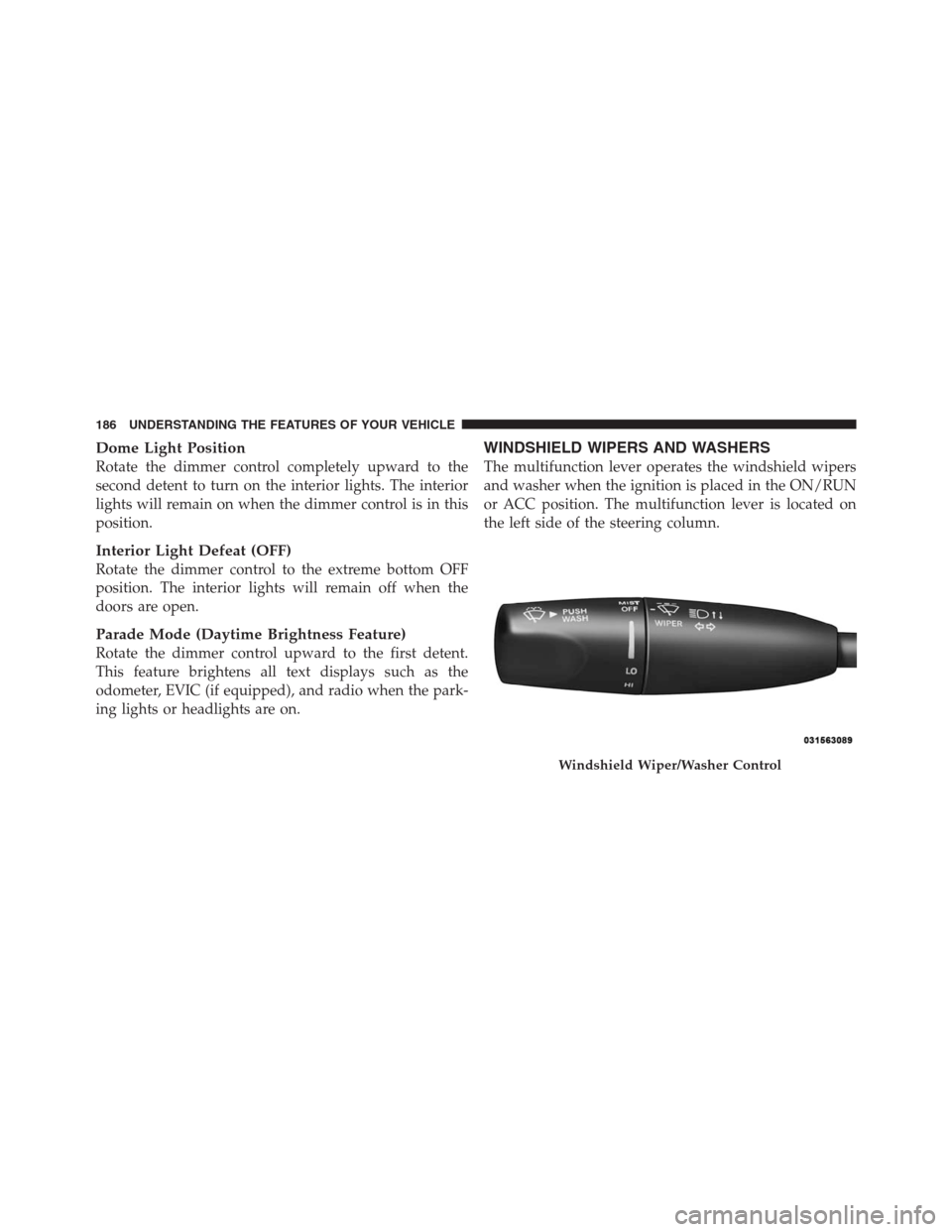
WINDSHIELD WIPERS AND WASHERS
The multifunction lever operates the windshield wipers
and washer when the ignition is placed in the ON/RUN
or ACC position. The multifunction lever is located on
the left side of the steering column.
Windshield Wiper/Washer Control
186 UNDERSTANDING THE FEATURES OF YOUR VEHICLE
Page 197 of 576

The switch is located on the front side of the driver’s seat
cushion side shield.
Press the switch forward to move the pedals forward
(toward the front of the vehicle).
Press the switch rearward to move the pedals rearward
(toward the driver).•The pedals can be adjusted with the ignition OFF.
•The pedalscannotbe adjusted when the vehicle is in
REVERSE or when the Electronic Speed Control Sys-
tem is on. The following messages will be displayed
on vehicles equipped with the Electronic Vehicle In-
formation System (EVIC) if the pedals are attempted to
be adjusted when the system is locked out (“Adjust-
able Pedal Disabled — Cruise Control Engaged” or
“Adjustable Pedal Disabled — Vehicle In Reverse”.
NOTE:For vehicles equipped with Driver Memory
Seat, you can use your Remote Keyless Entry (RKE)
transmitter or the memory switch on the driver’s door
trim panel to return the adjustable pedals to pre-
programmed positions. Refer to “Driver Memory Seat”
in “Understanding The Features Of Your Vehicle” for
further information.
Adjustable Pedals Switch
3
UNDERSTANDING THE FEATURES OF YOUR VEHICLE 195