Page 330 of 576
SETTING THE ANALOG CLOCK
To set the analog clock at the top center of the instrument
panel, press and hold the button until the setting is
correct.
iPod�/USB/MP3 CONTROL — IF EQUIPPED
This feature allows an iPod�or external USB device to be
plugged into the USB port.
iPod�control supports Mini, 4G, Photo, Nano, 5G iPod�
and iPhone�devices. Some iPod�software versions may
not fully support the iPod�control features. Please visit
Apple’s website for software updates.
For further information, refer to the Uconnect Touch™
User ’s Manual.
HARMAN KARDON�Logic7�HIGH
PERFORMANCE MULTICHANNEL SURROUND
SOUND SYSTEM WITH DRIVER-SELECTABLE
SURROUND (DSS) — IF EQUIPPED
Your vehicle is equipped with a Harman Kardon�audio
system with GreenEdge™ technology that offers superior
sound quality, higher Sound Pressure Levels (SPL) and
reduced energy consumption. The new system utilizes
Setting The Analog Clock
328 UNDERSTANDING YOUR INSTRUMENT PANEL
Page 337 of 576

Performing this function will cause the automatic opera-
tion to switch into manual mode and the AUTO indicator
will turn off.
2. Recirculation Button
Press and release to change the current setting, the
indicator illuminates when ON.
3. Blower Control
Blower control is used to regulate the amount of air
forced through the climate system. There are seven
blower speeds available. Adjusting the blower will cause
automatic mode to switch to manual operation. The
speeds can be selected using either hard-keys or soft-keys
as follows:
NOTE:For vehicles equipped with Remote Start, the
climate controls will not function during Remote Start
operation if the blower control is left in the “O” (Off)position. Blower control should be left in the “ON”
position to allow the climate control to either warm or
cool the vehicle
Hard-key
The blower speed increases as you turn the control
clockwise from the lowest blower setting. The blower
speed decreases as you turn the knob counter-clockwise.
Soft-key — Uconnect Touch™ System 4.3 (If Equipped)
Press the blower soft-key to enter the blower setting
screen. Once in the blower settings screen use the UP and
DOWN arrows to adjust the blower speed setting, or
directly select the speed setting by pressing the blower
bar area around the blower icon. The blower speed
increases as you press the UP arrow or move clockwise
on the setting scale and decreases when press the DOWN
arrow or move counter-clockwise on the setting scale.
4
UNDERSTANDING YOUR INSTRUMENT PANEL 335
Page 460 of 576

Road Tire Installation
1. Mount the road tire on the axle.
2. Install the remaining lug nuts with the cone shaped
end of the nut toward the wheel. Lightly tighten the lug
nuts.
WARNING!
To avoid the risk of forcing the vehicle off the jack,
do not tighten the wheel nuts fully until the vehicle
has been lowered. Failure to follow this warning may
result in personal injury.
3. Lower the vehicle to the ground by turning the jack
handle counterclockwise.
4. Finish tightening the lug nuts. Push down on the
wrench while at the end of the handle for increased
leverage. Tighten the lug nuts in a star pattern until eachnut has been tightened twice. The correct tightness of
each lug nut is 110 ft/lbs (150 N·m). If in doubt about the
correct tightness, have them checked with a torque
wrench by your authorized dealer or service station.
5. After 25 miles (40 km) check the lug nut torque with a
torque wrench to ensure that all lug nuts are properly
seated against the wheel.JUMP-STARTING PROCEDURES
If your vehicle has a discharged battery it can be jump-
started using a set of jumper cables and a battery in
another vehicle or by using a portable battery booster
pack. Jump-starting can be dangerous if done improperly
so please follow the procedures in this section carefully.
NOTE:When using a portable battery booster pack
follow the manufacturer ’s operating instructions and
precautions.
458 WHAT TO DO IN EMERGENCIES
Page 569 of 576
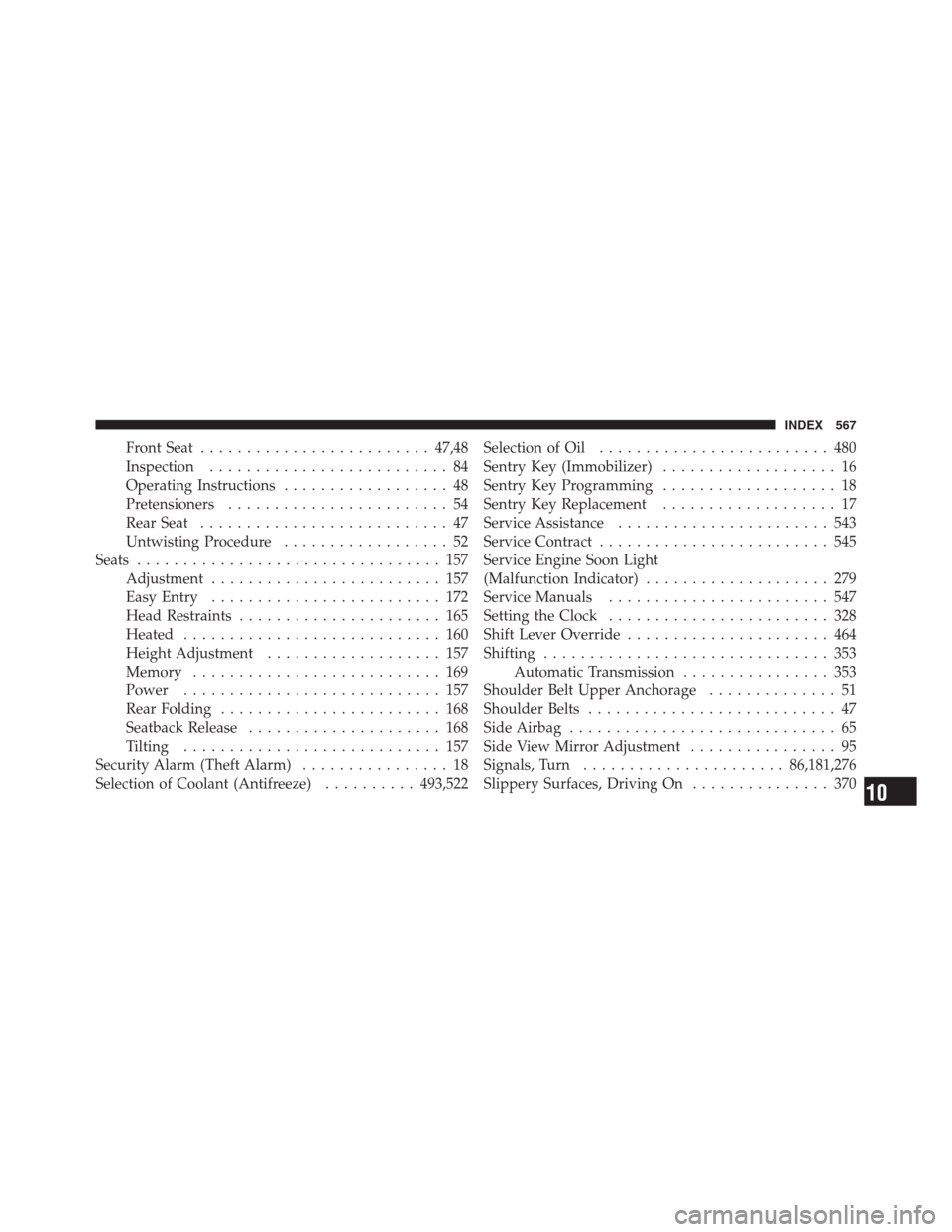
Front Seat.........................47,48
Inspection.......................... 84
Operating Instructions.................. 48
Pretensioners........................ 54
Rear Seat........................... 47
Untwisting Procedure.................. 52
Seats................................. 157
Adjustment......................... 157
Easy Entry......................... 172
Head Restraints...................... 165
Heated............................ 160
Height Adjustment................... 157
Memory........................... 169
Power............................ 157
Rear Folding........................ 168
Seatback Release..................... 168
Tilting............................ 157
Security Alarm (Theft Alarm)................ 18
Selection of Coolant (Antifreeze)..........493,522Selection of Oil......................... 480
Sentry Key (Immobilizer)................... 16
Sentry Key Programming................... 18
Sentry Key Replacement................... 17
Service Assistance....................... 543
Service Contract......................... 545
Service Engine Soon Light
(Malfunction Indicator).................... 279
Service Manuals........................ 547
Setting the Clock........................ 328
Shift Lever Override...................... 464
Shifting............................... 353
Automatic Transmission................ 353
Shoulder Belt Upper Anchorage.............. 51
Shoulder Belts........................... 47
Side Airbag............................. 65
Side View Mirror Adjustment................ 95
Signals, Turn......................86,181,276
Slippery Surfaces, Driving On............... 370
10
INDEX 567
