Page 268 of 508
iPod�control supports Mini, 4G, Photo, Nano, 5G iPod�
and iPhone� devices. Some iPod� software versions may
not fully support the iPod� control features. Please visit
Apple’s website for software updates.
NOTE:
•If the radio has a USB port, refer to the appropriate
Uconnect™ Multimedia radio User ’s Manual for
iPod� or external USB device support capability.
•Connecting an iPod� or consumer electronic audio
device to the AUX port located in the radio faceplate,
plays media, but does not use the iPod� /MP3 control
feature to control the connected device.
Connecting The iPod� Or External USB Device
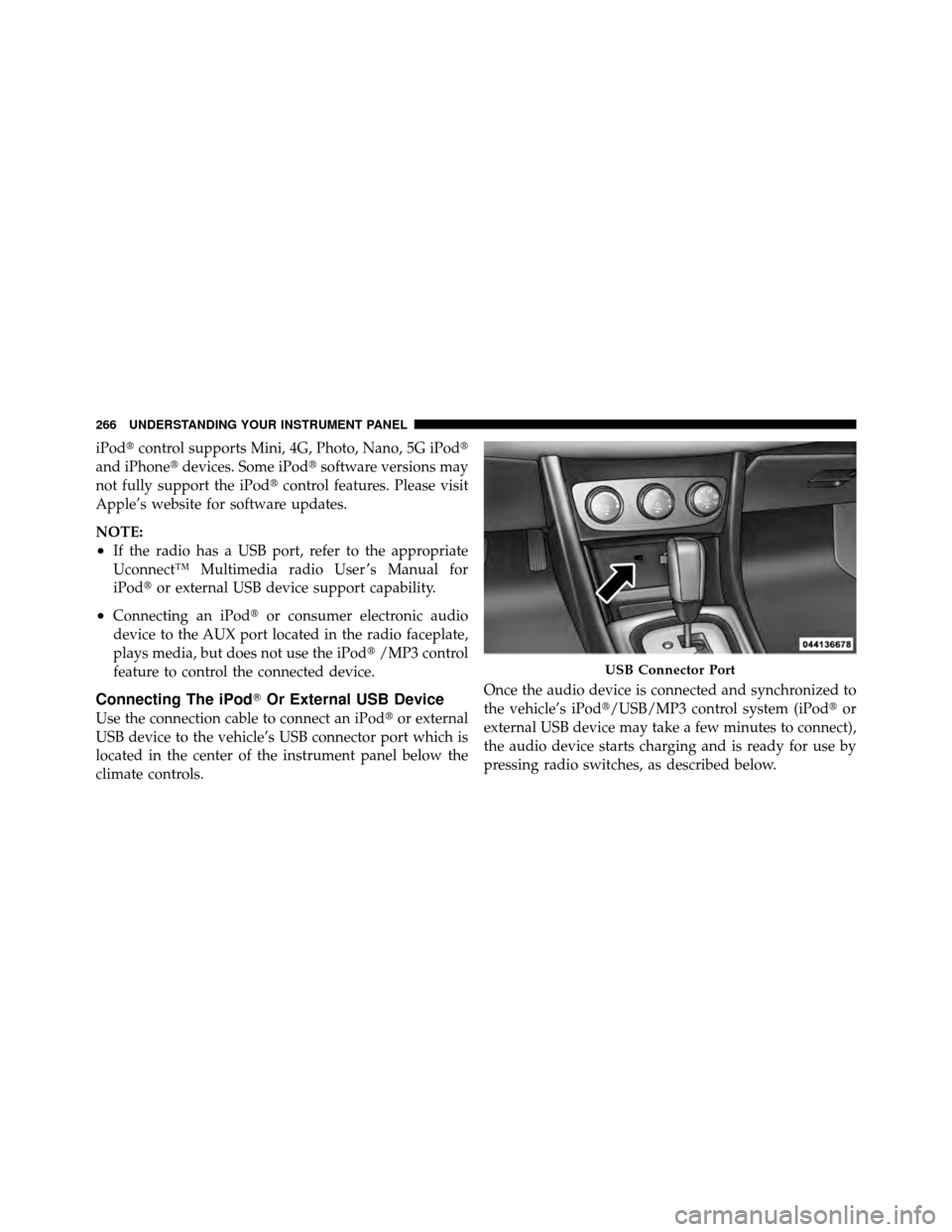
Use the connection cable to connect an iPod� or external
USB device to the vehicle’s USB connector port which is
located in the center of the instrument panel below the
climate controls. Once the audio device is connected and synchronized to
the vehicle’s iPod�/USB/MP3 control system (iPod�
or
external USB device may take a few minutes to connect),
the audio device starts charging and is ready for use by
pressing radio switches, as described below.
USB Connector Port
266 UNDERSTANDING YOUR INSTRUMENT PANEL
Page 273 of 508

WARNING!
Do not plug in or remove the iPod�or external USB
device while driving. Failure to follow this warning
could result in an accident.
Bluetooth Streaming Audio (BTSA)
Music can be streamed from your cellular phone to the
Uconnect™ phone system.
Controlling BTSA Using Radio Buttons
To get into the BTSA mode, press either “AUX” button on
the radio or press the VR button and say “Bluetooth
Streaming Audio”.
Play Mode
When switched to BTSA mode, some audio devices can
start playing music over the vehicle’s audio system, but
some devices require the music to be initiated on the
device first, then it will get streamed to the Uconnect™
phone system. Seven devices can be paired to the
Uconnect™ phone system, but just one can be selected
and played.
Selecting Different Audio Device
1. Press PHONE button to begin.
2. After the �Ready�prompt and the following beep, say
�Setup�, then �Select Audio Devices�.
3. Say the name of the audio device or ask the
Uconnect™ phone system to list audio devices.
4
UNDERSTANDING YOUR INSTRUMENT PANEL 271
Page 274 of 508
Next Track
Use the SEEK UP button, or press the VR button on the
radio and say “Next Track” to jump to the next track
music on your cellular phone.
Previous Track
Use the SEEK DOWN button, or press the VR button on
the radio and say “Previous Track” to jump to the
previous track music on your cellular phone.
Browse
Browsing is not available on a BTSA device. Only the
current song that is playing will display info.
STEERING WHEEL AUDIO CONTROLS — IF
EQUIPPED
The remote sound system controls are located on the rear
surface of the steering wheel, at the three and nine
o’clock positions.
Remote Sound System Controls(Back View Of Steering Wheel)
272 UNDERSTANDING YOUR INSTRUMENT PANEL
Page 276 of 508

CD/DVD DISC MAINTENANCE
To keep a CD/DVD in good condition, take the following
precautions:
1. Handle the disc by its edge; avoid touching the
surface.
2. If the disc is stained, clean the surface with a soft cloth,
wiping from center to edge.
3. Do not apply paper or tape to the disc; avoid scratch-
ing the disc.
4. Do not use solvents such as benzene, thinner, cleaners,
or anti-static sprays.
5. Store the disc in its case after playing.
6. Do not expose the disc to direct sunlight.
7. Do not store the disc where temperatures may become
too high.NOTE:
If you experience difficulty in playing a particu-
lar disc, it may be damaged (i.e., scratched, reflective
coating removed, a hair, moisture or dew on the disc)
oversized, or have protection encoding. Try a known
good disc before considering disc player service.
RADIO OPERATION AND MOBILE PHONES
Under certain conditions, the mobile phone being on in
your vehicle can cause erratic or noisy performance from
your radio. This condition may be lessened or eliminated
by relocating the mobile phone antenna. This condition is
not harmful to the radio. If your radio performance does
not satisfactorily “clear” by the repositioning of the
antenna, it is recommended that the radio volume be
turned down or off during mobile phone operation when
not using Uconnect™ (if equipped).
CLIMATE CONTROLS
The air conditioning and heating system is designed to
make you comfortable in all types of weather.
274 UNDERSTANDING YOUR INSTRUMENT PANEL
Page 404 of 508

10. Reinstall the protective cover over the remote posi-
tive(+)battery post of the discharged vehicle.
If frequent jump-starting is required to start your vehicle
you should have the battery and charging system in-
spected at your authorized dealer.
CAUTION!
Accessories that can be plugged into the vehicle
power outlets draw power from the vehicle’s battery,
even when not in use (i.e., cellular phones, etc.).
Eventually, if plugged in long enough, the vehicle’s
battery will discharge sufficiently to degrade battery
life and/or prevent the engine from starting.
FREEING A STUCK VEHICLE
If your vehicle becomes stuck in mud, sand, or snow, it
can often be moved by a rocking motion. Turn your
steering wheel right and left to clear the area around the front wheels. Then shift back and forth between DRIVE
and REVERSE. Using minimal accelerator pedal pressure
to maintain the rocking motion, without spinning the
wheels, is most effective.
CAUTION!
Racing the engine or spinning the wheels may lead to
transmission overheating and failure. Allow the en-
gine to idle with the shift lever in NEUTRAL for at
least one minute after every five rocking-motion
cycles. This will minimize overheating and reduce
the risk of transmission failure during prolonged
efforts to free a stuck vehicle.
NOTE: If your vehicle is equipped with Electronic
Stability Control (ESC), turn the system to Partial OFF
before attempting to “rock” the vehicle. Refer to “Elec-
tronic Brake Control” in “Starting and Operating” for
further information.
402 WHAT TO DO IN EMERGENCIES
Page 480 of 508
This is why you should always talk to an authorized
dealer’s service manager first. Most matters can be re-
solved with this process.
•If for some reason you are still not satisfied, talk to the
general manager or owner of the authorized dealer-
ship. They want to know if you need assistance.
•If an authorized dealership is unable to resolve the
concern, you may contact the manufacturer’s customer
center.
Any communication to the manufacturer’s customer cen-
ter should include the following information:
•Owner’s name and address
•Owner’s telephone number (home and office)
•Authorized dealership name
•Vehicle Identification Number (VIN)
•Vehicle delivery date and mileage
Chrysler Group LLC Customer Center
P.O. Box 21–8004
Auburn Hills, MI 48321–8004
Phone: (800) 247–9753
Chrysler Canada Inc. Customer Center
P.O. Box 1621
Windsor, Ontario N9A 4H6
Phone: (800) 465–2001 English / (800) 387–9983 French
In Mexico contact:
Av. Prolongacion Paseo de la Reforma, 1240
Sante Fe C.P. 05109
Mexico, D. F.
In Mexico City: 5081-7568
Outside Mexico City: 1-800-505-1300
478 IF YOU NEED CONSUMER ASSISTANCE
Page 483 of 508
If NHTSA receives similar complaints, it may open an
investigation, and if it finds that a safety defect exists in
a group of vehicles, it may order a recall and remedy
campaign. However, NHTSA cannot become involved in
individual problems between you, your authorized
dealer, and the manufacturer.
To contact NHTSA, you may either call the Auto Safety
Hotline toll free at 1–888–327–4236 (TTY: 1–800–424–
9153), or go to http://www.safercar.gov; or write to:
Administrator, NHTSA, 1200 New Jersey Avenue, SE.,
West Building, Washington, D.C. 20590. You can also
obtain other information about motor vehicle safety from
http://www.safercar.gov.In Canada
If you believe that your vehicle has a safety defect, you
should contact the Customer Service Department imme-
diately. Canadian customers who wish to report a safety
defect to the Canadian government should contact Trans-
port Canada, Motor Vehicle Defect Investigations and
Recalls at 1-800-333-0510 or go to
http://www.tc.gc.ca/roadsafety/
PUBLICATION ORDER FORMS
To order the following manuals, you may use either the
website or the phone numbers listed below. Visa, Mas-
tercard, American Express, and Discover orders are ac-
cepted. If you prefer mailing your payment, please call
for an order form.
NOTE:A street address is required when ordering
manuals (no P.O. Boxes).
9
IF YOU NEED CONSUMER ASSISTANCE 481
Page 490 of 508

Caps, FillerFuel .............................. 368
Oil (Engine) ..................... 409,417
Power Steering ...................... 321
Radiator (Coolant Pressure) ............. 430
Car Washes ............................ 439
Carbon Monoxide Warning ...............86,364
Cellular Phone ....................... 100,274
Chains, Tire ............................ 350
Changing A Flat Tire ..................... 388
Chart, Tire Sizing ........................ 333
Check Engine Light
(Malfunction Indicator Light) ............... 412
Checking Your Vehicle For Safety ............. 85
Checks, Safety ........................... 85
Child Restraint .................... 72,74,79,82
Child Restraint Tether Anchors .............77,79
Child Safety Locks ........................ 34
Cigar Lighter ........................... 180 Clean Air Gasoline
....................... 361
Cleaning Wheels ............................ 441
Windshield Wiper Blades ............... 424
Climate Control ......................... 274
Clock ........................ 221,224,242,251
Coin Holder ........................... 182
Compact Disc (CD) Maintenance ............. 274
Compact Spare Tire ...................... 345
Compass ........................... 207,214
Compass Calibration ..................... 215
Compass Variance ....................... 215
Computer, Trip/Travel .................. 20,213
Connector UCI .............................. 265
Universal Consumer Interface (UCI) ....... 265
Console .............................. 147
Console, Floor ....................... 147,182
Contract, Service ........................ 479
488 INDEX
