Page 66 of 517

Supplemental Seat-Mounted Side Air Bag (SAB)
Inflator Units
The Supplemental Seat-Mounted Side Air Bags (SAB) are
designed to activate only in certain side collisions.
The ORC determines if a side collision requires the side
air bags to inflate, based on the severity and type of
collision.
Based on the severity and type of collision, the side air
bag inflator on the crash side of the vehicle may be
triggered, releasing a quantity of non-toxic gas. The
inflating SAB exits through the seat seam into the space
between the occupant and the door. The SAB fully inflate
in about 10 milliseconds. The side air bag moves at a very
high speed and with such a high force that it could injure
you if you are not seated properly, or if items are
positioned in the area where the side air bag inflates. This
especially applies to children.
Front And Side Impact Sensors
In front and side impacts, impact sensors can aid the
ORC in determining appropriate response to impact
events.
Enhanced Accident Response System
In the event of an impact causing air bag deployment, if
the communication network remains intact, and the
power remains intact, depending on the nature of the
event the ORC will determine whether to have the
Enhanced Accident Response System perform the follow-
ing functions:
•Cut off fuel to the engine.
•Flash hazard lights as long as the battery has power or
until the ignition key is turned off.
•Turn on the interior lights, which remain on as long as
the battery has power or until the ignition key is
removed.
64 THINGS TO KNOW BEFORE STARTING YOUR VEHICLE
Page 93 of 517

CONVERTIBLE TOP OPERATION
CAUTION!
Failure to follow these cautions may cause interior
water damage, stains or mildew on the top material:
•Avoid high-pressure car washes, as they can dam-
age the top material. Also, increased water pres-
sure may force water past the weather strips.
•Remove any standing water from the top and dry
the surface before opening it. Operating the top,
opening a door or lowering a window while the
top is wet may allow water to drip into the
vehicles interior.
•Use care when washing the vehicle, water pressure
directed at the weather strip seals may cause water
to leak into the vehicles interior.
WARNING!
The convertible top does not provide the structural
protection that a reinforced metal roof does and the
fabric top cannot be expected to prevent the ejection
of the occupants in a collision. Therefore, it is impor-
tant that all occupants wear their seat belts at all
times. Death or serious injuries could occur if you are
ejected from the vehicle during a collision.
You can lower or raise the power convertible top from
inside the vehicle or lower the top remotely using the
Remote Keyless Entry (RKE) transmitter. Either operation
takes approximately 30 seconds. The entire process, in-
cluding unlatching or latching the top at the windshield
header is automatic.
The top does take up some space in the trunk when
retracted. However, the trunk will still hold a significant
amount of cargo.
3
UNDERSTANDING THE FEATURES OF YOUR VEHICLE 91
Page 101 of 517
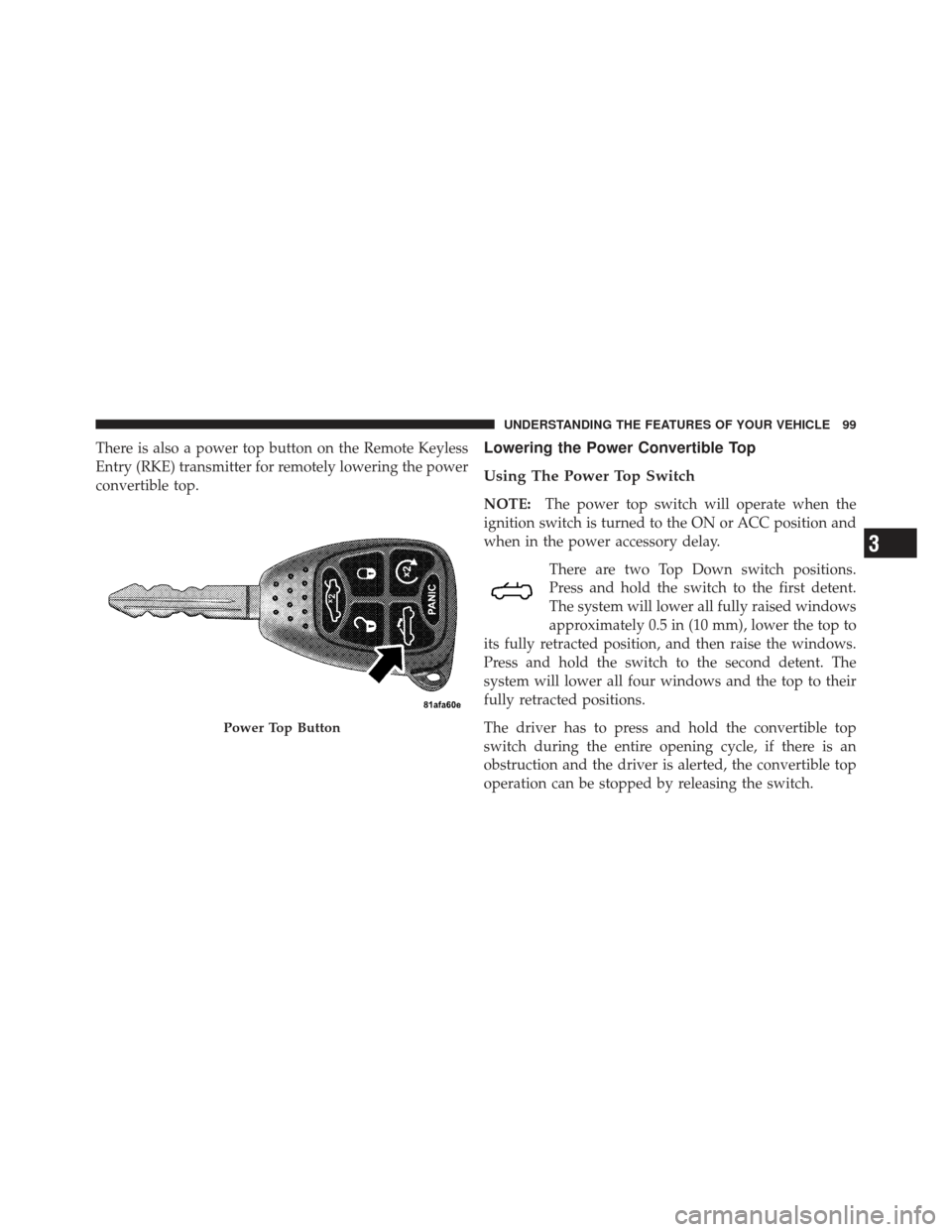
There is also a power top button on the Remote Keyless
Entry (RKE) transmitter for remotely lowering the power
convertible top.Lowering the Power Convertible Top
Using The Power Top Switch
NOTE:The power top switch will operate when the
ignition switch is turned to the ON or ACC position and
when in the power accessory delay.
There are two Top Down switch positions.
Press and hold the switch to the first detent.
The system will lower all fully raised windows
approximately 0.5 in (10 mm), lower the top to
its fully retracted position, and then raise the windows.
Press and hold the switch to the second detent. The
system will lower all four windows and the top to their
fully retracted positions.
The driver has to press and hold the convertible top
switch during the entire opening cycle, if there is an
obstruction and the driver is alerted, the convertible top
operation can be stopped by releasing the switch.
Power Top Button
3
UNDERSTANDING THE FEATURES OF YOUR VEHICLE 99
Page 102 of 517

Using The Remote Keyless Entry Transmitter
NOTE:Steps1–3must be performed within five
seconds.
1. Press and release the UNLOCK button on the RKE
transmitter.
2. Press and release the POWER TOP button
on the RKE transmitter.
3. Press and hold the POWER TOP button until the
Power Top and All Windows Down feature is complete.
Raising The Power Convertible Top
Using The Power Top Switch
NOTE: The power top switch will operate when the
ignition switch is turned to the ON or ACC position and
when in the power accessory delay.
Press and hold the switch in the Top Up
position until the operation of raising the top
and latching it is complete, which is indicated
by the system raising the windows and dis-
playing “TOP DONE” in the odometer or “CONVERT-
IBLE TOP COMPLETE” in the EVIC (if equipped).
Using The Remote Keyless Entry Transmitter
You cannot use the power top button on the RKE
transmitter to raise the power convertible top. You must
use the power top switch inside the vehicle to perform
this operation.
100 UNDERSTANDING THE FEATURES OF YOUR VEHICLE
Page 128 of 517
on hold may not become active automatically. This is cell
phone-dependent. To bring the call back from hold, press
and hold the
button until you hear a single beep.
Redial
•
Press thebutton to begin.
•After the “Ready” prompt and the following beep, say
“Redial”.
•The Uconnect™ Phone will call the last number that
was dialed from your mobile phone.
NOTE: This may not be the last number dialed from the
Uconnect™ Phone.
Call Continuation
Call continuation is the progression of a phone call on the
Uconnect™ Phone after the vehicle ignition key has been
switched to OFF. Call continuation functionality avail-
able on the vehicle can be any one of three types:
•After the ignition key is switched to OFF, a call can
continue on the Uconnect™ Phone either until the call
ends, or until the vehicle battery condition dictates
cessation of the call on the Uconnect™ Phone and
transfer of the call to the mobile phone.
•After the ignition key is switched to OFF, a call can
continue on the Uconnect™ Phone for a certain dura-
tion, after which the call is automatically transferred
from the Uconnect™ Phone to the mobile phone.
•An active call is automatically transferred to the
mobile phone after the ignition key is switched to OFF.
126 UNDERSTANDING THE FEATURES OF YOUR VEHICLE
Page 131 of 517
Paging
To learn how to page, refer to “Working with Automated
Systems”. Paging works properly except for pagers of
certain companies, which time out a little too soon to
work properly with the Uconnect™ Phone.
Voice Mail Calling
To learn how to access your voice mail, refer to “Working
with Automated Systems”.
Working With Automated Systems
This method is used in instances where one generally has
to press numbers on the mobile phone keypad while
navigating through an automated telephone system.
You can use your Uconnect™ Phone to access a voice
mail system or an automated service, such as a paging
service or automated customer service line. Some ser-
vices require immediate response selection. In some
instances, that may be too quick for use of the
Uconnect™ Phone.When calling a number with your Uconnect™ Phone that
normally requires you to enter in a touch-tone sequence
on your mobile phone keypad, you can press the
button and say the sequence you wish to enter, followed
by the word “Send”. For example, if required to enter
your PIN followed with a pound, (3746#),youcan
press the
button and say, “3746#Send”. Saying
a number, or sequence of numbers, followed by “Send”,
is also to be used for navigating through an automated
customer service center menu structure, and to leave a
number on a pager.
You can also send stored Uconnect™ phonebook entries
as tones for fast and easy access to voice mail and pager
entries. To use this feature, dial the number you wish to
call and then press the
button and say, “Send.” The
system will prompt you to enter the name or number and
say the name of the phonebook entry you wish to send.
3
UNDERSTANDING THE FEATURES OF YOUR VEHICLE 129
Page 133 of 517

Dialing Using The Mobile Phone Keypad
You can dial a phone number with your mobile phone
keypad and still use the Uconnect™ Phone (while dialing
via the mobile phone keypad, the user must exercise
caution and take precautionary safety measures). By
dialing a number with your paired Bluetooth�mobile
phone, the audio will be played through your vehicle’s
audio system. The Uconnect™ Phone will work the same
as if you dial the number using Voice Command.
NOTE: Certain brands of mobile phones do not send the
dial ring to the Uconnect™ Phone to play it on the vehicle
audio system, so you will not hear it. Under this situa-
tion, after successfully dialing a number the user may feel
that the call did not go through even though the call is in
progress. Once your call is answered, you will hear the
audio.
Mute/Un-Mute (Mute OFF)
When you mute the Uconnect™ Phone, you will still be
able to hear the conversation coming from the other
party, but the other party will not be able to hear you. In
order to mute the Uconnect™ Phone:
•Press thebutton.
•Following the beep, say “Mute”.
In order to un-mute the Uconnect™ Phone:
•Press thebutton.
•Following the beep, say “Mute off”.
Advanced Phone Connectivity
Transfer Call To And From Mobile Phone
The Uconnect™ Phone allows ongoing calls to be trans-
ferred from your mobile phone to the Uconnect™ Phone
without terminating the call. To transfer an ongoing call
3
UNDERSTANDING THE FEATURES OF YOUR VEHICLE 131
Page 140 of 517
16. Can this wait?
17. Bye for now
18. When can we meet
19. Send number to call
20. Start without me
Turn SMS Incoming Announcement ON/OFF
Turning the SMS Incoming Announcement OFF will stop
the system from announcing the new incoming mes-
sages.
•Press thebutton.
•After the “Ready” prompt and the following beep, say
“Setup, SMS Incoming Message Announcement,” you
will then be given a choice to change it.
Bluetooth�Communication Link
Mobile phones have been found to lose connection to the
Uconnect™ Phone. When this happens, the connection
can generally be reestablished by switching the phone
off/on. Your mobile phone is recommended to remain in
Bluetooth�ON mode.
Power-Up
After switching the ignition key from OFF to either the
ON or ACC position, or after a language change, you
must wait at least fifteen seconds prior to using the
system.
138 UNDERSTANDING THE FEATURES OF YOUR VEHICLE