Page 201 of 517

▫Operating Instructions — Radio Mode ..... 260
▫ Operation Instructions — CD Mode For CD
And MP3 Audio Play ................. 266
▫ Notes On Playing MP3 Files ............ 268
▫ List Button (CD Mode For MP3 Play) ...... 270
▫ Info Button (CD Mode For MP3 Play) ...... 271
▫ Uconnect™ Multimedia (Satellite Radio) — If
Equipped .......................... 272
� iPod�/USB/MP3 Control — If Equipped ..... 276
▫ Connecting The iPod� Or External USB
Device ............................ 277
▫ Using This Feature ................... 277
▫ Controlling The iPod� Or External USB
Device Using Radio Buttons ............. 278▫
Play Mode ......................... 278
▫ List Or Browse Mode ................. 280
▫ Bluetooth Streaming Audio (BTSA) ........ 282
� Steering Wheel Audio Controls —
If Equipped .......................... 283
▫ Radio Operation ..................... 283
▫ CD Player ......................... 284
� CD/DVD Disc Maintenance .............. 284
� Radio Operation And Mobile Phones ....... 285
� Climate Controls ...................... 285
▫ Manual Heating And Air Conditioning ..... 285
▫ Automatic Temperature Control (ATC) — If
Equipped .......................... 290
▫ Operating Tips ...................... 296
4
UNDERSTANDING YOUR INSTRUMENT PANEL 199
Page 218 of 517
29. Electronic Vehicle Information Center (EVIC)
Display — If Equipped
This display shows the EVIC messages when the appro-
priate conditions exist. Refer to “Electronic Vehicle Infor-
mation Center (EVIC)” for further information.
MINI-TRIP COMPUTER — IF EQUIPPED
The Mini-Trip Computer is located in the instrument
cluster and features a driver-interactive trip information
and temperature display.
NOTE:The system will display the last known outside
temperature when starting the vehicle and may need to
be driven several minutes before the updated tempera-
ture is displayed. Engine temperature can also affect the
displayed temperature; therefore, temperature readings
are not updated when the vehicle is not moving.
Control Buttons
STEP Button
Press the STEP button located on the steering wheel to
scroll through sub menus (i.e., Temperature, Trip Func-
tions: Odometer, Trip A, Trip B).
Mini-Trip Control Buttons
216 UNDERSTANDING YOUR INSTRUMENT PANEL
Page 219 of 517
RESET Button
To reset the display shown, turn the ignition switch to the
ON position, then press and hold the RESET button
located on the steering wheel.
The following displays can be reset or changed:
•Trip A
•Trip B
Trip Odometer (ODO)
This display shows the distance traveled since the last
reset. Press and release the STEP button on the instru-
ment cluster to switch from odometer, to Trip A or Trip B.
Trip A
Shows the total distance traveled for Trip A since the last
reset.
Trip B
Shows the total distance traveled for Trip B since the last
reset.
4
UNDERSTANDING YOUR INSTRUMENT PANEL 217
Page 221 of 517
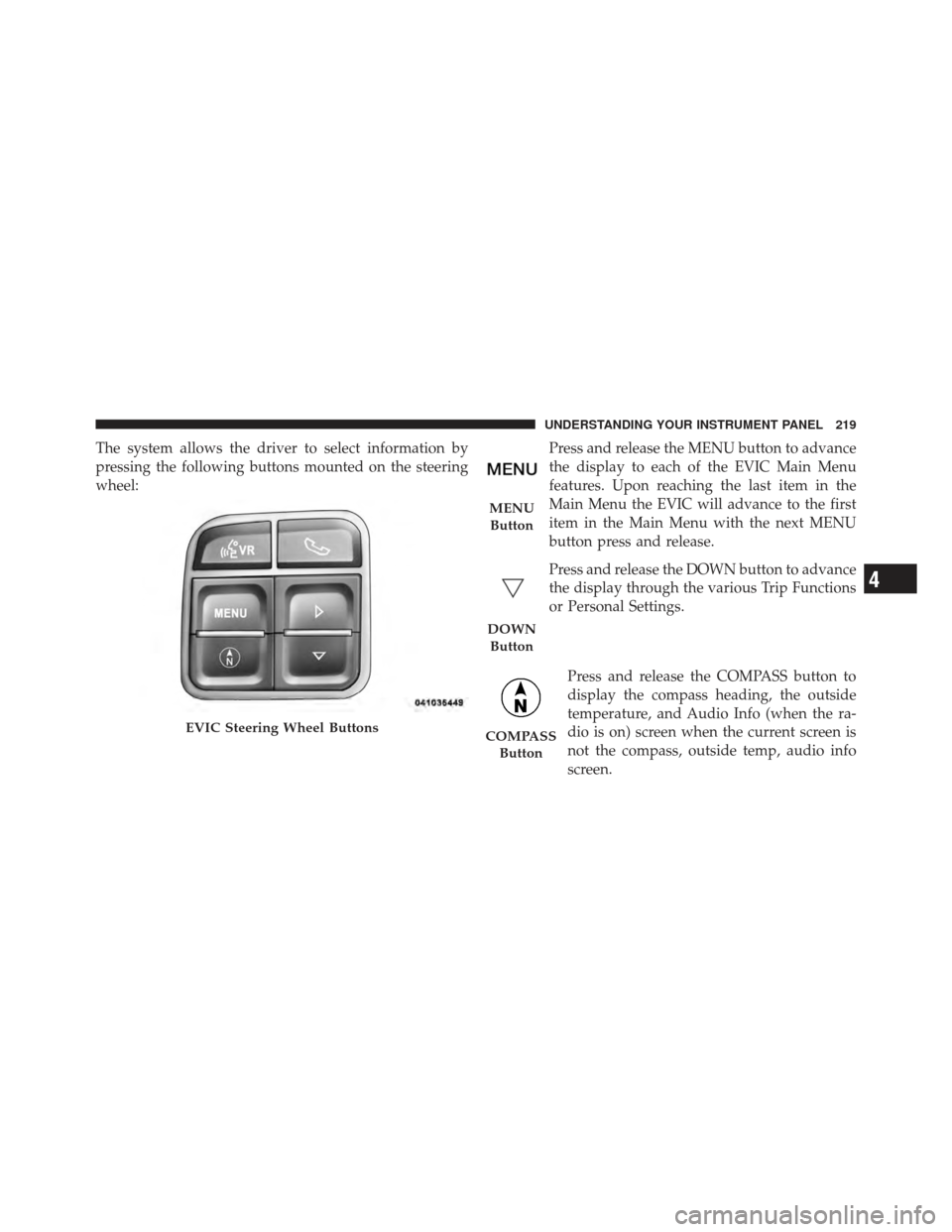
The system allows the driver to select information by
pressing the following buttons mounted on the steering
wheel:Press and release the MENU button to advance
the display to each of the EVIC Main Menu
features. Upon reaching the last item in the
Main Menu the EVIC will advance to the first
item in the Main Menu with the next MENU
button press and release.
Press and release the DOWN button to advance
the display through the various Trip Functions
or Personal Settings.
Press and release the COMPASS button to
display the compass heading, the outside
temperature, and Audio Info (when the ra-
dio is on) screen when the current screen is
not the compass, outside temp, audio info
screen.
EVIC Steering Wheel Buttons
MENUButton
DOWN Button
COMPASS Button
4
UNDERSTANDING YOUR INSTRUMENT PANEL 219
Page 285 of 517

STEERING WHEEL AUDIO CONTROLS — IF
EQUIPPED
The remote sound system controls are located on the rear
surface of the steering wheel, at the three and nine
o’clock positions.The right-hand rocker switch has a pushbutton in the
center, and controls the volume and mode of the sound
system. Pressing the top of the rocker switch will increase
the volume. Pressing the bottom of the rocker switch will
decrease the volume. Pressing the center button changes
the operation of the radio from AM to FM, or to CD
mode, depending on which radio is in the vehicle.
The left-hand rocker switch has a pushbutton in the
center. The function of the left-hand switch is different,
depending on which mode you are in.
The following describes the left-hand rocker switch op-
eration in each mode.
Radio Operation
Pressing the top of the switch will SEEK up for the next
listenable station, and pressing the bottom of the switch
will SEEK down for the next listenable station.Remote Sound System Controls
(Back View Of Steering Wheel)
4
UNDERSTANDING YOUR INSTRUMENT PANEL 283
Page 304 of 517

▫Traction ........................... 320
� Driving Through Water ................. 320
▫ Flowing/Rising Water ................. 320
▫ Shallow Standing Water ............... 321
� Power Steering ....................... 322
▫ Power Steering Fluid Check ............. 323
� Parking Brake ........................ 324
� Anti-Lock Brake System (ABS) ............ 326
� Electronic Brake Control System ........... 329
▫ Anti-Lock Brake System (ABS) ........... 329
▫ Traction Control System (TCS) ........... 329
▫ Brake Assist System (BAS) .............. 330
▫ Electronic Stability Control (ESC) ......... 331▫
ESC Activation/Malfunction Indicator Light
And ESC Off Indicator Light ............ 333
� Tire Safety Information ................. 334
▫ Tire Markings ....................... 334
▫ Tire Identification Number (TIN) ......... 338
▫ Tire Terminology And Definitions ......... 339
▫ Tire Loading And Tire Pressure .......... 340
� Tires — General Information ............. 344
▫ Tire Pressure ....................... 344
▫ Tire Inflation Pressures ................ 345
▫ Radial-Ply Tires ..................... 347
▫ Spare Tire Matching Original Equipped Tire
And Wheel – If Equipped .............. 347
▫ Compact Spare Tire – If Equipped ........ 348
302 STARTING AND OPERATING
Page 324 of 517

WARNING!
•Driving through standing water limits your vehi-
cle’s traction capabilities. Do not exceed 5 mph
(8 km/h) when driving through standing water.
•Driving through standing water limits your vehi-
cle’s braking capabilities, which increases stop-
ping distances. Therefore, after driving through
standing water, drive slowly and lightly press on
the brake pedal several times to dry the brakes.
•Getting water inside your vehicle’s engine can
cause it to lock up and stall out, and leave you
stranded.
•Failure to follow these warnings may result in
injuries that are serious or fatal to you, your
passengers, and others around you.
POWER STEERING
The standard power steering system will give you good
vehicle response and increased ease of maneuverability
in tight spaces. The system will provide mechanical
steering capability if power assist is lost.
If for some reason the power assist is interrupted, it will
still be possible to steer your vehicle. Under these condi-
tions, you will observe a substantial increase in steering
effort, especially at very low vehicle speeds and during
parking maneuvers.
NOTE:
•Increased noise levels at the end of the steering wheel
travel are considered normal and do not indicate that
there is a problem with the power steering system.
•Upon initial start-up in cold weather, the power steer-
ing pump may make noise for a short amount of time.
This is due to the cold, thick fluid in the steering
322 STARTING AND OPERATING
Page 325 of 517

system. This noise should be considered normal, and it
does not in any way damage the steering system.
WARNING!
Continued operation with reduced power steering
assist could pose a safety risk to yourself and others.
Service should be obtained as soon as possible.
CAUTION!
Prolonged operation of the steering system at the end
of the steering wheel travel will increase the steering
fluid temperature and it should be avoided when
possible. Damage to the power steering pump may
occur.
Power Steering Fluid Check
Checking the power steering fluid level at a defined
service interval is not required. The fluid should only bechecked if a leak is suspected, abnormal noises are
apparent, and/or the system is not functioning as antici-
pated. Coordinate inspection efforts through an autho-
rized dealer.
CAUTION!
Do not use chemical flushes in your power steering
system as the chemicals can damage your power
steering components. Such damage is not covered by
the New Vehicle Limited Warranty.
WARNING!
Fluid level should be checked on a level surface and
with the engine off to prevent injury from moving
parts and to ensure accurate fluid level reading. Do
not overfill. Use only manufacturer’s recommended
power steering fluid.
5
STARTING AND OPERATING 323