2012 CHEVROLET VOLT lock
[x] Cancel search: lockPage 121 of 454

Black plate (5,1)Chevrolet Volt Owner Manual - 2012
Instruments and Controls 5-5
Controls
Steering Wheel
Adjustment
To adjust the steering wheel:
1. Pull the lever (A) down.
2. Move the steering wheel upor down.
3. Pull or push the steering wheel closer or away from you.
4. Pull the lever (A) up to lock the steering wheel in place. Do not adjust the steering wheel
while driving.
Steering Wheel Controls
For vehicles with audio steering
wheel controls, some audio controls
can be adjusted at the steering
wheel.
b/g(Push to Talk):
For vehicles
with an OnStar, Bluetooth,
or navigation system (if equipped),
press to interact with those systems.
See Bluetooth (Overview) on
page 7‑22 orBluetooth
(Infotainment Controls) on
page 7‑24 orBluetooth (Voice
Recognition) on page 7‑28 and
OnStar Overview on page 14‑1 for
more information.
$/i(End Call/Mute): Press to
silence the vehicle speakers only.
Press again to turn the sound on.
For vehicles with OnStar or
Bluetooth systems, press to reject
an incoming call, or to end a
current call.
_SRC^(Rotary Control): Turn_
or^to select a radio band or audio
source.
Turn
_or^to select the next or
previous favorite radio station, CD
track, DVD track/chapter, or MP3
track.
Page 123 of 454

Black plate (7,1)Chevrolet Volt Owner Manual - 2012
Instruments and Controls 5-7
G(Adjustable Interval Wipes):
Move the lever up to
Gfor
adjustable interval wipes, then turn
the band up for more frequent wipes
or down for less frequent wipes.
9(Off): Use to turn the windshield
wipers off.
3(Mist): For a single wipe, briefly
move the wiper lever down. For
several wipes, hold the wiper
lever down.
Clear ice and snow from the wiper
blades before using them. If frozen
to the windshield, carefully loosen or
thaw them. Damaged wiper blades
should be replaced. See Wiper
Blade Replacement on page 10‑28. Heavy snow or ice can overload the
wipers. If the wiper motor overheats,
the windshield wipers will stop until
the motor cools and the wiper
control is turned off. See
Electrical
System Overload on page 10‑33.
Wipe Parking
If the vehicle is turned off while the
wipers are on 1, 2, or
G, they will
stop immediately.
If the windshield wiper lever is then
moved to off before the driver door
is opened or within 10 minutes, the
wipers will restart and move to the
base of the windshield.
If the vehicle is turned off during a
windshield wash, the wipers will
stop when they reach the base of
the windshield.
Windshield Washer
Pull the windshield wiper lever
toward you to spray windshield
washer fluid and activate the wipers.
The washer and wipers will continue
until the lever is released or the
maximum wash time is reached.
When the windshield wiper lever is
released, additional wipes may
occur depending on how long the
windshield washer had been
activated. See Washer Fluid on
page 10‑21 for information on filling
the windshield washer fluid
reservoir.
{WARNING
In freezing weather, do not use
the washer until the windshield is
warmed. Otherwise the washer
fluid can form ice on the
windshield, blocking your vision.
Page 128 of 454

Black plate (12,1)Chevrolet Volt Owner Manual - 2012
5-12 Instruments and Controls
A.Battery Gauge (High Voltage)
on page 5‑14.
B. Fuel Gauge on page 5‑15.
C. Service Electric Parking Brake
Light on page 5‑23.
D. Security Light on page 5‑27.
E. Engine Coolant Temperature
Warning Light on page 5‑25.
F. Charging System Light (12-Volt
Battery) on page 5‑19.
G. Engine Oil Pressure Light on
page 5‑26.
H. High-Beam On Light on
page 5‑27.
I. Second Row Passenger Safety Belt Reminder Light. See Safety
Belt Reminders on page 5‑16.
J. Turn and Lane-Change Signals
on page 6‑4.
K. Compass on page 5‑14.
L. Speedometer on page 5‑14. M.
Cruise Control Light on
page 5‑28.
N. Electric Parking Brake Light on
page 5‑22.
O. Door, Hood, or Hatch Open
Light on page 5‑28.
P. Low Fuel Warning Light on
page 5‑27.
Q. Antilock Brake System (ABS)
Warning Light on page 5‑23.
R. Electric Drive Unit Positions. See Electric Drive Unit on
page 9‑31.
S. Driver Efficiency Gauge on
page 5‑15.
T. Brake System Warning Light on
page 5‑22.
U. Driver Safety Belt Reminder Light. See Safety Belt
Reminders on page 5‑16.
V. Airbag Readiness Light on
page 5‑17. W.
Total Vehicle Range on
page 5‑15.
X. Vehicle Ready Light on
page 5‑27.
Y. StabiliTrak
®OFF Light on
page 5‑24.
Z. Driver Information Center (DIC)
on page 5‑45.
AA. Traction Off Light on page 5‑24.
AB. Sport Mode Light on page 5‑24
and Mountain Mode Light on
page 5‑24.
AC. Lamps On Reminder on
page 5‑28.
AD. Odometer on page 5‑14.
AE. Malfunction Indicator Lamp on
page 5‑19.
AF. Traction Control System (TCS)/
StabiliTrak
®Light on page 5‑25.
AG. Tire Pressure Light on
page 5‑25.
Page 139 of 454

Black plate (23,1)Chevrolet Volt Owner Manual - 2012
Instruments and Controls 5-23
Service Electric Parking
Brake Light
The Service Electric Parking Brake
light should come on briefly when
the vehicle is in ON/RUN. If it does
not come on, have it fixed so it will
be ready to warn if there is a
problem.
If this light stays on, there is a
problem with a system on the
vehicle that is causing the parking
brake system to work at a reduced
level. The vehicle can still be driven,
but should be taken to a dealer as
soon as possible. SeeElectric
Parking Brake on page 9‑34 for
more information. If a message
displays in the Driver Information Center (DIC), see
Brake System
Messages on page 5‑48 for more
information.
Antilock Brake System
(ABS) Warning Light
This light should come on briefly
when the vehicle is in ON/RUN. If it
does not come on, have the vehicle
serviced by your dealer.
If the ABS warning light stays on
longer than a few seconds after the
vehicle is in ON/RUN, or comes on
and stays on while driving, try
resetting the system. To reset the
system:
1. While driving, pull over when it is safe to do so.
2. Place the vehicle in P (Park). 3. Turn the vehicle off.
4. Restart the vehicle.
If the ABS warning light remains on
after resetting the system or comes
on again while driving, the vehicle
needs service. If the ABS warning
light is on, but the regular brake
system warning light is not on, the
antilock brakes are not working
properly, but the regular brakes are
still functioning. Have the vehicle
serviced right away. If both brake
lights are on, the vehicle does not
have antilock brakes, and there is a
problem with the regular brakes as
well. Have the vehicle towed for
service. See
Towing the Vehicle on
page 10‑81.
Page 148 of 454

Black plate (32,1)Chevrolet Volt Owner Manual - 2012
5-32 Instruments and Controls
Charging
Programmable Charging
This vehicle has three
programmable charge modes. To
view the current charge mode status
in the center stack display, press the
[button on the center stack and
then press the Charging button at
the top of the touch screen.
The current charge mode status can
also be viewed in a temporary
pop-up in the center stack display
by pressing the charge port door
release button on the driver door.
The Charge Start and Charge
Complete time estimations are also
displayed on the screen. These
estimations are most accurate when
the vehicle is plugged in and in
moderate temperature conditions.
Also, to get an accurate time
estimate, the vehicle uses an
internal clock for programmable
charging, not the clock in the center
stack. Charge Mode Status
Immediately:
The vehicle starts
charging as soon as it is connected
to an electrical outlet. See Plug-In
Charging on page 9‑48.
Delayed Departure Time: The
vehicle estimates the charging start
time considering the programmed
departure time for the current day of
the week. Charging begins at the
start time and is complete by the
departure time only if sufficient time
is allowed after the charge cord is
plugged in.
Page 160 of 454
Black plate (44,1)Chevrolet Volt Owner Manual - 2012
5-44 Instruments and Controls
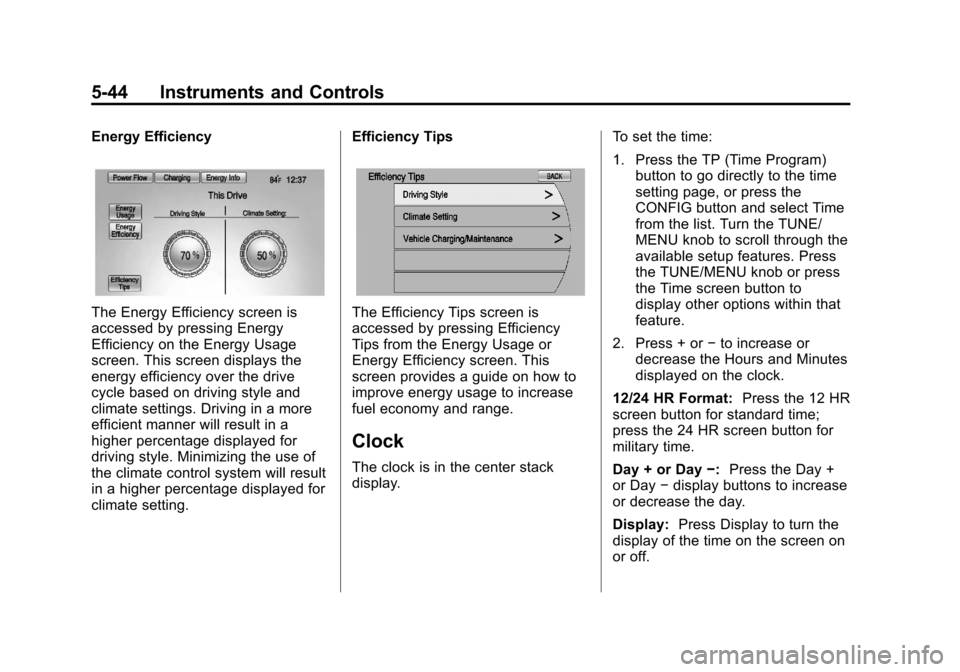
Energy Efficiency
The Energy Efficiency screen is
accessed by pressing Energy
Efficiency on the Energy Usage
screen. This screen displays the
energy efficiency over the drive
cycle based on driving style and
climate settings. Driving in a more
efficient manner will result in a
higher percentage displayed for
driving style. Minimizing the use of
the climate control system will result
in a higher percentage displayed for
climate setting.Efficiency TipsThe Efficiency Tips screen is
accessed by pressing Efficiency
Tips from the Energy Usage or
Energy Efficiency screen. This
screen provides a guide on how to
improve energy usage to increase
fuel economy and range.
Clock
The clock is in the center stack
display.
To set the time:
1. Press the TP (Time Program)
button to go directly to the time
setting page, or press the
CONFIG button and select Time
from the list. Turn the TUNE/
MENU knob to scroll through the
available setup features. Press
the TUNE/MENU knob or press
the Time screen button to
display other options within that
feature.
2. Press + or −to increase or
decrease the Hours and Minutes
displayed on the clock.
12/24 HR Format: Press the 12 HR
screen button for standard time;
press the 24 HR screen button for
military time.
Day + or Day −:Press the Day +
or Day −display buttons to increase
or decrease the day.
Display: Press Display to turn the
display of the time on the screen on
or off.
Page 167 of 454

Black plate (51,1)Chevrolet Volt Owner Manual - 2012
Instruments and Controls 5-51
Key and Lock Messages
When programming new Remote
Keyless Entry (RKE) transmitters,
DIC messages display. SeeRemote
Keyless Entry (RKE) System
Operation on page 2‑3 for more
information.
NO REMOTE DETECTED
This message displays when the
RKE transmitter is not detected
while attempting to start the vehicle.
The transmitter battery may be
weak. See “Starting the Vehicle with
a Low Transmitter Battery” under
Remote Keyless Entry (RKE)
System Operation on page 2‑3 for
more information.
NO REMOTE DETECTED,
PRESS BRAKE TO RESTART
This message displays if the RKE
transmitter is no longer detected in
the vehicle. Press the brake pedal
and the POWER
Obutton to restart the vehicle, or press the POWER
O
button without pressing the brake
pedal to turn the vehicle off. If the
vehicle is turned off and a valid
transmitter is not available, the
vehicle will not restart.
REMINDER: KEY LEFT IN
VEHICLE
This message displays when
leaving the vehicle with the RKE
transmitter still inside.
REPLACE BATTERY IN
REMOTE KEY
This message displays when the
battery in the RKE transmitter needs
to be replaced.
SERVICE KEYLESS START
SYSTEM
This message displays when the
keyless start system needs service.
Take the vehicle to your dealer.
Lamp Messages
AUTOMATIC LIGHT CONTROL
ON OR OFF
A message will display when the
automatic light control has been
turned on or off.
CHECK LAMP or LAMP
FAILURE
Depending on the lamp, one of
these messages may display. See
Bulb Replacement on page 10‑29.
TURN SIGNAL ON
This message displays if the turn
signal has been left on. Turn off the
turn signal.
Page 169 of 454

Black plate (53,1)Chevrolet Volt Owner Manual - 2012
Instruments and Controls 5-53
Ride Control System
Messages
LOW TRACTION
This message displays when the
Antilock Brake System (ABS) is
active and is working to assist the
driver with control of the vehicle in
difficult driving conditions.
SERVICE STABILITRAK
This message displays when there
is a problem detected with the
StabiliTrak system. The vehicle is
safe to drive, but the StabiliTrak
system is not operational. See
Electronic Stability Control (ESC) on
page 9‑38for information on
resetting the system.
SERVICE TRACTION
CONTROL
This message displays when there
is a problem detected with the
Traction Control System (TCS). The
vehicle is safe to drive, but the TCS
is not operational. See Traction
Control System (TCS) on page 9‑36
for information on resetting the
system.
STABILITRAK OFF
This message displays when
StabiliTrak is turned off. Adjust your
driving accordingly.
TRACTION CONTROL OFF
This message displays when the
Traction Control System (TCS) is
turned off. Adjust your driving
accordingly.
TRACTION CONTROL ON
This message displays when the
Traction Control System (TCS) is
turned on.
Airbag System Messages
SERVICE AIRBAG
This message displays if there is a
problem with the airbag system.
Take the vehicle to your dealer for
service.
Anti-theft Alarm System
Messages
SERVICE THEFT ALARM
This message displays if there is a
problem with the alarm. See your
dealer for service.